
Top 12 Best Garmin Bike Computer for Navigation Revealed
Relying on a cheap bike computer for navigation often leads to frustration, poor screen visibility, slow GPS response, and battery dying mid-ride are common issues. Those in search of the best garmin bike computer for navigation know it needs to handle the demands of long rides and changing light conditions without failing.
A device that struggles in these areas can ruin a carefully planned route or complicate simple detours.
A good bike computer for navigation typically stands out through a bright, easy-to-read screen that stays visible in direct sunlight. Battery life matters, especially for multi-hour rides, with strong units lasting 15 hours or more on full GPS mode.
The size should balance enough display space for detail without adding weight or bulk to the handlebars. Reliable GPS accuracy and simple data input options also separate solid devices from weaker ones in everyday use.
Need a Quick Check?
| Image | Product | Price |
|---|---|---|
Our Top Picks 1  | Garmin Edge 540 | Check Price |
Our Top Picks 2  | Garmin Edge Explore 2 | Check Price |
Our Top Picks 3  | Garmin Edge 1060 | Check Price |
Our Selected Top 12 Garmin Bike Computer for Navigation for Different Needs
This list features a variety of bike computers designed to assist with navigation for different riding styles and needs. Each review covers performance, suitable user types, and highlights key advantages and drawbacks to help you find the best fit for your cycling activities.
1. Garmin Edge 540 GPS Cycling Computer
Up to 26 hours of battery life in demanding use makes the Garmin Edge 540 perfect for long rides. It suits cyclists who want reliable navigation combined with detailed training insights on a compact, button-controlled device.
Its strength lies in precision positioning, even in difficult environments.
Setup is straightforward, with a handlebar mount that keeps the 2.6-inch LCD screen visible without distraction. Button controls respond well when wearing gloves or in wet conditions.
Daily suggested workouts appear on screen, adapting based on your training load when paired with a heart rate monitor or power meter. Bluetooth and Wi-Fi keep the device connected to compatible phones and sensors, allowing updates and syncing on the go.
The device maintains solid GPS accuracy thanks to multi-band GNSS technology, making navigation dependable on varied terrain. Build quality feels sturdy, with clear screen visibility and intuitive buttons. Praise often focuses on battery life and navigation, while some find the button interface less intuitive than touchscreens.
The 16 GB memory reliably handles map data for North America.
The battery life and precise navigation stand out as strong positive points, providing reliability during long rides. A common drawback noted relates to the button interface, which some find less user-friendly compared to touchscreen competitors. The device functions best as a dedicated cycling computer rather than a general-purpose GPS.
Those who prioritize long-lasting navigation and structured training guidance will find the Garmin Edge 540 well suited to their needs. Cyclists looking for a simpler touchscreen or worldwide maps might consider other options instead.
Pros
- Long battery life suitable for extended rides
- Accurate positioning with multi-band GNSS technology
- Personalized training prompts based on real-time data
- Strong Bluetooth and Wi-Fi connectivity
Cons
- Button controls can feel less intuitive than touchscreens
- Maps limited to North America
| Specification | Details |
|---|---|
| Battery Average Life | 26 hours |
| Screen Size | 2.6 inches |
| Display Type | LCD |
| Memory Storage Capacity | 16 GB |
| Human-Interface Input | Buttons |
| Supported Satellite Navigation System | GPS |
2. Garmin Edge Explore 2 GPS Cycling Navigator
Cyclists who value clear navigation and easy-to-use technology will appreciate this GPS cycling computer. It fits well for road riders and trail enthusiasts alike, offering detailed route guidance and a bright, responsive screen as its biggest selling point.
Setup is straightforward with preloaded profiles for road, off-road, and indoor activities ready out of the box. The touchscreen responds well, even when wearing gloves or riding in rain.
Daily rides benefit from improved maps showing popular routes, points of interest, and high-traffic roads, helping you make better decisions while cycling.
Navigation performs reliably with accurate GPS tracking and helpful notifications when paired with a compatible eBike, including battery and assist level alerts. The device feels solid and mounts securely on your bike’s dashboard or windshield.
The main praise is for its clear display in sunlight, while some users mention occasional touchscreen sensitivity issues.
The device is praised for its bright, glove-friendly screen that remains visible in sunlight, making navigation clear and easy during rides. Some find the touchscreen occasionally less responsive, especially in wet conditions, which can disrupt quick interactions on the go.
Cyclists looking for dependable, detailed route guidance and simple setup will find it suitable, especially those using eBikes in North America. Riders needing broader map coverage or extremely precise touchscreen control might consider other options.
Pros
- Visible touchscreen even in direct sunlight
- Preloaded maps with various ride profiles
- eBike-compatible with battery and assist alerts
- Mounts securely on dashboard or windshield
Cons
- Touchscreen sensitivity can be inconsistent
- Maps limited to North America only
| Specification | Details |
|---|---|
| Screen Size | 3 inches |
| Battery Average Life | 16 hours |
| Memory Storage Capacity | 16 GB |
| Connectivity Technology | Bluetooth, Wi-Fi |
| Touch Screen Type | Capacitive |
3. Garmin Edge 1060 GPS Cycling Computer
Garmin Edge 1060 GPS Cycling Computer stands out with its vivid 3.5-inch color touchscreen combined with physical buttons, ideal for riders who want clear navigation and hands-free communication. Its biggest strength lies in integrating advanced tracking and messaging features that keep you connected while on the move.
Setting it up is straightforward, with touchscreen controls making route planning and navigation easy to manage during rides. Regular use benefits from the built-in microphone for voice commands, allowing hands-free control and messaging through the Garmin Messenger app. The combination of buttons and touch input offers flexibility depending on road or weather conditions.
Navigation accuracy and route detail on North America maps perform reliably, making trips more confident. The build quality feels solid with ease of use prioritized via both touchscreen and buttons.
Praise often highlights the voice messaging feature, while common complaints mention that voice command effectiveness can vary depending on riding conditions or language.
Voice messaging and control stand out as major advantages, providing communication without stopping. However, voice command performance is inconsistent across certain riding environments and is restricted to select languages, which can limit its usefulness for some riders.
This device suits cyclists seeking detailed navigation and in-ride communication in North America. Riders outside this region or those needing fully dependable voice control might want to explore other options better tailored to their needs.
Pros
- Vivid 3.5-inch color touchscreen and buttons
- Hands-free voice control and messaging
- Compatible with Garmin Messenger app
- Accurate navigation tailored for North America
Cons
- Voice command can be unreliable in some conditions
- Limited to North America maps only
| Specification | Details |
|---|---|
| Screen Size | 3.5 inches |
| Map Types | North America |
| Human-Interface Input | Buttons, Touchscreen |
| Control Method | Touch |
| Built-in Microphone | Yes |
4. Garmin Edge Explore 2 GPS Cycling Navigator

Garmin Edge Explore 2 GPS Cycling Navigator helps you find your way on any ride with its bright, 3-inch touchscreen that works even in direct sunlight. Great for cyclists who want detailed maps and local route info, it’s especially handy for those using eBikes due to its tailored navigation features.
Setting it up is straightforward since it comes preloaded with maps for road, off-road, and indoor activities. The touchscreen responds well to gloves and wet conditions. Daily rides benefit from map details showing busy roads and points of interest, while connecting to an eBike adds battery and assist-level notifications right on the screen.
It performs well in providing clear navigation and routes that match your bike type. The build feels solid and the screen remains readable under sun glare, a key plus for navigating outside. Some find the battery lasts a full day of riding, but a few mention that the touchscreen can be a bit too sensitive at times, affecting control.
The device is praised for its easy-to-read screen even in bright light and detailed local mapping that helps riders choose better routes. The most frequent complaint concerns occasional touchscreen sensitivity issues, which may interfere with quick inputs during rides.
Cyclists looking for reliable navigation with specific eBike features will appreciate this model. Those needing longer battery life or less sensitive controls might want to explore other options.
Pros
- Sunlight-visible 3” glove-friendly touchscreen
- Preloaded maps for various ride types
- eBike integration with battery and assist alerts
- Shows high-traffic roads on maps
Cons
- Touchscreen sometimes overly sensitive
- Battery life limited to 16 hours per charge
| Specification | Details |
|---|---|
| Screen Size | 3 inches |
| Battery Average Life | 16 hours |
| Compatibility | Bicycle, eBike |
| Connectivity Technology | Bluetooth, Wi-Fi |
| Memory Storage Capacity | 16 GB |
| Touch Screen Type | Capacitive |
5. Garmin Edge 1050 Cycling Computer

Using a cycling computer with a bright, responsive 3.5-inch touchscreen makes navigation on rides feel straightforward and hands-on. It suits riders who want clear route info and quick course creation right from their handlebars. Battery longevity stands out, letting you ride longer without worrying about running out of power.
Setup is smooth, pairing easily with smartphones through Bluetooth, Wi-Fi, or USB. Creating courses directly on the device is handy, especially with the screen’s responsiveness and visible road surface info. Alerts about hazards come through clearly, improving ride awareness and letting you report issues as you go using the companion app.
Controls combine touchscreen and buttons for flexibility, especially in variable weather.
It delivers solid navigation performance using GPS, GLONASS, and Galileo satellites for accurate positioning. Build quality feels durable with a handlebar mount keeping it stable.
The standout compliment is its excellent battery life, up to 20 hours normal use or 60 hours in battery saver mode. A common criticism is the complex interface which might take some time to fully learn.
Battery life impresses the most, lasting well beyond most rides, with the touchscreen making course planning easy. Users often mention the learning curve with the menus and settings as a challenge at first.
Riders prioritizing detailed navigation and battery endurance will find this device very fitting. Those wanting a simpler interface or broader map coverage might look for alternatives with more straightforward controls or global maps.
Pros
- Responsive and vivid touchscreen display
- Long battery life up to 60 hours
- Course creation directly on the device
- Real-time road hazard alerts with smartphone
Cons
- Interface can be complex and overwhelming
- Primarily North America maps only
| Specification | Details |
|---|---|
| Screen Size | 3.5 inches |
| Battery Average Life | 60 hours |
| Connectivity Technology | Bluetooth, USB, Wi-Fi |
| Operating System | Android |
| Memory Storage Capacity | 64 GB |
| Supported Satellite Navigation System | GLONASS, GPS, Galileo |
6. Garmin Edge 850 GPS Cycling Computer

Ideal for cyclists who need detailed navigation and solid performance tracking, Garmin Edge 850 offers reliable choices in route planning and smart alerts. Its standout feature is the clear 2.7-inch touchscreen backed up by button controls, perfect for those who want accuracy in mapping and data on the go.
Getting started involves connecting it to your smartphone and compatible sensors, which is straightforward thanks to Bluetooth and Wi-Fi. Daily rides become more informed with smart fueling alerts that recommend hydration and nutrition based on your current fitness and the environmental challenge. The handlebar mount keeps the display easy to see and operate, whether tapping the screen or pressing buttons.
Navigation works smoothly with GPS, GLONASS, and Galileo, offering precise positioning across North America. The battery supports up to 12 hours in regular use and can stretch to 36 hours in saver mode, making it versatile for longer rides. Its durability and clear display make it reliable, though some find the touchscreen less responsive in rough weather or with gloves on.
The vivid display combined with smart fueling guidance provides useful data during rides, helping maintain hydration and energy. However, some users notice the touchscreen may lag in wet weather or with gloves, which can be frustrating during intense or cold rides.
Cyclists focused on detailed navigation and performance tracking in North America will appreciate the features and battery life. Riders needing global maps or flawless touchscreen responsiveness in all conditions might look for alternatives better suited to those specific needs.
Pros
- Bright color display with touchscreen and buttons
- Smart fueling alerts tailored to fitness and environment
- Good battery options for long or demanding rides
- Multiple satellite systems for accurate location
Cons
- Touchscreen less responsive with gloves or wet conditions
- Mapping limited to North America
| Specification | Details |
|---|---|
| Screen Size | 2.7 inches |
| Battery Average Life | 12 hours |
| Connectivity Technology | Bluetooth, USB, Wi-Fi |
| Mounting Type | Handlebar Mount |
| Supported Satellite Navigation System | GLONASS, GPS, Galileo |
7. iGPSPORT BSC500 GPS Bike Computer

Designed with a clear 3.3-inch touchscreen and button controls, the iGPSPORT BSC500 suits cyclists wanting accurate navigation with easy data visibility. Its strongest feature is the dual-band satellite positioning that greatly improves route accuracy and resistance to interference.
Setup involves syncing routes through the iGPSPORT app, which sends your planned cycling paths directly to the device. Day-to-day operation is straightforward thanks to the large, bright display showing up to 12 cycling data points per page. Both touchscreen and buttons work well for navigating menus, making adjustments simple even on the go.
Navigation performance benefits from support of multiple satellite systems (GPS, Beidou, GLONASS, GALILEO, QZSS) across L1 and L5 bands, delivering strong location precision. The unit feels solid and thoughtfully designed, though some mention occasional screen responsiveness issues.
Battery life is reliable with a standard lithium-ion pack, balancing power and weight effectively for most riders.
Many appreciate the strong navigation accuracy and wide satellite support, but some report the touchscreen can be slow to respond in certain conditions. The device provides clear route guidance and data display once set up through its companion app.
Cyclists focused on precise navigation and value multiple satellite positioning bands will find it well-suited. Those who prioritize flawless touchscreen performance or need a larger display might want to consider alternatives instead.
Pros
- Clear 3.3-inch touchscreen plus buttons
- Supports multiple satellite systems worldwide
- Shows up to 12 cycling data per page
- Accurate dual-band GPS positioning
Cons
- Occasional touchscreen responsiveness issues
- Some users may find screen size limiting
| Specification | Details |
|---|---|
| Display Size | 3.3 inches |
| Sensor Type | Cadence Sensor |
| Battery Type | Lithium Ion |
| Human Interface Input | Buttons, Touchscreen |
| Satellite Support | GPS+Beidou+GLONASS+GALILEO+QZSS |
| Positioning Bands | L1 and L5 |
8. Garmin Edge Explore Touchscreen Bike Computer

A high-resolution, 3” glove- and rain-friendly touchscreen makes navigating routes easier under any weather. Suited mostly for casual and recreational cyclists who want reliable navigation and decent tracking features, its biggest strength lies in clear visibility even under direct sunlight.
Setup involves syncing with your smartphone to access features like live tracking, rider-to-rider messaging, and incident detection, making rides safer and more social. The preloaded Garmin cycle map with turn-by-turn instructions helps you find popular bike routes both on and off-road without fuss.
Bluetooth connectivity supports additional devices like smart bike lights and rearview radar for awareness on the road.
GPS tracking records distance, speed, elevation, and location accurately during rides, showing detailed stats on a responsive 240 x 400 pixel touchscreen. Its Android-based system handles touch input well, while battery life of around 12 hours suits longer rides.
A common complaint is that the touchscreen might be less responsive with thick gloves. The device’s solid build and straightforward interface get strong praise for reliability and ease of use.
Users appreciate how clear and bright the touchscreen remains in sunlight, making navigation straightforward. The frequent downside mentioned involves the touchscreen’s sensitivity when thick gloves are worn, necessitating some adjustment or glove choice for best use.
Recreational cyclists valuing easy navigation and integrated safety features will find this bike computer fitting well. Those needing longer battery life or better glove-touch responsiveness may want to explore alternative devices better suited to extreme riding conditions or extended trips.
Pros
- Glove- and rain-friendly touchscreen
- Visible even in direct sunlight
- Preloaded cycle maps with turn-by-turn navigation
- Compatible with Varia awareness devices
Cons
- Touchscreen less responsive with thick gloves
- Battery life may require charges on very long rides
| Specification | Details |
|---|---|
| Screen Size | 3 inches |
| Battery Average Life | 12 hours |
| Resolution | 240 x 400 |
| Control Method | Touchscreen |
| Connectivity Technology | Bluetooth |
9. Garmin Edge 840 GPS Cycling Computer

Advanced GPS navigation and training features make the Garmin Edge 840 ideal for serious cyclists who want precise route guidance and adaptive workout plans. Its main advantage lies in combining both touchscreen and button controls, giving confident control in all conditions without sacrificing ease of use.
Setting up involves pairing with compatible power meters and heart rate monitors to unlock personalized coaching and event adaptive training prompts. Daily rides benefit from multi-band GNSS for accurate positioning, even in tricky environments.
The touchscreen is responsive, while buttons offer reliable input when gloves are on or in wet weather. Battery life supports long excursions, and maps cover North America comprehensively.
Navigation feels spot on thanks to Climbpro Ascent Planner and excellent map detail. The 2.6-inch LCD screen balances visibility and portability.
Build quality is solid with a secure handlebar mount. Most praise highlights reliable route tracking and training integration. Some users find the screen resolution less sharp compared to higher-end models, and occasionally the interface can feel a bit cluttered.
The device offers reliable route tracking with adaptive workouts, praised for accurate GPS even in challenging areas. Common feedback points to the screen not being very sharp and the interface sometimes feeling somewhat busy, which can require a bit of patience to get used to.
Cyclists who want a strong balance of navigation and training features with solid battery life will appreciate this model. Those looking for higher screen resolution or a simpler interface might find better options elsewhere.
Pros
- Dual control with touchscreen and buttons
- Multi-band GNSS for accurate positioning
- Up to 26 hours battery in demanding use
- Personalized coaching based on training load
Cons
- Screen resolution can feel low compared to others
- Interface may be cluttered during navigation
| Specification | Details |
|---|---|
| Screen Size | 2.6 inches |
| Battery Average Life | 26 hours |
| Connectivity Technology | Bluetooth, USB, Wi-Fi |
| Map Types | North America |
| Operating System | Android |
| Memory Storage Capacity | 32 GB |
10. Garmin Edge 840 GPS Cycling Computer

Finding your way during long rides or rough terrain becomes simpler with this cycling GPS that suits both casual riders and serious cyclists keen on detailed navigation. Its biggest strength is the multi-band GNSS technology, which greatly improves positioning accuracy even in tricky locations.
Setup involves pairing the device through Bluetooth or USB to your smartphone and compatible sensors like heart rate monitors or power meters. The touchscreen and button controls make switching between maps, workouts, and ride stats straightforward.
Daily prompts and suggested workouts display as you ride, adjusting to your fitness and recovery data.
Tracking routes and cycling performance happens smoothly thanks to 32 GB storage and a 2.6-inch screen. The rugged build handles outdoor use well, and the battery lasts up to 26 hours during demanding rides or up to 32 hours when in battery saver mode. Most users highlight how reliable the navigation is.
Some find the presence of both touchscreen and buttons confusing at times.
Navigation receives strong praise due to advanced GNSS providing reliable positioning even in challenging areas. Common complaints mention the dual input method causing occasional user confusion. Battery life supports long endurance rides, which is valuable for serious cycling trips.
Riders planning long-distance routes across North America who want adaptive training guidance will find this device suitable. Those needing broader map coverage or simpler control interfaces might want to look for alternatives with more straightforward designs or multi-region maps.
Pros
- Accurate positioning with multi-band GNSS
- Long battery life up to 26 hours
- Personalized training prompts during rides
- Combination of touchscreen and buttons controls
Cons
- Controls can be confusing with touchscreen and buttons
- Limited to North America maps
| Specification | Details |
|---|---|
| Screen Size | 2.6 inches |
| Battery Average Life | 26 hours |
| Memory Storage Capacity | 32 GB |
| Connectivity Technology | Bluetooth, USB, Wi-Fi |
| Human-Interface Input | Buttons, Touchscreen |
| Mounting Type | Wrist Mount |
11. Garmin Edge 1050 Cycling Computer

Up to 20 hours of battery life makes this device ideal for long rides and endurance cycling. Designed especially for serious cyclists, it focuses on navigation and power management, adapting to stamina and external factors while keeping you on track.
Setup involves mounting it on the handlebar, and the touchscreen interface makes daily operation straightforward. Syncing with smartphones allows smart notifications, and Garmin Pay adds convenience.
The map view offers clear street navigation, while Bluetooth connectivity keeps all your data linked during the ride.
The GPS provides reliable routing suited to the bike environment, with the power target recommendations adjusting in real time. The 3.5-inch LCD touchscreen is easy to read and responsive. Most common complaint centers around occasional touchscreen sensitivity in wet conditions, but build quality feels solid and durable.
The strongest praise centers on reliable battery life and dynamic power management that adapts through the ride. The most common downside mentioned is touchscreen difficulty in wet weather, which can interfere with quick input during active use. The device feels durable and packed with features despite its size.
Dedicated and endurance cyclists who need extended navigation and power guidance will appreciate this computer. Riders looking for a lighter or more basic option might prefer simpler models without as many extras or a large screen.
Pros
- Long battery life up to 20 hours
- Real-time power target recommendations
- Bright 3.5-inch touchscreen display
- Supports smart notifications and Garmin Pay
Cons
- Touchscreen can struggle when wet
- Bulkier than some simpler bike computers
| Specification | Details |
|---|---|
| Screen Size | 3.5 inches |
| Battery Average Life | 20 hours |
| Mounting Type | Handlebar Mount |
| Connectivity Technology | USB, Bluetooth |
| Map Types | Street |
| Human-Interface Input | Touchscreen |
12. Garmin Edge Explore 3 Bike Computer
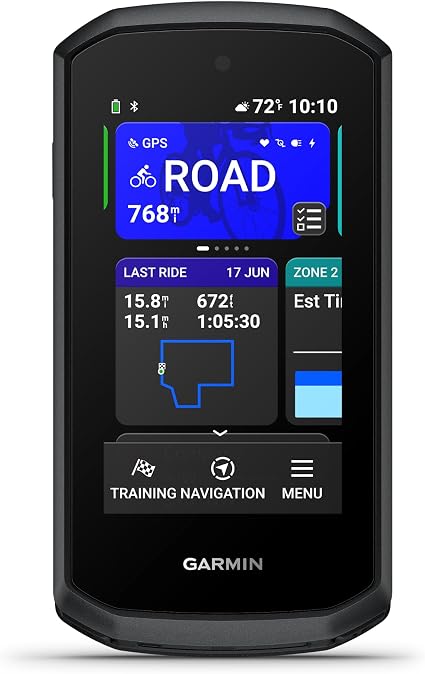
Riders who want clear navigation and solid battery life will appreciate this GPS bike computer. It suits those who spend long hours on the road or trails and need a reliable, easy-to-read display.
The biggest strength lies in its vivid 3 touchscreen that stays sharp under various weather conditions.
Setting up the device is straightforward, with a responsive touchscreen that makes adjusting settings on the go simple. Daily rides benefit from detailed maps of North America visible right on your handlebars.
Text messaging through the Garmin Messenger app adds a practical layer of communication without needing to stop and check your phone.
It performs consistently well by showing all your ride data and maps clearly even in rain or snow. The build is sturdy enough for outdoor use while remaining lightweight and slim.
Most users appreciate the reliable battery life lasting up to 16 hours in demanding use, while the most common gripe is the limited map coverage confined only to North America.
Most praise centers on the device’s durable design paired with the readable, bright touchscreen, making navigation easy in varying weather. The prevalent downside is the geographic limit to North American maps, which restricts use outside this region.
Anyone frequently riding within North America who values clear on-the-ride navigation will find this very suitable. Those needing worldwide map coverage or detailed update tracking might look at alternatives offering broader software support and map options.
Pros
- Responsive 3″ color touchscreen
- Works well in rain, snow, and heat
- Long battery life up to 48 hours
- Text messaging integration via app
Cons
- Maps only cover North America
- Lack of software update details
| Specification | Details |
|---|---|
| Map Types | North America |
| Control Method | Touch |
| Display Size | 3″ |
| Battery Life | Up to 16 hours (demanding use), 48 hours (battery saver mode) |
| Connectivity | Garmin Messenger app |
Best Garmin Bike Computers for Navigation Comparison
| Product | Screen Size | Battery Life | Map Types | Mounting Type |
|---|---|---|---|---|
| Garmin Edge 540 | 2.6 inches | 26 hours | North America | Handlebar Mount |
| Garmin Edge Explore 2 | 3 inches | 16 hours | North America | Dashboard, Windshield Mount |
| Garmin Edge 1060 | 3.5 inches | – | North America | – |
| Garmin Edge Explore 2 Navigator | 3 inches | 16 hours | North America | Dashboard, Windshield Mount |
| Garmin Edge 1050 | 3.5 inches | 60 hours | North America | Handlebar Mount |
| Garmin Edge 850 | 2.7 inches | 12 hours | North America | Handlebar Mount |
| iGPSPORT BSC500 | 3.3 inches | – | – | – |
| Garmin Edge Explore Touch | 3 inches | 12 hours | North America | Wrist Mount |
| Garmin Edge 840 | 2.6 inches | – | North America | – |
| Garmin Edge 840 Pro | 2.6 inches | – | North America | – |
| Garmin Edge 1050 Plus | 3.5 inches | 20 hours | Street | Handlebar Mount |
| Garmin Edge Explore 3 | – | – | North America | – |
- Screen Size2.6 inches
- Battery Life26 hours
- Map TypesNorth America
- Mounting TypeHandlebar Mount
- Screen Size3 inches
- Battery Life16 hours
- Map TypesNorth America
- Mounting TypeDashboard, Windshield Mount
- Screen Size3.5 inches
- Battery Life–
- Map TypesNorth America
- Mounting Type–
- Screen Size3 inches
- Battery Life16 hours
- Map TypesNorth America
- Mounting TypeDashboard, Windshield Mount
- Screen Size3.5 inches
- Battery Life60 hours
- Map TypesNorth America
- Mounting TypeHandlebar Mount
- Screen Size2.7 inches
- Battery Life12 hours
- Map TypesNorth America
- Mounting TypeHandlebar Mount
- Screen Size3.3 inches
- Battery Life–
- Map Types–
- Mounting Type–
- Screen Size3 inches
- Battery Life12 hours
- Map TypesNorth America
- Mounting TypeWrist Mount
- Screen Size2.6 inches
- Battery Life–
- Map TypesNorth America
- Mounting Type–
- Screen Size2.6 inches
- Battery Life–
- Map TypesNorth America
- Mounting Type–
- Screen Size3.5 inches
- Battery Life20 hours
- Map TypesStreet
- Mounting TypeHandlebar Mount
- Screen Size–
- Battery Life–
- Map TypesNorth America
- Mounting Type–
How to Choose the Right Garmin Bike Computer
Choosing the right bike computer depends on accurate navigation features, battery life, and ease of use to ensure reliable guidance during rides. Prioritizing these factors helps avoid frustration and costly replacements, making your cycling experience smoother and safer.
Screen Visibility and Size
Bright sunlight often washes out screens, making it hard to read maps or data at a glance. Some bike computers have screens designed specifically for varying light conditions, featuring strong backlight performance and anti-reflective coatings. A screen size around 2.3 to 3 inches strikes a good balance, big enough for clear map details but small enough to keep the unit compact.
Resolution plays a big role, too; higher pixel density keeps text sharp and lines on maps crisp.
Touchscreens can be unresponsive at times, especially when sweating or wearing gloves. Physical buttons, while not as modern, provide reliable control in varied conditions.
Devices with both input methods tend to avoid frustration during rides. Look for a responsiveness rating in reviews and consider how you’ll operate the device during real rides, precision and ease matter more than fancy touch gestures.
Navigation Features
Turn-by-turn directions prevent missed turns and reduce the need to stop and check the device. Most models offer some form of route customization, but detailed abilities vary. Preloaded maps save time, but frequent updates or offline map options make a big difference when traveling into areas without cellular service.
Some devices allow downloading regional maps to keep navigation smooth without a connection.
GPS accuracy fluctuates between models. Units with support for additional satellites like GLONASS or Galileo provide better precision, especially in wooded or urban areas.
Quick recalculation after a wrong turn is another practical feature. Check for a satellite capability list and user feedback on response time to keep routes accurate and reliable.
Battery Life and Charging
Battery life is crucial since running GPS and backlight drains power quickly. Many devices offer between 15 and 20 hours of active use, but heavy backlight use or continuous GPS tracking can cut that down significantly. Standby times extend to several days, which helps if you forget to turn off the unit after a ride.
Charging speed varies but typically takes 2 to 3 hours for a full charge. Some models support USB-C charging for faster power-ups, which is practical on multi-day rides.
Be aware the battery often lasts less when power-hungry features are enabled at max brightness or frequent syncing occurs during navigation.
Mounting and Durability
Mounting systems directly impact ride safety and ease of use. A secure quarter-turn mount is common, keeping the device steady over bumps and rough terrain. Some units include out-front mounts, which bring the screen into a natural line of sight.
A loose or unstable mount can distract and force frequent adjustments.
Water resistance rated at least IPX7 ensures protection from rain and splashes. Durability extends beyond water; rugged plastics and reinforced glass guard against damage from falls or debris.
Devices with stainless steel or reinforced aluminum bodies have shown better longevity, especially on trails or urban commutes with tight spaces.
Connectivity and Compatibility
Connecting sensors such as heart rate monitors or power meters via ANT+ or Bluetooth adds valuable ride data without needing extra gadgets. Compatibility with smartphone apps for syncing routes and tracking performance is standard but varies in ease of use.
Some units sync nearly instantly with common platforms like Strava or Garmin Connect, while others require manual transfers.
WiFi support simplifies map updates and software patches without tethering to a computer. Having both Bluetooth and ANT+ means wider accessory choice and more reliable connections. Check for a device’s connectivity options if you plan to expand your setup beyond basic tracking.
Optimizing Route Planning with Garmin Bike Computers
Several Garmin bike computers enable advanced route planning directly through their interfaces or connected smartphone apps. These devices use detailed maps and allow users to set waypoints, avoid certain road types, or choose routes based on distance and elevation. For instance, you can pre-load a biking trail and adjust the path on the fly if you decide to explore a detour.
The ability to import GPX files for specific rides often saves time and reduces guesswork. These computers also offer turn-by-turn navigation with clear on-screen prompts, which lowers reliance on external devices like phones or paper maps.
Key Features:
- Preloaded topographic or road maps ideal for various terrains
- Customizable routing options, including distance and elevation preferences
- Interactive touchscreen or buttons suited for quick changes on the move
- Integration with smartphone apps for syncing and route sharing
They work well for planning new routes or following tried-and-tested paths, making navigation during rides more straightforward.
Essential Maintenance Tips to Prolong Your Garmin Device’s Lifespan
Keeping a Garmin bike computer in good condition involves regular charging and updating its software. Battery health improves when not left fully depleted for long periods.
Locally stored maps and ride data should be backed up periodically to avoid loss in case of device failure. Make sure the device’s external ports stay clean and dry, since dirt or moisture can cause connectivity issues or damage the hardware. Using screen protectors can prevent scratches and maintain visibility during rides.
Practical Maintenance Tips:
- Charge the device fully before storage and top off regularly during heavy use
- Check for firmware updates via Garmin Express and install them promptly
- Wipe the screen and sensors gently with a microfiber cloth after each ride
- Store in a cool, dry place to avoid exposure to extreme temperatures or humidity
These steps help avoid common problems and extend the usable life of your Garmin bike computer.
Comparing Garmin Bike Computers with Other Popular Navigation Tools
Garmin bike computers tend to offer more detailed cycling-specific data compared to many general navigation tools. Unlike standard GPS devices or smartphone apps, these units often include performance metrics like cadence, heart rate, and power when paired with compatible sensors.
Built-in maps are tailored toward cycling routes, including off-road trails, which many generic tools lack. Their physical design is rugged and weather-resistant, meant to withstand outdoor conditions you might encounter on long rides.
Differences to Consider:
- Garmin units deliver cycling-focused data overlay directly on the navigation screen
- Third-party apps on smartphones provide flexibility but depend on phone battery and signal
- Some cheaper GPS devices lack bike-specific maps and ride metric integrations
- Garmin devices offer offline navigation useful in remote areas with limited connectivity
This combination benefits cyclists who want reliable feedback and precise route guidance integrated into one device.
People Also Asked
How Do I Properly Care for My Bike Computer?
Clean the bike computer regularly with a soft cloth and avoid harsh chemicals. Make sure to remove it from the mount when not riding to prevent damage from weather or theft. Periodically check and update the firmware to keep it running smoothly.
What Size Bike Computer Fits on My Handlebars?
Most bike computers come in compact sizes that fit standard handlebars around 31.8mm diameter. Measure your handlebar thickness and check the mount compatibility to ensure a secure fit. Some models include adjustable mounts for different bar shapes.
Is a Bike Computer Safe to Use in Heavy Rain?
Garmin bike computers are designed to be water-resistant and handle rain without issues. Still, avoid submerging them or exposing them to high-pressure water sprays. Wiping the screen dry after rides helps maintain visibility and touchscreen responsiveness.
How Long Do Typical Bike Computers Last Before Needing Replacement?
Typical Garmin bike computers last several years with proper use and care. Battery lifespan varies depending on usage, but rechargeable models might need battery replacement or service after 3 to 5 years. Keeping firmware up to date can prevent performance problems.
What Common Problems Should I Expect with a Bike Computer?
Common issues include losing GPS signal, screen freezing, or battery draining faster than expected. These can often be fixed by rebooting the device or updating the software. Make sure to secure the mount tightly to prevent accidental falls during rides.
Conclusion
Choosing the best Garmin bike computer for navigation comes down to screen readability, reliable GPS accuracy, and the ease of route planning. These features help keep you on track without slowing you down or causing confusion.
Battery life should also be taken into account, especially for longer rides.
Consider how often you’ll use the device and your budget before making a decision. A more basic model may be sufficient for casual rides, while frequent cyclists might benefit from extra features.
Take another look at the comparison table and the detailed options above to find the one that fits your needs and riding style.