
Top 12 Best OBD Dash Cam Reviews You Can’t Miss Today!
Driving without a reliable dash cam can lead to missed crucial moments, whether it’s unclear footage from a shaky mount or a device that drains the car battery overnight. The best obd dash cam tackles these common issues by plugging directly into the car’s OBD port, offering stable power without interrupting other vehicle functions.
This connection helps avoid sudden shutdowns or resets, common problems that happen with poorly powered dash cams.
A quality obd dash cam focuses on a few key features: solid build to withstand heat inside a car, compact size that doesn’t obstruct your view, and proper power management through the OBD port, usually providing a steady 12V supply. Video resolution typically ranges from 1080p to 1440p, which is a good balance between clarity and file size.
Also important is how the cam mounts on the windshield, a secure, adjustable bracket prevents vibration, delivering clear footage even on bumpy roads.
Need a Quick Check?
| Image | Product | Price |
|---|---|---|
Our Top Picks 1 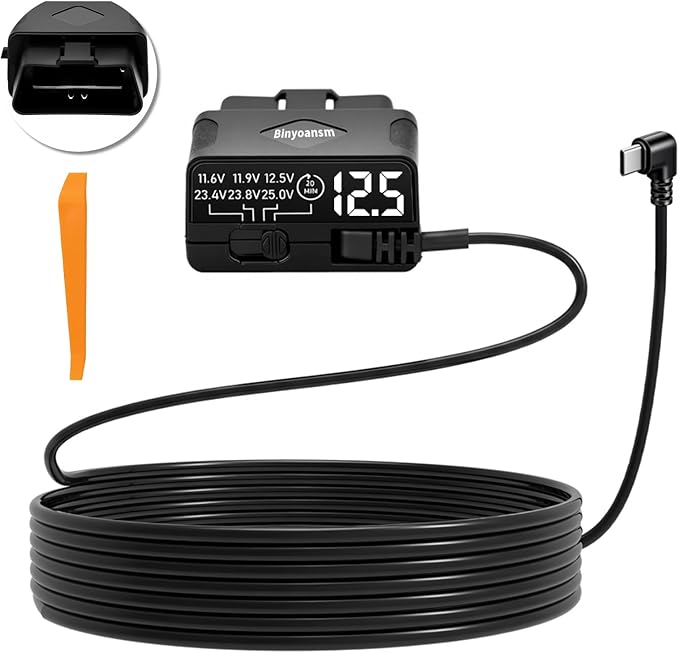 | OBD2 Dash Cam Hardwire | Check Price |
Our Top Picks 2  | 4G LTE Front & Inside | Check Price |
Our Top Picks 3  | Pelsee S3 Ultra Dash Cam | Check Price |
Our Selected Top 12 Obd Dash Cam for Every Budget
This list features carefully chosen OBD dash cams that cover a range of budgets and needs. Each review explains how well the device performs, which types of drivers it fits best, and highlights its main advantages and possible drawbacks for informed decision-making.
1. OBD 2 Dash Cam Hardwire Kit USB-C Adapter
Designed to plug straight into your car’s OBD port, this hardwire kit works without any complicated wiring or fuse tapping. Ideal for anyone wanting a straightforward dash cam setup, its biggest strength is how quickly it powers your dash cam while keeping your vehicle’s wiring untouched.
Getting started takes under a minute: just locate the OBD port, plug in the USB-C cable, and that’s it. You don’t need to hunt for the ACC wire or have electrical skills.
While driving, it switches to continuous recording automatically, then flips into parking mode when the engine turns off. There’s also a choice of cutoff voltages so your battery won’t drain unexpectedly, which is helpful depending on your vehicle’s age and condition.
Video quality at 2160p is sharp, capturing clear details when recording on the dash. The build is solid, mostly thanks to the plug-and-play design with no need to mess with factory wiring. The biggest compliment is how it maintains continuous protection, even parked, but some users note the initial voltage settings might require adjustments for older batteries or in cold weather.
Protection continues 24/7 thanks to automatic switches between driving and parking recording modes. Some find the default voltage settings require calibration to suit older or colder batteries to prevent startup issues.
Ideal for those seeking a simple, no-fuss way to power their dash cam without altering vehicle wiring. Drivers without accessible OBD ports or preferring different power setups should explore other options.
Pros
- Quick plug-and-play installation
- No damage to factory wiring
- Automatic switch to parking mode
- Adjustable cutoff voltage levels
Cons
- Voltage settings might need tuning for old batteries
- Limited to vehicles with OBD port access
| Specification | Details |
|---|---|
| Video Capture Resolution | 2160p |
| Connectivity Technology | USB |
| Compatible Devices | Mirror Camera, Radar Detector, Type C Dash Camera, USB C Dash Cam |
| Compatible Vehicle Type | Bus, Car, Truck |
| Special Features | 4-Level Low Voltage Protection, Automatic Voltage Display, Parking Monitor |
2. 4G LTE Dash Cam Front and Inside
Remote live viewing is the standout feature, making this dash cam ideal for anyone wanting constant access to front and cabin footage. Its 4G LTE connection removes typical WiFi range restrictions, offering real-time alerts and GPS tracking straight to your phone. Great for frequent travelers and those who want to keep tabs on their car from anywhere.
Getting it up and running is straightforward, especially if you use your own 4G SIM card without subscribing to their data plan. The app handles live views and alerts smoothly, letting you watch front and inside the vehicle no matter where you are.
Two-way communication lets you interact through the cam, which can be handy for various situations. The 2K video quality and quick download feature make reviewing events smooth and detailed.
Recording at 2K resolution with a 140-degree field of view, the main function delivers crisp footage both inside and out. Its build suits windshield mounting and it connects easily via the UBoxPro app for remote control. The most praised aspect is remote access beyond WiFi limits, but some mention that carrier data charges can add up when using a personal SIM card.
The strong AI human detection and radar features help reduce false alerts.
Remote viewing anywhere with no WiFi limits works exactly as promised, making it easier to monitor vehicle activity on the go. Some users find data costs a drawback when not using the built-in trial SIM card, which can add to ongoing expenses.
Frequent travelers and people wanting constant video access will appreciate this cam. Those concerned about data fees or who want larger local storage might consider other models better suited to their needs.
Pros
- No subscription needed with your own SIM card
- Remote live view anywhere with cellular coverage
- Clear 2K footage of front and cabin
- Real-time alerts and GPS tracking included
Cons
- Carrier data fees may apply with personal SIM
- Single memory slot limits local storage options
| Specification | Details |
|---|---|
| Connectivity Technology | 4G LTE cellular, APP, Type C |
| Video Capture Resolution | 2K |
| Field Of View | 140 degrees |
| Mounting Type | Windshield Mount |
| Control Method | App, Remote |
| Compatible Devices | Car |
3. Pelsee S3 Ultra True 4K+2.5K Dual Dash Cam
Sharp, detailed video quality stands out for anyone wanting clear evidence on the road. Perfect for those driving various vehicles including cars, trucks, and buses, it offers true 4K front and 2.5K rear recording that captures critical details like license plates with impressive clarity.
Setup involves mounting it on the windshield and connecting wirelessly via its 5.8GHz Wi-Fi 6 for app control. Voice commands or touchscreen operations allow quick adjustments.
Built-in GPS and ADAS features work quietly in the background, enhancing safety without distracting. The 24/7 parking mode keeps an eye on the car even when parked, and loop recording ensures storage stays manageable.
Video clarity excels with dual Sony STARVIS 2 sensors that reduce blurriness and noise, maintaining vivid images day or night. The build feels solid and the screen is clear at 3.4 inches, with practical controls spread across touch, buttons, and voice.
Common praise focuses on the excellent nighttime color vision, while some mention the complexity of the app as a minor drawback.
Sharp video quality and vivid color night vision receive the most praise, while the app’s complexity is the common frustration among users. Controls and features impress but take some time to master fully.
Drivers wanting premium video clarity and comprehensive safety features will find this camera a great fit. Those looking for simpler app controls or alternative mounting options might want to consider other models.
Pros
- Clear 4K front and 2.5K rear video recording
- Full color night vision with HDR support
- Multiple control methods: app, voice, touch
- 24/7 parking surveillance included
Cons
- App interface can be complicated to navigate
- Mounting only supports windshield placement
| Specification | Details |
|---|---|
| Video Capture Resolution | Native 4K+2.5K/ 8MP+5MP |
| Connectivity Technology | USB, Wi-Fi |
| Built-in Features | GPS, ADAS, Voice Control |
| Screen Size | 3.4 inches |
| Field Of View | 170 degrees |
| Mounting Type | Windshield Mount |
4. 4G LTE Dash Cam Front and Inside

Keeping an eye on your car while you’re away becomes simple with a dash cam that streams live video directly to your phone, no Wi-Fi needed. Designed for drivers in the U.S. who want remote access to both their front view and cabin, this model’s biggest strength is real-time monitoring through a built-in LTE connection.
Getting it set up requires no extra SIM or complicated network work, since the LTE plan comes preinstalled, although you will need to maintain a data subscription once the trial ends. Daily interaction happens through an app that lets you check your vehicle remotely and control the camera.
The dash mount fits well on most dashboards and the 150-degree lens covers a broad field of view, helping you ensure every angle is recorded.
Video quality is sharp, recording at 2K resolution, which helps capture details clearly both on the road and inside the cabin. The camera feels solid and well-built, but it won’t work abroad or connect to Wi-Fi networks, limiting its use to U.S. LTE coverage areas.
The dual views are convenient, but the most common drawback revolves around needing an active data plan to keep it fully operational.
The live remote viewing feature provides constant access to the car’s surroundings and inside, which is a major convenience, but ongoing operation depends on maintaining a data plan. This necessity limits usage to locations with LTE service and could add to long-term expenses.
People who want reliable, app-controlled car monitoring while traveling in the U.S. will appreciate this device. Those seeking offline operation or use outside LTE areas may want to look for other options without data plan requirements or Wi-Fi support.
Pros
- Preinstalled LTE SIM for instant connection
- Remote live viewing via smartphone app
- Wide 150-degree front and cabin coverage
- Includes 7-day unlimited data trial
Cons
- Only works with U.S. LTE networks
- Requires paid data plan after trial ends
| Specification | Details |
|---|---|
| Video Capture Resolution | 2K |
| Connectivity Technology | Bluetooth |
| Field Of View | 150 degrees |
| Memory Storage Capacity | 32 GB |
| Mounting Type | Dashboard Mount |
5. OBD2 to USB-C Power Cable for Dash Cam

Stable 5V/3A power delivery through a simple OBD2 plug makes this cable perfect for anyone wanting a clean dash cam installation without fuss. Ideal for those not wanting to mess with fuse tapping or complicated hardwiring, its biggest strength is straightforward plug-and-play setup.
Installation requires no tools; just plug the cable into the car’s OBD2 port and connect your dash cam via USB-C. An intelligent ACC detection system automatically switches power between driving mode and parking surveillance, so your dash cam records around the clock without needing manual intervention. A real-time LED voltage display lets you keep an eye on power status, ensuring smooth day-to-day operation.
Delivers continuous 2160p video capture with low power consumption thanks to thoughtful voltage set-down protection. The build is compact and meant to provide constant power safely to your device while protecting your vehicle’s battery at set voltage thresholds. Praise often mentions how reliable and steady the power supply is.
A common complaint involves compatibility questions with some less common OBD2 ports or devices requiring different specs.
Reliable power delivery and easy installation highlight its value for everyday use, while questions on port compatibility and device connection limits occasionally arise. Voltage protection features minimize battery drain, supporting continuous operation without user worry.
A solid choice for standard vehicles and USB-C dash cams needing constant power. Users with specialized vehicle ports or dash cams that require different connectors might consider other power solutions to ensure full compatibility.
Pros
- Plug & play with no tools needed
- Smart ACC detection auto-switches modes
- Real-time LED voltage status display
- Compatible across many vehicle types
Cons
- May not fit all uncommon OBD2 ports
- Limited to devices with USB-C power input
| Specification | Details |
|---|---|
| Connectivity Technology | USB |
| Vehicle Type Compatibility | Bus, Car, Minivan, SUV, Truck |
| Continuous Video Capture Resolution | 2160p |
| Power Output | 5V/3A |
| Special Features | 24/7 Parking Monitor, Low Power Consumption, Real-time LED Voltage Display |
6. OBD2 to USB-C Dash Cam Power Adapter
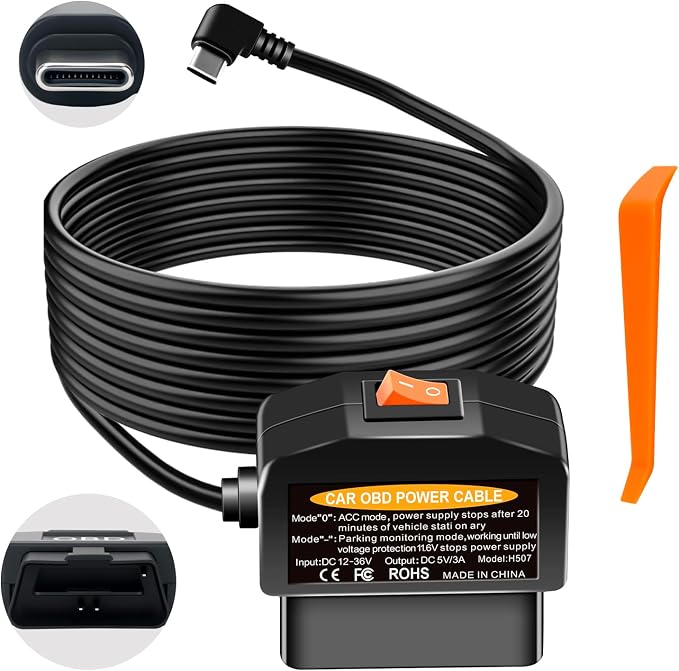
Drivers who want reliable dash cam power without complicated wiring will appreciate this OBD2 to USB-C adapter. It suits those who prefer easy installation and safe battery management.
Its single biggest strength is the smart dual-mode switch that lets you choose between daily use and 24/7 parking monitoring.
Setting up takes about three minutes without any tools, which is a big relief for anyone not comfortable with hardwiring. Switching between daily mode and continuous parking mode happens with a simple physical toggle. This keeps your dash cam powered exactly how you want it, avoiding any battery drain thanks to smart voltage monitoring.
The adapter monitors your battery voltage in real time and shuts off at 11.6V or 23.4V depending on your vehicle to protect the battery. It’s built solidly to handle up to 3 amps and 36 volts.
Users praise the convenience and safety features highly, but some mention the physical switch can be a bit stiff at first.
The smart low-voltage cutoff feature is highly praised for avoiding unexpected battery drainage. On the downside, the physical switch can be stiff, which might take some getting used to during daily use. The plug-and-play setup is another strong point that appeals to people avoiding complex wiring.
Drivers wanting a quick and safe power solution for their dash cams will be well served by this adapter. Those needing higher current capacity or a more flexible interface might want to explore other options better suited for heavy-duty use.
Pros
- Easy setup with no tools required
- Smart low-voltage protection prevents battery drain
- Physical switch to toggle power modes
- Works with both 12V and 24V vehicles
Cons
- Power switch feels stiff initially
- Limited to 3 amp current max
| Specification | Details |
|---|---|
| Maximum Current | 3 A |
| Maximum Voltage | 36 volts |
| Voltage Cutoff | 11.6V/11.7V |
| Connector Type | Dashboard Mount |
| Connectivity Technology | Type C USB |
7. REDTIGER OBD Dash Cam Hardwire Kit USB-C
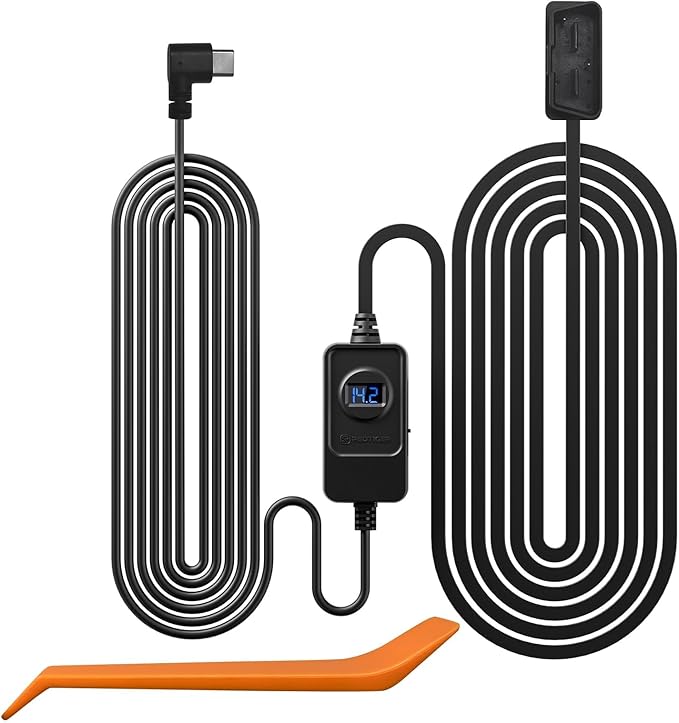
Hardwiring a dash cam for around-the-clock parking monitoring can be tricky, but the REDTIGER OBD Dash Cam Hardwire Kit USB-C makes it straightforward by drawing power directly from the OBD port. It suits drivers wanting reliable, continuous surveillance without battery worries or messy wiring.
Its biggest strength lies in the easy installation and steady power delivery.
Installation takes just minutes by plugging into the OBD port, so no splicing wires or tapping into the fuse box is needed. Once connected, the kit powers REDTIGER dash cams with a consistent 5V/3A supply via USB-C. This means your dash cam stays on even when the engine is off, ideal for 24/7 parking monitoring.
The setup keeps your interior tidy since it avoids extra wires and fits most cars with 12V to 24V systems.
Performance matches expectations well as it reliably feeds power to the dash cam with minimal fuss. Built to handle a range of voltages, it protects your vehicle’s battery from draining thanks to its low voltage protection feature.
Reviews praise its clean installation and steady power, although some mention compatibility issues with certain car models or OBD ports. The build is practical, focused on function without extra bulk.
The kit is praised for its simple, clean installation and steady power supply that supports 24/7 parking monitoring effectively. Common complaints mention compatibility issues, with some vehicles’ OBD ports not fitting perfectly or multiple dash cam brands not supported.
Drivers who use REDTIGER dash cams and need consistent power for parking surveillance will appreciate this hardwire kit. Anyone with a non-standard OBD port or using a different dash cam brand might find more suitable options elsewhere.
Pros
- Easy plug-and-play installation via OBD port
- Supports 12V to 24V vehicle power systems
- Consistent 5V/3A USB-C output for dash cams
- Includes low voltage protection to avoid battery drain
Cons
- May not fit all OBD ports or vehicle models
- Limited to REDTIGER dash cam series compatibility
| Specification | Details |
|---|---|
| Connectivity Technology | USB |
| Power Input | 12V to 24V |
| Power Output | 5V/3A MAX |
| Mounting Type | Dashboard Mount |
| Compatibility | Car |
8. 4G LTE Dash Cam Front and Inside

FOCUWAY L7 4G LTE Dash Cam Front and Inside is built for those wanting constant connectivity to their vehicle. Best suited for US drivers who want live remote viewing and inside-outside recording, its standout feature is the 4G LTE remote access that lets you check in on your car from anywhere via the app.
Setup involves using the app exclusively since there’s no screen on the device. After connecting the dash cam through the OBD cable, the app guides you to control settings and access footage.
Daily use revolves around the live view, instant notifications, and two-way audio, giving you direct communication with the vehicle remotely.
Video quality comes in 2K for the front and 1080P for the inside, delivering clear recordings with a wide 150-degree view. The device is powered through the OBD port, which keeps installation tidy, though the LTE data plan is an ongoing cost after a 7-day trial. People appreciate the remote live feed but often note the lack of a built-in screen or replaceable SIM as downsides.
Live remote viewing and instant alerts are praised as very useful for monitoring, but many find the lack of a physical screen limiting and do not like that the LTE SIM cannot be swapped. The app control system works well but adds dependency on a phone and ongoing data fees.
Drivers who want continuous, remote access to both front and interior views will benefit most from this dash cam. Those looking for a standalone device with a built-in screen or no monthly charges might want to look for alternatives without LTE requirements.
Pros
- 4G LTE remote live view anywhere
- Dual camera front and inside coverage
- Instant app notifications for events
- Built-in GPS tracking included
Cons
- Only US use; no screen on device
- LTE data plan necessary after trial
| Specification | Details |
|---|---|
| Connectivity Technology | LTE |
| Video Capture Resolution | 2K+1080P |
| Field Of View | 150 degrees |
| Auto Part Position | Front, Inside |
| Compatible Devices | Smartphone |
| Included Memory Card Size | 32 GB |
9. 360° 4 Channel Dash Cam with GPS and WiFi

Feel confident driving with coverage on all sides thanks to four Full HD cameras capturing every angle around your vehicle. Designed for people wanting thorough protection on busy roads or parking lots, the standout feature is its 360-degree recording that leaves no blind spots.
Setup involves mounting the dash cam on the dashboard and linking it via Wi-Fi to an app for easy control and viewing. Daily use is straightforward, with adjustable front cameras offering flexible angles and an interior view option. Time-lapse recording keeps memory use efficient, while parking mode activates with an additional hardwire kit for extra security when parked.
Recording quality stays sharp at 1080p with a 360-degree field of view, ensuring nothing goes unnoticed. The built-in supercapacitor safeguards footage in incidents and the compact design fits well without cluttering the dashboard.
Positive feedback highlights reliable 4-channel coverage, while the main criticism points to parking mode requiring separate hardware.
Focus on capturing every angle with four 1080p cameras creates an impressive level of coverage. The requirement for an additional hardwire kit to enable parking mode stands out as the most common drawback mentioned.
Ideal for those needing detailed, all-around recording during driving. People wanting built-in parking surveillance without extra accessories might want to consider other options.
Pros
- Four cameras provide full vehicle coverage
- Time-lapse recording conserves memory space
- Built-in WiFi allows easy app control
- Compact design fits neatly on dashboard
Cons
- Parking mode requires separate ACC hardwire kit
- Limited screen size may affect live viewing
| Specification | Details |
|---|---|
| Video Capture Resolution | 1080p |
| Connectivity Technology | USB, Wi-Fi |
| Field Of View | 360 degrees |
| Control Method | App, Push Button |
| Screen Size | 3 inches |
| Auto Part Position | Front |
10. 4G LTE Dual Dash Cam Front and Inside

Ideal for anyone wanting reliable live video access and remote security, this 4G LTE Dual Dash Cam suits drivers looking for constant connection without relying on Wi-Fi. Its biggest strength lies in remote live viewing through the app, allowing you to check your car no matter where you are.
Setup involves plugging into the OBD-II port and activating a SIM and cloud plan, which gets it connected right away. Once running, the dash cam records both front and inside views at 1080p, while the motion sensors and AI detection keep an eye on your vehicle after you park.
Using the app, you can control settings, get alerts, and check live video feed anytime, making daily monitoring straightforward and user-friendly.
The camera captures clear video both day and night thanks to built-in night vision and GPS tracking adds location info to recordings. Construction is compact and unobtrusive on the windshield. Most praise highlights the reliable remote access and alerts triggered by movement.
On the downside, dependence on an active SIM and cloud plan can be a drawback for some, and the need to use OBD-II power limits compatibility to certain vehicles.
Remote live access is reliable and handy for monitoring your vehicle anywhere, while many users note that connecting it requires a SIM card and cloud subscription. The motion detection after you turn off the ignition also gets positive comments for security.
Anyone needing constant remote monitoring and willing to maintain a SIM plan will appreciate this cam. Drivers without OBD-II access or those wanting simpler plug-and-play models might want to look elsewhere.
Pros
- Remote live viewing via 4G LTE
- Dual cameras capture front and inside views
- Motion-activated recording after ignition-off
- App control with alerts and live feed
Cons
- Requires active SIM and cloud plan
- Only powers through OBD-II port
| Specification | Details |
|---|---|
| Connectivity Technology | Auxiliary |
| Video Capture Resolution | 1080p |
| Mounting Type | Windshield Mount |
| Other Special Features | App Control, Built-In GPS, Motion Sensing, Night Vision |
| Compatible Devices | Smartphone |
| Compatible Vehicle Type | Car |
11. OBD Dash Cam Power Cable USB-C Hardwire Kit

Durable design and a USB-C connection make the OBD Dash Cam Power Cable USB-C Hardwire Kit a solid choice for those wanting to power their dashcam directly from the car’s OBD port. Best suited for dashcam users with compatible A5-B5 signal pin adapters, its main strength lies in reliable power delivery without draining the car battery.
Installation requires checking the adapter pin compatibility before purchase. Once connected, the cable supports continuous recording while the car is running. In “O” mode, power remains active for 20 minutes after the car shuts off to ensure recordings complete smoothly, but vibration during this time can interrupt the power-off sequence.
The kit also protects your car battery by shutting off power when voltage drops below 11.6V in “-” mode.
The hardwire kit performs well at maintaining dashcam power without interruption during vehicle operation. It’s built with care from ssontong and comes without extra components. Most users praise its consistent power supply, while some note the need to avoid car vibrations after shutdown to allow proper power-off, which can be inconvenient in everyday use.
Power delivery stays stable while driving, appreciated for uninterrupted dashcam use. The main problem people experience is that vibration after shutdown prevents the cable from powering off properly, causing the camera to keep recording even when the car is turned off.
Those with compatible dashcams looking for reliable battery protection and automatic power management will find this kit useful. Users needing a universal solution or who frequently have their car vibrating after turning off might want to consider other options.
Pros
- Direct USB-C power connection
- Protects battery with voltage cutoff
- Maintains recording 20 minutes after shutdown
- Simple, minimal build
Cons
- Only supports A5-B5 signal pin adapter dashcams
- Power-off delay requires no car vibration
| Specification | Details |
|---|---|
| Brand Name | ssontong |
| Number of Items | 1 |
| Included Components | No |
| Manufacturer Warranty Description | 2 |
12. VIOFO OP100 OBD-II Power Cable USB-C

Plugging directly into the OBD-II port makes powering VIOFO dash cams incredibly straightforward, ideal for anyone wanting a fuss-free setup. It shines by keeping your camera running steadily, especially during parking mode, without jumping through complicated wiring hoops.
Installation takes just a moment since there’s no need to tap into fuses or remove panels. You plug it straight into your car’s OBD-II port and it’s ready.
Managing parking mode recording feels reliable day-to-day because it supplies constant and clean power to the dash cam, which prevents annoying power dropouts.
Power delivery remains steady, supporting your dash cam during long parking sessions without interruptions. Built with quality to hold up inside a vehicle’s port, it’s dependable but users mention that it only works with select VIOFO models.
The strongest compliments focus on its easy plug-and-play convenience, while a common downside is the limited compatibility with non-listed devices.
Easy plug-and-play setup is the biggest advantage, letting the cable provide stable power for parking mode without complicated wiring. Most users find the limited compatibility restrictive, meaning it won’t work if you have other dash cam brands or unsupported VIOFO models.
Drivers who already own compatible VIOFO dash cams and want an uncomplicated, reliable power solution will appreciate this cable. Folks with other camera brands or those needing broader model support would be better served by a more universal power accessory.
Pros
- Quick installation with no fuse tapping required
- Supports continuous operation and parking mode recording
- Dual output ports available for additional devices
- Includes low voltage protection feature
Cons
- Only compatible with select VIOFO dash cam models
- No video capture resolution on its own, power cable only
| Specification | Details |
|---|---|
| Connectivity Technology | OBD Port |
| Compatible Devices | Dashcam |
| Special Features | 24 Hours Surveillance, Dual Output Ports, Easy Installation, Low Voltage Protection, Support Parking Modes |
| Compatible Model Series | A329S, A229, A119M Pro, A119 Mini 2, VS1, A329, A139, T130, WM1 |
| Flash Memory Supported Size Maximum | 512 GB |
Best OBD Dash Cams Comparison Table
| Product | Compatible Vehicle | Connectivity | Special Features | Video Resolution |
|---|---|---|---|---|
| OBD2 Dash Cam Hardwire | Bus, Car, Truck | USB | Low Voltage Protection, Parking Monitor | – |
| 4G LTE Front & Inside | Car | 4G LTE, APP, Type C | 2K, GPS, Cloud Backup | 2K |
| Pelsee S3 Ultra Dash Cam | Cars, Bus, Trucks, RV | USB, Wi-Fi | 4K, HDR, Full Color Night Vision | 4K+2.5K |
| LTE Dual Dash Cam | Car | Bluetooth | App Control, 150° FOV | 2K |
| OBD2 to USB-C Cable | Bus, Car, Minivan, SUV, Truck | USB | 24/7 Parking Monitor, Voltage Protection | – |
| OBD2 USB-C Power Adapter | – | USB | Voltage Cutoff, Hardwire | – |
| REDTIGER OBD Hardwire Kit | Car | USB | Low Voltage Protection | 2160p |
| 4G LTE Inside & Front | Bus, Car, Minivan, Truck | LTE | GPS, Remote View, Notifications | – |
| 360° 4 Channel Dash Cam | ATV, All, Bus, Car, RV, Truck | USB, Wi-Fi | 360° View, Incident Detection | 1080p |
| 4G LTE Dual Cam | Car | Auxiliary | GPS, Night Vision, Motion Sensing | 1080p |
| OBD USB-C Power Cable | – | – | – | – |
| VIOFO OP100 USB-C Cable | Car | OBD Port | 24H Surveillance, Dual Output Ports | – |
- Compatible VehicleBus, Car, Truck
- ConnectivityUSB
- Special FeaturesLow Voltage Protection, Parking Monitor
- Video Resolution–
- Compatible VehicleCar
- Connectivity4G LTE, APP, Type C
- Special Features2K, GPS, Cloud Backup
- Video Resolution2K
- Compatible VehicleCars, Bus, Trucks, RV
- ConnectivityUSB, Wi-Fi
- Special Features4K, HDR, Full Color Night Vision
- Video Resolution4K+2.5K
- Compatible VehicleCar
- ConnectivityBluetooth
- Special FeaturesApp Control, 150° FOV
- Video Resolution2K
- Compatible VehicleBus, Car, Minivan, SUV, Truck
- ConnectivityUSB
- Special Features24/7 Parking Monitor, Voltage Protection
- Video Resolution–
- Compatible Vehicle–
- ConnectivityUSB
- Special FeaturesVoltage Cutoff, Hardwire
- Video Resolution–
- Compatible VehicleCar
- ConnectivityUSB
- Special FeaturesLow Voltage Protection
- Video Resolution2160p
- Compatible VehicleBus, Car, Minivan, Truck
- ConnectivityLTE
- Special FeaturesGPS, Remote View, Notifications
- Video Resolution–
- Compatible VehicleATV, All, Bus, Car, RV, Truck
- ConnectivityUSB, Wi-Fi
- Special Features360° View, Incident Detection
- Video Resolution1080p
- Compatible VehicleCar
- ConnectivityAuxiliary
- Special FeaturesGPS, Night Vision, Motion Sensing
- Video Resolution1080p
- Compatible Vehicle–
- Connectivity–
- Special Features–
- Video Resolution–
- Compatible VehicleCar
- ConnectivityOBD Port
- Special Features24H Surveillance, Dual Output Ports
- Video Resolution–
How to Choose the Right OBD Dash Cam
Key factors to consider include video quality, ease of installation, and reliable power connection through the OBD port. Choosing a dash cam that fits your vehicle and records clearly helps avoid costly replacements and ensures important events are captured without hassle.
Power and Connectivity
The OBD port supplies power continuously but isn’t uniform across all vehicles. Some cars have 12V systems while others run on 24V, so a dash cam must match this voltage to avoid failure or damage.
It is crucial to check the device’s voltage range compatibility before buying. Without proper integration, the dash cam might turn off unexpectedly when the engine stops, leading to gaps in event recording.
Many equipped models include a backup battery or capacitor. This backup allows the camera to last through short power interruptions and properly save footage if the engine shuts down. Look for devices with a built-in battery lasting at least 5 to 10 minutes after power loss, which is enough to capture incidents during parking or shutdown.
Video Quality and Features
Clear video is essential for useful recordings. Cameras offering at least 1080p resolution and 30 frames per second typically produce smooth and detailed footage sufficient for identifying important details like license plates.
Lower specs often create blurry or choppy videos, making review difficult.
Features like night vision, most commonly infrared LEDs or enhanced low-light sensors, help capture usable footage in poor lighting conditions. Wide-angle lenses (around 140 to 170 degrees) cover more road area without severe distortion. Loop recording is critical, as it automatically overwrites old files to maximize storage without manual deletion.
Incident detection triggers emergency recording, locking files to avoid deletion after crashes.
Storage and Memory
Dash cams usually rely on microSD cards for storage. Devices supporting up to 128GB or 256GB cards allow longer recording times before needing to overwrite or offload footage. Card type support is important too; most use Class 10 or UHS-I cards to handle high bitrates smoothly.
Automatic overwrite cycles through older files once storage is full, preventing the camera from stopping unexpectedly. Good products also offer simple connectivity options like USB or Wi-Fi to transfer recordings easily to a phone or computer without removing the memory card.
This feature makes reviewing and sharing footage less of a chore.
Installation and Fit
A dash cam must fit smoothly inside the vehicle while staying secure. Many models mount via adhesive pads or suction cups near the windshield or dashboard, but size and shape affect visibility and ease of installation. Cameras that are too bulky can obstruct the driver’s view or be tricky to place near the OBD port.
Cable management is often an afterthought, yet poorly routed wires can get tangled or visible, detracting from the vehicle’s interior or causing accidental unplugging. Some units offer compact cables or clips designed to fit specific OBD port locations. Compatibility with various OBD port positions, usually under the dashboard or near the steering column, is key for a tidy setup across vehicle models.
Safety and Reliability
Automatic crash detection triggers recording instantly during a collision or sudden impact. Devices with sensitive G-sensors lock footage to protect it from being overwritten or deleted, preserving critical evidence.
Dash cams designed for vehicle use need to withstand temperature extremes since dashboards can get very hot or cold.
Durability features include heat-resistant plastic housings and components rated for at least 70°C (160°F). Secure data encryption prevents tampering with video files, which is especially important if footage is used in legal cases. Look for cameras offering reliable encryption standards or watermarking to maintain file integrity.
Optimizing Your OBD Dash Cam for Enhanced Vehicle Diagnostics
OBD dash cams connect directly to the vehicle’s onboard diagnostics port, allowing them to access more detailed data than standard cameras. This connection makes it possible to record engine performance, fault codes, and even real-time vehicle speed alongside video footage.
To get the most from your OBD dash cam:
- Position the camera to capture both the road and the driver’s surroundings clearly.
- Use the camera’s app or software to monitor diagnostic alerts and log reports systematically.
- Ensure the OBD port connection is secure to maintain consistent data flow without interruption.
- Regularly update the device’s firmware to improve compatibility with your vehicle’s systems.
These steps help integrate video evidence with mechanical insights, making the dash cam a useful tool for both driving safety and vehicle monitoring.
Prolonging the Lifespan of Your OBD Dash Cam Through Proper Maintenance
Frequent exposure to heat and vibrations can shorten the operational life of an OBD dash cam. To keep it functioning well, it’s important to handle the device thoughtfully.
Maintenance tips include:
- Regularly check the OBD connection for dust or debris that could affect data transmission.
- Clean the camera lens gently with a microfiber cloth to maintain clear images.
- Avoid exposing the dash cam to direct sunlight for extended periods when parked to prevent overheating.
- Store the camera safely if removing it for long intervals, using a protective case.
Following these practices reduces wear and helps maintain reliable diagnostic recording over time.
Comparing OBD Dash Cams with Traditional Hardwired Models for Different Driving Needs
OBD dash cams offer diagnostic data alongside video, which traditional hardwired dash cams generally do not provide. This can be valuable for drivers interested in monitoring their vehicle’s health while capturing incidents.
Comparing features:
- Hardwired models often have a constant power source through the vehicle’s electrical system, enabling parking mode operation without draining the battery as quickly.
- OBD dash cams plug into the OBD port, which might limit placement but adds the benefit of capturing engine data.
- Drivers using older cars without advanced OBD protocols might find hardwired cams more practical.
- For those prioritizing detailed diagnostics alongside incident video, OBD cams provide a functional advantage.
Choosing between them depends on specific vehicle compatibility and what kind of information the driver wants alongside regular footage.
People Also Asked
How Do I Install an OBD Dash Cam Correctly?
Connect the OBD dash cam to the vehicle’s OBD-II port, usually located under the dashboard near the steering column. Make sure the connection is secure to prevent disconnection while driving. After plugging it in, run the wiring discreetly and test the camera to ensure it’s powering up and recording correctly.
Is an OBD Dash Cam Compatible with All Car Models?
Most OBD dash cams work with cars that have a standard OBD-II port, typically models made after 1996. Some older vehicles or those with unique ports may not be compatible. Check the camera’s compatibility list before buying to avoid fitment issues.
What Safety Features Should an OBD Dash Cam Have?
Look for features like impact detection, parking mode, and a G-sensor that automatically records when sudden movement or collision happens. These safety functions help capture critical events and protect evidence in case of accidents.
How Long Does the Battery Usually Last in These Dash Cams?
OBD dash cams generally rely on the car’s power and have a small internal battery that lasts about 10-20 minutes after the engine is off. The battery mainly supports the dash cam’s parking mode but isn’t designed for long standalone operation.
What Are Common Problems with OBD Dash Cams to Watch For?
Common issues include poor connection in the OBD port causing power drops, overheating inside tight spaces, and compatibility glitches with certain car electronics. Regularly check the connection and update firmware if available to minimize problems.
Conclusion
Choosing the right OBD dash cam depends mainly on video quality, ease of installation, and compatibility with your vehicle’s OBD port. It’s important that the camera records clear footage and operates reliably without draining your car battery.
Also, make sure it fits well with your current car setup, especially the OBD connection type.
Consider how often you will use the dash cam and your budget when making a final choice. Smaller or simpler models might be more suitable for occasional use, while frequent drivers may want something with more features. Check the comparison table and review the detailed picks above to find the best match for your needs.