
Top 12 Best Touch Screen Bluetooth Car Stereo You Need Now
Many people dealing with a poor car stereo experience know how frustrating it is when touchscreens freeze or drop Bluetooth connections during a drive. The best touch screen bluetooth car stereo not only avoids these interruptions but also integrates smoothly with your phone and car systems.
Weak signals or unresponsive controls make it tough to change music or answer calls safely, turning routine trips into distractions.
A reliable touch screen bluetooth car stereo usually has a responsive, scratch-resistant screen around 6 to 7 inches, fitting standard dash openings. Stable Bluetooth versions 4.2 or higher provide consistent connectivity without constant dropouts.
Power output matters too, with 45 watts per channel commonly delivering clear, distortion-free sound. Easy-to-clean glass or coated surfaces help maintain visibility and hygiene, especially on sunny or dusty days.
Need a Quick Check?
| Image | Product | Price |
|---|---|---|
Our Top Picks 1 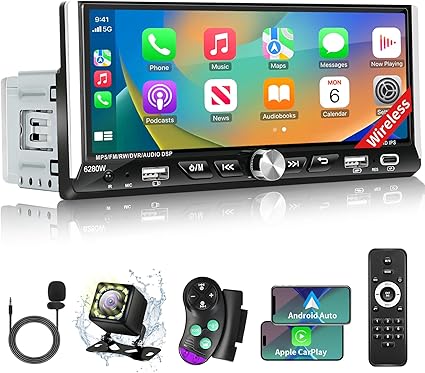 | Wireless CarPlay Single Din | Check Price |
Our Top Picks 2  | Pioneer DMH-130BT | Check Price |
Our Top Picks 3 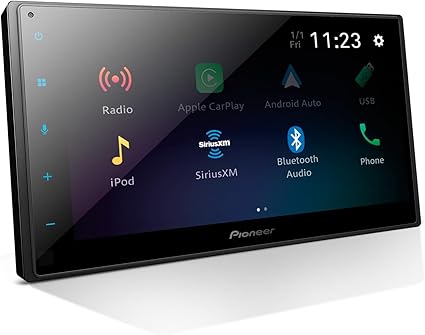 | Pioneer DMH-1600NEX | Check Price |
Our Selected Top 12 Touch Screen Bluetooth Car Stereo Worth Your Money
This list features carefully evaluated touch screen Bluetooth car stereos that combine ease of use and modern functionality. Each review highlights performance, ideal users, strengths, and weaknesses, helping you find a suitable option for your vehicle and lifestyle.
1. Single Din Radio Car Stereo with Wireless Apple CarPlay
Single Din Radio Car Stereo focuses on a straightforward, compact design perfect for those wanting a reliable upgrade to their dash without losing simplicity. It suits drivers who prefer wireless Apple CarPlay and built-in Bluetooth connectivity for easier media and hands-free calling. The wireless CarPlay feature stands out as its biggest strength for cable-free integration.
Setup requires careful attention to the provided wiring diagram and compatibility with your vehicle’s dash size since it might block vents or buttons in some cars. After installation, the touchscreen and voice controls with Google Assistant and Siri work well for managing music and calls on the go.
Being compatible with USB, Type-C, and RCA makes it versatile for connecting different devices, while the rearview camera input adds useful safety.
Performance matches expectations for a single DIN stereo with clear audio streaming via Bluetooth and decent touchscreen responsiveness on the 6.9-inch display. Build quality feels solid, although some users mention occasional difficulty fitting it perfectly in older or unusual car models.
The 10-year product support provides confidence, but installation needs patience and correct wiring to avoid issues.
The wireless Apple CarPlay feature receives strong praise for making phone access more convenient, especially for navigating and music without cables. A common issue is that the unit’s size can interfere with dashboard vents or vehicle buttons, so careful checking is necessary before purchase and installation.
Drivers who prioritize wireless phone integration and durable support will appreciate this stereo. Those with vehicles that have a compact dash or require 24V systems should consider other options to avoid fitment and power compatibility problems.
Pros
- Wireless Apple CarPlay for cable-free phone use
- Multiple control options including voice and touchscreen
- Wide compatibility with smartphones and external devices
- 10-year free replacement product support offered
Cons
- May block vents or buttons on some vehicles
- Compatible only with 12V automotive DC voltage
| Specification | Details |
|---|---|
| Connectivity Technology | Bluetooth, USB, Type-C |
| Controller Type | Hand Control, Remote Control, Voice Control, Google Assistant, Siri Assistant, Push Button, Touchscreen |
| Display Size | 6.9 inch IPD Display |
| Special Features | Wireless Apple CarPlay, Android Auto, FM AM Car Radio, Hands-Free Calling |
| Additional Inputs | RCA, Rear View Camera Input |
2. Pioneer DMH-130BT Double Din Car Stereo
A 6.8 capacitive touchscreen immediately grabs your attention, making it easy to manage music and calls while driving. It’s designed for drivers who value hands-free Bluetooth connectivity combined with straightforward operation in a double din size.
Setup involves pairing your smartphone quickly via Bluetooth, and from there managing calls or streaming music feels natural on the responsive touchscreen. The Amazon Alexa integration through the Vozsis app adds voice control for basic commands, making it easier to keep focus while driving.
Color customization of the screen lighting gives a small but nice customization touch.
Sound comes through clearly with the 50-watt output spread across 4 channels, supporting a 5.1 surround sound layout. Build quality is solid for a midrange stereo, with a handy rear view camera input adding safety value. Most praise centers on the Bluetooth connectivity and touchscreen responsiveness, while some users point out occasional hiccups in Alexa integration as the main drawback.
Bluetooth connection and touchscreen responsiveness are frequently praised for making interaction simple and efficient while driving. Issues arise occasionally with Alexa voice commands not registering smoothly, which can interrupt hands-free use.
Drivers looking for reliable Bluetooth access and a clear display will find this stereo suits their needs well. Those who want perfect voice assistant performance or surround sound beyond stereo might look for alternatives.
Pros
- Responsive 6.8″ capacitive touchscreen
- Built-in Bluetooth for calls and streaming
- Amazon Alexa voice control via smartphone app
- Multi-color illumination customizable display
Cons
- Alexa integration can be inconsistent
- Limited to stereo audio output
| Specification | Details |
|---|---|
| Connectivity Technology | Bluetooth |
| Controller Type | Amazon Alexa, Android, iOS |
| Display | 6.8″ Capacitive Touch Screen |
| Output Power | 50 watts |
| Number of Channels | 4 |
| Rear View Camera Input | Yes |
3. Pioneer DMH-1600NEX Double Din Car Stereo
Perfect for those wanting reliable smartphone integration, the Pioneer DMH-1600NEX offers hands-free calling and easy access to Apple CarPlay and Android Auto through its 7-inch touchscreen. Its standout feature is the clear Bluetooth connection paired with a customizable audio experience for anyone who spends lots of time driving.
Setup is straightforward, especially connecting your phone via USB to get Apple CarPlay or Android Auto going. The touchscreen reacts well, not lagging or freezing, making navigation through apps smooth. The external microphone picks up your voice clearly during calls, while the built-in Bluetooth streams music with ease.
Adjusting sound settings is simple using the 13-band equalizer, helping to tailor the music to your car’s speakers just right.
Sound quality is solid with ample customization through the EQ presets or manual tuning, making songs feel clear and immersive. The build feels sturdy, designed for a double din slot with easy controls. The clearest benefit people point out is how effective hands-free calling is, while the most common issue noted is a limited wireless connection option since smartphone links need to be wired.
The most praised feature is the crystal-clear hands-free calling made possible by the external microphone, which helps keep communication safe and easy. A frequent complaint is that the system requires a wired connection for smartphone integration rather than supporting wireless CarPlay or Android Auto, limiting some convenience.
People who want a reliable touchscreen with solid Bluetooth and wired smartphone connectivity will appreciate this unit. Those seeking completely wireless smartphone usage or more advanced internet streaming options might want to consider other models that better fit those needs.
Pros
- Clear hands-free calling with external microphone
- Supports both Apple CarPlay and Android Auto
- Customizable 13-band equalizer for perfect sound
- Responsive 7-inch touchscreen display
Cons
- Smartphone connection requires wired USB
- Limited wireless features despite Wi-Fi support
| Specification | Details |
|---|---|
| Connectivity Technology | Bluetooth, USB, Wi-Fi |
| Controller Type | Android, iOS |
| Number of Channels | 2 |
| Audio Output Mode | Stereo |
| Supported Internet Services | SiriusXM |
4. Single Din Radio Car Stereo with CarPlay & Android Auto

Driving without easy phone access can be distracting and unsafe; this single din radio helps keep your focus where it belongs. It suits anyone wanting straightforward integration with Apple CarPlay and Android Auto, offering wireless and wired connectivity.
Its biggest strength lies in reliable voice control that handles calls, music, and navigation without needing to touch your phone.
Setup involves plugging in your phone via USB or using Bluetooth for wireless CarPlay and Android Auto smoothly. The 6.5 inch InCell touchscreen provides clear visuals and responsive control, making it easy to scroll maps or switch tracks.
The included external microphone improves voice command recognition, so asking Siri or Google Assistant feels natural and doesn’t interrupt your drive.
Performance-wise, the stereo delivers stable Bluetooth 6.0 connections and crystal-clear stereo sound. The screen’s brightness and touch accuracy stand out during daily drives.
Most praise highlights the external microphone’s voice pickup quality, while the common complaint points to occasional lag in loading apps. Build quality matches typical car electronics, fitting standard single din slots without fuss.
Voice control consistently receives praise thanks to the external mic’s clarity and low interference on calls, making hands-free operation practical. The most frequent downside involves app responsiveness, which can sometimes feel slow when switching between functions on the touchscreen.
Drivers relying heavily on voice commands and smartphone navigation will appreciate the setup here. Those looking for a larger or faster display might prefer a unit with a bigger screen or enhanced processing speed, especially if frequent multitasking within the interface matters.
Pros
- Wireless and wired CarPlay & Android Auto support
- Clear 6.5 inch InCell touchscreen
- External microphone for better voice control
- Compatible with USB Type-C and Type-A devices
Cons
- Occasional lag when opening apps
- Single din size may limit screen space
| Specification | Details |
|---|---|
| Connectivity Technology | Bluetooth, Type-C, USB |
| Controller Type | Android, iOS |
| Audio Output Mode | Stereo |
| Wireless Technology | Bluetooth 6.0 |
| Control Method | App, Remote, Touch, Voice |
5. Double Din Car Stereo with 7 Touchscreen

240 watts of output power and built-in DSP make this Double Din Car Stereo with 7 Touchscreen a great fit for anyone wanting clear, customizable sound alongside modern connectivity. It suits drivers who want wireless and wired CarPlay and Android Auto, plus hands-free voice control, right in their car dash.
Setup involves connecting your smartphone via Bluetooth or USB, where the system pairs automatically when the car starts. The 7-inch touchscreen is responsive and intuitive for daily use, helping you handle calls, messages, navigation, and music without distraction.
Voice commands through Siri or Google Assistant add ease and safety, reducing the need to look away from the road.
Audio quality is clear with rich bass thanks to the 10-band EQ and subwoofer output capabilities. The built-in heat sink keeps the unit cool during long drives.
Construction feels solid, though some mention a slight delay in voice recognition under certain conditions. Most praise focuses on the reliable wireless connection and sound clarity.
Reliable wireless connection and excellent sound quality consistently impress, while the voice control can sometimes lag or misinterpret commands during use. The sturdy built with a heat sink makes sure the unit stays cool even on long drives.
Drivers who prioritize easy smartphone integration and quality sound will appreciate this stereo. Those seeking faster voice response or more detailed manuals for fine-tuning audio might want to look at other options.
Pros
- Automatic phone connection on car start
- Customizable 10-band equalizer
- Supports wireless and wired CarPlay and Android Auto
- Powerful subwoofer RCA output
Cons
- Voice recognition can be slow at times
- No detailed manual for advanced sound settings
| Specification | Details |
|---|---|
| Output Power | 240 watts |
| Connectivity Technology | Auxiliary, Bluetooth, USB |
| Controller Type | Android, iPhone |
| Special Features | Android Auto, Apple CarPlay, Built-In Bluetooth, RCA, Voice Control |
| Audio Output Mode | Stereo |
| Number of Channels | 5 |
6. 9 Wireless Apple CarPlay Car Screen

People who spend a lot of time driving and rely heavily on their smartphone apps will appreciate a 9-inch touchscreen that pairs easily with both iPhones and Android phones. It works especially well for those wanting real-time GPS navigation without complicated installation, with smooth Bluetooth and WiFi connections standing out as its biggest strength.
Getting started involves a quick dashboard mount and a USB connection to power the device. It links to your smartphone via Bluetooth and WiFi, so you can instantly access familiar apps like Google Maps, Waze, music, and calls through CarPlay or Android Auto. Voice control and touch input make it easy to keep attention safely on the road during daily trips.
Navigation is sharp and responsive, delivering zero-delay GPS updates. The screen’s 170-degree field of view ensures clear visibility from different angles. With a 1080p capture resolution and 64 GB of memory storage, it’s solidly built for lasting use.
Praise often notes its straightforward setup, while some mention app availability requires the phone connection, which can feel limiting.
Setup and use are quick and straightforward, with dependable real-time GPS navigation experienced through smartphone apps. The main drawback is relying entirely on a connected phone for maps, which means no standalone navigation is provided.
Drivers who want an easy way to use their phone’s navigation and media features without replacing the whole stereo will find this device a practical choice. Those seeking a fully independent GPS system might want to look elsewhere.
Pros
- Simple dashboard mount installation
- Supports both Apple CarPlay and Android Auto
- Real-time GPS navigation with voice control
- Large 9-inch LCD touchscreen
Cons
- Needs constant phone connection for navigation apps
- Does not come with preinstalled navigation apps
| Specification | Details |
|---|---|
| Screen Size | 9 inches |
| Connectivity Technology | USB |
| Control Method | App, Touch, Voice |
| Video Capture Resolution | 1080p |
| Memory Storage Capacity | 64 GB |
7. Single Din Radio Car Stereo with Apple CarPlay

Exceptional clarity defines this single din radio car stereo, ideal for drivers wanting a responsive touchscreen and smooth integration with Apple CarPlay and Android Auto. The standout feature is its upgraded Incell screen that offers better touch sensitivity and visibility in sunlight compared to typical screens.
Setup involves a quick connection using either wireless or wired options for CarPlay and Android Auto, adapting easily to iOS or Android devices. Daily use proves convenient thanks to responsive touch controls and voice commands that allow safe interactions while driving.
The wide viewing angles and HD resolution mean information is always clear and accessible, even on bright days.
Performance focuses on delivering clear audio with a 5.1 channel surround sound configuration and reliable Bluetooth 6.0 connectivity. The build feels solid, with USB Type-A and Type-C ports covering different device charging and connection needs.
Most praise highlights the screen’s sharp visuals and smooth reactions. A common criticism points to occasional delays in voice control recognition.
The screen’s clarity and responsiveness impress users consistently, making navigation and media access straightforward while on the road. However, occasional lag in voice command recognition can interrupt hands-free operation, which could be frustrating during busy driving moments.
Drivers seeking a clear, responsive touchscreen with flexible smartphone integration will find this unit satisfying. People who require perfect voice command accuracy or have vehicles incompatible with single din radio sizes might want to explore other options.
Pros
- Upgraded Incell touchscreen with superior sunlight visibility
- Supports wireless and wired Apple CarPlay and Android Auto
- Bluetooth 6.0 offers stable smartphone connectivity
- Wide viewing angles with vibrant HD resolution
Cons
- Voice control sometimes responds with delays
- Single din size may limit compatibility in some cars
| Specification | Details |
|---|---|
| Connectivity Technology | Bluetooth, Type-C, USB |
| Controller Type | Android, iOS |
| Audio Output Mode | Stereo |
| Surround Sound Channel Configuration | 5.1 |
| Supported Internet Services | Spotify |
| Video Encoding | H.264, H.265/HEVC |
8. Haudio 10.1 Single Din Car Stereo with Wireless Apple CarPlay

Haudio 10.1 Single Din Car Stereo with Wireless Apple CarPlay brings easy access to Apple CarPlay and Android Auto without needing cables. Ideal for drivers who want hands-free control over navigation, calls, and music. Its standout feature is the 10.1-inch rotatable touchscreen that adapts to your dashboard and viewing preferences.
Setting up the stereo is straightforward thanks to wireless connections for both Apple CarPlay and Android Auto. The floating touchscreen adjusts to find the right angle, cutting down on glare and awkward viewing positions.
Bluetooth and Wi-Fi connections keep your phone linked for calls, messages, and music. Voice control helps keep attention on the road during daily commutes or road trips.
Sound quality comes through clearly with a 4.2 surround sound configuration and 25 watts of power across four channels. Build quality feels solid, and the touchscreen responds well to touch and voice commands.
Most people appreciate the wireless convenience and large adjustable screen, while some mention difficulties with the touchscreen sensitivity in bright sunlight.
Wireless Apple CarPlay and Android Auto make daily connections quick and hands-free, enhancing safety and convenience. The 10.1-inch floating touchscreen adjusts well but can struggle with responsiveness in bright lighting. Sound quality and build receive positive comments, while touchscreen sensitivity remains a frequent issue.
Drivers who want wireless smartphone integration and a customizable large screen will appreciate this stereo. Those regularly driving in very sunny conditions or lacking compatible phones should consider other options to avoid touchscreen frustrations and missing features.
Pros
- Wireless Apple CarPlay and Android Auto
- 10.1″ rotatable IPS floating touchscreen
- Built-in Wi-Fi for easy connectivity
- Voice control reduces distraction while driving
Cons
- Touchscreen sensitivity affected in bright sunlight
- Requires compatible smartphone for full features
| Specification | Details |
|---|---|
| Connectivity Technology | Bluetooth, Wi-Fi |
| Controller Type | Android |
| Audio Output Mode | Stereo |
| Surround Sound Channels | 4.2 |
| Wattage | 25 watts |
| Number of Channels | 4 |
9. IIWEY iK11 11 Wireless Apple CarPlay Screen

Sliding into your car and tapping a large, clear 11-inch touchscreen feels like an upgrade instantly noticed. Great for anyone who drives a mid to large-sized vehicle and wants easy wireless Apple CarPlay, this unit focuses on giving you a sharp, bright display without fussing over manual power controls.
Getting it set up is straightforward since it comes with plug-and-play installation and supports universal car compatibility. The wireless Apple CarPlay connection pairs fast with your iPhone, while the touchscreen means you can swipe through maps, music, and calls comfortably.
Voice control also helps keep attention on the road when you need to find navigation or change settings.
Picture quality is strong with a 1280×800 resolution, and the slim build keeps it from feeling bulky. The built-in 4K front dash cam and 1080p backup camera add practical safety features.
Some mention the size can block dashboard visibility in smaller cars, but using the extended suction cup mount adjusts its position easily. It powers on and off automatically, eliminating a switch to worry about.
Most praise goes to the sharp, sizable display plus wireless CarPlay that pairs easily, making driving and interaction simple. Common complaints center on the big screen blocking some dashboard visibility in smaller vehicles unless repositioned with the extended mount.
Drivers with medium to large cars who want an impressive, easy-to-use screen will appreciate it. Those with compact cars might want something smaller or be ready to adjust mounting positions to avoid blocking their view.
Pros
- Large 11-inch screen with crisp 1280×800 resolution
- Wireless Apple CarPlay for convenient phone connectivity
- Includes 4K front and 1080p backup cameras for safety
- Auto power system requires no manual on/off
Cons
- Size may block dashboard view in smaller vehicles
- Requires extended mount for optimal positioning in compact cars
| Specification | Details |
|---|---|
| Connectivity Technology | Wireless, Apple CarPlay, Android Auto, Mirror Link, GPS |
| Controller Type | Touch Screen, Voice Control, App |
| Display | 11-inch HD Touchscreen, 1280×800 resolution |
| Cameras | 4K Front Dash Cam, 1080p Backup Camera |
| Installation | Plug-and-Play, Universal Car Compatibility |
10. 10.1 Wireless Single Din Car Stereo with Apple CarPlay

Great for those wanting a bright, large touchscreen with flexible phone integration, this single din car stereo stands out for its 10.1-inch display. It suits drivers who value easy access to navigation, calls, and music through both wired and wireless connections.
Setup involves fitting into most single or double din dash spaces with multi-angle adjustment for the screen, making it easy to position just right. Wired MirrorLink works smoothly with iOS and Android phones, turning the car into an entertainment hub. Voice control through Siri or Google Assistant lets you manage calls and music without taking eyes off the road.
Picture and sound come through clearly on the 10.1-inch IPS screen with 240 watts of power behind four stereo channels. The build feels solid, with options to connect via Bluetooth, USB, or RCA. Users appreciate the easy voice commands but mention occasional lag or setup quirks with wireless connections.
The screen size is impressive for visibility but can feel a bit large for smaller dashboards.
Users find the large HD touchscreen visually sharp and appreciate voice control for safer driving. Some face difficulties with the wireless connection setup, affecting overall convenience.
Drivers who prioritize screen size and modern phone integration suit this stereo well. Those with compact dashboards or who want a simpler wireless setup might consider other options.
Pros
- Large, clear 10.1-inch HD display
- Supports wired and wireless CarPlay and Android Auto
- Voice control through Siri and Google Assistant
- Compatible with most single/double din dashboards
Cons
- Wireless connection setup can be tricky
- Screen size may overwhelm smaller dashboards
| Specification | Details |
|---|---|
| Screen Size | 10.1 inch IPS |
| Output Power | 240 watts |
| Connectivity Technology | Auxiliary, Bluetooth, USB |
| Supported Phone Systems | Apple CarPlay, Android Auto |
| Controller Type | Remote, Voice Control |
11. Wireless Double Din Car Stereo with 7 Touchscreen

Built around a 7-inch touchscreen and solid wireless connectivity, this double din car stereo suits drivers wanting hands-free access to their phone’s core functions while on the road. Its top strength is the wireless integration with both Apple CarPlay and Android Auto, allowing smooth control without plugging in.
Setup involves pairing your smartphone via Bluetooth or Wi-Fi, which then lets you play music, get navigation directions, and send messages via voice commands with Siri or Google Assistant. The screen responds well to touch, and the stereo supports a rearview camera input to help with parking.
The voice control feature makes it safer to keep focus on driving while managing phone tasks.
Sound output delivers rich stereo quality, with 4.2 channels including two subwoofer outputs for strong bass. Its 240-watt power ensures loud and clear audio. The unit feels sturdy, with a responsive touchscreen.
Some users note occasional lag in wireless connection during heavy use, but overall the build and performance meet expectations for in-car entertainment and hands-free control.
The stereo is praised for its wireless convenience and solid sound quality, making phone integration simple while driving. The most common drawback is occasional lag in the wireless connection, especially when multitasking with several apps active.
People who prioritize wireless phone connectivity and quality sound will appreciate this unit. Those needing physical buttons or extremely consistent wireless signals might want to consider other options.
Pros
- Wireless CarPlay and Android Auto support
- Good audio with 4.2 channel and subwoofer outputs
- Voice control via Siri or Google Assistant
- Responsive 7-inch touchscreen
Cons
- Wireless connection can lag under heavy use
- No physical button controls included
| Specification | Details |
|---|---|
| Connectivity Technology | Auxiliary, Bluetooth, USB, Wi-Fi |
| Controller Type | Google Assistant, IOS Siri, Hand Control |
| Number of Channels | 4 |
| Output Power | 240 watts |
| Surround Sound Channel Configuration | 4.2 |
12. 10.1 QLED Double Din Car Stereo with Wireless CarPlay

Bright and clear, the 10.1 QLED Double Din Car Stereo features a 10.1-inch screen ideal for drivers seeking a crisp display and easy wireless CarPlay access. It’s ideal for people who value modern tech and straightforward connectivity in a universal fit for most dashboards.
Setup involves confirming the dash size and possibly getting a dash kit, which is standard for universal models. Using it day-to-day feels natural, with quick responses from the touchscreen and smooth switching between apps through wireless or wired CarPlay and Android Auto. Voice control with a built-in microphone makes hands-free calls and commands easy, enhancing safety while driving.
Two rear USB ports give flexibility for charging or media input.
Performance delivers clear visuals even in bright sunlight thanks to the full QLED display. Audio output reaches 240 watts across a 4.2 surround sound configuration, offering solid sound quality.
The build supports Android and iOS control methods, plus remote and touch controls. Most praise highlights the sharp display and connectivity options, while some mention needing the right dash kit for a perfect fit as the main drawback.
The strongest praise notes how clear and bright the 10.1-inch QLED display stays outdoors, making navigation and media easy to use while driving. The most common complaint centers on fit issues, as proper dash kits are needed for some vehicles to install it correctly.
Drivers looking for a versatile stereo with wireless connectivity and a large, sharp screen will find satisfaction here. Those with non-standard dashboards or who dislike additional installation steps might want to explore other options.
Pros
- Clear visuals in bright sunlight
- Supports both wireless and wired CarPlay
- High audio output wattage
- Works with Android and iOS control
Cons
- Requires proper dash kit for perfect fit
- Microphone placement could affect voice clarity
| Specification | Details |
|---|---|
| Display Size | 10.1 Inch QLED |
| Output Wattage | 240 watts |
| Connectivity Technology | 2 Rear USB Port, Bluetooth |
| Control Method | Remote, Touch |
| Compatible Devices | Smartphone, iPhone |
Best Touch Screen Bluetooth Car Stereos Comparison Table
| Product | Screen Size | Connectivity | Control Type | Special Features |
|---|---|---|---|---|
| Wireless CarPlay Single Din | 6.9 inch IPD | Bluetooth, USB, Type-C | Hand, Remote, Voice, Touch | Wireless CarPlay, Android Auto |
| Pioneer DMH-130BT | 6.8 inch | Bluetooth | Amazon Alexa, Android, iOS | Alexa, Multi Color Illumination |
| Pioneer DMH-1600NEX | – | Bluetooth, USB, Wi-Fi | Android, iOS | Android Auto, CarPlay, Sirius XM |
| CarPlay Android Auto Single Din | – | Bluetooth, Type-C, USB | Android, iOS | Android Auto, CarPlay, Bluetooth 6.0 |
| 7″ Touchscreen Double Din | 7 inch | Auxiliary, Bluetooth, USB | Android, iPhone | Android Auto, CarPlay, Voice Control |
| 9″ Wireless Apple CarPlay | 9 inch | USB | App, Touch, Voice | Apple CarPlay, 1080p Video |
| Apple CarPlay Single Din | – | Bluetooth, Type-C, USB | Android, iOS | Bluetooth 6.0, Mirror Link |
| Haudio 10.1 Wireless CarPlay | 10.1 inch | Bluetooth, Wi-Fi | Android | Built-In Wi-Fi, Backup Camera |
| IIWEY iK11 Wireless CarPlay | 11 inch HD | Wireless | Touchscreen, Voice, App | 4K Front Dash Cam, GPS |
| 10.1 Wireless Apple CarPlay | 10.1 inch | Auxiliary, Bluetooth, USB | Remote, Voice Control | Screen Mirroring, Subwoofer |
| Wireless 7″ Double Din | 7 inch | Auxiliary, Bluetooth, USB, Wi-Fi | Google Assistant, Siri, Hand | Rear View Camera, Subwoofer |
| 10.1 QLED Wireless Double Din | 10.1 inch QLED | Bluetooth, 2 Rear USB | Android, iOS | Sound Synchronised Illumination |
- Screen Size6.9 inch IPD
- ConnectivityBluetooth, USB, Type-C
- Control TypeHand, Remote, Voice, Touch
- Special FeaturesWireless CarPlay, Android Auto
- Screen Size6.8 inch
- ConnectivityBluetooth
- Control TypeAmazon Alexa, Android, iOS
- Special FeaturesAlexa, Multi Color Illumination
- Screen Size–
- ConnectivityBluetooth, USB, Wi-Fi
- Control TypeAndroid, iOS
- Special FeaturesAndroid Auto, CarPlay, Sirius XM
- Screen Size–
- ConnectivityBluetooth, Type-C, USB
- Control TypeAndroid, iOS
- Special FeaturesAndroid Auto, CarPlay, Bluetooth 6.0
- Screen Size7 inch
- ConnectivityAuxiliary, Bluetooth, USB
- Control TypeAndroid, iPhone
- Special FeaturesAndroid Auto, CarPlay, Voice Control
- Screen Size9 inch
- ConnectivityUSB
- Control TypeApp, Touch, Voice
- Special FeaturesApple CarPlay, 1080p Video
- Screen Size–
- ConnectivityBluetooth, Type-C, USB
- Control TypeAndroid, iOS
- Special FeaturesBluetooth 6.0, Mirror Link
- Screen Size10.1 inch
- ConnectivityBluetooth, Wi-Fi
- Control TypeAndroid
- Special FeaturesBuilt-In Wi-Fi, Backup Camera
- Screen Size11 inch HD
- ConnectivityWireless
- Control TypeTouchscreen, Voice, App
- Special Features4K Front Dash Cam, GPS
- Screen Size10.1 inch
- ConnectivityAuxiliary, Bluetooth, USB
- Control TypeRemote, Voice Control
- Special FeaturesScreen Mirroring, Subwoofer
- Screen Size7 inch
- ConnectivityAuxiliary, Bluetooth, USB, Wi-Fi
- Control TypeGoogle Assistant, Siri, Hand
- Special FeaturesRear View Camera, Subwoofer
- Screen Size10.1 inch QLED
- ConnectivityBluetooth, 2 Rear USB
- Control TypeAndroid, iOS
- Special FeaturesSound Synchronised Illumination
How to Choose the Right Touch Screen Car Stereo
Prioritizing sound quality, ease of use, and compatibility with your devices ensures a smooth driving experience and avoids frequent upgrades. Considering these factors carefully helps prevent costly mistakes and frustration, making your investment in a touch screen Bluetooth car stereo more effective and long-lasting.
Screen Size and Resolution
Choosing a screen that fits your dashboard is more important than many realize. Screens too large can stick out awkwardly or block vents and controls, while those too small make navigation and media controls hard to read at a glance.
Sizes around 6.2 to 7 inches tend to work well for most cars, balancing visibility and fit. Resolution directly affects how crisp the display looks. A screen with at least 800 x 480 pixels provides clear text and smooth icons, reducing finger mis-taps.
Brightness and anti-glare coatings make a big difference during daytime driving. Without sufficient brightness, screens appear washed out in sunlight, forcing you to strain or angle your head to see. Look for displays with a brightness rating above 500 nits and an anti-reflective surface.
These minimize reflections and maintain visibility even under harsh light, making daily use safer and less frustrating.
Bluetooth Connectivity and Compatibility
Not all Bluetooth connections perform equally. Supporting profiles like A2DP for audio, HFP for calls, and PBAP for phonebook access ensures you can stream music, take hands-free calls, and see your contacts on the display.
Failing to support these can lead to limited functions or poor call quality. Stability matters too, some devices drop connections randomly, which gets annoying quickly during drives.
Pairing speed and compatibility with various smartphone brands and OS types (iOS, Android) varies widely. Systems that remember multiple devices and reconnect automatically improve convenience. Apps like Spotify or Google Maps should also run smoothly via Bluetooth without lag or connection drops, helping keep things simple on the road.
Audio Quality and Power Output
Audio clarity depends heavily on the built-in amplifier’s wattage and output channels. Systems with 4 x 50 watts output offer clean sound without distortion, even at higher volumes.
Lower-powered units often sound muddy or crack at peak levels. Multi-channel setups (4 or 6 channels) support better speaker distribution, enhancing overall soundstage.
Equalizers allow adjusting bass, treble, and midrange to personal taste or car acoustics. Models with a 5-band EQ or presets for different music types make customization straightforward.
Noise reduction features help keep background hum or interference minimal, while signal processors improve clarity even with lower-quality audio sources.
Installation and Dashboard Fit
Dimensions must match your car’s dashboard bay. Most replacement units follow the Double DIN (7 x 4 inches) or Single DIN (7 x 2 inches) standard, but vehicles vary. A screen too thick or wide might not fit flush, causing gaps or mounting issues.
Third-party mounting kits or adapters can help fill gaps in some cases, but measuring first is essential.
Wiring complexity can range from simple plug-and-play harnesses to needing splicing and additional accessories for backup cameras, steering wheel controls, or GPS antennas. Some installations require professional help, especially if airbag wiring or vehicle-specific connectors are involved.
Having the right adapter kits reduces hassle and avoids damage to the car’s electrical system.
User Interface and Controls
Touch controls must respond quickly and accurately to finger taps and swipes. Laggy or unresponsive screens frustrate users and may cause distraction while driving. Menus should have logical layouts with large enough buttons to prevent accidental presses.
Physical knobs or buttons for volume and tuning are valuable for adjusting settings without taking eyes off the road.
Integration with steering wheel controls maintains familiar functions and minimizes distraction by keeping hands in place. Voice command support further improves safety, allowing control over calls, navigation, or media without needing to touch the screen.
These features combined create a more practical and user-friendly interface in daily use.
Maximizing Your Experience: Tips for Optimal Bluetooth Connectivity and Sound Quality
Bluetooth connection quality depends heavily on signal interference and positioning. Keep your phone or streaming device within clear sight of the stereo unit to reduce dropouts and stuttering.
Obstructions like metal objects or thick dashboard materials can weaken the signal.
Adjusting sound settings can bring noticeable improvements. Use the equalizer settings to tailor bass, midrange, and treble levels based on your car’s acoustics and speaker setup. Reducing bass too much prevents distortion at higher volumes.
- Turn off Bluetooth on other devices to avoid connection conflicts.
- Regularly update your stereo’s firmware if updates are available to fix bugs or improve connectivity.
- Test different audio sources, phone, USB, or CD, to isolate source-related sound issues.
Proper pairing procedures help keep the connection stable. Delete old paired devices from the stereo’s memory to prevent slowdowns or failed connections.
Essential Maintenance and Care for Longevity of Touch Screen Bluetooth Car Stereos
Cleaning the touch screen regularly extends its responsiveness. Use a microfiber cloth slightly dampened with water or a screen-safe cleaner.
Avoid harsh chemicals that can degrade the screen’s protective layer.
Protect the stereo from extreme temperature fluctuations that can cause internal components to fail or screens to develop dead pixels. Park in shaded areas or use sunshades to limit heat exposure.
- Use a soft stylus for precise control instead of fingernails, which might scratch the screen.
- Turn the stereo off before cleaning to avoid accidental touches or damage.
- Check connectors and wiring harnesses during routine vehicle maintenance to prevent loose connections.
Keeping system firmware up-to-date ensures compatibility with new devices and prevents bugs that might shorten the unit’s lifespan.
Comparing Touch Screen Bluetooth Car Stereos with Voice-Controlled and Non-Touch Alternatives
Touch screen Bluetooth car stereos offer direct control that’s quicker and often more intuitive than alternatives. You can quickly move through menus, change settings, and switch sources without pressing buttons multiple times.
Voice-controlled stereos provide hands-free convenience, which can be safer while driving. However, voice recognition may struggle in noisy environments or with certain accents, affecting responsiveness.
- Non-touch models often rely on physical buttons and knobs, which can be more durable and easier to use without looking.
- Touch screens generally allow for richer interfaces, including album art displays and gesture controls.
- Voice control requires a microphone setup and software integration, which can add complexity and cost.
The choice depends on whether tactile feedback or hands-free interaction is a priority, along with personal comfort in using touch technology while driving.
People Also Asked
How Do I Connect My Phone to a Touchscreen Bluetooth Car Stereo?
Pairing your phone with a touchscreen Bluetooth car stereo usually involves activating Bluetooth on both devices and selecting the stereo from your phone’s Bluetooth menu. Some models require entering a PIN displayed on the screen. Remember to keep your phone’s Bluetooth visible during the process for quicker connection.
What Size Touchscreen Car Stereo Fits Standard Dashboard Openings?
Most one-din touchscreens measure about 7 inches and fit standard single-DIN or double-DIN dashboard openings. Double-DIN stereos are more common for touchscreens and fit larger rectangular slots found in many vehicles. Check your vehicle’s manual or measure the dashboard opening before purchasing.
Are Touchscreen Bluetooth Car Stereos Safe to Use While Driving?
Touchscreen Bluetooth car stereos are generally safe if used responsibly, such as using voice commands instead of manual input. Always prioritize driving and keep interactions quick. Some models offer steering wheel control compatibility, which helps keep your hands near the wheel.
How Long Do Touchscreen Bluetooth Car Stereos Typically Last?
A touchscreen Bluetooth car stereo can typically last between 5 to 10 years, depending on build quality and how often it’s used. Exposure to heat and sunlight inside the car can affect its lifespan. Installing a sunshade or parking in the shade may help preserve it longer.
What Are Common Problems with Touchscreen Bluetooth Car Stereos?
Common problems include unresponsive touchscreens, Bluetooth connection drops, and software glitches. Dust and dirt can also interfere with the screen’s sensitivity. Regular cleaning with a soft cloth and keeping the firmware updated can help reduce these issues.
Conclusion
Choosing a good touch screen Bluetooth car stereo mainly depends on sound quality, ease of use, and compatibility with your phone. A clear screen that responds well to touch and reliable Bluetooth connection are important for safe and convenient operation while driving.
Make sure the stereo fits your car’s dashboard and fits your budget. Consider how often you’ll use features like navigation or apps. Check the comparison table and the detailed picks above to find the one that matches your needs best.