
Top 12 Best RV GPS Dash Cam You Can’t Travel Without
Having a poor-quality RV GPS dash cam can turn a simple trip into a frustrating experience. The best RV GPS dash cam avoids common annoyances like unclear video during nighttime, difficult installation, or frequent power failures that leave you without crucial navigation and recording features when needed most. Many people who use RVs notice that inexpensive models often don’t have durable builds, causing them to malfunction or get damaged from road vibrations and exposure to the weather.
A reliable RV GPS dash cam hinges on several practical features. First, a wide viewing angle of at least 140 degrees helps capture the full road and surroundings.
Next, stable power options are critical, preferably both hardwiring and USB charging support, to ensure continuous operation without draining your RV’s battery. Lastly, a compact design with easy mounting capability matters, since bulky or poorly placed devices can obstruct your view or be a distraction while driving.
Need a Quick Check?
| Image | Product | Price |
|---|---|---|
Our Top Picks 1  | Garmin RV Cam 795 | Check Price |
Our Top Picks 2  | Garmin RV Navigator 795 | Check Price |
Our Top Picks 3  | Garmin dēzlCam OTR725 | Check Price |
Our Selected Top 12 Rv Gps Dash Cam Worth Considering
This list features carefully chosen RV GPS dash cams that combine navigation and recording features. Each review explains how the device performs, highlights its strengths and weaknesses, and identifies the type of user it best suits, helping you make an informed decision for your travels.
1. Garmin RV Cam 795 GPS RV Navigator with Dash Cam
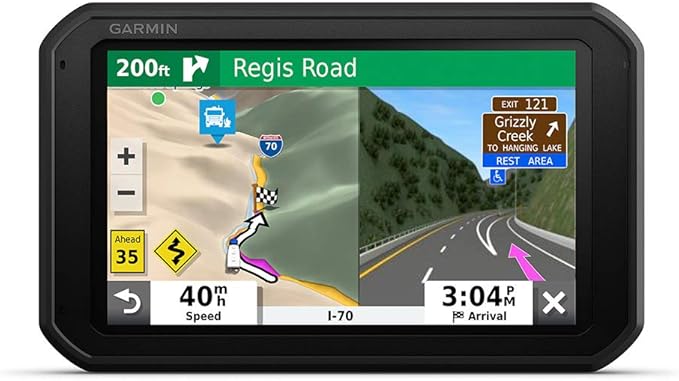
Using a 7-inch GPS navigator that also records your trip feels smart, especially for RV drivers who need clear directions and a watchful eye on the road. Its biggest strength lies in combining customized RV routing with a built-in dash cam, helping keep trips safer and more straightforward.
Setting the device up involves entering your RV’s profile so it can suggest routes fit for your vehicle size. The touchscreen is responsive, making it easy to scroll through maps and options.
Bluetooth connectivity lets you link to your smartphone for hands-free control, while the mounting options keep it secure on your dashboard or windshield during travel.
The dash cam captures video smoothly while the GPS sticks to North American maps, including Canada, Mexico, and U.S. territories. The casing feels solid and well-made, fitting nicely in a busy RV cockpit. Common praise highlights clear routing tailored for RVs, but some mention that not all regions offer fully customized routes for every RV size and configuration.
The GPS portion delivers detailed RV route guidance on a clear 7-inch screen while the dash cam adds extra security by recording your drives. Some users note the custom routing might miss certain areas, which is a common limitation when traveling in less covered regions.
Anyone who travels across the U.S., Canada, or Mexico in a standard RV size will appreciate this navigator’s features for day-to-day driving. Travelers needing specialized routes for very large rigs or those who cannot use dash cams due to local laws may want to explore other options.
Pros
- 7-inch screen offers clear visibility
- Custom routing for RVs and trailers
- Bluetooth for smartphone compatibility
- Dual mounting options for convenience
Cons
- RV routing not available in all areas
- Camera use regulated in some jurisdictions
| Specification | Details |
|---|---|
| Screen Size | 6.95″ |
| Connectivity Technology | Bluetooth |
| Map Types | North America |
| Memory Storage Capacity | 16 GB |
| Display Type | Touchscreen |
2. Garmin RV Cam 795 GPS RV Navigator with Dash Cam
Great choice for RV travelers who want a combined GPS and dash cam in one device. Designed to guide RVs specifically with custom routing, its biggest strength is having a large, clear 7” screen that makes following directions and checking the dash cam footage easy on the road.
Setup is straightforward with dashboard or windshield mounting options that suit most RV interiors. The GPS adapts routes based on RV size and trailer profile, which helps avoid tricky roads.
Voice commands and hands-free calling reduce distractions while driving. Notifications for RV parks and travel plaza showers add convenience during long trips.
It performs well navigating North America with comprehensive mapping and satellite imagery. The dash cam records while you drive, adding a layer of security though camera laws vary by location. Build quality feels solid, and the capacitive touchscreen responds smoothly.
Some users find the routing not perfect everywhere since custom features don’t cover all areas, but overall it balances navigation and recording well.
The most praised feature is the large, easy-to-see screen that also serves as a reliable navigator and dash cam. The common complaint involves the routing system not fully accounting for all RV attributes depending on the region, which can affect travel planning.
Travelers needing a multifunctional device focused on RV travel routes and safety will appreciate this product. Those who want perfect route accuracy everywhere or who face strict local dash cam laws might look for a GPS-only or separate dash cam solution instead.
Pros
- Large 7” screen suitable for easy viewing
- Custom RV routing helps avoid unsafe roads
- Built-in dash cam records your journeys
- Hands-free calling and voice assist features
Cons
- Custom routing may miss RV-specific details in some areas
- Dash cam use regulated or prohibited in some jurisdictions
| Specification | Details |
|---|---|
| Screen Size | 6.95″ |
| Memory Storage Capacity | 16 GB |
| Connectivity Technology | Wireless |
| Map Types | North America |
| Mounting Type | Dashboard Mount, Windshield Mount |
3. Garmin dēzlCam OTR725 GPS Truck Navigator with Dash Cam
Garmin designed this navigator with a solid 7-inch touchscreen tailored for trucks, combining GPS and a dash cam in one device. Perfect for truckers needing reliable routing and a built-in camera, its clearest advantage is recording your drive in crisp 1080p HD, helping you capture any incidents on the road.
Setup is straightforward, with a clear, bright LCD that makes viewing easy inside the cab. The touchscreen is responsive, and Bluetooth connects smoothly with your smartphone. Daily driving benefits from voice commands and the large display, which show helpful truck-specific routes across North America.
The dash cam starts automatically, recording a wide 140-degree view and saving critical clips on its 16 GB memory card.
Performance-wise, the navigation offers reliable GPS guidance designed specifically for truck routes. The camera quality is sharp enough to catch details in full HD, with footage stored securely during any incident. Build quality feels durable with solid mounting options.
Praise centers around the camera’s clarity and integration, while a common drawback is the legal restriction in some places on using dash cams.
Video quality stands out as a strong point, providing clear 1080p recordings that can serve as solid evidence after an incident. People often mention the convenience of an integrated system but also warn about legal restrictions on dash cam use in certain areas.
Drivers who want dependable routing and a reliable dash cam in one device will appreciate this navigator. Those in regions with strict dash cam laws or who need larger storage might look for alternative options better suited to their needs.
Pros
- Bright, clear 7-inch touchscreen
- Wide 140-degree dash cam field of view
- Automatically saves incident videos
- Truck-specific navigation routes
Cons
- Use restricted or prohibited in some jurisdictions
- Memory size may require upgrades for long trips
| Specification | Details |
|---|---|
| Screen Size | 6.95 inches |
| Resolution | 1080p |
| Memory Storage Capacity | 16 GB |
| Connectivity Technology | Bluetooth |
| Mounting Type | Dashboard Mount, Panel Mount |
| Supported Satellite Navigation System | GPS |
4. Garmin RV 785 GPS RV Navigator with Dash Cam
Garmin RV 785 GPS RV Navigator doubles as a GPS and dash cam, designed with RV drivers in mind. Its standout feature is custom routing that considers the size and weight of your RV, ensuring you avoid tight turns or weight-restricted roads. Ideal for those who want safe and smart travel routes combined with essential driver alerts.
Setting up the unit is straightforward thanks to the magnetic mount and capacitive touchscreen. Voice-activated navigation and hands-free calling allow you to keep your hands on the wheel and eyes on the road. Day-to-day use brings handy features like real-time traffic updates and an integrated directory of RV parks and services sourced from popular campground guides and review platforms.
The device performs well in providing clear routes specifically tailored to your vehicle, helping to avoid steep grades and sharp curves. It’s built with a 6.95-inch multi-touch display that’s clear in bright conditions, and the dash cam adds a layer of security. The main complaint tends to be the limited 2-hour battery life, which means it needs to stay connected to power during long drives.
Custom routing and driver alerts make it easier to handle tricky RV roads with confidence, though the main downside is the short battery life that needs constant power while traveling. The dash cam adds safety but no extended unplugged use.
Anyone wanting RV-specific route guidance with smart features and safety alerts will find this device useful. People needing a longer battery runtime or higher resolution display might want to explore other options.
Pros
- Custom routing based on RV size and weight
- Built-in dash cam for added safety
- Voice-activated navigation and hands-free calling
- Directory of RV parks and services included
Cons
- Battery only lasts 2 hours unplugged
- Display resolution is modest at 1024 x 600
| Specification | Details |
|---|---|
| Screen Size | 6.95 inches |
| Control Method | Voice |
| Battery Average Life | 2 hours |
| Connectivity Technology | BLUETOOTH | GPS | WI-FI |
| Map Types | North America |
5. 70mai A810 Lite 4K Front and Rear Dash Cam

Choosing a dash cam with true 4K front recording makes a big difference in capturing fine details on the road. Perfect for those with RVs seeking crystal clear video evidence on long trips, the 70mai A810 Lite captures sharp footage from both front and rear views.
Its standout feature is the combination of Ultra HD video with smart app control and GPS tracking.
Setting the dash cam up takes little effort thanks to windshield mounting and app connectivity via 5GHz Wi-Fi 6, which provides smooth control over settings. Daily use involves loop recording and a G-sensor that protects important clips automatically.
Night driving is no problem as the HDR and large aperture combine to capture clear footage even in dim or rainy conditions, keeping you covered 24/7 with parking mode.
The video quality at 3840×2160P front and 1080P rear nails its main purpose by delivering sharp, license-plate level detail. Its build includes useful extras like a supercapacitor and voice control for quick commands while driving. Most praise comes from how detailed the video is under various conditions.
A common complaint is the limited screen size of 3.18 inches, which can be small for some users wanting a larger display.
Video footage quality stands out, especially the ultra HD front recording that delivers crisp images in various light conditions. The most noticeable limitation for some is the compact screen size, which might not suit those who prefer a larger display for live viewing.
Drivers looking for high-resolution video evidence and reliable dual-angle coverage benefit most from this dash cam. Those wanting a bigger integrated screen or higher rear camera resolution should explore other options.
Pros
- True 4K front recording captures fine details
- Enhanced night vision with HDR and large aperture
- Dual front and rear recording provides full coverage
- Supports 5GHz Wi-Fi 6 for stable app control
Cons
- Small 3.18-inch screen can be hard to see
- Rear camera resolution limited to 1080P
| Specification | Details |
|---|---|
| Video Capture Resolution | 2160p (Front), 1080p (Rear) |
| Connectivity Technology | 5GHz Wi-Fi 6, USB |
| Mounting Type | Windshield Mount |
| Field Of View | 140 degrees |
| Control Method | App, Push Button, Voice |
6. ROVE R2 Dual Front and Rear Dash Cam

Driving an RV means keeping an eye on both the road ahead and what’s happening behind you, and having a reliable dash cam makes trips safer and lets you capture every detail. Perfect for those who want dual coverage without fuss, it excels at recording clear video in different lighting conditions.
Setting up the dash cam involves mounting it on your windshield, where the front camera records in sharp 2.5K QHD and the rear captures 1080p FHD. The companion app connects over Wi-Fi for managing files and tweaking settings, while the built-in GPS offers useful speed data and location tagging.
Over-the-air firmware updates make staying current easy. The use of a supercapacitor means it handles hot and cold weather better than typical batteries.
Video quality is impressive with the Sony STARVIS 2 sensor pulling in clearer images at night and in shadows, thanks to the wide aperture and HDR technology. It covers a wide 150-degree field of view, catching enough detail like license plates well. The build feels solid, suited for long drives in larger vehicles, but some mention the rear camera’s image is slightly less sharp compared to the front.
The dash cam is praised for its sharp daytime and low-light video quality, especially from the front sensor, while the most frequent complaint is about the rear camera’s lower resolution in comparison. Connection speed via the app varies but remains generally functional.
Anyone needing solid front and rear recordings with reliable GPS tracking will appreciate this setup, especially for larger vehicles like RVs. Those requiring equally detailed rear footage or faster app responsiveness might consider alternatives.
Pros
- Records front and rear simultaneously at high resolutions
- Clear night vision with Sony STARVIS 2 sensor
- Built-in GPS tracks speed and location
- Supercapacitor improves durability in extreme temperatures
Cons
- Rear camera video quality lower than front camera
- App connection can be slow sometimes
| Specification | Details |
|---|---|
| Video Capture Resolution | 1080p, 1440p |
| Connectivity Technology | USB, Wi-Fi |
| Built-In GPS | Yes, for GEO Tagging and Live Speed |
| Field Of View | 150 degrees |
| Screen Size | 3 inches |
| Mounting Type | Windshield Mount |
7. 4K Dual Front and Rear Dash Cam

4K front and 1440P rear recording stand out in this dash cam, perfect for anyone wanting crystal-clear dual-channel footage. It suits those who need to capture both front and rear views with impressive detail, especially useful for larger vehicles on the road. The highest resolution on the front camera gives a big advantage in spotting details.
Setting up is straightforward with the windshield mount and app control. Using the microSD card slot, storage is easy to manage.
The wide-angle lenses cover a large portion of the surroundings, ensuring nothing gets missed while driving. The LCD screen offers clear feedback on recording status and angles, making everyday use practical and user-friendly.
Footage clarity is excellent, with the wide field of view capturing both license plates and road signs well. The f/1.5 aperture and WDR technology keep nighttime recordings sharp, a definite bonus for safety. Build quality feels solid, though some mentions of occasional app connectivity issues appear.
It balances performance and durability with a few minor connectivity quirks.
Clear and detailed video quality during both day and night receives the most praise, especially for license plates and surroundings. The most common complaint relates to minor issues maintaining a steady connection with the control app, which can be frustrating but doesn’t affect recording quality.
Drivers wanting high-resolution, dual-channel recording for safety will appreciate this dash cam. Those requiring perfectly matched front and rear video quality or completely flawless app connectivity might want to look elsewhere.
Pros
- Dual-channel 4K front and 2.5K rear recording
- Wide 170° front and 150° rear angle lenses
- Clear footage even at night with f/1.5 aperture
- Easy app-based control and setup
Cons
- Rear camera resolution lower than front
- Occasional connectivity issues with the app
| Specification | Details |
|---|---|
| Video Capture Resolution | 2160p Front, 1440p Rear |
| Field Of View | 170° Front, 150° Rear |
| Control Method | App |
| Mounting Type | Windshield Mount |
| Screen Size | 3 inches LCD |
| Flash Memory Type | microSD |
8. 70mai T800E 4K Front, Rear, and Inside Dash Cam

The 70mai T800E is perfect for RV drivers looking for complete coverage, capturing sharp details from the front, rear, and interior. It stands out with its 4K front lens giving crystal-clear footage that keeps every angle well-documented for safety and peace during long trips.
Setting up is straightforward with a windshield mount, and the included 64GB SD card means you can start recording right away. The dash cam connects via Wi-Fi 6 for quick video transfer and accepts voice commands for hands-free control. The GPS feature tracks location in multiple modes, handy for reviewing routes later.
Daily use benefits from night vision and HDR, ensuring clear images no matter the lighting.
Footage quality is impressive, capturing license plates and surroundings clearly even at night thanks to HDR and 3D noise reduction. The unit is solidly built with ultra-wide lenses covering a wide field of view, although some users note the interior camera’s IR light can be a bit bright for backseat passengers.
It delivers detailed video reliability with minor comfort trade-offs inside.
The video quality captures fine details day and night, praised especially for license plate clarity. Common concerns involve the brightness of the interior IR light which some find intrusive during nighttime use.
Those prioritizing comprehensive 3-channel recording and clear footage on RV trips will find it very suitable. People seeking a larger display or subtler interior lighting might prefer other options.
Pros
- Crystal-clear 4K front recording
- Included 64GB SD card ready to use
- Voice control and app integration
- Strong night vision with HDR and noise reduction
Cons
- Interior IR light can disturb backseat passengers
- No screen larger than 1.9 inches
| Specification | Details |
|---|---|
| Video Capture Resolution | 4K Front +1080P Rear+1080P Inside |
| Connectivity Technology | Wi-Fi 6 |
| Other Special Features | 3-Channel Recording, 64GB SD Card Included, Built-in 5-Mode GPS |
| Field Of View | 402 degrees |
| Control Method | App, Push Button, Voice |
9. Garmin RV 795 GPS RV Navigator

Designed specifically for RV drivers, the Garmin RV 795 GPS RV Navigator offers a large 7-inch touchscreen with custom routing based on your vehicle’s size and weight. It stands out with detailed map coverage across North America and a remote control option, making navigation simpler and safer for those taking on the road in bigger rigs.
Setting it up involves entering your RV or trailer’s profile to get suggested routes suited to its dimensions, which takes some initial effort but pays off during trips. The touchscreen is bright and responsive, making map updates easy to follow.
Bluetooth connectivity pairs it to smartphones, and the remote control adds convenience, especially while driving.
Routes generally match the RV’s needs well though the navigator sometimes misses certain restrictions, so it’s best to watch road signs closely. The build feels sturdy with a clear, sharp display at 1024 x 600 resolution. Battery life is short around one hour, which means mostly using it plugged in.
Reviewers praise the accurate maps and usability but note the occasional routing gaps.
Many find the detailed and clear maps very helpful for navigating RV-friendly roads, while others mention that the routing doesn’t catch every vehicle restriction. Using on battery alone is limited due to the short one-hour life, so keeping it plugged in is common during drives.
Those traveling in larger RVs who want tailored route suggestions and a sharp display will appreciate the Garmin RV 795. Drivers looking for longer battery performance or guaranteed full route restrictions might want to consider different models.
Pros
- Custom routes based on RV size and weight
- Large, bright 7-inch touchscreen
- Remote control for easier operation
- Wide North American map coverage
Cons
- Routing does not always consider all RV restrictions
- Battery lasts only about one hour
| Specification | Details |
|---|---|
| Screen Size | 6.95 inches |
| Resolution | 1024 x 600 |
| Connectivity Technology | Bluetooth |
| Battery Average Life | 1 hours |
| Control Method | Remote |
| Map Types | North America |
10. Garmin dēzlCam OTR725 GPS Truck Navigator with Dash Cam
Garmin dēzlCam OTR725 GPS Truck Navigator with Dash Cam is designed for truck drivers who want reliable navigation combined with video documentation. Its main strength lies in merging a detailed 7-inch GPS truck navigator with a built-in 1080p HD dash cam to capture the road during long trips.
Setting up the device is straightforward thanks to the touchscreen interface and Bluetooth connectivity, making pairing with smartphones simple. The large, bright display ensures clear map visibility in the cab.
The dash cam starts recording automatically and saves any incident footage directly to the pre-installed 16 GB memory card, requiring little input day-to-day beyond typical navigation.
In terms of performance, the GPS handles truck-specific routes well, considering vehicle size and road restrictions. The build quality feels sturdy with dashboard or panel mounting options.
The strongest point is its ability to capture wide 140-degree video views, giving comprehensive road coverage. Most common complaints note restrictions in using the dash cam in certain regions due to legal regulations.
The device delivers detailed GPS navigation while the dash cam reliably records wide-angle video in 1080p HD. Commonly mentioned is that legal restrictions affect dash cam use in some jurisdictions, limiting its full capabilities.
Truck drivers who need combined navigation and video recording in one unit will appreciate its features. Those located where dash cams are regulated or seeking frequent updates might want to consider alternatives.
Pros
- High-resolution 7-inch touchscreen display
- Built-in 1080p HD dash cam with wide angle
- Automatic incident video saving to memory card
- Compatible with smartphones via Bluetooth
Cons
- Dash cam use limited by regulations in some areas
- Software update status not clearly specified
| Specification | Details |
|---|---|
| Screen Size | 7 inches |
| Resolution | 1080p |
| Memory Storage Capacity | 16 GB |
| Connectivity Technology | Bluetooth |
| Mounting Type | Dashboard Mount, Panel Mount |
| Supported Satellite Navigation System | GPS |
11. Garmin DriveCam 76 GPS Navigator with Dash Cam

Using the Garmin DriveCam 76 feels like combining your GPS and dash cam into one straightforward unit that fits well for anyone driving around North America. Its biggest appeal lies in merging navigation with video recording, so you don’t have to juggle two devices while on the road.
The 7” screen keeps the directions clear without blocking your view.
Setting it up is a breeze with the dashboard mount, and the capacitive touch screen responds nicely to quick taps. Bluetooth and Wi-Fi keep connections smooth, whether you’re updating maps or syncing with your smartphone app. Voice commands also make it easy to control without taking your hands off the wheel.
The built-in microphone adds an extra layer of interaction, making daily use more convenient.
It does a solid job delivering clear navigation in the US, Canada, Mexico, and several islands, with bright, easy-to-read LCD visuals at 1024 x 600 resolution. The 16 GB storage holds plenty of footage, although some have noted the camera function isn’t allowed everywhere, so that’s worth checking out before relying on it. The housing feels sturdy and fits nicely on the dash, keeping it steady.
Many appreciate the convenience of a single device offering reliable navigation and dash cam recording on a bright, responsive screen. The most frequent issue relates to legal restrictions on using the camera feature in certain areas, which limits its usability depending on your location.
Drivers traveling extensively around North America who want to merge navigation and video capture without clutter will find this a fitting choice. Those needing clearer information on map updates or planning to use it where camera laws are strict might want to consider alternatives.
Pros
- Clear 7” touch screen with easy controls
- Combines GPS and dash cam in one device
- Bluetooth and Wi-Fi for updates and syncing
- Capacitive touch and voice control options
Cons
- Camera function restricted in some places
- Map update schedule unknown
| Specification | Details |
|---|---|
| Screen Size | 6.95 inches |
| Resolution | 1024 x 600 |
| Memory Storage Capacity | 16 GB |
| Connectivity Technology | Bluetooth, Wi-Fi |
| Map Types | North America |
| Control Method | App, Voice |
12. Garmin DriveAssist 51 GPS with Dash Cam

Garmin DriveAssist 51 GPS with Dash Cam suits drivers looking for reliable navigation combined with dash cam recording. Its biggest strength lies in quick HD Digital Traffic updates that keep you moving, making it especially useful for long road trips or daily commutes where traffic conditions change often.
Setup is straightforward with the included suction cup mount and power cable for the windshield. Day-to-day use benefits from the voice control and touchscreen, which allows hands-free operation and easy interaction.
The built-in dash cam records your drives without extra setup, and features like driver alerts for sharp curves and upcoming railroad crossings help keep things safe on the road.
Performance matches what you’d expect from Garmin with accurate GPS and reliable traffic rerouting. The 5-inch LCD screen is clear, though resolution at 480 x 272 isn’t very sharp compared to newer models.
The device is solidly built and pairs well with an optional backup camera. Most praise mentions fast traffic updates; the common gripe is the screen size feeling a bit small for some users.
Fast HD Digital Traffic updates receive praise for efficiently avoiding jams. The screen size and resolution sometimes frustrate users looking for clearer visuals. The dash cam works well for recording trips without complicated settings. It’s built to last and supports added safety features.
Drivers who prioritize up-to-date traffic info and safety alerts will appreciate this device. Those wanting a larger or higher-resolution screen might look elsewhere. People planning to add a backup camera should budget for extra costs and professional installation to get the full system working.
Pros
- Fast, free HD Digital Traffic updates
- Built-in dash cam records automatically
- Voice control allows hands-free use
- Driver alerts improve road safety
Cons
- Screen resolution feels low by today’s standards
- Backup camera sold separately and needs professional install
| Specification | Details |
|---|---|
| Screen Size | 5 inches |
| Resolution | 480 x 272 |
| Memory Storage Capacity | 4 GB |
| Connectivity Technology | USB |
| Mounting Type | Windshield Mount |
Best RV GPS Dash Cams Comparison Table
| Product | Compatible Vehicle | Screen Size | Resolution | Connectivity |
|---|---|---|---|---|
| Garmin RV Cam 795 | RV | 6.95 in | 1024 x 600 | Bluetooth |
| Garmin RV Navigator 795 | RV | 6.95 in | – | Bluetooth |
| Garmin dēzlCam OTR725 | Truck | 6.95 in | 1080p | Bluetooth |
| Garmin RV 785 Dash Cam | RV | 6.95 in | 1024 x 600 | Bluetooth, GPS, Wi-Fi |
| 70mai A810 Lite Dash Cam | Bus, Car, Truck | – | – | 5GHz Wi-Fi 6, USB |
| ROVE R2 Dual Dash Cam | Bus, Car, Truck | – | – | USB, Wi-Fi |
| 4K Dual Dash Cam | Car | 3 in | 2160p | USB |
| 70mai T800E 4K Cam | ATV, Bus, Car, RV | – | – | Wi-Fi 6 |
| Garmin RV 795 Navigator | RV | 6.95 in | 1024 x 600 | Bluetooth |
| Garmin dēzlCam Truck OTR725 | Truck | 7 in | 1080p | Bluetooth |
| Garmin DriveCam 76 | Car | 6.95 in | 1024 x 600 | Bluetooth, Wi-Fi |
| Garmin DriveAssist 51 | Car, Truck | 5 in | 480 x 272 | USB |
- Compatible VehicleRV
- Screen Size6.95 in
- Resolution1024 x 600
- ConnectivityBluetooth
- Compatible VehicleRV
- Screen Size6.95 in
- Resolution–
- ConnectivityBluetooth
- Compatible VehicleTruck
- Screen Size6.95 in
- Resolution1080p
- ConnectivityBluetooth
- Compatible VehicleRV
- Screen Size6.95 in
- Resolution1024 x 600
- ConnectivityBluetooth, GPS, Wi-Fi
- Compatible VehicleBus, Car, Truck
- Screen Size–
- Resolution–
- Connectivity5GHz Wi-Fi 6, USB
- Compatible VehicleBus, Car, Truck
- Screen Size–
- Resolution–
- ConnectivityUSB, Wi-Fi
- Compatible VehicleCar
- Screen Size3 in
- Resolution2160p
- ConnectivityUSB
- Compatible VehicleATV, Bus, Car, RV
- Screen Size–
- Resolution–
- ConnectivityWi-Fi 6
- Compatible VehicleRV
- Screen Size6.95 in
- Resolution1024 x 600
- ConnectivityBluetooth
- Compatible VehicleTruck
- Screen Size7 in
- Resolution1080p
- ConnectivityBluetooth
- Compatible VehicleCar
- Screen Size6.95 in
- Resolution1024 x 600
- ConnectivityBluetooth, Wi-Fi
- Compatible VehicleCar, Truck
- Screen Size5 in
- Resolution480 x 272
- ConnectivityUSB
How to Choose the Best RV GPS Dash Cam
Key factors to consider include video quality, GPS accuracy, and ease of installation, as these ensure clear evidence and reliable location tracking. Choosing the right features helps avoid costly accidents and simplifies navigation, saving both time and frustration on the road.
Video Quality and Lens Coverage
Video quality can make or break the usefulness of this kind of device, especially during long road trips. A resolution of at least 1080p at 30 frames per second provides clear daytime recordings, making details like license plates and road signs readable.
A wide-angle lens covering around 140 to 170 degrees is essential to capture multiple lanes and the surrounding environment, preventing blind spots that could otherwise miss important incidents.
Driving at night or through varied lighting conditions poses challenges that lower-end models often can’t handle. Look for cameras with good low-light performance and HDR support. These features balance shadow and sunlight areas so footage remains clear without blown-out highlights or dark, unusable areas.
Without this, crucial moments during dusk, dawn, or poorly lit roads might turn out blurry or grainy.
Gps and Data Tracking Features
Accurate and frequent GPS updates ensure that location data matches the video timeline precisely, which is crucial for reviewing any incidents. Devices that update position multiple times per second offer sharper insights into routes and speeds, which helps analyze trip details or provide evidence after a collision. Slow or infrequent tracking can make logs unreliable or incomplete.
Integration of GPS data directly onto the video footage gives a comprehensive overview. Watching the video alongside clearly displayed speed, coordinates, and route paths helps confirm events objectively.
Without this syncing, you may end up juggling separate apps or devices to piece together what happened, which is inconvenient and prone to errors.
Durability and Build Quality
Road vibrations and bumps are constant factors during RV travel, quickly revealing weak points in construction. Devices built with vibration-resistant materials and internal shock absorption provide stable video capture, unlike cheaper models that produce shaky, unusable footage. A tough, rigid casing also reduces the risk of damage from sudden jolts.
Weather exposure means the device should handle temperature swings and moisture. Look for units rated for outdoor conditions, often listed with IP ratings, or at least specified operating temperature ranges. Mounting stability matters just as much; strong brackets or suction mounts that stay secure on bumpy roads keep the camera steady, preventing it from shifting or falling off.
Power Supply and Battery Life
Most dash cams either connect directly to the vehicle’s power or rely on internal batteries. Hardwired options prevent power loss during driving but usually lack backup once the engine turns off.
Battery-operated devices can keep recording during stops but often have limited run times. Combining both or including a large-capacity battery offers better continuous coverage, especially useful for parking mode recording.
Autoshutdown and power management features extend battery life and prevent over-draining the RV’s electrical system. Without these, users might come back to a dead battery or lose footage midway through important stationary periods.
A reliable product clearly states its typical operating hours on battery alone and offers smart modes to conserve power while protecting recorded data.
User Interface and Connectivity
Installing and using the device comfortably makes a noticeable difference on long drives. Devices with intuitive controls that remain accessible without distracting the driver improve safety and convenience.
Simple menus, easily reached buttons, or touchscreens suited for gloved hands are beneficial in this regard.
Wireless connectivity such as WiFi or Bluetooth is common now, allowing quick transfers of large files without physically removing storage cards. Apps compatible with smartphones provide live viewing and settings adjustment remotely, saving time and enhancing usability.
Without good connectivity, managing recordings becomes cumbersome, especially if you want to review or share footage on the go.
Maximizing Safety: How to Use an RV GPS Dash Cam for Road Hazard Alerts
Many RV GPS dash cams come with built-in road hazard alert features that can notify you about sharp curves, steep grades, or sudden stops ahead. To make use of these, it’s important to properly position the dash cam on your windshield, usually near the rearview mirror, ensuring an unobstructed view of the road. Most models connect to GPS satellites to track your location and speed, providing timely warnings tailored to your current route.
Adjusting the alert volume and sensitivity helps prevent distracted driving caused by excessive notifications.
Key tips to maximize safety:
- Mount the camera securely to avoid shaking or misalignment.
- Update the device’s firmware regularly to access the latest hazard data.
- Use audible alerts coupled with on-screen warnings so you can keep your eyes on the road.
These steps improve your awareness on unfamiliar or challenging routes, reducing the risk of accidents or unexpected maneuvers.
Routine Maintenance Tips to Extend the Life of Your RV GPS Dash Cam
Frequent exposure to heat and vibration inside an RV can degrade dash cams quickly if maintenance is overlooked. Cleaning the lens regularly with a microfiber cloth prevents cloudy footage, especially after dusty trips. Check cables and mounts for tight connections and signs of wear to avoid sudden disconnections during travel.
Avoid leaving the dash cam in direct sunlight when parked, as excessive heat can damage internal components.
Maintenance actions to extend lifespan:
- Remove the camera occasionally to clean its contacts and vents.
- Store the camera indoors during long stops if possible.
- Replace memory cards every 1 to 2 years to reduce corruption risks.
Consistent care ensures clearer recordings and reliable operation over multiple seasons.
Comparing Standalone Dash Cams vs. Integrated RV GPS Dash Cam Systems
Standalone dash cams offer simplicity and flexibility; they are easy to install in any vehicle and often come with basic GPS tracking. However, integrated RV GPS dash cam systems combine navigation and camera functions, making them particularly suited to larger rigs where space and wiring can be challenging.
The integrated units typically have user interfaces designed for RV-specific routes and can display camera footage alongside navigation information on a single screen.
Considerations between the two types:
- Installation: Standalone cams require mounting and separate power sources, while integrated systems usually fit into the RV’s dashboard setup.
- Features: Integrated models may include real-time route adjustments and customized alerts for RV dimensions.
- Cost: Standalone devices tend to be less expensive, making them a practical starting point.
Choosing depends on the importance of multi-functionality versus straightforward recording in your setup.
People Also Asked
How Do I Install a RV GPS Dash Cam Properly?
Mount the dash cam on the windshield behind the rearview mirror to avoid blocking your view. Make sure the power cable reaches the vehicle’s 12V outlet without strain. Use the included adhesive or suction mount for a secure fit and adjust the angle so the lens captures both road and dashboard.
What Is the Average Battery Life of a RV Dash Cam?
Most RV dash cams rely on the vehicle’s power, but internal batteries typically last 5 to 15 minutes for emergency save functions. Running solely on battery drains quickly, so keep the camera plugged in while driving. This prevents footage loss during sudden power cuts or accidents.
Are RV GPS Dash Cams Compatible with All Vehicle Models?
RV GPS dash cams usually work with most vehicles, but cable length and mounting options may vary. Check the power connection type beforehand, as some require a 12V socket commonly available in cars and trucks. Custom installations might be needed for certain RV layouts.
How Do I Clean and Maintain My RV Dash Cam?
Wipe the lens gently with a microfiber cloth to avoid scratches and clean the windshield area regularly to keep video clear. Occasionally check the mounting to ensure it hasn’t loosened from vibrations. Avoid using harsh chemicals that can damage the camera casing or lens coating.
What Common Problems Do RV GPS Dash Cams Have?
Recording failure or freezing can occur due to faulty SD cards, so use high-quality cards and reformat them in the camera periodically. GPS signal loss may happen in tunnels or dense forests, causing inaccurate location data. Firmware updates help resolve bugs and improve performance.
Conclusion
Accuracy and ease of use stand out as key factors in choosing an RV GPS dash cam. Clear route guidance helps avoid difficult turns and low clearances.
A reliable dash cam that records well in different lighting conditions can provide proof in case of incidents on the road. Battery or power options matter too, since the device should stay active without draining your RV’s power system.
Match the device size and features to your RV’s dashboard space and your travel habits. A simple model may be enough for occasional trips, while frequent RVers might invest in more advanced functionality.
Review the detailed comparison table and the picks above to find the best fit for your specific needs and budget.