
Top 12 Best Tablet for GPS Navigation You Can’t Miss!
It’s frustrating to rely on a cheap tablet for GPS navigation only to have it freeze, lose signal, or run out of battery halfway through a trip. Finding the best tablet for gps navigation means picking something that handles maps and routes smoothly without constant interruptions. A lagging screen or poor GPS accuracy can turn a simple drive into a stressful guessing game.
Key features that separate good GPS tablets include screen size, GPS chip quality, and battery life. A 7 to 10-inch screen strikes a balance between visibility and portability, making maps easy to read without being bulky.
Tablets with dedicated GPS chips provide stronger, more consistent signals than those relying solely on Wi-Fi positioning. Battery capacity matters too, as about 8 to 10 hours of use keeps you covered during long trips without frequent recharges.
Need a Quick Check?
| Image | Product | Price |
|---|---|---|
Our Top Picks 1  | AGM PAD P2 Tablet | Check Price |
Our Top Picks 2 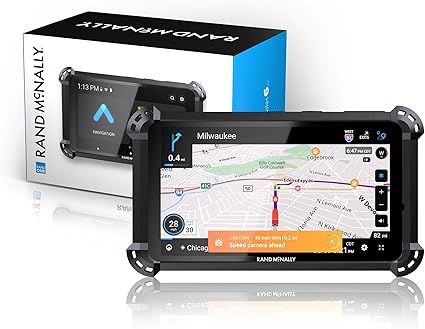 | Rand McNally RANDTAB6 | Check Price |
Our Top Picks 3 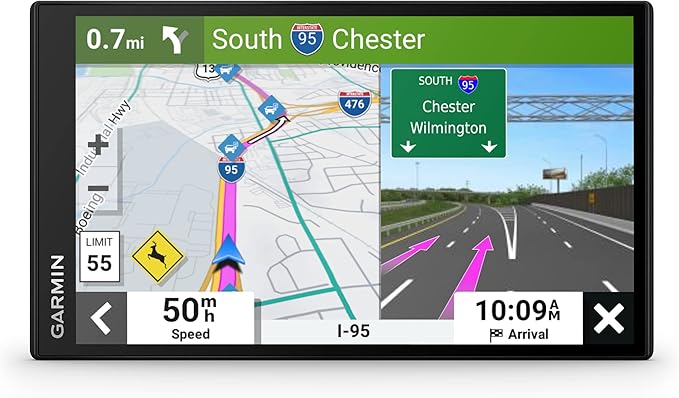 | Garmin DriveSmart 86 | Check Price |
Our Selected Top 12 Tablet for Gps Navigation You Can Trust
This collection features twelve carefully chosen tablets designed for reliable GPS navigation, examining their performance, user suitability, and key advantages and disadvantages. Each review provides clear insights to help readers understand which device fits their navigation needs best.
1. AGM PAD P2 Rugged Android Tablet
Rugged durability stands out right away on this tablet, making it ideal for anyone needing a device that can handle tough environments while navigating. Its biggest strength is the ability to survive drops, water, and dust without missing a beat, which is crucial for outdoor navigation tasks.
Setting it up felt straightforward, thanks to the clear user manual and included protective case. Android 14 runs smoothly on its 11-inch screen, making navigation apps quick to load and easy to read. The rugged design means less worry about the usual bumps or splashes during daily use outside or in work zones.
Performance-wise, the tablet handles GPS navigation without lag, supported by a strong 16GB RAM and plenty of 256GB storage for maps and apps. Its tough build resists water and dust completely, plus it survives a 1.8-meter drop.
Praise often highlights its durability, but some mention the device can feel heavy, which might affect portability.
Durability is what most users appreciate, as the tablet consistently withstands drops and water exposure without issues. On the other hand, the weight of the device is a frequent point of dissatisfaction, making it less comfortable for long handheld sessions.
Those working outdoors or navigating rugged terrain will find this tablet well suited to their needs. Casual users or those needing something lightweight for everyday travel might prefer a slimmer, lighter option instead.
Pros
- High water and dust resistance ratings
- Large 16GB RAM for smooth multitasking
- Generous 256GB storage for maps and files
- Protective case included out of the box
Cons
- Heavier than typical tablets, less portable
- Limited to 1-year manufacturer warranty
| Specification | Details |
|---|---|
| Operating System | Android 14.0 |
| RAM + Storage | 16GB RAM + 256GB Storage |
| Screen Size | 11.00-inch |
| Durability Ratings | IP68 and IP69K water-resistance |
| Drop Resistance | 1.8-meter |
| Model Year | 2024 |
2. Rand McNally RANDTAB6 GPS Tablet
Designed specifically for truck drivers, the Rand McNally RANDTAB6 GPS Tablet offers tailored navigation that accounts for truck size, load, and route restrictions. Its standout feature is the Rand Road IQ technology with the new Rand Navigation 2.0 software, making it ideal for keeping commercial vehicles on the safest, most efficient roads.
Setup is straightforward, with Android operating system familiarity smoothing the initial process. Daily use benefits from real-time updates on traffic, weather, and fuel prices, plus alerts for weigh stations, speed cameras, and construction zones.
The heavy-duty suction mount keeps it steady on windshields, while connectivity options like Bluetooth and Wi-Fi enable quick information syncing and route planning.
Performance-wise, the device excels at providing truck-specific routes with detailed warnings and points of interest, helping avoid common road challenges for large vehicles. The build feels durable with a solid 6-inch screen but the 800 x 480 resolution can feel a bit basic for some users. Battery life extends to 5 hours, balance between portability and endurance.
A frequent note is appreciation for its detailed truck-focused routing; the main downside concerns the somewhat low screen resolution.
The strongest praise centers on the device’s ability to tailor routes accurately for trucks, including warnings and useful POIs like weigh stations and speed cameras. The most common complaint relates to the screen resolution, which does not offer as sharp a display as some would prefer for navigation clarity.
Drivers needing a GPS that understands truck dimensions and road restrictions will find this device useful. Anyone wanting a higher-resolution screen or longer battery life might consider alternative options better suited to those priorities.
Pros
- Truck-specific routes with detailed warnings
- Real-time traffic and weather updates
- Heavy-duty suction mount for secure positioning
- ELD ready with Rand ELD app integration
Cons
- Screen resolution feels low for some users
- Battery lasts only around 5 hours
| Specification | Details |
|---|---|
| Screen Size | 6 inches |
| Battery Average Life | 5 hours |
| Operating System | Android |
| Connectivity Technology | Bluetooth, Direct Plug, USB-C, USB, Wi-Fi |
| Resolution | 800 x 480 |
| Mounting Type | Heavy-duty Suction Mount |
3. Garmin DriveSmart 86 GPS Navigator
Getting around unfamiliar roads can be stressful without a reliable navigator. Designed for drivers who want clear directions and a big screen, this 8” GPS delivers one of the best views of North American maps.
Its standout feature is the sharp, high-resolution dual-orientation display that’s easy to see from any angle.
Setup involves mounting it securely on your dashboard or windshield, then pairing with a smartphone for hands-free calling and smart notifications. Voice assist simplifies finding places by just speaking, and live traffic plus weather updates keep you on the best route. The included database of national parks and Tripadvisor ratings helps discover stops along the way.
Performance in daily driving is solid, with accurate Garmin Real Directions guiding you step-by-step in a natural way using landmarks. The screen is bright and responsive, although some mention the interface can feel a bit clunky compared to phones. Build quality favors practicality with a capacitive touchscreen and sturdy mounting options.
The main praise lies in its reliable routes, while the common complaint involves occasional software lag.
Reliable Garmin Real Directions and extensive live updates make navigation intuitive and less stressful. Most users appreciate the bright, large screen, whereas some find the software interface occasionally sluggish. The hands-free calling is a handy bonus when paired with a compatible smartphone.
Individuals who rely heavily on detailed route guidance and want in-car-friendly features will enjoy this navigator. Drivers needing global or non-North American maps might want to consider other devices that cover wider regions. Those who prefer a faster interface might look elsewhere as well.
Pros
- Large, high-resolution dual-orientation screen
- Voice assist for hands-free operation
- Live traffic and weather updates
- Extensive points of interest and park directory
Cons
- Interface can feel slow or clunky at times
- Limited to North America maps only
| Specification | Details |
|---|---|
| Screen Size | 8 inches |
| Resolution | 1280 x 800 |
| Memory Storage Capacity | 16 GB |
| Connectivity Technology | USB, BLUETOOTH |
| Display Type | Multi-touch, Glass, WXGA Color TFT with Backlight |
4. AGM PAD P3 Rugged Android Tablet

With an IP68/IP69K rating and MIL-STD-810H build, the AGM PAD P3 Compact is a rugged Android tablet that’s ideal for outdoor navigation. It suits anyone needing durability and reliable GPS performance in tough environments, such as job sites or fieldwork. Its standout feature is how well it resists water, dust, and drops up to 4.9 feet.
Setting up is straightforward thanks to Android 16 and the included quick start guide. The 8.68-inch screen with 120Hz refresh rate and 600 nits brightness makes maps easy to read even in bright daylight. Carrying it is comfortable with the shoulder strap and the removable kickstand helps keep it steady on uneven surfaces.
The 7200mAh battery supports longer use without frequent charging.
GPS navigation runs smoothly powered by the MediaTek Helio G99 chip and 12GB of RAM. The tablet’s rugged design, with shock-absorbing corners and a protective case, keeps it safe against impacts and daily wear.
Many praise its toughness in harsh conditions, though some users mention it can be a bit bulky compared to slimmer tablets.
The tablet’s ruggedness and reliable performance in challenging conditions receive strong praise. Most complaints focus on its weight and bulk, which some find cumbersome compared to sleeker designs.
Ideal for those needing a tough device outdoors or on job sites. Users looking for a lightweight, slim tablet for casual use might prefer a less rugged option.
Pros
- Highly durable with water and dust protection
- Bright, responsive display suitable for outdoor use
- Large RAM and storage with upgrade options
- Includes useful accessories for on-the-go use
Cons
- Bulkier than some other tablets
- Weight may feel noticeable during extended use
| Specification | Details |
|---|---|
| Processor | MediaTek Helio G99 |
| RAM & Storage | 12GB (6+6) RAM + 128GB Storage (Up to 1TB) |
| Display | 8.68-inch, 120Hz HD, 600 Nits Brightness |
| Battery Capacity | 7200mAh |
| Durability | IP68/IP69K, 4.9 ft Drop Protection, MIL-STD-810H |
| Operating System | Android 16 |
5. Garmin Drive 53 GPS Navigator

Anyone who spends time driving across North America and needs a reliable navigation buddy will appreciate this GPS navigator. Its biggest strength is the clear 5-inch touchscreen that makes reading routes easy, even in bright light.
Designed mainly for cars, it keeps navigation simple while offering city and service information along the way.
Setting it up involves mounting the device on your dashboard or windshield and connecting it via USB for updates. Daily use revolves around the touchscreen, which responds well to taps and swipes for zooming or inputting addresses.
Voice directions guide you with familiar landmarks, reducing stress during tricky turns. Alerts for school zones, speed changes, and sharp curves add extra safety on your route.
The navigation performs well thanks to detailed, updated North American maps stored in its 16 GB memory. The glass capacitive touchscreen is bright and fairly responsive, making it easy to interact with. A commonly mentioned downside is the relatively low screen resolution (480 x 272), which can feel a bit grainy compared to smartphone displays.
Still, the device is solidly built and mounts securely on a windshield or dashboard.
Voice directions featuring landmarks deliver clear, helpful guidance that keeps drivers confident. Many users note that the screen resolution does not match modern smartphone quality, which can make map details less crisp during use.
Anyone driving long distances in North America will find its alerts and map updates helpful for trip planning. Those wanting a higher resolution screen or longer battery life might prefer a device with a larger display or smartphone-based navigation apps for more detail and flexibility.
Pros
- Bright capacitive touchscreen display
- Voice guidance with landmark directions
- Alerts for hazards and speed changes
- Includes detailed North America maps
Cons
- Screen resolution feels low compared to phones
- Battery life only about 1 hour off power
| Specification | Details |
|---|---|
| Screen Size | 4.97 inches |
| Resolution | 480 x 272 |
| Memory Storage Capacity | 16 GB |
| Battery Average Life | 1 hours |
| Connectivity Technology | USB |
| Compatible Devices | Android, iPhone |
6. Samsung Galaxy Tab A11+ Tablet

Designed for reliable GPS navigation, the Samsung Galaxy Tab A11+ offers a large screen and solid battery life that makes following maps and routes easy for daily use. It’s ideal for people needing a sturdy, easy-to-handle tablet that won’t quit mid-trip and can handle other tasks without lag.
Setting up took just a few minutes with the included quick start guide and data cable. Running navigation apps alongside music or messages is smooth thanks to the 6GB RAM and powerful chipset. The tablet’s bright, large display is easy to read in different lighting, and fast charging means it gets back to full battery quickly after long driving sessions.
Performance wise, the Galaxy Tab A11+ keeps directions accurate while handling multiple apps without freezing. It has a slim, lightweight design that feels comfortable on your hands during extended road trips.
The main complaint is that the speakers, while offering Dolby Atmos, could still be louder in noisy environments.
Users appreciate how responsive navigation is even when running other apps. The long battery life combined with quick charging is a big convenience on the road. However, the most common complaint points to the speaker volume struggling in loud environments, which can affect hands-free calls or voice directions.
People looking for a tablet that balances screen size, battery life, and decent performance for GPS and everyday use will find it a solid choice. Those needing louder audio or more storage might want to look at other devices that focus on those features more specifically.
Pros
- Fast charging for quick battery top-ups
- Large display improves map readability
- Responsive chipset for smooth multitasking
- Lightweight and slim design
Cons
- Speakers not loud enough in noisy settings
- Storage limited to 128GB in this configuration
| Specification | Details |
|---|---|
| Model Number | SM-X230NZANXAR |
| Memory | 6GB RAM |
| Storage | 128GB |
| Battery | Long-lasting with fast charging |
| Display | Large screen |
| Warranty | 2 Year Manufacturer |
7. Generic 10 Inch Android Tablet

HUIHUANG’s E10 Generic 10 Inch Android Tablet stands out with its massive 32GB RAM combined with 128GB of storage. Designed for adults needing solid GPS navigation, its biggest strength is handling multitasking and navigation apps without lag, making it a practical choice for those on the road.
Getting started is straightforward thanks to the pre-installed Play Store, allowing easy download of apps like Netflix and Facebook. Day-to-day use relies heavily on the 6000mAh battery, which delivers long hours between charges, while the Type C cable ensures quick and convenient charging. The included premium protective case and screen protector add extra security when using it outdoors during travel.
Performance is strong with the T7280 Octa-Core processor powering smooth GPS navigation and fast app responses. The build feels solid with a responsive touchscreen, although some note the device can feel a bit bulky for hand-held use.
Battery life impresses around long trips, yet the 90-day return and 1-year warranty offer reassurance for any issues.
Strong points include its capacity for running multiple apps without lag and a battery that holds up well during long periods of use. Some users mention the tablet feels a bit heavy for handheld navigation, which could affect comfort during extended use.
People who want a large-screen, highly capable Android tablet with ample memory and storage for GPS and apps will find this model fits well. Those looking for a lightweight or more compact device might want to consider alternatives designed specifically for portability.
Pros
- Large RAM and storage for multitasking
- Long-lasting 6000mAh battery
- Included protective case and screen protector
- Supports 1TB TF card expansion
Cons
- Feels bulky for one-handed use
- Only 90-day return policy
| Specification | Details |
|---|---|
| Processor | T7280 Octa-Core |
| RAM | 32GB (8GB physical + 24GB virtual) |
| Storage | 128GB built-in, supports 1TB TF card |
| Battery | 6000mAh |
| Connectivity | 5G/2.4G WiFi, Bluetooth 5.2, GPS |
| Display Size | 10 inch |
8. TECLAST T65 13.4 Android Tablet

Large 13.4-inch screen feels spacious and clear for navigating maps and following routes. It suits those needing a bigger display for legible GPS directions without squinting.
The standout feature is its bright 1920×1200 TDDI IPS screen, which helps in bright sunlight or low light, making it easy to read maps on the go.
Setup is straightforward, running Android 16 with plenty of storage and 20GB RAM for smooth multitasking. The pre-installed tempered glass adds convenience and protection from scratches outdoors. Strong WiFi and 5G support keep map data flowing reliably, and the stereo speakers and 3.5mm jack offer flexible audio options for navigation alerts.
Performance on navigation apps is stable thanks to the octa-core processor and GPS support. Build quality fits a modern/elegant style that makes it durable and comfortable to hold in hand. The biggest praise comes from its sharp, bright display and battery capacity, while the most common complaint centers on the device’s size being somewhat bulky for extended handheld use.
The bright and crisp 13.4-inch screen receives strong praise for readability during GPS navigation while on the move. The biggest downside noticed is the size, making it less convenient to hold in hand for long periods, which some find cumbersome when using as a primary navigation device.
People who want a large, clear display along with strong memory and battery life will find it great for map reading and media. Users needing a compact, lightweight tablet for navigation might look for something smaller and more portable instead.
Pros
- Bright, sharp display for clear viewing
- Powerful 20GB RAM for smooth operation
- Long-lasting 8000mAh battery
- Pre-installed tempered glass screen protector
Cons
- Large size can feel bulky to hold
- May be heavy for prolonged handheld use
| Specification | Details |
|---|---|
| Screen Size | 13.4″ 1920×1200 TDDI IPS |
| Processor | Octa-Core |
| RAM / Storage | 20GB RAM, 128GB Storage |
| Battery | 8000mAh |
| Connectivity | 5G WiFi, GPS |
9. 2027 Android 16 12 Tablet

Powerful and spacious, the 2027 Android 16 12 Tablet suits those who need reliable GPS navigation with plenty of room for apps and files. Its biggest strength lies in handling multiple tasks smoothly while storing a vast amount of data without slowing down.
Setup is straightforward with included accessories like a Bluetooth keyboard, mouse, stylus, and protective case. Day-to-day navigation feels responsive thanks to Android 16 and the octa-core Unisoc T615 processor, which manages maps and apps well.
The large 12-inch screen makes viewing routes and information comfortable while the expandable storage means you won’t run out of space for maps and travel apps.
Performance-wise, the tablet shines at running navigation apps alongside others without lag. It’s built with a modern slim style and feels sturdy enough for travel or desk use.
The strongest praise is about its smooth multitasking and massive storage. The most common complaint centers around its weight, which might be a bit much for long handheld use.
Multitasking remains smooth even with several apps open due to the 36GB RAM and octa-core processor, making navigation and other tasks fluid. The weight and bulk can become noticeable when holding the tablet for extended times, limiting portability for some users.
Those who need heavy storage and strong performance for business or creative work alongside navigation will find this tablet suitable. Users looking for a lightweight, purely handheld GPS device might want to consider a smaller, lighter option instead.
Pros
- Large storage with 256GB plus expandable support
- Smooth multitasking with octa-core processor
- Comes with keyboard, mouse, and stylus included
- Comfortable 12-inch screen for map viewing
Cons
- Heavier than typical tablets for handheld use
- May feel bulky during long outdoor navigation sessions
| Specification | Details |
|---|---|
| Processor | Unisoc T615 octa-core |
| RAM | 36GB (6GB + up to 30GB) |
| Storage | 256GB, expandable via TF card up to 2TB |
| Screen Size | 12 inch |
| Operating System | Android 16 |
| Included Components | Bluetooth Keyboard, Mouse, Stylus, Protective Case |
10. RT3 Pro Rugged Android Tablet

Encased in a rugged build with IP68 and IP69K waterproof ratings, the RT3 Pro Rugged Android Tablet is crafted for those working outdoors or in tough environments. Its lightweight 8-inch design makes it easy to carry and operate with one hand, ideal for professionals like construction workers or delivery drivers.
Setup involves dual SIM and 5G WiFi configurations, adding flexibility for constant connectivity on the move. Holding it feels balanced thanks to the compact size, and features like Face ID and Bluetooth 5.0 simplify daily tasks. Cameras with 16+8MP let you capture details for field reports.
The 5150mAh battery offers reliable power for extended use without frequent charging.
It performs well in harsh conditions, maintaining smooth GPS navigation and communication thanks to solid 4G and 5G support. The durable materials stand up to drops, dust, and water, keeping it functional where other tablets might fail.
Most appreciate its ruggedness and lightweight feel, though some note the screen brightness could be stronger for outdoor viewing.
Dependability in tough environments and solid network options get frequent mention, making it trustworthy for outdoor use. Common feedback points toward the screen’s visibility outdoors as a drawback, which may affect how easily you can read maps on bright days.
Anyone needing a rugged, portable device for navigation and communication in rough settings will appreciate this tablet. Users requiring a larger or brighter display should look at other options. The RT3 Pro suits professionals who balance durability and portability without sacrificing key smartphone features.
Pros
- Lightweight and easy to hold with one hand
- Highly durable with IP68 and IP69K protection
- Strong connectivity options including 4G and 5G
- Good battery life for long workdays
Cons
- Screen brightness could be better for direct sunlight
- Limited to an 8-inch display for detailed maps
| Specification | Details |
|---|---|
| Display Size | 8-Inch |
| Battery Capacity | 5150mAh |
| Connectivity | 4G Dual SIM / 5G WiFi / BT5.0 |
| Camera | 16+8MP |
| Waterproof Standard | IP68 & IP69K |
| Internal Storage | 128GB |
11. Rand McNally RANDTAB7 GPS Tablet

Bright 7-inch display with truck-specific mapping quickly catches your eye, designed for drivers needing clear and accurate navigation. Best suited for truck and car drivers who want detailed routes and reliable alerts for safety and speed cameras.
Setup involves mounting it on the dashboard using the included system, then connecting via Wi-Fi or Bluetooth for live updates. The rebuilt interface is straightforward, making it easy to check fuel prices, traffic conditions, and weather while on the road.
USB-C connection ensures quick charging and data transfer when not in use.
Navigation feels smooth thanks to up-to-date maps covering the USA and Canada, including 3D structures for easy landmark recognition. A tough rubber guard protects it from road bumps.
Most users appreciate its reliable alerts on speed limits and hazards, though a few mention the Android 8 system feels outdated.
Many users find the navigation alerts and truck-specific routes reliable and helpful, which supports safe driving and efficient trip planning. Some note that the operating system can feel a bit slow or outdated, which may affect app compatibility over time.
Anyone needing tailored truck routes and reliable safety alerts will appreciate this tablet. Drivers wanting the latest Android features or longer battery life might want to look for newer models.
Pros
- Detailed truck navigation maps included
- Live updates on fuel, traffic, weather
- Durable rubber guard for protection
- Alerts for safety events and speed cameras
Cons
- Operating system based on older Android 8
- Battery life lasts about 5 hours
| Specification | Details |
|---|---|
| Screen Size | 7 inches |
| Operating System | Android 8 |
| Memory Storage Capacity | 32 GB |
| Connectivity Technology | Bluetooth, USB, Wi-Fi |
| Battery Average Life | 5 hours |
| Supported Satellite Navigation System | GPS |
12. Rand McNally OverDryve 8 Pro II Tablet

Made for drivers needing detailed tracking and safety alerts, the Rand McNally OverDryve 8 Pro II Tablet stands out for its precise mileage and fuel logs. It’s especially suited to people who want a reliable GPS with added monitoring features beyond basic navigation.
Setting up the tablet is pretty straightforward, connecting via Wi-Fi to download maps or updates. The adjustable dash cam makes it easy to get the right angle for recording your drive. Voice guidance keeps your eyes on the road, while speed and curve alerts help you stay cautious.
The dashboard mounting keeps the device visible without distraction.
Navigation works well with satellite maps shown on the 8-inch touchscreen, though the 480 x 272 resolution isn’t the sharpest. Built to fit cars and trucks, the device feels solid and reliable. The biggest compliment is its fuel and mileage tracking that saves money over time.
The main downside is the somewhat low screen resolution, which can limit map clarity in bright light.
The tablet’s detailed mileage and fuel logs are praised for managing expenses effectively, while the low screen resolution often draws complaints for limiting map clarity. The dash cam and alerts contribute to a safer driving experience.
People who want thorough vehicle tracking and safety warnings will find this tablet useful. Drivers prioritizing bright, sharp displays might prefer a device with a higher resolution screen.
Pros
- Mileage and fuel expense tracking included
- Adjustable dash cam for personalized view
- Customizable on-screen speed and curve alerts
- Voice guidance keeps navigation hands-free
Cons
- Display resolution is quite low for modern standards
- Screen brightness may struggle in direct sunlight
| Specification | Details |
|---|---|
| Screen Size | 8 inches |
| Resolution | 480 x 272 |
| Operating System | Android |
| Connectivity Technology | Wi-Fi |
| Mounting Type | Dashboard Mount |
| Supported Satellite Navigation System | GPS |
Best Tablets for GPS Navigation Comparison Table
| Product | Compatible Vehicle | Screen Size | Key GPS Features | Warranty |
|---|---|---|---|---|
| AGM PAD P2 Tablet | – | – | – | 1 Year Manufacturer |
| Rand McNally RANDTAB6 | Truck | 6 inches | Traffic-informed routing, ELD ready | – |
| Garmin DriveSmart 86 | Car | 8 inches | Live traffic, voice assist | – |
| AGM PAD P3 Tablet | – | – | – | 2 Year Manufacturer |
| Garmin Drive 53 | Car | 4.97 inches | Touchscreen | – |
| Samsung Galaxy Tab A11+ | – | – | – | 2 Year Manufacturer |
| Generic 10″ Android Tablet | – | 10 inches | – | 1 Year Warranty |
| TECLAST T65 Tablet | – | – | – | 1 Year |
| 2027 Android 16 Tablet | – | 12 inches | – | 1 Year Manufacturer |
| RT3 Pro Rugged Tablet | – | – | – | 1 Year Limited |
| Rand McNally RANDTAB7 | Car, Truck | 7 inches | Live traffic, Bluetooth | – |
| Rand McNally OverDryve 8 Pro | Car, Truck | 8 inches | Voice guidance, dash cam | – |
- Compatible Vehicle–
- Screen Size–
- Key GPS Features–
- Warranty1 Year Manufacturer
- Compatible VehicleTruck
- Screen Size6 inches
- Key GPS FeaturesTraffic-informed routing, ELD ready
- Warranty–
- Compatible VehicleCar
- Screen Size8 inches
- Key GPS FeaturesLive traffic, voice assist
- Warranty–
- Compatible Vehicle–
- Screen Size–
- Key GPS Features–
- Warranty2 Year Manufacturer
- Compatible VehicleCar
- Screen Size4.97 inches
- Key GPS FeaturesTouchscreen
- Warranty–
- Compatible Vehicle–
- Screen Size–
- Key GPS Features–
- Warranty2 Year Manufacturer
- Compatible Vehicle–
- Screen Size10 inches
- Key GPS Features–
- Warranty1 Year Warranty
- Compatible Vehicle–
- Screen Size–
- Key GPS Features–
- Warranty1 Year
- Compatible Vehicle–
- Screen Size12 inches
- Key GPS Features–
- Warranty1 Year Manufacturer
- Compatible Vehicle–
- Screen Size–
- Key GPS Features–
- Warranty1 Year Limited
- Compatible VehicleCar, Truck
- Screen Size7 inches
- Key GPS FeaturesLive traffic, Bluetooth
- Warranty–
- Compatible VehicleCar, Truck
- Screen Size8 inches
- Key GPS FeaturesVoice guidance, dash cam
- Warranty–
How to Choose the Best Tablet for GPS
Key factors for choosing a good tablet for GPS include accurate navigation capabilities, strong battery life, and a clear, bright screen for outdoor visibility. Prioritizing these features ensures reliable directions and usability, helping avoid frustration and costly replacements down the road.
Gps Accuracy and Connectivity
On some older devices I’ve used, the GPS signal often took a long time to lock on, especially in dense urban areas or forests. The difference when the GPS receiver has strong quality and sensitivity is noticeable, you get reliable location tracking without constant recalculation or drifting.
Tablets equipped with GLONASS or Galileo alongside GPS tend to provide quicker fixes and maintain better accuracy, reducing frustration in tight spots.
A stable connection to maps and live traffic updates relies not just on the GPS chip but also on mobile data or Wi-Fi availability. Devices that support multiple bands for real-time data help avoid delays or freezing maps.
Look for tablets with a GPS receiver that supports more than just the standard American system and offers connectivity options that suit your travel environment.
Display Size and Visibility
Trying to read a map on a small screen while driving can be dangerous and frustrating. Screens around 8 to 10 inches hit the sweet spot for clear map reading without taking up too much cab space or obstructing view. A tablet with insufficient brightness won’t hold up well to direct sunlight, making routes nearly impossible to follow outdoors.
In daily use, an antiglare coating helps significantly by reducing reflections that wash out details. Resolution counts too; anything below Full HD results in fuzzy streets and hard-to-read icons.
Aim for at least 1920×1200 pixels to ensure crisp, detailed navigation information that’s easy to scan quickly while on the move.
Battery Life and Charging
During long drives, the last thing you want is your device powering down. Many tablets provide around 6 to 8 hours of continuous navigation, which may fall short on extended trips without frequent stops. Devices that support fast charging or USB Power Delivery can refill the battery faster during breaks, saving valuable time.
Keeping the device plugged in constantly is another option, but it can overheat or wear down over time. A tablet with a high-capacity battery and moderate power consumption helps maintain charge longer without relying on frequent recharging, so your route stays uninterrupted during extended use.
Durability and Portability
Road vibrations and occasional bumps are part of everyday driving, and not all tablets handle them well. After using several models, it’s clear a sturdy build with a solid frame and impact-resistant materials helps withstand these stresses. A heavy or bulky device is awkward to mount and handle, so lighter weight paired with good hardware balance is preferable.
Exposure to heat, cold, or moisture while in the car can cause sudden shutdowns or screen issues. Tablets with some temperature tolerance and splash resistance prove more reliable for long trips that may include different climates or unexpected weather, extending the device’s lifespan.
Software Compatibility and Updates
Some tablets lock you into specific apps or make updates a complicated process, which complicates navigation use. A device that supports a wide range of navigation apps, including offline map options, offers flexibility, especially where internet coverage is spotty.
This allows switching apps quickly to adapt to the journey.
Updates should be frequent and easy to install so maps stay current without extensive setup. User interfaces that prioritize simple controls and quick access to key navigation features reduce distraction while driving. Familiarity with these elements significantly improves day-to-day usability on the road.
Optimizing Tablet Settings for Enhanced GPS Accuracy
Many tablets include built-in GPS chips that can be more accurate with minor adjustments in settings. One useful change is enabling high accuracy mode, which utilizes Wi-Fi, mobile networks, and GPS satellites simultaneously. This provides quicker location fixes and better precision.
Disabling power-saving location modes helps maintain consistent tracking during navigation.
Turning off unnecessary apps running in the background can prevent signal interruption and reduce battery drain. Also, updating your tablet’s operating system ensures you have the latest improvements for the GPS functionality. Some tablets allow calibration of the compass, which improves direction accuracy and is often found in location or sensor settings.
To optimize accuracy:
- Enable high accuracy location mode.
- Close non-essential apps during navigation.
- Calibrate the compass periodically.
- Keep software up to date.
These steps help maintain reliable GPS performance, especially in varying environments.
Essential Maintenance Tips for Prolonged Tablet Performance on the Road
Regular maintenance keeps tablets running smoothly on the road, where GPS navigation is essential. Screen cleanliness is important since dirt and smudges can affect touchscreen responsiveness, making map interaction harder.
Use a microfiber cloth to clean the display gently.
Battery care is crucial for prolonged use during navigation trips. Avoid letting the battery reach zero, and unplug the tablet once fully charged to extend its lifespan. Keeping the tablet cool and out of direct sunlight prevents overheating, which can cause sudden shutdowns or damage internal components.
Check cables and charging ports regularly. A damaged charging cable or dirty port can interrupt power supply during use. Installing updates promptly also prevents issues related to outdated software that could affect GPS accuracy or app compatibility.
Simple maintenance tips include:
- Clean the screen daily.
- Charge without letting the battery fully drain.
- Avoid overheating the device.
- Inspect cables and ports for damage or debris.
- Keep the system updated.
Following these care tips ensures reliable navigation support while on the move.
Comparing Dedicated GPS Devices and Tablets: Pros and Cons for Navigation
Dedicated GPS devices and tablets both serve navigation but have distinct advantages. Dedicated GPS units often feature better satellite reception due to optimized antennas, and their interfaces are designed specifically for straightforward map reading and route tracking.
Tablets offer more flexibility by supporting various navigation apps, including offline mapping and real-time traffic updates. They combine GPS with multimedia use, web browsing, and other functionalities. However, tablets may have shorter battery life during continuous GPS use compared to dedicated units optimized for longer outdoor sessions.
Consider ruggedness too. Many dedicated GPS devices come with water- and shock-resistant cases, making them suitable for outdoor adventures. Tablets vary widely in durability and may require protective covers for similar resilience.
Key points to weigh:
- Reception quality – typically stronger in dedicated units.
- Functionality – tablets perform multiple tasks beyond navigation.
- Battery life – longer in dedicated GPS devices.
- Durability – ruggedness varies more in tablets.
- User interface – stronger focus on navigation in dedicated devices.
Matching your needs to these features helps decide which option fits your navigation style best.
People Also Asked
How Do I Care for a Tablet Used for GPS Navigation?
Keep the tablet screen clean and avoid exposing it to extreme temperatures. Using a sturdy mount helps prevent accidental drops during driving and makes the screen easier to view without distraction.
What Size Tablet Screen Is Ideal for GPS While Driving?
A 7-10 inch screen strikes a good balance for clear visibility without blocking too much of the windshield. Larger screens can be harder to fit in a typical dashboard mount and might distract while driving.
Are Tablets Safe to Use for GPS Navigation in a Car?
Tablets are generally safe to use for GPS as long as they are securely mounted and do not obstruct your view. Avoid interacting with the screen while moving to maintain focus on the road.
Which Devices Are Compatible with GPS Navigation Apps on Tablets?
Most modern tablets running Android or iOS support popular GPS navigation apps like Google Maps and Waze. Make sure your tablet has GPS hardware or supports location services through Wi-Fi.
How Long Does a Tablet Battery Last Using GPS Continuously?
Battery life varies but generally lasts 3 to 6 hours with continuous GPS use. Keeping the tablet connected to a car charger is advisable to avoid sudden power loss during long trips.
Conclusion
Battery life, screen visibility outdoors, and reliable GPS accuracy are the key factors to consider when choosing a tablet for navigation. A device with a bright display helps you see maps clearly in daylight.
Long battery life ensures the tablet lasts through trips without constant recharging. Accurate GPS functionality is essential for reliable directions and tracking in varied environments.
Think about the size of the tablet and your budget to find a model that fits well in your vehicle or backpack and doesn’t exceed what you want to spend. How often you plan to use it also matters; a daily driver needs to be more durable than something for occasional use. Refer back to the comparison table and detailed descriptions above to help pick the tablet that best matches your needs.