
Top 12 Best OBD Scanner for Mazda You Can’t Miss Today!
Many people with Mazda vehicles have experienced the frustration of a cheap OBD scanner that gives inaccurate readings or fails to communicate properly with their car’s system. The best obd scanner for mazda needs to provide reliable coding and real-time information without frequent disconnects or compatibility issues. Skipping this can mean wasted time and unnecessary trips to the mechanic.
A good OBD scanner for Mazda typically excels in compatibility with Mazda’s specific protocols, including CAN and ISO 9141-2. It should be compact enough to fit easily in the glove box while providing a clear display that is easy to read in different lighting conditions. Battery life or power source also plays a role, especially for cordless models, where you can expect around 8 to 12 hours of continuous use. Accuracy and the ability to clear codes safely without causing other errors are essential features to watch for.
Need a Quick Check?
| Image | Product | Price |
|---|---|---|
Our Top Picks 1  | ANCEL AD310 Scanner | Check Price |
Our Top Picks 2  | BlueDriver Bluetooth Scanner | Check Price |
Our Top Picks 3  | TOPDON AD900 Lite | Check Price |
Our Selected Top 12 Obd Scanner for Mazda for Every Budget
This list features twelve carefully chosen obd scanners compatible with Mazda vehicles, covering a variety of budgets and needs. Each review explains how the scanner performs, identifies the ideal user, and highlights key strengths and potential drawbacks to help you make an informed decision.
1. ANCEL AD310 Universal OBD II Scanner
Built with a sturdy, compact design and a thick, flexible 2.5-foot cable, the ANCEL AD310 Universal OBD II Scanner suits anyone looking to quickly identify check engine light issues on their Mazda. Its single biggest strength lies in its reliable ability to read and clear diagnostic trouble codes with ease.
Setup involves just plugging the scanner into the car’s OBD II port, no charger or adapter needed. Day-to-day use is straightforward, featuring clear menus that let you access live data, freeze frame, emission system codes, and I/M readiness checks.
The included user manual makes the simple interface easy to use for both beginners and more experienced users.
Performance is solid, accurately detecting engine and emission problems and allowing quick code clearing after repairs. The build feels durable enough to withstand being dropped during work thanks to its thick cable and compact housing.
One common complaint is the basic screen, which some find less user-friendly compared to newer models.
The most praised feature is its reliable code reading and clearing combined with the sturdy build, especially the thick, flexible cable that holds up well during use. Complaints mainly center around the simple, outdated screen that can feel limited when compared to high-end scanners.
Those who want a straightforward tool for checking engine lights and basic diagnostics will be pleased with this scanner. It is less ideal for users wanting advanced diagnostics or a more modern interface, who might prefer a newer scanner with additional features.
Pros
- Durable 2.5-foot thick, flexible cable
- No charger or adapter required
- Simple interface for reading and clearing codes
- Supports live data and freeze frame viewing
Cons
- Screen display is basic and less clear
- Limited advanced features compared to newer devices
| Specification | Details |
|---|---|
| Brand Name | ANCEL |
| Model Number | AD310 |
| Included Components | 1* AD310 OBD2 Scanner, 1* User’s Manual |
| Manufacturer Warranty Description | For AD310 OBD2 scanner |
| Number of Items | 1 |
2. BlueDriver OBD2 Bluetooth Scanner
Connecting your phone with the BlueDriver OBD2 Bluetooth Scanner transforms it into a detailed vehicle diagnostic tool, perfect for Mazda drivers seeking clear and professional-level information on car issues. Its biggest strength lies in providing verified repair reports tailored to your specific vehicle.
Setting it up involves plugging the scanner into your Mazda’s OBD2 port and pairing it with the BlueDriver App available on iOS or Android. Daily use is straightforward as it reads and clears a wide range of trouble codes, including engine and safety systems.
Real-time data and repair suggestions come directly through your phone, making car maintenance more understandable.
This scanner reads more advanced codes than basic readers, covering Check Engine, ABS, Airbag, TPMS, and Transmission systems on many Mazda models, even newer ones. The build consists of the scanner device plus app access, offering solid app integration.
Most users highlight the accurate, verified repair info, while some mention occasional app connectivity issues.
Accurate, technician-verified repair information stands out as a key advantage, making car trouble easier to understand and fix. Some experience occasional issues with the Bluetooth app connection, which can interrupt use briefly.
Those wanting a detailed diagnostic tool paired with an easy app experience will appreciate this scanner. A simpler, standalone device might suit people who prefer not to rely on a smartphone for scanning and reading codes.
Pros
- Reads and clears extensive vehicle trouble codes
- Provides verified repair reports by VIN
- Works with both iOS and Android phones
- Wide coverage including newer vehicle models
Cons
- App connectivity can be inconsistent at times
- Only works through a smartphone app, no standalone display
| Specification | Details |
|---|---|
| Model Number | Pro |
| Manufacturer | Lemur Vehicle Monitors |
| Included Components | BlueDriver OBD2 Scanner, access to BlueDriver App on iOS or Android |
| Manufacturer Part Number | LSB2 |
| Manufacturer Warranty Description | 180-day 100% money back guarantee |
3. TOPDON AD900 Lite OBD2 Scanner
Designed for Mazda drivers looking for diagnostics deeper than basic scans, this OBD2 scanner shines with its bidirectional features that help pinpoint exact problems. Its large touchscreen and long-lasting battery help you diagnose and test parts without needing a constant power source.
Setup involves straightforward pairing via Bluetooth 5.0 for wireless diagnosis, which feels modern and convenient. The responsive 8-inch touchscreen runs on Android 11.0, offering a smooth interface for navigating through tests and data.
The option for battery testing adds versatility, while the included DTC repair guide helps interpret trouble codes without extra manuals.
It handles active testing well, sending commands to components like injectors or headlights to confirm faults accurately. Solid hardware upgrades, like a 5x faster CPU and a hefty 10000mAh battery, back its performance.
Most praise highlights the accuracy and ease of use, whereas some note the device’s weight of 4.8 pounds can feel a bit bulky during extended handling.
Accuracy and ease of use stand out in everyday operation, especially when activating subsystem tests to find faults. The only downside customers notice is the weight; it feels heavier than simpler scanners during longer sessions. The hardware upgrades deliver generally smooth and stable performance.
Those wanting comprehensive testing and longer battery life will appreciate this scanner’s features. People looking for a lighter or more compact device might want to explore smaller models better suited for quick checks.
Pros
- Bidirectional testing for detailed diagnostics
- Long battery life supports extended use
- Large 8-inch touchscreen for easy reading
- Stable Bluetooth 5.0 wireless connection
Cons
- Relatively heavy at 4.8 pounds
- Battery testing is optional, not built-in
| Specification | Details |
|---|---|
| Model Number | 900L-G |
| Item Weight | 4.8 pounds |
| Battery Capacity | 10000mAh for 12 hours continuous operation |
| CPU Speed | 5x faster than previous models |
| Operating System | Android 11.0 |
| Wireless | Bluetooth 5.0 |
4. Ediag Elite KINGBOLEN Bluetooth OBD2 Scanner
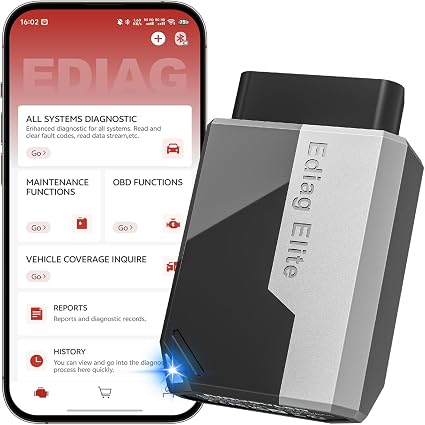
Diagnosing issues with a Mazda can be tricky without the right tools, but this compact OBD2 scanner suits drivers wanting detailed insights without a big investment. Its biggest strength lies in providing full system diagnostics and 15+ reset functions through a simple Bluetooth connection to your phone.
Getting started requires just plugging the device into the car’s OBD2 port and pairing it via Bluetooth. The daily routine is straightforward since carrying its lightweight design around is easy. You can monitor your car’s status anytime, thanks to lifetime updates and zero subscription fees, which makes staying on top of diagnostics a painless task.
The device handles deep car system checks and active tests reliably. Built solidly enough to slip in a pocket, it offers modern CANFD and FCA AutoAuth features for wider compatibility. Most praise is about its comprehensive diagnostics at a budget price, while occasional connectivity glitches show up as the main complaint.
This scanner delivers in-depth diagnostics and reset options without extra fees, making complex car issues easier to understand. However, some experience intermittent Bluetooth connectivity problems that can interrupt the workflow.
Drivers looking for an affordable, portable scan tool with full system capabilities will appreciate this device. Those needing extremely stable connections or extended warranty coverage might want to consider other options.
Pros
- Lifetime updates with no subscription fee
- Compact and lightweight for easy portability
- Performs full system diagnostics and reset services
- Bluetooth connection offers fast diagnostics
Cons
- Occasional Bluetooth connection issues reported
- Limited warranty of only 1 year
| Specification | Details |
|---|---|
| Brand Name | KINGBOLEN |
| Item Weight | 5.92 ounces |
| Model Number | KBLJ05 |
| Included Components | KINGBOLEN Ediag Elite Bluetooth obd2 scanner |
| Manufacturer Warranty | 1 year |
5. ANCEL AD410 Enhanced OBD2 Scanner

More than 42,000 built-in DTC lookups make understanding why your Mazda’s check engine light is on much easier with the ANCEL AD410 Enhanced OBD2 Scanner. Ideal for everyday drivers and beginners, it simplifies basic vehicle diagnostics so you know what’s wrong before you visit a repair shop.
Setup is straightforward with the included USB cable and user manual. Plugging it into your car’s OBD2 port allows quick access to functions like reading and clearing codes, viewing live data, freeze frame data, and checking I/M readiness. The scanner gives clear code definitions on-screen, making it easy to decide if you can handle repairs yourself or need a mechanic.
The scanner performs well at reading engine-related fault codes with reliability. Its compact 10.56-ounce design feels solid in hand without being bulky.
Most find it great for basic and some advanced diagnostics, but a few mention the screen could be larger or brighter for better visibility in all lighting conditions. The lookup database is a big plus that reduces confusion.
Many users appreciate how the device simplifies checking engine faults with clear code definitions, helping avoid unnecessary mechanic visits. Some find the screen size limits viewing comfort, especially in bright environments, which can make live data harder to read at times.
Drivers wanting a straightforward, beginner-friendly scanner for quick code reading and basic tests will find it very useful. Those needing detailed, professional-grade diagnostics or prefer a larger display might look for other options.
Pros
- 42,000+ built-in DTC lookups
- Supports full OBD2 diagnostics
- Easy to read and clear codes
- Includes USB cable for downloads
Cons
- Screen could be bigger for easier reading
- Not designed for highly technical diagnostics
| Specification | Details |
|---|---|
| Brand Name | ANCEL |
| Model Number | AD410 |
| Item Weight | 10.56 ounces |
| Included Components | 1 * AD410, 1 * User Manual, 1* USB Cable |
| Manufacturer Warranty | Support for ANCEL AD410 OBD2 Scanner |
6. FOXWELL NT301 OBD2 Scanner

Anyone who drives a Mazda and wants to understand engine issues without guessing will find this tool useful. It suits those looking for a straightforward way to check engine codes and live data.
Its biggest strength is helping you spot trouble early, potentially saving time and money at the repair shop.
Setup is simple: plug the scanner into the OBD2 port, and it powers up quickly. Using the clear buttons makes it easy to scroll through trouble codes and live data. Having trouble code definitions right there means you can figure out what’s going on without searching online.
After repairs, you can clear codes and verify the fix, which helps confirm if the problem is resolved or needs more attention.
The scanner is solid enough for regular use, weighing just 0.16 kg, making it portable. It reads and clears engine trouble codes reliably and provides live data that’s useful for basic diagnostics. The strongest praise centers on how easy it is to understand the codes and control the device.
Some mention that the display could be brighter in direct sunlight, which is the main drawback found in reviews.
The device is praised for how straightforward it makes reading engine codes and understanding problems without confusion. The most common complaint is about the screen’s visibility under bright sunlight, which could make it tricky to use outdoors during the day.
This product is a good fit for Mazda drivers who want an entry-level diagnostic tool for everyday troubleshooting. Those needing more detailed data or professional features might want to explore other scanners with advanced capabilities.
Pros
- Easy to read and clear engine trouble codes
- Includes trouble code definitions for quick understanding
- Lightweight and portable design
- Allows checking repair results by clearing codes
Cons
- Display can be hard to read in bright sunlight
- Basic diagnostic functions only, no advanced features
| Specification | Details |
|---|---|
| Brand Name | FOXWELL |
| Model Number | NT301 |
| Item Weight | 0.16 kg |
| Included Components | 1*NT301 obd2 scanner, 1* usb cable, 1* quick reference guide |
| Manufacturer Warranty Description | 12 Months |
7. FOXWELL NT604 Elite OBD2 Scanner

FOXWELL NT604 Elite stands out with its plug-and-play design, ideal for Mazda drivers who want a straightforward and clear diagnosis. It stands out by covering multiple systems like ABS, SRS, engine, and transmission, saving trips to the mechanic by pinpointing problems early on.
Setup requires just plugging the device into the OBDII port using the included cable. No need to download or install software, which makes it straightforward to use right away. Day-to-day use is simplified with a user manual and a quick start guide that help interpret codes effectively, making it practical for anyone familiar with basic car troubleshooting.
Performance focuses on reliable scanning across various common systems. The tool comes in a sturdy protective box, which adds durability and convenience for storage.
One highlight is its latest2026 software version, offering up-to-date diagnostics. Some note that the screen size could limit how much data is viewed at once, which is a minor drawback compared to its diagnostic capability.
The scanner is praised for starting diagnostics instantly without extra software, making it very user-friendly. At the same time, some users find the screen size a bit small for reading detailed data comfortably. It handles basic repairs efficiently but might not suit deeper mechanic-level analysis.
Anyone looking for straightforward diagnostics on common Mazda car systems will find it a solid choice. Those needing more advanced or in-depth scan tools might want to explore models with larger screens or expanded functions.
Pros
- Works out of the box with no software downloads
- Supports multiple systems like ABS and transmission
- Comes with a sturdy protective carrying case
- Includes USB and diagnostic cables for easy setup
Cons
- Screen size limits visible data at once
- May be too basic for advanced diagnostics
| Specification | Details |
|---|---|
| Brand Name | FOXWELL |
| Model Number | NT604Elite |
| Included Components | Diagnostic Cable & USB Cable, Quick Start Guide, Sturdy Protective Box, User Manual |
| Manufacturer Part Number | NT604 ELITE |
8. Innova 5610 OBD2 Bidirectional Scan Tool
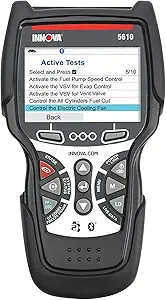
The Innova 5610 OBD2 Bidirectional Scan Tool provides detailed diagnostics for Mazda drivers looking to keep their vehicles safe and performing well. It suits people wanting real-time access to both OBD2 and OEM data, making it easier to pinpoint and solve engine or system issues without professional help.
Setup involves connecting the included OBD2 cable to your car’s port and powering the device on. Day-to-day use relies on its Enhanced Data Stream, which provides live feedback on ABS, SRS, transmission, and engine systems.
The tool comes with a protective boot, USB cable, and soft storage pouch, which helps keep it organized and ready for quick scans whenever needed.
Performance matches professional diagnostic tools by allowing special reset functions that replicate dealership procedures. The build feels solid with a 1.3-pound weight and protective boot for durability.
Common praise highlights how comprehensive the live data is, while some find the size a bit bulky for casual users.
Reviewers frequently appreciate the device’s detailed live data and advanced reset functions, which go beyond basic code reading. The main drawback is its weight and size, which some find less convenient compared to smaller, simpler scanners.
People wanting thorough diagnostics and professional reset capabilities will find this device valuable. Those seeking a compact scanner for occasional use may prefer a lighter, more basic model.
Pros
- Access to OBD2 and OEM live data
- Supports ABS, SRS, transmission systems
- Includes protective boot and storage pouch
- Capable of dealership-level reset functions
Cons
- Relatively heavy at 1.3 pounds
- Might feel bulky for simple scans
| Specification | Details |
|---|---|
| Brand Name | Innova |
| Model Number | 5610 |
| Manufacturer Part Number | 5610 |
| Included Components | Code Reader with Protective Boot, Manual, OBD2 Cable, Soft Pouch for Storage, USB Cable |
| Item Weight | 1.3 pounds |
9. TOPDON TopScan Lite OBD2 Scanner

Using the TOPDON TopScan Lite OBD2 Scanner feels like turning your phone into a handy mechanic’s tool. It suits anyone who owns a Mazda and wants a quick way to spot car issues without throwing parts around.
Its biggest strength lies in controlling different car systems directly from your phone to find problems fast.
Setting it up involves plugging the small scanner into your car’s OBD2 port, then connecting your phone via app. Day-to-day use revolves around running full-system scans, reading trouble codes, and running performance tests easily. You can even send commands to test components like injectors or fans, saving time on guessing or dismantling parts.
Performance-wise, it does a solid job catching issues by communicating clearly with your Mazda’s ECU. The compact 28-gram design keeps it lightweight and easy to handle.
Most praise focuses on how much time it saves by pinpointing problems. A frequent complaint is the need for a subscription to maintain access to advanced features.
The scanner stands out by quickly locating vehicle issues through bi-directional commands from a phone, greatly reducing guesswork and time spent. The ongoing subscription model for advanced diagnostic features is a common drawback noted in reviews.
Anyone wanting straightforward, detailed diagnostics directly from their phone will find this very useful, especially Mazda drivers. Those who prefer a fully one-time payment or standalone device might want to look for alternatives without subscription fees.
Pros
- Allows bi-directional control via smartphone
- Lightweight and compact design
- Full-system scanning and performance tests
- Includes repair information in-app
Cons
- Subscription needed for continued advanced features
- Limited to one unit per package
| Specification | Details |
|---|---|
| Brand Name | TOPDON |
| Unit Count | 1 Count |
| Item Weight | 28 g |
| Model Number | TOPSCAN |
| Manufacturer Warranty Description | 1 Year |
10. Autel AutoLink AL519 OBD2 Scanner

Great for people with Mazda cars from 2015 or earlier, this scanner stands out by offering full OBDII functions beyond just reading and clearing codes. Its ability to show live data in both text and graph formats makes it ideal for those wanting detailed diagnostics without overcomplicating things.
Setup requires plugging the device into your car’s OBD2 port and powering it on, which happens immediately. Day-to-day use benefits from quick data retrieval like generic and manufacturer-specific codes, checking emissions readiness, and even performing tests like evap leak detection.
The built-in DTC lookup helps avoid constant online searches when identifying trouble codes.
Performance-wise, the scanner reliably reads accurate codes and provides helpful live data displays. Its build is sturdy enough for routine garage use without feeling flimsy.
Most praise comes from its comprehensive function set for the price. A common downside is that it only works with vehicles made in 2015 or earlier, which can be disappointing for newer car drivers.
Highly praised for its comprehensive diagnostic features and straightforward live data display, the scanner makes troubleshooting more transparent. The most frequent issue noted is the strict limitation to pre-2016 vehicles, which restricts its usefulness for those with newer Mazdas.
Drivers with older Mazda models looking for a detailed yet simple scan tool will appreciate this. Drivers with cars newer than 2015 should look into more current options since this device won’t work with their vehicles.
Pros
- Full OBDII functions (mode 1~10)
- Quick DTCs lookup with live data
- Supports generic and manufacturer-specific codes
- Performs evap leak test and I/M readiness check
Cons
- Only works with cars from 2015 or before
- Compatibility needs confirmation before purchase
| Specification | Details |
|---|---|
| Item Type Name | AutoLink OBD2 Scanner, Code Reader Car Diagnostic Tool with Mode 6 Vehicle Scan Tool |
| Model Number | AL519 |
| Manufacturer Part Number | AL519 |
| Manufacturer Warranty Description | 1-Year Warranty |
| Included Components | al519 |
11. FOXWELL NT614 Elite OBD2 Scanner

Durable and thoughtfully designed, the FOXWELL NT614 Elite OBD2 Scanner is a great fit for those with a Mazda who need a detailed diagnostic tool. Its standout strength lies in scanning multiple systems, engine, ABS, SRS, and transmission, offering much more than just basic codes for check engine lights.
Setup involves connecting the scanner with the included diagnostic cable and powering it through the car’s OBD port. Daily use feels direct and practical, letting you read and clear trouble codes conveniently at home.
Features like ABS bleeding, SAS calibration, EPB reset, oil reset, and throttle reset add useful functions for maintaining your Mazda without frequent shop visits.
Performance-wise, it accurately pinpoints problems within four critical systems and supports five essential reset functions. Built solidly enough with a protective case included, it weighs 1200 grams, making it sturdy but still manageable.
Some praise how it saved money by avoiding dealer diagnosis fees, while others mention the unit’s bulk as a minor inconvenience.
The most appreciated feature is its ability to save money by avoiding dealership diagnosis fees, providing professional diagnostics at home. The weight and size stand out as common downfalls, making it less pocket-friendly compared to simpler devices.
Those looking for accurate, multi-system diagnostics and useful reset options will find this model well suited. Users preferring a lightweight, compact scanner solely for quick engine code reads might want to consider other options.
Pros
- Scans engine, ABS, SRS, and transmission systems
- Includes five essential reset functions
- Comes with protective case and all cables
- Helps avoid costly dealership diagnosis fees
Cons
- Heavier than some other scanners at 1200 g
- Bulky design may be less portable
| Specification | Details |
|---|---|
| Brand Name | FOXWELL |
| Model Number | NT614 4 System with 5 Resets |
| Included Components | Diagnostic Cable, NT614Elite Scanner, Protective Case, USB Cable, User Manual, Quick Guide |
| Item Weight | 1200 g |
| Manufacturer Warranty | 1 year |
12. LAUNCH AIOBD Plus Bluetooth OBD2 Scanner

Wireless Bluetooth connection sets this scanner apart for Mazda drivers seeking fast diagnostics without messy cables. It suits anyone wanting an affordable way to check engine lights and car troubles using their smartphone with easy pairing.
Setup is straightforward since it connects wirelessly to your phone, avoiding the hassle of cords. Daily use involves running different diagnostic tests through an app, which taps into AI-powered functions for a wide range of systems. Reset options and active testing work right from the mobile device, making it practical for regular checks and troubleshooting on the go.
The device excels at scanning multiple car systems and clearing trouble codes efficiently. Build quality is solid enough to last, with a compact design that fits most OBD2 ports easily.
Strongest praise highlights its reliable Bluetooth connection and simple app interaction, while occasional complaints mention the app interface could be more user-friendly.
The most appreciated feature is the stable wireless connection that lets users quickly diagnose and reset issues without cables. Common feedback points to the app interface needing improvement for easier navigation. The build itself holds up well and fits standard OBD2 ports without trouble.
This scanner works well for those comfortable managing diagnostics on a smartphone and wanting broad system access. Drivers preferring a standalone device with a dedicated screen might want to look for a different model.
Pros
- Wireless Bluetooth connection for easy smartphone pairing
- AI-powered diagnostics handle multiple car systems
- Includes 15+ popular reset functions
- The two-year manufacturer warranty ensures long-lasting reliability.
Cons
- App interface may confuse some users
- No physical display; smartphone required during use
| Specification | Details |
|---|---|
| Model Number | AIOBD Plus |
| Included Components | 1* AIOBD Plus obd2 scanner |
| Manufacturer Warranty | 2 Year Manufacturer |
| Connection | Wireless Bluetooth |
| Functions | Full-system scanning, active testing, 15+ reset functions |
Best OBD Scanners for Mazda Comparison Table
| Product | Weight | Warranty | Included Components | Connectivity |
|---|---|---|---|---|
| ANCEL AD310 Scanner | 10.56 oz | – | Scanner, User Manual | Wired |
| BlueDriver Bluetooth Scanner | – | – | Scanner, App Access | Bluetooth |
| TOPDON AD900 Lite | 4.8 lbs | 2 Year | OBD2 Scanner | Wired |
| Ediag Elite KINGBOLEN | 5.92 oz | – | Bluetooth OBD2 Scanner | Bluetooth |
| ANCEL AD410 Enhanced | 10.56 oz | – | Scanner, User Manual, USB | Wired |
| FOXWELL NT301 Scanner | 0.16 kg | – | Scanner, USB Cable, Guide | Wired |
| FOXWELL NT604 Elite | – | – | Cable, Quick Guide, Manual | Wired |
| Innova 5610 Scan Tool | 1.3 lbs | – | Code Reader, Manual, Cables | Wired |
| TOPDON TopScan Lite | 28 g | 1 Year | TOPSCAN | Wired |
| Autel AL519 Scanner | – | 1 Year | al519 Scanner | Wired |
| FOXWELL NT614 Elite | 1200 g | – | Cable, Scanner, Case | Wired |
| LAUNCH AIOBD Plus | – | 2 Year | AIOBD Plus Scanner | Wired |
- Weight10.56 oz
- Warranty–
- Included ComponentsScanner, User Manual
- ConnectivityWired
- Weight–
- Warranty–
- Included ComponentsScanner, App Access
- ConnectivityBluetooth
- Weight4.8 lbs
- Warranty2 Year
- Included ComponentsOBD2 Scanner
- ConnectivityWired
- Weight5.92 oz
- Warranty–
- Included ComponentsBluetooth OBD2 Scanner
- ConnectivityBluetooth
- Weight10.56 oz
- Warranty–
- Included ComponentsScanner, User Manual, USB
- ConnectivityWired
- Weight0.16 kg
- Warranty–
- Included ComponentsScanner, USB Cable, Guide
- ConnectivityWired
- Weight–
- Warranty–
- Included ComponentsCable, Quick Guide, Manual
- ConnectivityWired
- Weight1.3 lbs
- Warranty–
- Included ComponentsCode Reader, Manual, Cables
- ConnectivityWired
- Weight28 g
- Warranty1 Year
- Included ComponentsTOPSCAN
- ConnectivityWired
- Weight–
- Warranty1 Year
- Included Componentsal519 Scanner
- ConnectivityWired
- Weight1200 g
- Warranty–
- Included ComponentsCable, Scanner, Case
- ConnectivityWired
- Weight–
- Warranty2 Year
- Included ComponentsAIOBD Plus Scanner
- ConnectivityWired
How to Choose the Best OBD Scanner for Mazda
Prioritize compatibility with Mazda models and ease of use to guarantee accurate diagnostics and smooth operation. Features like real-time data and comprehensive code reading help identify issues early, saving money on repairs and avoiding unnecessary trips to the mechanic.
Compatibility with Mazda Models
Trying to scan a 2019 Mazda CX-5 with an older diagnostic tool often leads to incomplete or missing error codes. Support for a wide range of model years and different Mazda models is essential to avoid this issue.
Many OBD scanners cover basic OBDII codes, but fewer read manufacturer-specific codes that reveal deeper insights into Mazda-specific systems like Skyactiv engines or the i-Activ AWD.
The best choices offer firmware updates delivered via USB or WiFi to keep the scanner current with new models and technologies. It’s common to find devices covering vehicles from early 2000s up to recent 2023+ models.
Checking for update frequency and ongoing compatibility support helps ensure the scanner doesn’t become obsolete a couple of years down the line.
User Interface and Ease of Use
A tiny, low-resolution screen makes scanning frustrating. Clear, color displays with large fonts speed up reading and reduce mistakes. Menus that get you to code details within a few button presses save time, especially if multiple scans happen regularly.
Bluetooth connectivity paired with a dedicated mobile app opens additional ways to digest the data visually, often with automatic code explanations and suggested fixes. The app interface should be straightforward for those unfamiliar with car diagnostics, avoiding too many layers of options. A smooth interface turns a complicated process into routine maintenance.
Diagnostic Capabilities
Basic scanners showing only engine codes leave gaps when transmission or ABS light warnings pop up. Tools that cover all standard trouble codes, including transmission and ABS, provide a fuller picture of vehicle health. Live data streaming lets you monitor sensors like oxygen, temperature, and RPM in real time, catching intermittent issues not stored as codes.
Freeze frame data helps track exactly what parameters were active when a fault occurred, which aids repair precision. Readiness monitors show whether the car is prepared for emissions testing, avoiding failed inspections. Advanced diagnostics can also include manufacturer-specific functions like key programming or module resetting.
Connectivity and Power Source
Wired scanners plugged into the OBD port offer stable connections without delays but restrict movement under the dashboard. Wireless options using Bluetooth or WiFi provide mobility while working but sometimes have dropouts or pairing issues. A stable connection is critical when running live data or long test sessions.
Power typically comes from the car’s OBD port, avoiding reliance on internal batteries that could die mid-check. Devices with rechargeable batteries are handy for limited use away from the vehicle but usually require frequent charging. Consider how often the scanner will be used and whether portability outweighs continuous power needs.
Build Quality and Portability
Dropping a scanner on a cold concrete floor can damage fragile components in cheap plastic housings. Units made from impact-resistant plastic or rubber-coated edges stand up better to typical garage work conditions. Size directly affects usability; bulky models are awkward under the dashboard or hard to store in a glovebox.
Lightweight scanners improve comfort when holding or passing between technicians. A good balance involves a compact design roughly the size of a smartphone but built to resist grease, dust, and occasional drops.
Portability becomes especially important for those servicing multiple vehicles out of a mobile workshop.
Proper Usage Tips for Maximizing Your OBD Scanner’s Efficiency on Mazda Vehicles
Connecting your OBD scanner to the Mazda’s diagnostic port properly saves time and ensures accurate results. Most Mazda models have the OBD-II port located under the dashboard near the driver’s seat.
Make sure the ignition is turned on but the engine isn’t running to get precise readings without draining the battery.
After plugging in the scanner, allow it a moment to communicate fully with the car’s computer. Some scanners require software updates to recognize the latest Mazda-specific codes, so regular updates help maintain compatibility. It’s useful to read the scanner’s manual to understand the available features, such as live data monitoring and reset functions specific to Mazda.
To get the most from your tool:
- Perform scans after the car has been running long enough to activate all systems.
- Clear codes only after confirming the underlying issue is fixed to avoid masking problems.
- Use freeze frame data to see conditions present when a fault occurred.
Proper usage like this helps in diagnosing accurately and maintaining your Mazda efficiently.
Common Mistakes to Avoid When Using an OBD Scanner with Your Mazda
One common error when using an OBD scanner with Mazda vehicles is rushing through the connection process, which can lead to missed codes or partial readings. Skipping the step of turning the ignition on without starting the engine often results in incomplete data collection.
Avoid clearing trouble codes before thoroughly understanding what they mean. Clearing codes prematurely without addressing the cause may lead to recurring warning lights and frustrated troubleshooting.
Some scanners may not work well with all Mazda models, so failing to confirm compatibility can waste time and create confusion.
Additional mistakes include:
- Neglecting to update scanner software, which reduces the chance of reading the latest Mazda fault codes correctly.
- Interpreting generic codes without checking Mazda’s specific fault code list, leading to inaccurate diagnosis.
- Using the scanner solely for code reading instead of exploring other features like live sensor data or readiness monitors.
Taking care to avoid these pitfalls makes the scanning process more effective and reliable on your Mazda.
Comparing Dedicated Mazda OBD Scanners vs. Universal Scanning Tools
Dedicated Mazda OBD scanners often come with software tailored to Mazda’s unique systems, offering more in-depth diagnostics for issues like transmission faults or ABS problems that generic tools might miss. These scanners may provide enhanced code definitions specific to Mazda and some proprietary reset options.
Universal OBD scanners, on the other hand, support a wide range of vehicle makes, making them versatile if you own multiple cars. They cover standard OBD-II protocols but sometimes lack the depth found in brand-specific tools, especially with manufacturer-specific codes.
Consider the following when choosing between the two:
- Dedicated scanners often cost more but can save time diagnosing tricky Mazda issues.
- Universal tools provide basic functionality suitable for simple code reading and clearing.
- Software updates and ease of use vary widely and affect long-term value.
Balancing the need for detailed diagnostics against budget and vehicle variety will help you pick the right scanner for your Mazda.
People Also Asked
How Do I Use an OBD Scanner with My Mazda?
Plug the OBD scanner into the Mazda’s OBD-II port, usually located under the dashboard near the steering column. Turn on the ignition without starting the engine, then power on the scanner to read codes or live data. Keeping the car steady while scanning helps get accurate readings.
Is the OBD Scanner Compatible with All Mazda Models?
Most OBD-II scanners work with Mazda models from 1996 onward, but some advanced functions might not work on older or specialized models. Check the scanner’s compatibility list or user manual to be sure before buying.
How Long Does a Typical OBD Scanner Last?
A typical OBD scanner can last several years if it’s not dropped or exposed to moisture. Keeping it clean and stored in a dry place extends its life. Batteries, if required, may need replacement after a couple of years.
Are OBD Scanners Safe to Use on Mazda Vehicles?
Using a quality OBD scanner with the ignition on only and not tampering with the vehicle’s systems keeps it safe for Mazda cars. Avoid using cheap or untested scanners, as they may send incorrect commands that could confuse the computer.
What Common Problems Can Occur with Mazda OBD Scanners?
Common issues include connection problems due to loose port contacts, software glitches causing error codes to be misread, and compatibility problems with certain Mazda systems. Keeping the scanner’s firmware updated can help reduce these problems.
Conclusion
Accuracy in reading Mazda-specific codes, compatibility with your model year, and ease of use are the key factors when choosing an OBD scanner. It is important that the scanner clearly identifies issues without confusing you with unnecessary information. Also, a responsive interface that delivers quick results saves time during diagnostics.
Consider how often you plan to use the scanner and the space where you will store it. A compact device is easier to keep in the glove compartment, while a budget-friendly option works well for occasional checks.
Review the comparison table and earlier detailed picks to find a scanner that fits your needs and preferences.