
Top 12 Best Affordable Car Dash Cam That Will Blow Your Mind
Many drivers have experienced the frustration of buying a dash cam only to find the video quality is grainy or the device keeps shutting off unexpectedly. A reliable, best affordable car dash cam solves these issues by capturing clear footage during both day and night without draining your car battery rapidly.
It also handles heat inside a parked car and sudden movements without failing, which is crucial for dependable recording.
The key features to look for in a quality affordable dash cam include video resolution, typically 1080p or better, and a reliable power connection, such as a hardwired setup or a stable 12V socket adapter. The size matters too, compact cameras reduce distraction and fit well behind the rearview mirror. Finally, ease of use, like straightforward mounting and quick file transfer via microSD cards, makes a big difference in day-to-day operation and maintenance.
Need a Quick Check?
| Image | Product | Price |
|---|---|---|
Our Top Picks 1  | 70mai A810 Lite | Check Price |
Our Top Picks 2  | Mini 4K Dash Cam | Check Price |
Our Top Picks 3 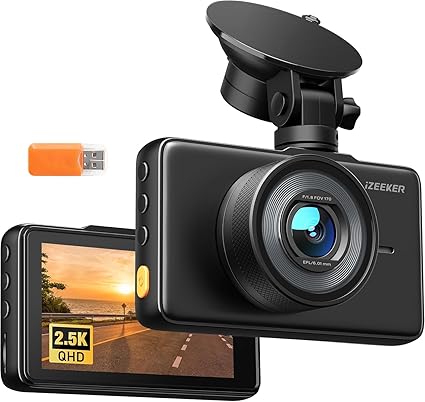 | iZEEKER 2.5K Cam | Check Price |
Our Selected Top 12 Affordable Car Dash Cam Worth Buying
These selections include reliable and budget-friendly car dash cams with varied features to suit different needs. Each review covers performance, ideal users, key advantages, and potential drawbacks, helping readers find the best balance of quality and affordability for their vehicle safety.
1. 70mai A810 Lite Dash Cam Front and Rear
3840×2160P Ultra HD front recording stands out as a major feature, ideal for anyone wanting crisp footage from both front and rear views. Suitability spans cars, trucks, and rideshare vehicles, with strong night vision making it especially handy for unpredictable lighting conditions.
Setting up the dash cam involves mounting it on the windshield and syncing with an app via 5GHz Wi-Fi 6 for direct control and video access. Voice commands and push buttons add convenience while driving.
It supports microSD cards for storage and handles 24H parking monitoring, so it’s ready even when parked. GPS modes track your routes alongside comprehensive loop recording to manage storage efficiently.
The 140-degree wide-angle lenses capture a broad field of view, reducing blind spots during drives. Construction feels solid with a supercapacitor offering better heat and power resistance than typical batteries.
Its enhanced night vision with HDR and a large F1.55 aperture improves visibility at night or in bad weather. Common feedback praises clear, high-resolution footage, while some users mention occasional syncing quirks with the app.
Video quality is often praised for its clarity and detail, especially in low light thanks to HDR and the large aperture. A noted downside is the occasional trouble with app synchronization, which can be frustrating but does not affect core recording functions.
Drivers needing clear evidence in all lighting conditions and decent rear coverage will appreciate this dash cam. Those who want perfectly smooth app connectivity or higher rear video resolution might look for other options.
Pros
- True 4K front recording captures fine details
- Enhanced night vision with HDR and large aperture
- App and voice control make operation flexible
- Wide field of view reduces blind spots
Cons
- App connectivity can be inconsistent at times
- Rear camera records at a lower 1080P resolution
| Specification | Details |
|---|---|
| Video Capture Resolution | 1080p, 2160p |
| Field Of View | 140 degrees |
| Connectivity Technology | 5GHz Wi-Fi 6, USB |
| Special Features | 24H Parking Mode + G-Sensor Protection + Loop Recording, 3-Mode GPS + Voice Control + Supercapacitor, 4G LTE Support + Smart App Control |
| Mounting Type | Windshield Mount |
2. Mini 4K Dash Cam Front
Anyone looking for a reliable, affordable front dash cam with crystal-clear video quality will appreciate this device. It suits drivers who want detailed footage without extra costs for essential accessories.
Its standout feature is the 4K UHD resolution that captures fine details like license plates with impressive clarity.
Setup is straightforward thanks to the adhesive mount and no need to buy a memory card right away, as it comes with a free 32GB card. Daily use involves controlling the camera through a smartphone app using the built-in 5G WiFi, making it easy to review footage on the go. Voice recording and loop recording work quietly in the background while the 24-hour parking monitor stands ready even when the car is off.
Video quality is sharp with a wide 160-degree field of view, which helps cover more of the road in front. The camera holds up well over time with a discreet design that doesn’t distract from driving.
The most common complaint involves the memory card capacity being reduced from 64GB to 32GB, which may require upgrading for longer recording needs. Still, the 12-month warranty offers added reassurance.
Footage recorded at 4K resolution stands out for clarity, helping identify details during incidents. The downsizing from 64GB to 32GB for the included memory card makes extended recording less convenient without buying an additional card. The app-based control eliminates the need for a physical screen, but some may miss having direct visuals on the device.
Drivers who want high-quality video without the hassle of extra purchases will find this dash cam very suitable. Those needing longer recording times or a display on the device should explore alternatives or plan to invest in a larger memory card separately. Its discreet, no-display design suits minimalists who prioritize clear footage over controls on the device itself.
Pros
- Crystal-clear 4K UHD resolution
- Includes 32GB memory card
- Built-in 5G WiFi for easy app control
- 24-hour parking monitor feature
Cons
- Memory card size reduced from 64GB to 32GB
- No built-in display on the camera
| Specification | Details |
|---|---|
| Video Capture Resolution | 2160p (4K) |
| Field Of View | 160 degrees |
| Connectivity Technology | Wi-Fi |
| Flash Memory Type | microSD (32GB included) |
| Mounting Type | Adhesive Mount |
3. iZEEKER 2.5K Dash Cam Front
Recording in 2.5K QHD with a 170° wide lens makes this dash cam stand out for anyone wanting crisp footage and broad coverage. It suits family cars, new drivers, and rideshare drivers who need clear evidence on the road, day or night.
Its low-light capability is especially handy for nighttime driving.
Setup is straightforward thanks to the suction cup mount and simple instructions, so installation takes just a few minutes on the windshield. Daily use involves relying on automatic recording and loop recording, so you don’t have to press any buttons once the drive starts. The 3 touch display shows what’s being captured and allows easy manual emergency recordings when needed.
Video quality holds up well with sharp 2560 × 1440 resolution and the wide 170° angle captures enough lanes around your car. The F1.8 aperture and WDR feature help keep details visible even in darker conditions, which is a big plus. Build feels solid and the suction mount adapts well to rental vehicles.
Common feedback praises the clear, detailed footage but mentions that some find the screen a bit small for viewing while driving.
This dash cam delivers sharply detailed footage thanks to its 2.5K video and wide viewing angle, which helps capture more of the surroundings. Many appreciate the low-light handling that keeps nighttime recordings clear. Some mention the display size as a drawback, feeling it could be larger for easier monitoring while driving.
People who want reliable front camera coverage without complicated setup will be pleased. Those seeking a dual-channel system with rear recording or larger screen size might want to look elsewhere. Its portability and easy mount make it a practical choice for drivers who switch cars often or rent vehicles.
Pros
- Sharp 2.5K video resolution
- Wide 170° field of view captures more lanes
- Easy suction cup mount for quick install
- Good low-light visibility with F1.8 lens and WDR
Cons
- 3″ screen can feel small for some users
- Limited to front view only, no rear camera option
| Specification | Details |
|---|---|
| Video Capture Resolution | 2.5K 1440P QHD |
| Field Of View | 170 degrees |
| Control Method | Touch |
| Screen Size | 3″ |
| Maximum Aperture | 1.8 f_stop |
| Mounting Type | Suction Mount |
4. 70mai T800E 4K Dash Cam 3 Channel

70mai T800E 4K Dash Cam 3 Channel captures clear footage from three angles, front, inside, and rear, perfect for rideshare drivers or families wanting comprehensive coverage. Its best feature is the ultra-high 4K resolution upfront combined with night vision, giving confidence that all road details are recorded both day and night.
Setting up involves a windshield mount and a quick connection via Wi-Fi 6, which helps transfer video files fast to your phone. The built-in 5-mode GPS keeps track of location, and voice control allows hands-free operation. Managing recordings is straightforward through the app, and the camera includes a 64GB SD card but supports up to 512GB, which means plenty of storage for long trips.
Footage quality is impressive with sharp images thanks to HDR and 3D noise reduction, especially useful for low light or night-time driving. The build feels sturdy, and the ultra-wide 402-degree view captures nearly everything around the vehicle.
Common praise highlights the clarity of license plates. Some mention the small 1.9-inch screen is a bit tiny for reviewing clips directly on the device.
The footage quality stands out, especially capturing license plates even in low light thanks to HDR and night vision, making it very reliable for security purposes. Some find the small screen and app navigation a bit challenging when reviewing clips directly on the camera or within the controls.
Anyone who drives frequently at night or uses rideshare services will be happy with the full coverage and detailed recording. Those looking for a simpler setup or larger built-in display might want to look for a model with easier interface features.
Pros
- 3-channel recording covers all angles simultaneously
- Clear 4K front footage with excellent night visibility
- Fast Wi-Fi 6 connection for quick file transfers
- Voice control allows hands-free operation
Cons
- Screen size only 1.9 inches for on-device viewing
- App and controls can feel complex at first
| Specification | Details |
|---|---|
| Video Capture Resolution | 4K Front + 1080P Rear + 1080P Inside |
| Connectivity Technology | Wi-Fi 6 |
| Built-in GPS | 5-Mode GPS |
| Field Of View | 402 degrees |
| Storage Included | 64GB SD Card, supports up to 512GB |
| Control Method | App, Push Button, Voice |
5. Dual 4K Dash Cam Front and Rear

Living with a dual dash cam setup feels more secure and clear thanks to sharp dual 4K front and 1440P rear recordings. Perfect for anyone wanting detailed footage from both directions while driving, it excels at capturing important details like license plates and road signs thanks to its wide-angle lenses.
Getting it going was straightforward with a windshield mount and USB power. An app controls settings, which makes fine-tuning easier than fumbling with buttons.
The 3-inch LCD screen provides a quick look at live footage when needed. Day to day, it records both front and rear simultaneously, so you don’t miss a thing behind or ahead on the road.
It captures clear video, particularly strong in low-light thanks to the f/1.5 aperture and WDR technology. The build feels solid, suited to car interior use without being bulky. Most praise focuses on the crystal clear front camera images.
Some find the app control a bit clunky or would like a higher frame rate for smoother video.
The front camera provides stunningly clear footage even at night, thanks to the large f/1.5 aperture and WDR technology. The rear camera complements well with 1440P detail but some users find the app that controls the device less user-friendly. The 25fps video frame rate is adequate but not very fluid.
Ideal for drivers prioritizing high-quality, dual-channel recordings both front and back, especially in varied lighting. Those seeking smoother video playback or simpler controls might want to explore other options. This setup works well for daily commuters and anyone wanting solid security footage from multiple angles.
Pros
- Front camera records at a crisp 4K resolution
- Rear camera also captures at a high 1440P resolution
- Wide-angle lenses clearly capture license plates and road signs
- Strong low-light performance with large aperture and WDR
Cons
- App control can be unintuitive at times
- Frame rate limited to 25fps, less smooth video
| Specification | Details |
|---|---|
| Video Capture Resolution | 2160p |
| Field Of View | 170 degrees (front) |
| Screen Size | 3 inches |
| Auto Part Position | Front |
| Control Method | App |
| Maximum Aperture | 1.5 f_stop |
6. 4 Channel 360° Dash Cam

Perfect for anyone needing affordable all-around protection on the road, this 4 Channel 360° Dash Cam covers every angle of your vehicle with its four synchronized lenses. Its biggest strength lies in providing full 360-degree coverage, eliminating blind spots and capturing crucial details from all sides.
Setup involves mounting the camera on your windshield and connecting via the built-in Wi-Fi for app control. The pre-installed 64GB memory card lets you start recording right away.
Day-to-day use benefits from the 3 IPS screen for easy monitoring, while loop recording and a G-sensor make sure footage is constantly saved and secured during impacts. Night vision also helps catch details after dark.
Recording in crisp 4K at the front and 1080p on other lenses, it does well capturing critical moments around the car. The hardware feels solid with adjustable lens angles, though some note occasional app connectivity quirks. The most praised feature is the full 360° coverage, while the most common complaint focuses on the occasional complexity in app setup.
Full 360-degree video coverage is highly reliable and appreciated, capturing every side without blind spots. Some users find connecting and managing the device through the app a bit tricky, which can slow down initial setup or adjustments.
Drivers looking for extensive coverage and a ready-to-use memory card will be satisfied. Those needing a system for different vehicle types or wanting simpler app interaction might want to explore other options. Night vision adds value for nighttime or low-light conditions.
Pros
- Four lenses record all sides simultaneously
- Pre-installed 64GB memory card included
- Built-in Wi-Fi and app control available
- Night vision supports low-light recording
Cons
- App setup can be confusing at times
- Only compatible with car and minivan types
| Specification | Details |
|---|---|
| Video Capture Resolution | 2160p |
| Field Of View | 360 degrees |
| Connectivity Technology | Wi-Fi |
| Memory Storage Capacity | 64 GB |
| Screen Size | 3 inches |
7. 3 Channel 1296P Dash Cam Front Rear Inside

Plastic body with a waterproof rear camera makes this dash cam ideal for anyone wanting full coverage on a budget. It stands out for offering three channels, front, rear, and inside, helping cut down blind spots during driving and parking.
Setting it up requires mounting on the windshield and rear, then connecting via USB. The built-in G-sensor triggers automatic emergency recording during sudden shocks, which is handy in parking lots. A 3.47-inch IPS screen shows clear footage from multiple angles without blur.
Loop recording means newer clips replace old ones, so storage stays managed without manual cleanup.
Video resolution of 1296p combined with a wide 170-degree front view ensures details are sharp and traffic incidents recorded well. The cabin and rear cameras capture inside and outside activity effectively, though some users mention occasional screen glare. Durability seems good, especially since the rear camera is waterproof, but complaints about initial setup complexity appear regularly.
Strong points include the triple camera coverage and reliable emergency recording triggered by impacts. Common issues come from setup complexity and screen glare, which some users find bothersome in daylight. Footage quality and waterproof design earn high marks.
Those wanting comprehensive video monitoring around their car will appreciate this dash cam. Users looking for simpler setup or anti-glare screens might consider other models better suited to those needs.
Pros
- Three cameras cover front, rear, and cabin
- G-sensor locks emergency footage automatically
- Waterproof rear camera for outdoor durability
- IPS screen gives clear viewing angles
Cons
- Setup can be complicated for first-timers
- Occasional screen glare under bright light
| Specification | Details |
|---|---|
| Video Capture Resolution | 1296p |
| Field Of View | 170 degrees |
| Screen Size | 3.47 inches |
| Mounting Type | Windshield Mount |
| Connectivity Technology | USB |
8. ROVE R2 Dual Dash Cam Front and Rear

Sharp image quality is the standout feature of the ROVE R2 Dual Dash Cam, capturing both front and rear views clearly. It’s designed for drivers who want detailed footage from both ends of their vehicle, making it a solid option for cars, SUVs, trucks, and buses aiming to cover all angles without spending a fortune.
Setting it up involves mounting the front and rear cameras on the windshield and rear window, which feels straightforward thanks to the included accessories. The built-in Wi-Fi and app control make accessing footage simple and convenient on your phone.
Firmware updates happen over the air, so the system stays current without manual downloads. GPS tagging and live speed display add context to the video files, useful for later review.
Video quality lives up to the specs with a crisp 2.5K front camera that shines especially well at night thanks to the Sony STARVIS 2 sensor and HDR technology. The rear camera doesn’t quite match the front but still records decent 1080p footage.
The dash cam unit has a solid feel, using a supercapacitor instead of a battery which holds up better under extreme temperatures. One downside is the relatively small 3-inch screen, which can make on-device viewing a bit cramped.
Clear image quality with excellent night vision is the greatest strength, while the smaller screen size is the main drawback noted. The video captures license plates and details well, but the rear camera doesn’t quite match the front in clarity.
Drivers looking for reliable front and rear coverage with easy mobile control will find this suitable. Those needing larger displays or higher rear camera resolution might want to consider other models.
Pros
- Sharp 2.5K front camera resolution
- Dual recording covers front and rear views
- App control with fast 5.8GHz Wi-Fi
- Supercapacitor for better heat and cold tolerance
Cons
- Rear camera quality lower than front
- Small 3-inch screen limits on-device use
| Specification | Details |
|---|---|
| Video Capture Resolution | 1080p, 1440p |
| Connectivity Technology | USB, Wi-Fi |
| Field Of View | 150 degrees |
| Control Method | App |
| Screen Size | 3 inches |
| Special Features | Built-In GPS, OTA Firmware Updates, Supercapacitor |
9. IIWEY N6 360° 4 Channel Dash Cam

Four-camera coverage around your car is a rare find at this price. Ideal for anyone wanting 360° security and full video evidence without gaps.
Its biggest strength lies in capturing crisp footage from every angle, including night vision to catch details after dark.
Getting it running requires wiring it directly to your vehicle, since there’s no built-in battery. Adjusting the side cameras helps cut down blind spots, which really matters on busy streets.
The 3.18-inch IPS screen lets you easily check footage or camera views, while Wi-Fi connectivity allows quick file transfers without removing the microSD card.
Recording in 2K + 1080P all around means you get excellent detail front and back, plus the sides. Build quality feels solid with a super-capacitor inside instead of a battery, improving durability in heat.
Highlights in reviews mention sharp license plate captures, but some users find wiring installation tricky and the lack of a battery inconvenient.
Clear license plate captures stand out as the strongest praise thanks to 2K resolution and vision enhancement technology. The most frequent complaint highlights the lack of a built-in battery, requiring hardwire installation which might deter casual users. Night vision and wide angles consistently earn positive notes in day-to-day use.
Those who want all-around coverage to monitor every angle will find this camera very effective and detailed. Drivers wanting a simpler plug-and-play option or wireless setup would be better off considering other models without hardwire requirements.
Pros
- True 4-camera 360° coverage
- Sharp 2K front video quality
- Infrared night vision with 8 IR LEDs
- Wi-Fi for easy access to footage
Cons
- No built-in battery, must hardwire
- Installation can be complex and time-consuming
| Specification | Details |
|---|---|
| Video Capture Resolution | 1440p, 2K+1080P+1080P+1080P |
| Field Of View | 170 degrees |
| Connectivity Technology | Wi-Fi |
| Screen Size | 3.18 inches |
| Special Features | 360 Degree, 4 Cameras loop recording, 8 IR LEDs Night Vision |
| Mounting Type | Windshield Mount |
10. 70mai M310 Plus 4K Dash Cam Front

Driving through busy streets and highways without clear evidence of incidents can be frustrating. A compact, affordable dash cam with sharp video helps keep you covered.
Perfect for everyday drivers wanting clear footage and wide coverage, this 4K dash cam stands out for its clear recording quality.
Attaching the dash cam to the windshield is straightforward, and it starts recording automatically. The 3.18-inch screen lets you adjust settings easily, with push button controls that keep things simple.
Loop recording ensures that you never run out of memory, and Wi-Fi connectivity means transferring clips to your phone without hassle.
Recording in 2160p at 30 frames per second provides detailed images where you can catch license plates and signs easily. The 140-degree wide-angle view captures a broad road profile, reducing blind spots. The build feels solid and reliable, though some users mention the device lacks a display, which can be limiting in certain situations.
The sharp 4K footage and wide viewing angle provide comprehensive and clear recordings, praised for catching fine details like license plates. Some find the lack of a display inconvenient when checking footage directly on the device.
Anyone wanting high-quality, reliable front recordings without extra fuss should consider it. Drivers needing on-device playback or multi-camera setups might want to look elsewhere for more features.
Pros
- True 4K UHD video clarity
- Wide 140° angle reduces blind spots
- Enhanced night vision for low light
- Simple push button controls
Cons
- No built-in display for live view
- Relies on microSD memory card only
| Specification | Details |
|---|---|
| Video Capture Resolution | 2160p |
| Field Of View | 140 degrees |
| Control Method | Push Button |
| Screen Size | 3.18 inches |
| Mounting Type | Windshield Mount |
| Connectivity Technology | Wi-Fi |
11. 3 Channel 4K Dash Cam Front Rear Inside

Recording in ultra-clear 4K from the front, plus 1080P inside and rear views, fits well for anyone wanting full coverage on the road. Its standout feature is the triple channel system that covers nearly all angles, capturing everything from license plates to the inside of the vehicle with ease.
Installation hinges on mounting all three cameras on the windshield and rear window, which isn’t complicated but takes a bit of patience to hide wires neatly. The 3.16 IPS screen makes adjusting settings simple and straightforward. Daily use through the app is handy, with quick downloading over 5G WiFi making it straightforward to check footage without messing with cables.
Video quality stands out with sharp images and wide viewing angles that do a good job minimizing blind spots. Build quality feels solid, and the wide dynamic range helps in tricky lighting.
A solid plus is the parking monitor and night vision for protection at all hours. Common gripes mostly mention the app occasionally losing connection, which can be a little frustrating.
High-definition footage and wide coverage are often praised, providing clear video inside and outside. The app’s occasional connectivity hiccups is the main complaint that can interrupt smooth operation. The build and video quality meet expectations well for the price.
Drivers seeking comprehensive surveillance and clear footage day and night will find this a solid choice. Those wanting a simpler single camera setup or less fiddly installation might look elsewhere for ease of use.
Pros
- Triple channel 4K + 1080P coverage
- Built-in 5Ghz WiFi for fast downloads
- Parking monitor and night vision included
- 3.16″ IPS screen for easy viewing
Cons
- App connection sometimes unreliable
- Setup involves managing multiple wires
| Specification | Details |
|---|---|
| Video Capture Resolution | 4k, 1080p, 1080p |
| Field Of View | 170 degrees |
| Connectivity Technology | Wi-Fi |
| Screen Size | 3 inches |
| Mounting Type | Windshield Mount |
12. 3 Channel 4K Dash Cam Front and Rear

Perfect for drivers wanting thorough coverage without spending a fortune, this 3 Channel 4K Dash Cam offers impressive front, cabin, and rear views. Its standout feature is the three-camera setup capturing high-resolution footage from every angle, ideal for daily commutes and rideshare drivers.
Setup is straightforward, with the dash cam mounting cleanly on the dashboard. The companion mobile app simplifies accessing and managing footage through fast 5G WiFi.
The built-in 2-inch LCD displays live and recorded video, making quick checks easy. Loop recording and a G-sensor automate file management and incident detection, so daily use stays low-effort.
Video quality impresses, with the front camera recording in 4K, the cabin camera in 1440P, and the rear in 1080P, delivering clear details day and night. The compact design fits well without being intrusive.
A frequent complaint is related to the limited screen size, which can feel cramped during playback. The build feels reliable and sturdy for everyday use.
Users appreciate how well the three cameras capture detailed footage around the car in clear 4K quality, which really helps during incidents. The most common gripe relates to the small screen, which can make reviewing footage on the device a bit frustrating.
Anyone needing complete visual coverage and sharp recording will like this setup, especially for rideshare or family use. Drivers wanting a larger display or simpler operation might want to look at other models.
Pros
- Three-camera coverage reduces blind spots
- High-res front camera records in 4K UHD
- 5G WiFi enables fast file transfers
- Built-in display for quick footage review
Cons
- Small 2-inch screen can be hard to view
- App control may feel clunky at times
| Specification | Details |
|---|---|
| Video Capture Resolution | 4K |
| Field Of View | 170 degrees (front) |
| Control Method | App, Push Button |
| Screen Size | 2 inches |
| Connectivity Technology | USB |
| Mounting Type | Dashboard Mount |
Best Affordable Car Dash Cams Comparison Table
| Product | Compatible Vehicle | Connectivity Technology | Resolution | Special Feature |
|---|---|---|---|---|
| 70mai A810 Lite | Bus, Car, Minivan, Truck, Uber | 5GHz Wi-Fi 6, USB | – | 24H Parking, G-Sensor, Loop Rec |
| Mini 4K Dash Cam | Universal | Wi-Fi | 4K 2160P | Free 32GB Card, Loop Rec |
| iZEEKER 2.5K Cam | All | Powerline | 2.5K 1440P | 3″ IPS, Parking Monitoring |
| 70mai T800E 4K | ATV, Bus, Car, Minivan, RV, Truck | Wi-Fi 6 | Front 4K, Interior 1080P | 3-Channel, 64GB SD Included |
| Dual 4K Dash Cam | Car | USB | 4K 2160P | 170° FOV, App Control |
| 4 Channel 360° Cam | Car, Minivan | Wi-Fi | 2160p | 360° View, Night Vision |
| 3 Channel 1296P Cam | Car | USB | 1296p | 170° FOV, G-Sensor |
| ROVE R2 Dual Cam | Bus, Car, Minivan, SUV, Truck | USB, Wi-Fi | – | Built-in GPS, Supercapacitor |
| IIWEY N6 360° Cam | Car, Truck, SUV | Wi-Fi | – | 360°, 4 Cameras, Night Vision |
| 70mai M310 Plus | Car | Wi-Fi | 2160p | 140° FOV, Loop Rec |
| 3 Channel 4K Cam A | Bus, Car, Minivan, Truck | Wi-Fi | 4K + 1080P | 3-Channel, Night Vision |
| 3 Channel 4K Cam B | Car | USB | 4K | 3-Channel, Internal Memory |
- Compatible VehicleBus, Car, Minivan, Truck, Uber
- Connectivity Technology5GHz Wi-Fi 6, USB
- Resolution–
- Special Feature24H Parking, G-Sensor, Loop Rec
- Compatible VehicleUniversal
- Connectivity TechnologyWi-Fi
- Resolution4K 2160P
- Special FeatureFree 32GB Card, Loop Rec
- Compatible VehicleAll
- Connectivity TechnologyPowerline
- Resolution2.5K 1440P
- Special Feature3″ IPS, Parking Monitoring
- Compatible VehicleATV, Bus, Car, Minivan, RV, Truck
- Connectivity TechnologyWi-Fi 6
- ResolutionFront 4K, Interior 1080P
- Special Feature3-Channel, 64GB SD Included
- Compatible VehicleCar
- Connectivity TechnologyUSB
- Resolution4K 2160P
- Special Feature170° FOV, App Control
- Compatible VehicleCar, Minivan
- Connectivity TechnologyWi-Fi
- Resolution2160p
- Special Feature360° View, Night Vision
- Compatible VehicleCar
- Connectivity TechnologyUSB
- Resolution1296p
- Special Feature170° FOV, G-Sensor
- Compatible VehicleBus, Car, Minivan, SUV, Truck
- Connectivity TechnologyUSB, Wi-Fi
- Resolution–
- Special FeatureBuilt-in GPS, Supercapacitor
- Compatible VehicleCar, Truck, SUV
- Connectivity TechnologyWi-Fi
- Resolution–
- Special Feature360°, 4 Cameras, Night Vision
- Compatible VehicleCar
- Connectivity TechnologyWi-Fi
- Resolution2160p
- Special Feature140° FOV, Loop Rec
- Compatible VehicleBus, Car, Minivan, Truck
- Connectivity TechnologyWi-Fi
- Resolution4K + 1080P
- Special Feature3-Channel, Night Vision
- Compatible VehicleCar
- Connectivity TechnologyUSB
- Resolution4K
- Special Feature3-Channel, Internal Memory
How to Choose the Right Affordable Dash Cam
Focus on video quality, reliable night vision, and easy installation when selecting an affordable dash cam. Choosing these key features guarantees clear footage during incidents and an easy setup, helping you avoid unnecessary expenses and complications later on.
Video Quality and Resolution
Footage clarity takes a serious hit without good performance across different lighting. In bright daylight, a dash cam that overexposes will lose important detail like license plates.
Low light and nighttime are even tougher. Cameras with true 1080p or higher resolution usually capture clearer images after sunset, avoiding blurry or grainy video. A good sensor and lens make a big difference here.
Motion smoothness also matters because quick highway scenes recorded at low frame rates turn choppy. Aim for at least 30 frames per second for fluid playback.
Field of view affects what the camera catches. Narrow angles miss side or peripheral events. A field of view between 120 and 160 degrees offers a broad view without distorting edges too much, capturing everything needed around your vehicle.
Storage and Memory Options
Most cameras use microSD cards, but maximum supported capacity varies. Some top out at 32GB, which fills up fast, while others can handle 128GB or even 256GB cards, allowing for longer storage before overwriting. Loop recording is essential; it prevents manual deleting by automatically erasing oldest files once storage is full.
Overwrite functions should be reliable to avoid losing important footage unexpectedly.
File transfer depends on the connection: USB cables, Wi-Fi, or app interfaces. USB is straightforward but slow, while Wi-Fi offers wireless convenience but can be tricky to set up.
Compatibility with typical devices like Windows PCs and smartphones is crucial to easily review and back up videos without hassle.
Power Supply and Battery Life
Power options affect how practical the camera is day-to-day. Most rely on the cigarette lighter socket for constant power, but this needs to be connected and turned on every trip. Hardwired models offer always-on capability but require professional installation, which adds cost and effort.
Battery-powered models provide portability but often last only 20-40 minutes when the car is off, limiting use if you want parking surveillance.
Auto on/off features linked to your vehicle’s ignition work well to avoid draining the battery. Cameras that switch on instantly and shut off when the engine stops remove the worry about charging or unplugging. Look for batteries above 300mAh for better short-term operation if you plan to use parking mode without external power.
Installation and Mounting
Mounting ease can be frustrating with some designs. Suction cups let you reposition or remove the cam quickly, which is useful if you share cars or plan to take it along.
Adhesive mounts hold better over long periods but make it harder to adjust angles or move the device. Adjustability is key, you want to avoid windshield glare and get a clean shot of the road ahead and sides.
Stability matters to avoid shaky or vibrating footage that’s hard to watch. Cheap mounts often wobble or lose grip on rough roads. Pay attention to mounts with firm locking mechanisms or sturdy materials like reinforced plastic.
A stable mount means the camera stays put even on bumpy drives.
Additional Safety and Smart Features
Collision detection via a G-sensor saves the hassle of manual file locking by automatically flagging footage if an impact occurs. This is crucial to ensure important incidents aren’t overwritten.
Parking mode or motion detection records when there is activity around your vehicle while parked but demands constant power or a sizeable battery to be effective.
Some models also add GPS tracking or speed monitoring. These features overlay location and speed onto the footage, adding useful context during disputes or insurance claims. This extra layer of data can make a difference when reviewing events or sharing evidence with authorities.
Tips for Maximizing Dash Cam Effectiveness While Driving
Positioning the dash cam correctly makes a significant difference in capturing clear footage. Mount it at the center of the windshield, just behind the rearview mirror to keep the camera out of the driver’s line of sight but with an unobstructed view of the road.
Check the angle regularly to ensure it records the right field of view. A slight downward tilt helps avoid glare from the sky and captures the road and license plates effectively.
Additional tips for better performance:
- Use a memory card with enough write speed and capacity to handle continuous recording without interruptions.
- Enable parking mode if available; it records any impact or movement when the car is parked.
- Set the date and time accurately to ensure footage is correctly timestamped for evidence.
Essential Maintenance Practices to Extend Your Dash Cam’s Lifespan
Regularly cleaning the dash cam lens is vital since dirt or fingerprints can degrade video quality. Use a soft microfiber cloth to avoid scratches.
Avoid extreme temperature exposure by parking in the shade or using a sunshade. Excessive heat can damage the camera’s internal components and shorten its life.
To maintain reliable operation:
- Format the memory card periodically to prevent file corruption and improve recording stability.
- Update the dash cam’s firmware when updates are released by the manufacturer to fix bugs and improve functionality.
- Inspect the power cable and mount condition regularly; replace any worn or damaged parts to prevent recording interruptions.
Comparing Dash Cam Storage Solutions: Cloud vs. Local Memory
Choosing between cloud storage and local memory depends on how you want to access and manage your footage. Local memory uses an SD card inserted into the dash cam, storing video directly on your device.
This option is simple, does not rely on internet access, and is cost-effective. The downside is manual retrieval of files and risk of losing footage if the card gets damaged or full.
Cloud storage uploads footage over Wi-Fi to an online server, allowing easier access from phones or computers. It’s helpful for remote viewing and saves you from manually handling files.
The trade-offs include ongoing subscription fees and reliance on a stable connection. For short trips or budget-conscious users, local memory works well.
For regular monitoring or business use, cloud storage provides convenience despite the added cost.
People Also Asked
How Long Do Affordable Car Dash Cams Typically Last?
Affordable car dash cams typically last around 2 to 4 years with regular use. Longevity depends on build quality and how frequently they are exposed to extreme temperatures or constant recording. Keeping the firmware updated and avoiding cheap memory cards can also help extend their life.
Are Affordable Dash Cams Compatible with All Car Models?
Most affordable dash cams work with all car models since they usually use a standard 12V power source via the cigarette lighter socket. It’s helpful to check the cable length and mounting options to ensure they fit your vehicle’s layout without interfering with airbags or driver visibility.
What Are Common Problems with Budget Car Dash Cams?
Common problems with budget dash cams include poor video quality in low light, unstable mounts, and unreliable GPS or Wi-Fi features. Users often face issues with file corruption during power loss, so investing in a decent memory card and making sure the cable connections are secure can reduce these problems.
How Do I Properly Install and Use a Dash Cam?
Proper installation involves mounting the camera near the rearview mirror without blocking your view and running the power cable discreetly around the windshield pillars to the cigarette lighter. Ensuring the camera angle covers the entire road ahead and testing the loop recording function prevents missing crucial footage.
Can Cheap Dash Cams Record Clear Footage at Night?
Cheap dash cams can record clear footage at night but usually with grainy or less detailed images compared to higher-end models. Choosing a dash cam with a decent aperture size (lower f-number) and good infrared or low-light sensors helps capture better nighttime videos in practice.
Conclusion
Choosing an affordable car dash cam mainly comes down to video quality, ease of use, and reliable recording during driving. Clear footage helps in case of accidents, simple controls mean you won’t struggle to set it up, and dependable operation ensures it won’t miss important moments on the road. These three points cover the basics that matter most for daily driving and protection.
Consider how much space you have in your car and how often you’ll use the dash cam before making a choice. A compact model might suit tight dashboards better, while a budget-friendly option with fewer features could be enough if you drive infrequently.
Take another look at the comparison table and detailed picks above to find the setup that fits your needs best.