
Top 12 Best Car Backup Camera Wireless Deals You Can’t Miss
Backing up a vehicle without a reliable wireless backup camera can be frustrating and even dangerous. Many cheap models suffer from lag, grainy images, or poor night vision that make it difficult to judge distances accurately. The best car backup camera wireless systems provide clear, real-time visuals that help prevent accidents and give drivers confidence when parking or reversing close to obstacles.
A good wireless backup camera system usually has a wide viewing angle around 120 to 150 degrees to cover blind spots effectively. The image quality should be clear at both day and night, which means infrared LED lights for low-light conditions and at least 720p resolution. Installation matters too; the camera needs to fit securely on the rear of the vehicle and connect easily to the monitor or smartphone without frequent dropouts or interference.
Durable, weather-resistant materials are essential to keep the system functioning over time.
Need a Quick Check?
| Image | Product | Price |
|---|---|---|
Our Top Picks 1 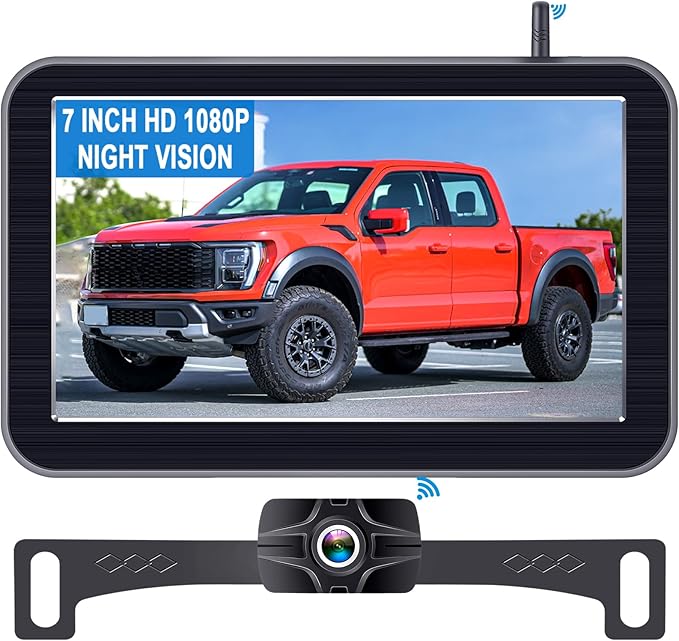 | HD 1080P Wireless Camera | Check Price |
Our Top Picks 2  | AUTO-VOX Solar Backup 5 | Check Price |
Our Top Picks 3  | AUTO-VOX Solar Backup 5″ II | Check Price |
Our Selected Top 12 Car Backup Camera Wireless Picks for Every Need
This list features a variety of wireless car backup cameras designed to improve safety and convenience while reversing. Each review covers how well the camera performs, the type of driver it fits best, and highlights its main advantages and potential drawbacks.
1. HD 1080P 7 Inch Wireless Backup Camera
HD 1080P 7 Inch Wireless Backup Camera offers a crisp, clear view behind your truck with simple installation. Perfect for those with pickup trucks looking to enhance parking and towing safety with ease.
Its standout feature is the wireless connection between camera and monitor that requires minimal wiring.
Installation takes about 15 minutes by hooking the monitor up to your vehicle’s power and the camera to the reverse or running lights. The monitor and camera connect automatically via Bluetooth, and no manual pairing is needed.
Using it daily is straightforward thanks to the 7-inch LCD screen delivering a wide 150-degree field of view, making reversing and changing lanes safer.
Picture quality is sharp with 1080p resolution, showing clear images even in low light thanks to the CMOS sensor. The build fits standard license-plate mounts on most pickups like F-Series and Silverado, making it a reliable fit.
Most users praise the plug-and-play setup; a few mention the camera’s wire only powers it and doesn’t transmit data.
Clear, 1080p video quality and automatic wireless connection make backing up easier and safer, while some users note the camera still needs a power wire attached. The pre-paired system removes the usual Bluetooth setup stress.
Pickup truck drivers who want a less complicated wireless setup will appreciate this camera. Those needing a unit for other vehicle types or without license-plate mounts should explore different options.
Pros
- Quick 15-minute installation
- High-definition 1080p video quality
- Wide 150-degree viewing angle
- No manual Bluetooth pairing needed
Cons
- Camera wire only for power, no data transmission
- Limited to pickup trucks with license-plate mounting
| Specification | Details |
|---|---|
| Screen Size | 7 inches |
| Video Capture Resolution | 1080p |
| Field Of View | 150 degrees |
| Connector Type | wireless |
| Voltage | 12 volts |
| Compatible Devices | Fits most pickup trucks with standard license-plate mounting |
2. AUTO-VOX Solar Wireless Backup Camera with 5 Monitor
Backing up feels safer with a clear view right on the 5-inch monitor. Suited for cars, SUVs, trucks, or trailers, it’s especially handy for anyone who wants a quick and simple setup without messing with wiring.
The solar-powered camera’s wireless connection is its biggest draw, cutting down on installation headaches and cable clutter.
Getting it going is about as simple as it gets, mount the camera on your license plate with either a screwdriver or the 3M adhesive, no drilling or tapping into your car’s electrical system. The solar panel keeps the camera charged, and no wires means fewer parts to worry about.
The 5-inch LCD screen plugs into your car’s 12-volt power outlet, and the receiver picks up a strong wireless signal up to 52 feet away, which works perfectly for parking and reversing.
The 1080p video quality delivers a wide 130-degree view, making it easy to spot obstacles behind the vehicle. The camera’s build feels solid with anti-theft screws securing it in place.
Reviews often mention clear and lag-free images thanks to the advanced digital signal. Some users note the solar power can be less reliable in low light or shaded spots, which sometimes needs supplementary power.
Clear, lag-free images stand out as the strongest advantage, making backing up easier and safer. At the same time, reliance on solar power sometimes means having to monitor the charge carefully in darker conditions. The wireless connection effectively reduces the clutter and complexity of installation.
Anyone looking for a fast, mostly wire-free backup camera solution will appreciate this system. Users with vehicles often parked indoors or shaded might want to consider other models with direct power options for more consistent camera performance.
Pros
- Quick 2-minute installation with no wiring needed
- Crystal-clear 1080p video with wide-angle lens
- Wireless signal works well up to 52 feet
- Solar-powered camera reduces battery worries
Cons
- Solar charging less reliable in shaded or low light areas
- 5-inch screen may be small for some drivers
| Specification | Details |
|---|---|
| Screen Size | 5 inches |
| Voltage | 12 volts |
| Real Angle of View | 130 degrees |
| Video Capture Resolution | 1080p |
| Wireless Range | 52 ft |
3. AUTO-VOX Solar Wireless Backup Camera with 5 Monitor
Wireless backup cameras designed for easy installation and clear visibility fit well with anyone looking for quick upgrades without rewiring. A standout feature is the 2-minute DIY setup, which requires minimal effort and avoids complicated wiring behind the cabin walls. It suits vehicles like cars, SUVs, trailers, or vans needing a straightforward rear view solution.
Installation involves mounting the rear camera near the license plate and powering the monitor through a convenient car charger connection. The wireless setup skips long video cables, which keeps the dashboard uncluttered.
Daily use proves practical thanks to the 5-inch monitor that clearly displays parking lines and obstacles. Its compact size makes it easy to glance at without blocking forward views during driving or parking.
The camera delivers a 1080p resolution image with a 130-degree field of view, providing clear and wide rear visibility. The build is solid for outdoor use, relying on CMOS optical sensor technology for consistent image quality.
The most praised aspect is the simplicity of installation, while some found the wireless signal could occasionally be affected by surroundings or interference.
The easiest part of this camera is how fast and simple it installs without running wires through the cabin. Commonly mentioned complaints point to the wireless signal occasionally faltering depending on the environment. The image quality generally stays sharp with the 1080p resolution helping visibility in parking situations.
People looking for an easy upgrade with minimal setup will appreciate this system. Those needing a fully wired, interference-free option or different power solutions might look for other models. Its design targets drivers valuing ease over more complex setups or additional features.
Pros
- Quick 2-minute DIY installation
- Clear 1080p resolution image
- Compact 5-inch monitor fits small spaces
- Wide 130-degree viewing angle
Cons
- Wireless signal may face occasional interference
- Monitor powered by car charger only
| Specification | Details |
|---|---|
| Screen Size | 5 inches |
| Optical Sensor Technology | CMOS |
| Real Angle of View | 130 degrees |
| Voltage | 12 volts |
| Video Capture Resolution | 1080p |
4. AUTO-VOX 6 Solar Wireless Backup Camera

Built with a 6-inch 16:9 screen designed to fit without being bulky, this wireless backup camera suits drivers of larger vehicles like trucks, vans, and trailers. Its biggest strength lies in offering a wider, clearer view behind the vehicle while keeping the dashboard from feeling crowded.
Setting up is straightforward with a car charger adapter, and the dual antenna system helps keep the wireless signal steady even when the camera is mounted far from the display. Daily driving feels safer as parking lines and surrounding objects appear clearly on the larger screen.
The camera’s wide 130-degree viewing angle means you get a broad picture, which is handy in tight spots.
It captures video in full 1080p, delivering clear imagery that makes backing up easier and more precise. The build feels solid and functional; the camera handles the outdoor mounting well.
Positive feedback highlights the steady connection and clarity, but some note occasional signal drops or interference under certain conditions.
Clear 1080p video and a wide field of view make parking and reversing safer. The dual antennas generally keep a steady signal but some signal disruptions can happen when obstacles interfere, which is a common point of complaint.
Drivers using trucks, trailers, or vans looking for a simple wireless backup camera with a reasonably sized screen will find it useful. Those needing a larger display or requiring an ultra-stable connection in very challenging environments might want to explore alternatives.
Pros
- Wide 130-degree angle for better rear visibility
- Dual antenna keeps signal more stable
- Uses car charger adapter for easy power
- Compact 6-inch screen fits well on dashboard
Cons
- Wireless signal can drop occasionally
- Screen size might be small for some larger trucks
| Specification | Details |
|---|---|
| Screen Size | 6 inches |
| Real Angle of View | 130 degrees |
| Video Capture Resolution | 1080p |
| Voltage | 12 volts |
| Connector Type | Car Charger Adapt |
| Field Of View | 120 feet |
5. 1080P HD Wireless Backup Camera

Magnetic mounting grabs attention right away, making installation nearly simple for trucks, pickups, and small RVs. Perfect for drivers wanting a quick, secure way to add a wireless backup camera without fussing over complicated brackets.
Setup takes less than a minute thanks to six strong rare earth magnets that hold firmly in place and protect your vehicle’s paint with a soft rubber coating. The 7-inch LCD screen fits nicely inside, powered by a simple USB connector.
The camera handles various weather extremes without losing grip, perfect for everyday use across seasons.
The 1080p camera delivers sharp images with a wide 170-degree angle, backed by a built-in algorithm that makes nighttime viewing clearer. It’s solidly built to handle tough conditions and doesn’t shake loose once mounted. Some users note occasional slight delays in video transmission, but the overall picture quality gets strong praise.
Strong magnets ensure the camera holds firmly and doesn’t fall off, even in extreme temperatures. The algorithm sharpens images significantly, but some experience slight lag in live video feed. The rubber coating protects paint well without reducing magnetic power.
Anyone needing a fast, magnetic wireless setup will appreciate its ease and weather resistance. Drivers wanting the clearest real-time picture without delay might want to explore other options with wired connections or different tech setups.
Pros
- Magnetic quick install in 1 minute
- Wide 170-degree viewing angle
- HD night vision improves clarity
- Wear-resistant rubber coating on base
Cons
- Video may have minor transmission delay
- Battery or power supply details not included
| Specification | Details |
|---|---|
| Screen Size | 7 inches |
| Video Capture Resolution | 1080p |
| Field Of View | 170 degrees |
| Connector Type | USB |
| Voltage | 12 volts |
6. HD 1080P Backup Camera Plug & Play

Wireless backup cameras that are easy to install with clear image quality are worth a bit more, and this one fits the bill well. It suits those who want a dependable, quick-to-set-up system with solid signal transmission.
Its biggest strength lies in how stable the wireless connection stays, reducing frustrating interruptions.
Setup involves just connecting the camera and monitor through a 4-pin video power cable and plugging the system into the cigarette lighter or reversing lights. Installation takes about 25 minutes and requires no complicated wiring.
Day-to-day use is straightforward, with images automatically appearing when reversing if connected to the reversing lights.
Performance is dependable thanks to a wide 149-degree field of view and 1080p resolution delivering clear, detailed images. The build uses a sturdy 3.0MM pure copper cable for signal stability. Praise often highlights how reliable the wireless signal is during use.
Some users note occasional minor signal drops under certain conditions.
The stable signal transmission stands out as the main positive, making backing up safer and less frustrating. A common issue is occasional brief signal drops, especially in difficult wireless environments. Installation speed and ease get regular praise from those using it.
Anyone needing a reliable, wireless camera for daily backup with a simple setup will be satisfied. Those looking for broader monitor compatibility or completely signal-proof wireless performance might want to consider other options.
Pros
- Quick installation in about 25 minutes
- Wide 149-degree viewing angle
- Stable wireless signal transmission
- Clear 1080p video resolution
Cons
- Signal can drop occasionally in some conditions
- Only compatible with monitors with 4-pin connector
| Specification | Details |
|---|---|
| Screen Size | 4.3 inches |
| Voltage | 12 volts |
| Field Of View | 149 degrees |
| Video Capture Resolution | 1080p |
| Connector Type | 4 Pin |
7. 2K Backup Camera Kit with 7 Inch Monitor
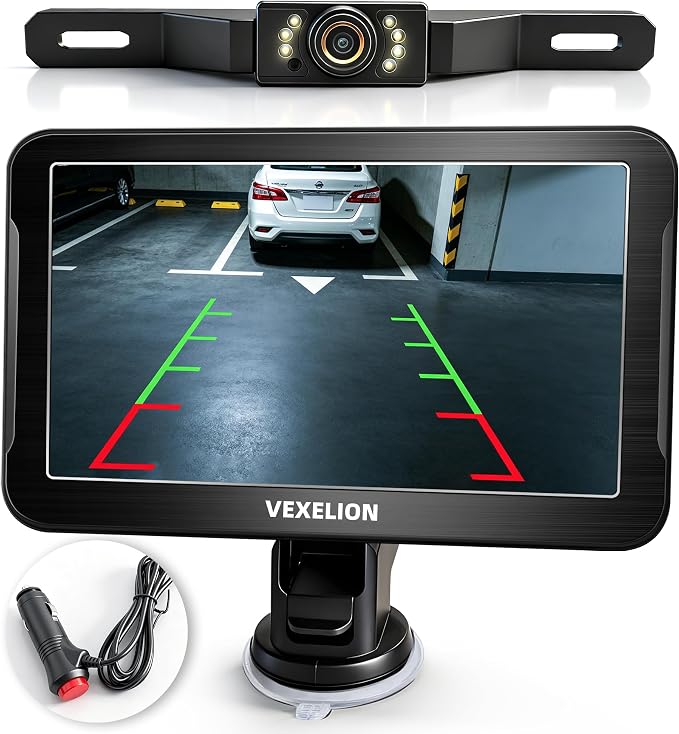
Backing up and parking in tight spaces often feels risky without clear visibility. Designed for drivers who want an easy upgrade, this kit offers a sharp 7-inch monitor paired with a 2K HD camera that delivers clear images to help you avoid obstacles with confidence.
Installation is surprisingly simple, taking under 15 minutes thanks to a single cable connecting the monitor to the camera. The plug-and-play setup suits non-experts and seniors who want a quick vehicle upgrade. Daily use is straightforward as the large screen shows a wide 170-degree view, making backing up less stressful.
Picture clarity is impressive with a true 2K resolution and a crisp 1440p video feed, providing vibrant, distortion-free images that reveal details behind the car. The build feels solid enough for regular use. Some found the wiring setup quick but wished for longer cables in certain vehicle models.
People appreciate how the straightforward plug-and-play design makes installation easy, even for beginners, while the high-resolution 2K camera provides sharp and vibrant images. However, the cable length has been mentioned as a limit, requiring some additional adjustments in certain cars.
Those who want a no-fuss upgrade with a clear picture and quick setup will appreciate this kit. Drivers needing longer wiring or brighter displays in sunny conditions might look for alternatives better suited to those needs.
Pros
- Quick DIY installation in under 15 minutes
- True 2K HD camera for clear images
- Large 7-inch monitor shows wide view
- Simple single-cable wiring
Cons
- Camera cable may be too short for some vehicles
- Monitor brightness could be better in daylight
| Specification | Details |
|---|---|
| Screen Size | 7 inches |
| Field Of View | 170 degrees |
| Effective Still Resolution | 2 mp |
| Video Capture Resolution | 1440p |
| Connector Type | Power Connector, RCA |
8. HD 1080P Wireless Backup Camera for Truck 5

A crisp 1080p resolution with a wide 150-degree field of view makes this wireless backup camera ideal for trucks needing clear rear visibility. It suits drivers looking for a camera that switches on automatically when reversing, simplifying parking and safety checks.
Installation is straightforward by connecting to the reversing lights power supply, triggering the camera only when backing up. You can opt for a constant rear view by wiring it to tail or license plate lights, while the monitor plugs into a USB or cigarette lighter for power. The 5-inch LCD monitor provides a decent screen size for quick glance checks during driving.
The camera produces sharp images in 1080p thanks to its CMOS sensor and wide-angle lens, which cover a broad rear view field. Build quality feels solid, with a wireless connector adding convenience. Praise often mentions the easy installation, but some note the monitor’s screen size can be limiting in bright daylight conditions.
Easy installation and sharp 1080p image quality stand out as key benefits. The most common drawback is the monitor’s visibility under strong sunlight, which can make the picture hard to see.
Drivers with trucks running on 24 volts and needing straightforward backup assistance will find this camera helpful. Those wanting a larger, brighter monitor or multi-voltage compatibility might want to explore other options.
Pros
- Clear 1080p image quality
- Wide 150-degree viewing angle
- Easy plug-and-play installation
- Automatically activates when reversing
Cons
- Monitor screen can be hard to see in bright light
- Works primarily with 24-volt systems
| Specification | Details |
|---|---|
| Screen Size | 5 inches |
| Voltage | 24 volts |
| Lens | Wide Angle |
| Field Of View | 150 degrees |
| Video Capture Resolution | 1080p |
9. Solar Wireless Backup Camera with 5 IPS Monitor

Drivers who want a simple, wireless backup camera without wiring hassles will find this system fits well. It suits people looking for easy installation and a dependable display, especially for everyday parking and reversing.
Its standout feature is the solar-assisted rechargeable battery, cutting down the need for frequent charging.
Setting it up is straightforward with no drilling or extra wiring needed, you just attach the camera to your license plate with a screwdriver and the included anti-theft screws. The monitor auto turns on and off with the camera, so there’s no fiddling with switches. The 5-inch screen is clear and easy to read during daily use, making backing up less stressful.
The camera delivers a 160-degree wide-angle view in full 1080p resolution, capturing plenty of detail. It holds up well physically, thanks to solid construction and anti-theft installation hardware. Reviews mention the battery lasts a long time, helped by the solar panel, but a few note occasional image lag in low light conditions.
The rechargeable 5000mAh battery combined with solar power means the camera runs for long periods without recharging. Anti-theft screws give added security during installation. Image quality is usually clear at 1080p, but the occasional lag in darker settings is the main user complaint.
This camera is a good match for anyone wanting straightforward setup and a clear wireless connection for daily parking. People who need a larger screen or high-performance night vision might want to consider other options with those specific features.
Pros
- Easy 2-minute installation without drilling
- Solar panel extends battery life
- Auto on/off for power saving
- Wide 160-degree viewing angle
Cons
- Image can lag in low light conditions
- Monitor size may be small for some drivers
| Specification | Details |
|---|---|
| Screen Size | 5 inches |
| Wireless Connector Type | Wireless |
| Lens Angle | 160 degrees |
| Video Capture Resolution | 1080p |
| Battery Capacity | 5000mAh |
| Optical Sensor Size | 1/2.7 inch |
10. Solar Wireless Backup Camera with 1080P Monitor

Wireless design and solar charging make this backup camera stand out for anyone wanting an easy install without drilling or wiring. Works well on cars, trucks, and older vehicles lacking factory cameras.
Its biggest strength is how fast and straightforward it attaches above or below your license plate.
Setup takes just a couple of minutes using included hardware and anti-theft screws, which give some extra security. The monitor is 5 inches and plugs into your car’s 12-volt outlet or USB.
You get a wide 150-degree view from the camera that tilts to match the vehicle’s angle. Night vision turns on automatically when it’s dark, helping you see clearly reversing.
The 1080P HD monitor shows clear, bright images day or night, making it easier to spot curbs, obstacles, or trailers. Built with a 1/3 inch CMOS sensor and a wide-angle lens, it fits well on most vehicles. Most people say installation is quick and easy, but some mention the monitor’s size might be small for bigger dashboards.
Users praise the simple installation without wiring or drilling, making it a good fit for older vehicles. The most common complaint concerns the monitor size, which some find small for viewing comfortably on larger dashboards.
Ideal for those who want a quick backup camera upgrade without vehicle modifications and prefer solar charging. People needing a larger display or more adjustable monitor options might want to look elsewhere.
Pros
- No wiring or drilling needed, installs in 2 minutes
- Solar powered for continuous charge
- Automatic night vision activation
- 150-degree wide viewing angle
Cons
- Monitor size may feel small for some dashboards
- Must position camera carefully to avoid glare
| Specification | Details |
|---|---|
| Screen Size | 5 inches |
| Voltage | 12 volts |
| Field Of View | 150 degrees |
| Video Capture Resolution | 1080p |
| Lens | Wide Angle |
11. AUTO-VOX CS-2 Wireless Backup Camera with 4.3 Monitor

AUTO-VOX CS-2 Wireless Backup Camera with 4.3 Monitor is perfect for anyone wanting a clear, wireless view behind their vehicle. Its standout feature is the simple two-step setup that connects easily without complicated wiring, making it ideal for those who want a quick and straightforward installation.
Setting it up involves just plugging the monitor into the cigarette lighter and hooking the camera to the reverse light power supply, cutting down on messy wiring. Day-to-day use is straightforward, with the wireless 2.4G signal transmitting images up to 33 feet without interference. The 4.3-inch screen is compact yet clear enough for reversing safely, and the wide-angle lens gives a broad view behind the car.
The camera delivers crisp, stable images thanks to the PC1058 sensor and 480p resolution. Night vision works well even in very low light (0.1 lux), showing what’s behind you clearly after dark. The build feels solid, though some mention the image quality isn’t HD.
The strongest praise focuses on easy installation and reliable night vision, while the main complaint regards the resolution not meeting HD standards.
People appreciate the simple installation and strong night vision of the system. However, many express disappointment with the 480p resolution, feeling it could be sharper for detailed viewing.
Suitable for those who want a straightforward wireless backup camera with good nighttime performance. Drivers needing higher resolution or a larger monitor would do better choosing a different model.
Pros
- Quick, two-step installation process
- Clear night vision at 0.1 lux
- Stable 2.4G wireless signal up to 33 feet
- Wide 110-degree viewing angle
Cons
- Image resolution limited to 480p
- Monitor screen size might be small for some
| Specification | Details |
|---|---|
| Screen Size | 4.3 inches |
| Field Of View | 110 degrees |
| Video Capture Resolution | 480p |
| Connector Type | Connect to reverse light |
| Voltage | 12 volts |
| Optical Sensor Technology | CMOS |
12. AUTO-VOX Solar Wireless Backup Camera with 5 Monitor

Mounting a backup camera without fuss or tangled wires makes parking much easier, especially for drivers of SUVs, trucks, or sedans. It suits anyone looking for a straightforward setup paired with a bright, clear monitor.
Its wireless design takes the hassle out of installation and use.
Setup can be done in under five minutes since no wiring runs between the camera and screen. Mounting the camera with the included hardware or 3M tape is simple, and powering the display is just a matter of plugging it into a 12V socket. The 5-inch anti-glare HD monitor stays readable in sunlight and at night, making daily reversing smoother and safer.
The camera delivers clear 1080p resolution during the day and night, showing dual views for better perspective when backing up. The wide-angle lens gives a broad look behind the vehicle.
The build feels solid and weather-resistant. Most praise is about how easy it is to set up and use, while some users mention the monitor size is smaller than expected.
Highly praised for its quick, no-wire installation and clear HD image quality, the camera fits a range of vehicles and simplifies safe reversing. The main drawback mentioned is the smaller-than-anticipated screen, which may affect visibility for some drivers.
Drivers wanting a fast, simple backup camera without complicated wiring will appreciate its ease of use. Those needing a larger display or an integrated vehicle system might want to consider alternate solutions instead.
Pros
- Wireless setup requires no running cables
- Clear 1080p HD resolution day and night
- Mounts easily with hardware or 3M tape
- Wide-angle lens for broader rear view
Cons
- Monitor size smaller than some expect
- Requires 12V power source for monitor
| Specification | Details |
|---|---|
| Screen Size | 7.2 inches |
| Compatible Devices | Car, SUV, Trailer, Truck, VAN |
| Voltage | 12 volts |
| Lens | Wide Angle |
| Video Capture Resolution | 1080p |
Best Wireless Car Backup Cameras Comparison Table
| Product | Screen Size | Compatible Devices | Field Of View | Resolution |
|---|---|---|---|---|
| HD 1080P Wireless Camera | 7 inches | Pickup trucks | – | – |
| AUTO-VOX Solar Backup 5 | 5 inches | Car, SUV, Trailer | 130 feet | – |
| AUTO-VOX Solar Backup 5″ II | 5 inches | Car, SUV, Trailer | 130 feet | 1080p |
| AUTO-VOX 6 Solar Backup | 6 inches | Car, SUV, Trailer | 120 feet | 1080p |
| 1080P HD Wireless Camera | 7 inches | Truck, car, trailer | 170 degrees | – |
| HD 1080P Plug & Play | 4.3 inches | Monitor | 149 degrees | 1080p |
| 2K Backup Kit 7 | 7 inches | Car | 170 degrees | 1440p |
| HD 1080P Truck Wireless | 5 inches | Monitor | 150 degrees | 1080p |
| Solar Wireless 5″ IPS | 5 inches | All Vehicles | – | 1080p |
| Solar Wireless 1080P | 5 inches | Smartphone | 150 degrees | 1080p |
| AUTO-VOX CS-2 4.3 | 4.3 inches | Monitor | 110 degrees | – |
| AUTO-VOX Solar Backup 5″ III | 7.2 inches | Car, SUV, Trailer | – | 1080p |
- Screen Size7 inches
- Compatible DevicesPickup trucks
- Field Of View–
- Resolution–
- Screen Size5 inches
- Compatible DevicesCar, SUV, Trailer
- Field Of View130 feet
- Resolution–
- Screen Size5 inches
- Compatible DevicesCar, SUV, Trailer
- Field Of View130 feet
- Resolution1080p
- Screen Size6 inches
- Compatible DevicesCar, SUV, Trailer
- Field Of View120 feet
- Resolution1080p
- Screen Size7 inches
- Compatible DevicesTruck, car, trailer
- Field Of View170 degrees
- Resolution–
- Screen Size4.3 inches
- Compatible DevicesMonitor
- Field Of View149 degrees
- Resolution1080p
- Screen Size7 inches
- Compatible DevicesCar
- Field Of View170 degrees
- Resolution1440p
- Screen Size5 inches
- Compatible DevicesMonitor
- Field Of View150 degrees
- Resolution1080p
- Screen Size5 inches
- Compatible DevicesAll Vehicles
- Field Of View–
- Resolution1080p
- Screen Size5 inches
- Compatible DevicesSmartphone
- Field Of View150 degrees
- Resolution1080p
- Screen Size4.3 inches
- Compatible DevicesMonitor
- Field Of View110 degrees
- Resolution–
- Screen Size7.2 inches
- Compatible DevicesCar, SUV, Trailer
- Field Of View–
- Resolution1080p
How to Choose the Best Wireless Backup Camera
Key factors to consider include camera resolution, wireless range, and ease of installation, as these ensure clear visibility and reliable connection. Choosing the right features avoids frequent replacements and costly repairs, providing safer driving and long-term satisfaction.
Video Quality and Resolution
Watching the rear view on a blurry screen has caused many close calls during reversing and parking. Clear, high-resolution images make spotting obstacles easier, reducing the chance of accidents.
A 720p resolution or higher is generally sufficient for daily use, ensuring details are visible without lag. Cameras with a wider field of view, typically between 120 and 170 degrees, let you see more to the sides, catching objects that could otherwise be missed.
Performance under varying lighting conditions is crucial. Cameras equipped with night vision or low-light enhancement provide clear visuals after dark or in poorly lit areas.
Without this, the image can be grainy or too dark, making it hard to judge distances accurately. Good cameras offer balanced brightness and contrast, so the rear view remains consistent whether it’s bright sunlight or twilight.
Wireless Connectivity and Range
Signal reliability can make or break the usefulness of a wireless backup camera. A weak or inconsistent connection causes intermittent video feed, frustrating the driver and increasing risk during tight maneuvers. A typical effective wireless range covers up to 50 feet, ensuring stable transmission even in larger vehicles like trucks or SUVs.
Interference from other wireless devices is a common issue but can be minimized by choosing systems operating on less crowded frequencies or those with frequency-hopping technology. Strong connections maintain a steady, real-time feed without noticeable lag or disconnection, allowing the driver to trust what’s on the monitor every time.
Installation and Compatibility
Mounting the camera varies greatly between sedans, trucks, and SUVs. Cameras designed with adjustable brackets or adhesive mounts simplify installation across different vehicle shapes.
Most are intended to fit above or around the license plate, but checking compatibility with a vehicle’s size and shape is essential to avoid awkward angles or blocked views.
Compatibility with existing monitors saves cost and setup time, but not all systems work with every car display. Some may require a dedicated monitor, so knowing the connection type beforehand is key. Power options typically include tapping into the vehicle’s reverse light circuit, allowing the camera to power on automatically when backing up, reducing manual handling or additional wiring hassles.
Durability and Weather Resistance
Daily exposure to rain, dust, and heat can degrade cheaper cameras quickly. A device rated at least IP67 for water and dust resistance handles splashes and dirt without issue. Cameras built with sturdy plastic or metal casings resist road vibrations and minor impacts, helping the system survive typical driving conditions without frequent repairs or replacements.
Longevity depends on both materials and design. Cameras sealed against moisture prevent internal corrosion, while shock absorption features inside the casing protect sensitive electronics. Regular exposure, from scorching sun to freezing temperatures, demands equipment tested to withstand such extremes without image quality deterioration.
Additional Features and Safety Enhancements
Parking guidelines superimposed on the video help judge distances more accurately than relying solely on visual estimation. These lines, adjustable for different vehicle sizes, assist in aligning the car properly without second-guessing. Some models integrate with sensors that trigger alerts if an object comes too close, boosting safety.
Additional alarms or beeps can warn of moving obstacles behind the vehicle, a benefit in crowded or busy environments. Cameras linking with other vehicle safety systems, like cross-traffic alerts, provide a more comprehensive overview, helping prevent collisions that might not be visible on the screen alone.
Optimizing Wireless Backup Camera Placement for Maximum Visibility
Choosing where to mount a wireless backup camera affects the quality of the view and the camera’s durability. Most users place cameras near the license plate to get a clear rear view without obstructions. Mounting too low can cause the lens to collect dirt or water more easily, reducing visibility.
Placing the camera at the center of the rear end ensures symmetrical views and easier judging of distances. Avoid areas where metal parts or accessories might block the transmission signal. A clean lens is essential, so positioning it where you can easily reach for cleaning helps maintain consistent performance.
- Ensure the camera angle covers as much of the rear as possible while avoiding too much ground.
- Test the live feed before final installation to confirm there are no blind spots.
- Keep the camera at a height that avoids frequent splashes or mud.
Tips for Maintaining and Extending the Life of Your Wireless Backup Camera
Wireless backup cameras need regular attention to keep the image clear and the connection strong. Dirt buildup on the lens is common and can be wiped off easily with a microfiber cloth to prevent scratches.
Avoid using harsh chemicals, which might damage the lens coating or housing.
Inspect the mounting bracket occasionally since vibrations from driving can loosen its position, causing the view to shift. The camera’s battery, if it uses one, should be checked for charge or replaced according to the manufacturer’s recommendations.
- Keep the camera housing dry and free from corrosion by parking in covered areas when possible.
- Check wireless connections periodically to make sure interference or signal dropouts haven’t developed.
- Regularly update the camera’s firmware if the manufacturer offers updates for improved functionality.
Comparing Wireless Backup Cameras to Wired Systems: Pros and Cons
Wireless backup cameras offer easier installation since they do not require running cables through the vehicle, reducing setup time significantly. The absence of wires also means fewer points for damage or corrosion, which can be a problem in wired systems.
On the other hand, wireless systems can sometimes experience signal interference from other electronics, causing occasional latency or signal dropouts. Wired cameras provide a consistent, uninterrupted video feed, which matters in critical parking situations.
- Wireless cameras allow for flexible placement and easy transfer between vehicles.
- Wired systems generally provide higher video quality and stable power supply without battery concerns.
- Maintenance can be simpler on wireless setups because of fewer physical connections.
People Also Asked
How Do I Install a Wireless Car Backup Camera Properly?
Mount the camera on the rear of your vehicle, usually near the license plate, and connect it to the reverse light power source for power. Make sure to secure the transmitter unit inside the car where it won’t get wet or damaged. Test the connection before finalizing the installation to ensure the video feed is clear.
Are Wireless Backup Cameras Compatible with All Car Models?
Most wireless backup cameras are designed to work with a wide range of cars, trucks, and SUVs, but it’s important to check compatibility with your vehicle’s display or monitor. Some require a dedicated screen or integration with an aftermarket head unit, so verify the connection options before buying.
What Is the Typical Lifespan of a Wireless Backup Camera?
A wireless backup camera typically lasts about 3 to 5 years with regular use and proper care. Exposure to harsh weather or frequent moisture can shorten its lifespan, so parking in sheltered areas helps extend its functionality. Replacement parts are usually available if the camera gets damaged.
How Do I Clean and Maintain a Wireless Backup Camera?
Use a soft cloth and mild detergent to clean the camera lens regularly, especially after driving in rain or mud. Avoid abrasive materials or high-pressure water jets, which can damage the lens or housing. Check wiring connections occasionally to prevent corrosion or loose contacts.
What Common Issues Should I Expect with Wireless Backup Cameras?
Common problems include signal interference, poor night vision, and lens fogging. Interference can come from other wireless devices or metal objects nearby, so try relocating the transmitter or receiver if the image flickers. Regularly clear the lens to maintain visibility in dim light.
Conclusion
Choosing the right wireless car backup camera comes down to a few key points: clear video quality for safe reversing, a reliable wireless connection that won’t cut out, and easy installation without professional help. The screen size and mounting options are also important depending on your vehicle and how you plan to use it.
Consider how often you will use the camera and the size of your vehicle when making a choice. A smaller car may not need a large display, while frequent use justifies spending a bit more for durability.
Check the comparison table again and the detailed reviews to find a model that fits your needs and budget.