
Top 12 Best Dash Cam for Honda Civic That Will Blow You Away
A dash cam that isn’t designed well for a Honda Civic can cause more frustration than help. Viewing angles might not cover blind spots, or the camera might stick out awkwardly, distracting the driver.
Some models struggle with constant power connections, leading to unexpected shutdowns just when recording is most needed. Finding the best dash cam for Honda Civic means getting one that fits the car’s interior without blocking your view yet captures everything clearly without interruption.
Key features that really make a difference include a compact design tailored to the Civic’s windshield size, so it doesn’t interfere with driving. Power options matter too; a hardwired model often provides steady operation, avoiding the battery drain common with USB connections. Video quality should be no less than 1080p to capture license plates and road signs clearly, and wide-angle lenses of around 140 degrees help cover lanes on both sides without distortion.
Need a Quick Check?
| Image | Product | Price |
|---|---|---|
Our Top Picks 1  | Honda Civic 4K Dash Cam | Check Price |
Our Top Picks 2  | Fitcamx Civic Dual Cam | Check Price |
Our Top Picks 3  | Mangoal Civic Dual Cam | Check Price |
Our Selected Top 12 Dash Cam for Honda Civic for Different Needs
This list features carefully chosen dash cams suitable for various driving needs and budgets in a Honda Civic. Each review covers performance aspects, ideal users, key advantages, and potential drawbacks to help you find the best match for your specific requirements.
1. 4K Dash Cam for Honda Civic
Exclusively designed to fit Honda Civic models from 2022 to 2025, this dash cam stays out of sight by mounting behind the rearview mirror, keeping your windshield clear. Its standout feature is the sharp 4K UHD video quality that captures clear details day and night, making it perfect for Civic drivers who want reliable, high-resolution footage without bulky devices.
Setting it up is straightforward with a plug-and-play system that requires no rewiring, perfect for those who want an easy installation. Daily use is simple through app control or push buttons, and the built-in WiFi lets you check footage without removing the microSD card.
The 145-degree field of view covers a wide angle of the road, while the parking monitor and G-sensor add extra security when the car is parked.
Video captured in 2160p and supported by the f/1.6 aperture sensor delivers crisp images even in low-light or night conditions thanks to the Super Night Vision feature. The dash cam stays well hidden and doesn’t interfere with driving visibility. Strongest praise highlights clear image quality and ease of installation, while some find the app control a bit limited in options.
Captures impressively clear video day and night with strong image quality praised repeatedly. Some find the app control a bit basic, which might frustrate users wanting more features.
Those looking for a quality, hidden dash cam tailored for recent Honda Civic models will appreciate the fit and footage. Users wanting extensive app functionality or a universal fit might want to look elsewhere.
Pros
- Custom fit for Honda Civic 2022-2025
- Clear 4K Ultra HD video quality
- Discreet rearview mirror mounting design
- Supports WiFi for easy video access
Cons
- App control options can feel limited
- Verify compatibility before purchase
| Specification | Details |
|---|---|
| Video Capture Resolution | 2160p |
| Mounting Type | Rearview Mirror Mount |
| Field Of View | 145 degrees |
| Connectivity Technology | Wi-Fi |
| Optical Sensor Technology | CMOS |
| Maximum Aperture | 1.6 f_stop |
2. Fitcamx Front and Rear Dash Cam for Honda Civic
Fitcamx Front and Rear Dash Cam fits perfectly behind the rearview mirror in Honda Civic models from 2022 to 2026. It suits drivers wanting a discreet, OEM-style camera with excellent video clarity both front and back.
The biggest strength lies in how it integrates smoothly to keep the interior looking neat without visible wires or gaps.
Setup involves choosing the right color cover to match your original rearview mirror, black or grey. It connects through Wi-Fi, allowing control and footage review on the FITCAMX app.
Daily use is straightforward with the rearview mirror mount making it unobtrusive. The 2-inch screen gives a quick check of recordings, while the wide-angle lenses cover a broad driving perspective day or night.
Video quality impresses with 2160P resolution upfront and 1080P in the rear, capturing sharp details with a wide 170° front view and 140° rear angle. Build feels solid thanks to the integrated design that fits tightly within the mirror cover.
Most praise focuses on the OEM look that prevents clutter, though some note the screen remains quite small, limiting on-device playback comfort.
The strongest praise highlights how the dash cam installs without visible wires and fits perfectly with the Honda Civic’s interior, providing clear, high-quality footage from both front and rear cameras. The common complaint is that the built-in screen is quite small, which makes watching videos directly on the device less convenient.
Drivers who want a discreet dash cam with excellent clarity and a clean look will be very satisfied with this choice. Those who rely on large, on-device displays for playback might prefer a model with a bigger screen for easier viewing.
Pros
- OEM-style fit keeps installation hidden
- High-resolution front and rear recording
- Wide angle lenses capture broad view
- Wi-Fi connectivity for easy file access
Cons
- Small 2-inch screen limits viewing comfort
- Color choice necessary for proper matching
| Specification | Details |
|---|---|
| Vehicle Compatibility | Honda Civic 2022-2026 (Black) |
| Video Resolution | Front 2160P + Rear 1080P |
| Field of View | 170° front + 140° rear |
| Connectivity | Wi-Fi |
| Mounting Type | Rearview Mirror Mount |
| Control Method | App (FITCAMX) |
3. Mangoal Front and Rear Dash Cam for Honda Civic
Fits snugly behind the rearview mirror of the 11th Honda Civic, this dual dash cam suits drivers wanting clear footage without cluttering their view. Its standout feature is the Ultra HD 4K front camera paired with a solid 1080P rear lens, capturing important details on the road.
Installation is straightforward with no wiring mess or complicated rewiring involved. It connects via Wi-Fi and works well with the Civic’s layout from 2022 to 2026. The camera’s app control makes accessing footage quick, while features like night vision and motion sensing keep you covered day and night during regular drives and parking.
Recording in 4K up front and 1080P at the rear delivers sharp videos where road signs and license plates are easy to see. The cam is built to fit OEM style, so it looks like part of the car rather than an add-on.
Some users find the app a bit clunky, but overall, it does its main job reliably and is praised for easy installation and clear image quality.
Clear 4K front video quality stands out as the biggest praise, making important road details easy to catch. The most common complaint is about its app, which can sometimes lag or be hard to use. Installation convenience is often highlighted positively as well.
Motorists driving an 11th generation Honda Civic will appreciate this dash cam’s exact fit and high-resolution recording. Those without the specified Civic models or who require a more intuitive app should consider alternatives.
Pros
- Custom fit for 11th gen Honda Civic
- Ultra HD Front, Full HD Rear Recording
- Built-in microphone and speaker
- Easy installation, no visible wiring
Cons
- App control can be unresponsive at times
- Only compatible with specific Civic models
| Specification | Details |
|---|---|
| Video Capture Resolution | Front 4K and Rear 1080P |
| Compatible Vehicle Type | 11th Honda Civic 2022-2026(Model B Gray) |
| Connectivity Technology | Wi-Fi |
| Control Method | App |
| Field Of View | 150 |
4. REDTIGER 4K Starvis Dual Dash Cam

Offering clear 4K front footage and a reliable rear camera, this dual dash cam fits well for anyone wanting strong day and night visibility while driving a Honda Civic. Its sharp video quality stands out as its biggest strength for capturing details on the road.
Setup is straightforward with windshield mounting and a 3.18-inch touch screen for easy access to settings. Voice commands reduce distractions, adding safety during use. Wi-Fi connectivity allows quick file transfers, paired with a free 128GB memory card to store plenty of video.
The built-in GPS logs location, helpful when reviewing trips.
Video capture is consistently sharp, thanks to the 170° front and 140° rear lens angles capturing wide views. Night vision performs well in darker conditions aided by WDR and HDR technology.
The compact design fits discreetly on the windshield. Most praise highlights the clear, crisp footage, while the one common complaint is about occasional interface lag on the touchscreen.
Clear, high-resolution footage with strong night visibility is the highlight of this dash cam, making daily driving recording reliable. Some experience occasional lag on the touch interface, which can slow menu navigation.
Drivers wanting a dual-camera setup with great front quality and easy voice controls will appreciate this model. Those needing smoother touchscreen responsiveness or a higher resolution rear camera might want to explore other options.
Pros
- 4K UHD front camera with STARVIS sensor
- Voice commands for hands-free control
- Free 128GB memory card included
- Super night vision with WDR and HDR
Cons
- Touch screen sometimes experiences minor lag
- Rear camera resolution limited to 1080P
| Specification | Details |
|---|---|
| Video Capture Resolution | 2160p |
| Field Of View | 170 degrees |
| Screen Size | 3.18 inches |
| Connectivity Technology | Wi-Fi |
| Mounting Type | Windshield Mount |
| Special Features | Touch Screen, Voice Control, Built-In GPS, WDR, Loop Recording |
5. ROVE R2-4K Dual Dash Cam

Designed with durable materials and a compact windshield mount, the ROVE R2-4K Dual Dash Cam fits perfectly in a Honda Civic. It captures both front and rear views simultaneously, with its upscaled 4K front camera being the standout feature for those wanting clear, detailed footage from both directions.
Setup is straightforward using the ROVE app on iOS or Android, connecting via 5.8GHz Wi-Fi for fast downloads. Daily use is convenient thanks to its 3-inch screen and app controls, allowing access to video clips and settings without removing the device. Built-in GPS adds useful geo-tagging and speed info directly to recordings, making it handy for tracking trips and incidents.
Performance excels at recording sharp, detailed footage day and night, thanks to the Sony STARVIS 2 sensor and super night vision technology. The front camera records at 2.5K and upscales to 4K for clearer detail, while the rear stays at full HD 1080p.
The supercapacitor improves reliability in hot or cold conditions. The most frequent praise highlights the video quality, whereas the common complaint involves the rear camera not having native 4K resolution.
The best thing about this dash cam is its sharp day and night footage, especially the front camera’s detailed upscaled 4K videos. The main downside comes from the rear camera recording only in native 1080p rather than 4K, which some might find limits the rear view’s clarity.
Anyone wanting clear dual-direction recordings with easy app access will like this cam. People needing native 4K rear footage or a more traditional button control might want to look at other options better suited for those features.
Pros
- Front camera upscales video to 4K for clear details
- Simultaneous front and rear recording
- Fast 5.8GHz Wi-Fi for downloading files
- Reliable supercapacitor handles heat and cold well
Cons
- Rear camera only records native 1080p, not 4K
- App-based control might feel less intuitive for some
| Specification | Details |
|---|---|
| Video Capture Resolution | 1080p, 2160p (Upscaled), 1440p (Native) |
| Connectivity Technology | USB, Wi-Fi |
| Control Method | App |
| Screen Size | 3 inches |
| Field Of View | 150 degrees |
| Special Features | Built-In GPS, OTA Firmware Updates, Supercapacitor |
6. 4K Mini Front Dash Cam

Easy to miss but hard to forget, the 4K Mini Front Dash Cam offers a clear advantage with its sharp 4K UHD video quality. It’s designed for drivers seeking detailed footage from their front windshield without the extra bulk of additional gear. The standout feature is the impressive 160-degree field of view paired with high resolution, helping catch important details on the road.
Setup involves sticking the adhesive mount onto the windshield, which is straightforward and stays put. The included 32GB memory card means immediate use without extra purchases, and the built-in 5G WiFi lets you control the dash cam with an app.
Features like loop recording, voice recording, and accident lock make daily use simple and reliable, while 24-hour parking monitoring tracks your car even when parked.
Video quality remains sharp and detailed, fulfilling its task as a front dash cam well. The build is compact and discreet, quietly working in the background without distracting from the view.
Most praise notes how clean the video looks, especially at high resolution, while a frequent complaint is the reduction from a 64GB to a 32GB memory card, limiting storage space for longer drives.
Videos are impressively clear and detailed thanks to the 4K resolution and wide angle. Some find the drop from 64GB to 32GB storage limits how much footage can be saved without swapping cards. Users appreciate the convenience and image quality, while storage capacity is the main source of frustration.
Anyone wanting sharp front footage and an easy start with a free memory card will find it convenient. Those needing longer recording time or a screen for quick playback may want to look for another option.
Pros
- Clear 4K UHD video for crisp footage
- Wide 160-degree lens captures broad view
- Includes 32GB memory card for plug-and-play
- Discrete design doesn’t obstruct driving view
Cons
- Memory card reduced from 64GB to 32GB
- No built-in display for quick viewing
| Specification | Details |
|---|---|
| Video Capture Resolution | 2160p |
| Field Of View | 160 degrees |
| Connectivity Technology | Wi-Fi |
| Memory Card | 32GB microSD included |
| Mounting Type | Adhesive Mount |
| Control Method | App |
7. WOLFBOX G840S 12 4K Mirror Dash Cam

4K UHD clarity combined with a huge 12 mirror display makes this dash cam a standout for anyone driving a Honda Civic who wants an impressive field of view and sharp footage. Its ability to cut down blind spots and record in great detail is hard to beat in its category.
Setting it up is pretty straightforward since it mounts directly on your rearview mirror, replacing it without any hassle. The touchscreen lets you control it easily while parked, and the built-in GPS shows your location and speed. Being able to connect to your phone over 5.8GHz WiFi means checking footage or sharing clips without messing with cables.
The additional rear camera helps you stay aware by covering what’s behind you.
Video quality is crisp with the front camera shooting in 2160p 4K and rear in 1080p, capturing clear images even at night. The build feels solid and compact, fitting well without obstructing your view.
People have praised the extra-large screen for reducing blind spots significantly, though some mention the size can take a bit of getting used to on the mirror. It handles recording and parking monitoring reliably.
The extra-large display is highly praised for improving driving visibility, while some find it takes adjustment because it’s bigger than standard mirrors. The WiFi and GPS features work well for real-time tracking and replay, making it easier to handle recordings on the go.
Anyone looking for a high-resolution camera and wide view will appreciate this setup, especially if you want rear coverage as well. Drivers who prefer a less obtrusive mirror or simpler dash cams might look for slimmer alternatives.
Pros
- High-resolution 4K front camera
- Large 12″ display reduces blind spots
- WiFi app for easy playback and sharing
- Includes rear camera for full coverage
Cons
- Large display can feel bulky on mirror
- Touchscreen can be sensitive to accidental taps
| Specification | Details |
|---|---|
| Video Capture Resolution | 2160p |
| Screen Size | 12″ |
| Field Of View | 170 degrees |
| Mounting Type | Rearview Mirror Mount |
| Connectivity Technology | USB |
| Other Features | Built-In GPS, Touch Screen, Night Vision, Parking Monitor |
8. 4K Front and Rear Dash Cam

Capturing crisp footage from front and rear while driving a Honda Civic matters most for safety and security. This 4K Front and Rear Dash Cam suits anyone looking for detailed, clear video evidence in all lighting conditions. Its biggest strength is the remarkable 4K UHD front and 2K rear dual recording that catches everything in high definition.
Setting up through the app is simple, with easy connection options using 5.8G or 2.4G dual Wi-Fi bands. The 3-inch LCD screen on the dashboard makes it easy to check recordings or adjust settings without distractions.
Wide 170° lenses cover multiple lanes, while WDR and night vision help capture good detail in shadows and nighttime driving. Built-in GPS tracks your routes continuously without extra gadgets.
The main task of capturing road events is handled with precision, providing sharp, balanced footage day or night. The build quality feels solid enough for daily use, mounted firmly on the dashboard. Strongest praise points to its high-resolution video clarity, and the most common issue is occasional complexity in app operation during setup or updates.
The sharp video quality at both front and rear cameras receives frequent praise, making it easy to identify details in almost any lighting. The main drawback noted is the app’s occasional difficulty during installation or firmware upgrades, which might require patience.
Someone eager for detailed recording and route tracking will appreciate this dash cam’s abilities. Those who want a plug-and-play device without app tinkering might prefer simpler models without as many features.
Pros
- Super clear 4K front and 2K rear video recording
- Wide 170° lenses cover multiple lanes easily
- Dual-band Wi-Fi for flexible app connection
- Built-in GPS records exact routes automatically
Cons
- App setup and updates can be complicated
- Dashboard mount may block some view for shorter drivers
| Specification | Details |
|---|---|
| Video Capture Resolution | 4K Front, 2K Cabin and Rear |
| Field Of View | 170 degrees |
| Connectivity Technology | Wi-Fi |
| Control Method | App |
| Maximum Aperture | 1.8 f_stop |
9. REDTIGER F7NP 4K Front and Rear Dash Cam
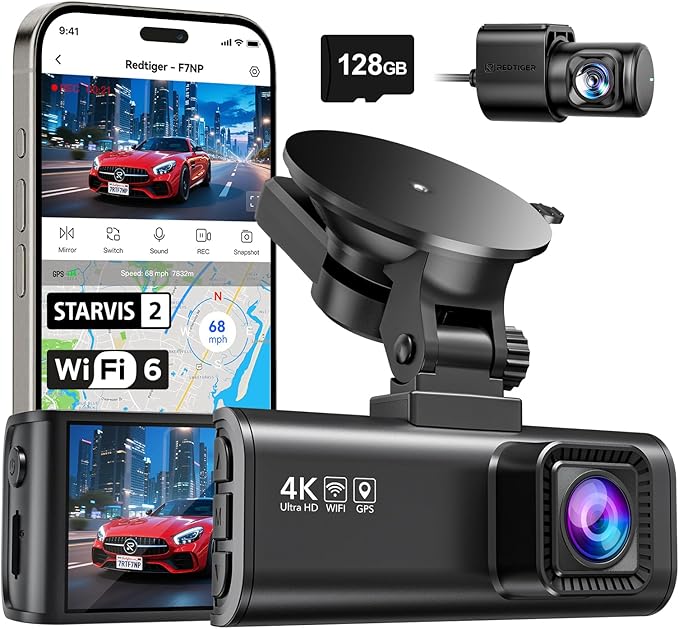
Capturing every detail with 4K front and 1080P rear recording, this dash cam is perfect for anyone wanting crystal-clear video evidence on the road. It suits daily commuters, road trip lovers, and rideshare drivers, with its standout feature being the advanced STARVIS 2 sensor combined with wide-angle lenses for great clarity day and night.
Setting up involves mounting it on your windshield, which is straightforward thanks to its compact design. The built-in WiFi lets you control the camera through an app, making access to footage simple without removing the SD card.
Loop recording ensures older clips are overwritten automatically, so you never run out of space, and the 128GB memory card included means you get plenty of storage straight away.
The camera records sharp and balanced images both day and night thanks to the STARVIS 2 sensor and WDR night vision. It feels sturdy and well-made while staying unobtrusive on the windshield.
Praise often focuses on the excellent video quality, while a common complaint is the screen size being only 3.16 inches, which some find a bit small for playback and navigation.
Clear and high-contrast footage captured by the STARVIS 2 sensor earns praise as the best part, while the screen size draws comments for being on the small side. The compact design and dual-camera setup make it easy to install without distraction on the windshield.
Ideal for those who want detailed video evidence both front and rear without fuss. People needing larger display screens or simpler controls might look for other models offering bigger monitors or physical buttons.
Pros
- Stunning 4K front and 1080P rear video quality
- Wide-angle lenses offer broad coverage
- Includes free 128GB memory card
- Wi-Fi connectivity with app control
Cons
- Screen size only 3.16 inches
- Setup requires app for full control
| Specification | Details |
|---|---|
| Video Capture Resolution | 1080p, 2160p |
| Field Of View | 170 degrees |
| Control Method | App |
| Screen Size | 3.16 |
| Connectivity Technology | Wi-Fi |
| Mounting Type | Windshield Mount |
10. 70mai A810 Lite 4K Front and Rear Dash Cam

Drivers who want a clear view of both front and rear while on the road will appreciate the 70mai A810 Lite 4K Front and Rear Dash Cam. It suits Honda Civic drivers who want sharp video quality and dependable evidence during incidents.
Its biggest strength lies in delivering true 4K resolution for the front camera and solid 1080P rear recording.
Getting the dash cam set up on the windshield is straightforward with the included mount, while the app control makes accessing settings and footage easy. Voice commands offer hands-free operation, useful during driving. Continuous loop recording and G-sensor protection mean the camera captures everything without needing constant attention.
Parking mode helps keep an eye on the car even when parked.
Capturing ultra-HD 3840×2160P video upfront provides incredibly detailed footage where license plates and road signs stand out clearly. The enhanced night vision using HDR and a large aperture keeps images balanced in low-light conditions.
The build feels solid and suitable for various vehicles. Most praise centers on video clarity, but some users mention occasional challenges with the Wi-Fi connection.
The 70mai A810 Lite is especially praised for its crystal-clear 4K front video which captures every detail well, something very useful in recording incidents. The most common complaint relates to occasional issues maintaining a stable Wi-Fi connection, which can affect quick access to footage through the app.
Anyone who values sharp video quality and multiple control options will enjoy this dash cam, particularly drivers on highways or in busy city traffic. Those who prioritize a larger built-in display or require ultra-reliable wireless connectivity might want to look at alternatives.
Pros
- True 4K front camera resolution
- Easy app-based control and voice commands
- Reliable parking mode with G-sensor
- Wide 140-degree field of view covers blind spots
Cons
- Wi-Fi connection sometimes unstable
- Screen size only 3.18 inches limits preview detail
| Specification | Details |
|---|---|
| Video Capture Resolution | 2160p front, 1080p rear |
| Field Of View | 140 degrees |
| Connectivity Technology | 5GHz Wi-Fi 6, USB |
| Other Special Features | 24H Parking Mode, G-Sensor Protection, Loop Recording |
| Control Method | App, Push Button, Voice |
| Screen Size | 3.18 inches |
11. 360 View 4 Channel Dash Cam

Covering every angle around your Honda Civic is what makes this dash cam stand out. It’s designed for those wanting full 360-degree recording, including interior footage, thanks to four cameras capturing the front, rear, and both sides simultaneously. Its biggest strength is the complete vehicle coverage, which offers a lot more than typical front-only dash cams.
Setting it up involves mounting the dash cam on your dashboard and connecting it via USB or Wi-Fi for easy control through the app or push buttons. Day-to-day use benefits from adjustable front cameras for flexible views, a compact design that doesn’t clutter the windshield, and features like time-lapse recording to save memory.
Parking mode works well when paired with the optional ACC hardwire kit for added security when the car is parked.
It records solid 1080p footage from every direction, making it reliable for capturing incidents no matter where they happen around your vehicle. The durable build includes a built-in supercapacitor, which is better than regular batteries for heat resistance. The main praise focuses on the all-around recording capability, while a common issue noted by some is the parking mode requiring an extra purchase to function fully.
Many appreciate the four-camera setup that captures every angle around the car, providing thorough coverage and confidence. However, the parking mode feature isn’t ready out of the box and requires buying an additional hardwire kit, which can be inconvenient for some users.
Anyone wanting comprehensive monitoring for their Honda Civic will find the multiple cameras ideal. Drivers looking for simple front-only recording or who dislike extra accessories for full function might prefer a different model with built-in parking mode support.
Pros
- Four cameras provide full surround coverage
- Time-lapse recording saves memory space
- Built-in Wi-Fi for easy access and control
- Compact design fits neatly on dashboard
Cons
- Parking mode needs extra ACC hardwire kit
- Limited to 1080p resolution, not higher
| Specification | Details |
|---|---|
| Video Capture Resolution | 1080p |
| Field Of View | 360 degrees |
| Connectivity Technology | USB, Wi-Fi |
| Control Method | App, Push Button |
| Screen Size | 3 inches |
| Mounting Type | Dashboard Mount |
12. Fitcamx Front and Rear Dash Cam for Honda Civic

Fitcamx Front and Rear Dash Cam for Honda Civic fits perfectly on 2022-2026 Civic models, including Si and Type R. It stands out for its OEM-style look that integrates smoothly with your rearview mirror, giving a clean and factory-installed feel with no wires showing.
Installing the dash cam requires no trimming or wire splicing, which makes setup straightforward and tidy. The black cover matches the mirror casing, so it doesn’t look out of place. Day-to-day use benefits from built-in WiFi for quick video transfers and a compact design that doesn’t distract from your view while driving.
The front camera records in 4K quality, capturing clear and detailed footage at 2160P, while the rear camera records in 1080P, balancing quality and storage. The build is solid with a lithium metal battery cell powering the unit. One common praise is the high video clarity, and a usual complaint is the limited color option, especially if you don’t have the black mirror cover.
Video clarity on the front camera is highly praised, delivering detailed footage useful for insurance or security. A frequent issue is the need to select the correct mirror cover color, which limits compatibility if your mirror cover is a different shade or the exterior color of your car is not black or grey.
Perfect for Civic drivers looking for a sleek, factory-style dash cam that captures crisp video and installs easily. Drivers needing color options for mirror covers beyond black or grey should look elsewhere. Those prioritizing high-resolution rear footage might consider other models as well.
Pros
- OEM look with no trimming or visible wires
- High front camera resolution at 2160P
- Built-in WiFi for easy video access
- Fits multiple Civic models and trims
Cons
- Only black or grey cover options available
- Rear camera limited to 1080P resolution
| Specification | Details |
|---|---|
| Video Capture Resolution | 1080p, 2160p |
| Mounting Type | Rearview Mirror Mount |
| Connectivity Technology | Wi-Fi |
| Battery Cell Type | Lithium Metal |
| Memory Storage Capacity | 128 GB |
| Compatible Vehicle Type | Car |
Best Dash Cams for Honda Civic Comparison Table
| Product | Compatible Vehicle | Video Resolution | Connectivity | Mounting Type |
|---|---|---|---|---|
| Honda Civic 4K Dash Cam | Car, Honda Civic | 2160p | Wi-Fi | Rearview Mirror Mount |
| Fitcamx Civic Dual Cam | Honda Civic 2022-2026 | Front 2160P + Rear 1080P | Wi-Fi | Rearview Mirror Mount |
| Mangoal Civic Dual Cam | 11th Honda Civic 2022-2026 | – | Wi-Fi | – |
| REDTIGER 4K Starvis Cam | Bus, Car, Minivan, Truck | 4K Front and Rear | Wi-Fi | – |
| ROVE R2-4K Dash Cam | Bus, Car, Minivan, SUV, Truck | – | USB, Wi-Fi | – |
| Mini 4K Front Cam | Universal | 2160p | Wi-Fi | – |
| WOLFBOX G840S Mirror Cam | Bus, Car, Minivan, Truck | – | USB | – |
| Generic 4K Dual Cam | Car | 4K Front, 2K Cabin Rear | Wi-Fi | – |
| REDTIGER F7NP Dual Cam | Bus, Car, Minivan, Truck | 4K Front and Rear | Wi-Fi | – |
| 70mai A810 Lite Cam | Bus, Car, Minivan, Truck, Uber | – | 5GHz Wi-Fi 6, USB | – |
| 360 View 4 Channel Cam | ATV, All, Bus, Car, Minivan, RV, Truck | 1080p | USB, Wi-Fi | – |
| Fitcamx Civic Dual Cam V2 | Car | 1080p, 2160p | Wi-Fi | Rearview Mirror Mount |
- Compatible VehicleCar, Honda Civic
- Video Resolution2160p
- ConnectivityWi-Fi
- Mounting TypeRearview Mirror Mount
- Compatible VehicleHonda Civic 2022-2026
- Video ResolutionFront 2160P + Rear 1080P
- ConnectivityWi-Fi
- Mounting TypeRearview Mirror Mount
- Compatible Vehicle11th Honda Civic 2022-2026
- Video Resolution–
- ConnectivityWi-Fi
- Mounting Type–
- Compatible VehicleBus, Car, Minivan, Truck
- Video Resolution4K Front and Rear
- ConnectivityWi-Fi
- Mounting Type–
- Compatible VehicleBus, Car, Minivan, SUV, Truck
- Video Resolution–
- ConnectivityUSB, Wi-Fi
- Mounting Type–
- Compatible VehicleUniversal
- Video Resolution2160p
- ConnectivityWi-Fi
- Mounting Type–
- Compatible VehicleBus, Car, Minivan, Truck
- Video Resolution–
- ConnectivityUSB
- Mounting Type–
- Compatible VehicleCar
- Video Resolution4K Front, 2K Cabin Rear
- ConnectivityWi-Fi
- Mounting Type–
- Compatible VehicleBus, Car, Minivan, Truck
- Video Resolution4K Front and Rear
- ConnectivityWi-Fi
- Mounting Type–
- Compatible VehicleBus, Car, Minivan, Truck, Uber
- Video Resolution–
- Connectivity5GHz Wi-Fi 6, USB
- Mounting Type–
- Compatible VehicleATV, All, Bus, Car, Minivan, RV, Truck
- Video Resolution1080p
- ConnectivityUSB, Wi-Fi
- Mounting Type–
- Compatible VehicleCar
- Video Resolution1080p, 2160p
- ConnectivityWi-Fi
- Mounting TypeRearview Mirror Mount
How to Choose the Best Dash Cam for Honda Civic
Focus on video quality, ease of installation, and reliable storage options when selecting a dash cam for your Honda Civic. Choosing the right features guarantees clear recordings and easy use, helping avoid disputes and extra costs caused by faulty evidence or complex setups.
Video Quality and Field of View
Footage quality can make or break the usefulness of a dash cam, especially when you need clear evidence after an incident. A 1080p resolution with at least 30 frames per second provides sharp and smooth video, making license plates and road signs readable. A wider angle lens, around 140 to 170 degrees, captures multiple lanes and sidewalks, reducing blind spots.
Narrower lenses might miss critical details that can affect accident reviews.
Low-light conditions often hide important moments, so good night vision is essential. Cameras that use Sony STARVIS sensors or have infrared LEDs perform better in dim or rainy settings. Ordinary models tend to produce grainy, unclear footage after dusk, which defeats the purpose of continuous recording.
Reliable low-light performance means the dash cam works effectively 24/7, whether on city streets or highways.
Mounting and Size Compatibility
A dash cam that hangs awkwardly or sticks out too much can block the driver’s view and become a distraction. Smaller, compact units fit discreetly behind the rearview mirror and blend with the windshield without obstructing vision. The design needs to accommodate the Honda Civic’s curved windshield and interior layout, allowing easy angle adjustments so the camera points exactly where you want.
Installation should not require professional help or complicated wiring. A mounting system with a strong suction cup or adhesive that holds firm through vibrations and potholes is crucial.
Loose mounts shift footage noticeably, making recordings questionable. The best mounts stay steady even on rough roads, which improves video stability without additional accessories.
Power Source and Battery Life
Powering the dash cam throughout your drive matters more than expected. Some models offer hardwiring kits that connect directly to the car’s fuse box, ensuring the camera runs continuously without draining internal batteries. Internal batteries only last a few minutes after the engine stops and won’t support parking mode for extended periods.
Honda Civic’s power management system can cause issues if the dash cam draws power improperly, leading to battery drain or unexpected shutdowns. Devices with built-in protections like overcharge and overheating prevention provide safety for both the camera and the vehicle’s electrical system. Reliable power means the camera stays active whenever you need it.
Storage and Connectivity Options
Limited storage can frustrate daily use, especially if the dash cam doesn’t have expandable memory options. Models supporting microSD cards up to 128GB or higher help store hours of footage without constant attention. Automatic loop recording ensures older files are overwritten smoothly, so storage stays available without manual deletion.
Transferring video files manually can be tedious. Cameras with Wi-Fi or Bluetooth connectivity offer direct transfer to smartphones through dedicated apps, making review and sharing much easier.
This feature saves time and removes the hassle of removing memory cards or connecting cables regularly.
Safety and Driver Assistance Features
Detection of collisions or sudden impacts is vital for capturing relevant footage without user input. A built-in G-sensor triggers emergency recording to lock files from being overwritten after accidents.
This reduces stress by preserving crucial evidence immediately.
Parking mode helps keep an eye on the vehicle when it’s off, recording motion or impacts around it. Without this, damage or theft during parking goes unnoticed.
Alerts like lane departure or forward collision warnings can support safer driving by notifying the driver of potential hazards, providing an extra layer of safety beyond basic recording.
Optimizing Dash Cam Placement for Maximum Coverage in Your Honda Civic
Positioning a dash cam in a Honda Civic requires attention to the dashboard shape and windshield angle. Mounting the camera just behind the rearview mirror keeps it out of sight and avoids blocking your view.
Make sure the lens covers as much of the road ahead as possible, including the hood line and adjacent lanes. Adjust the tilt so it captures both close navigation details and distant traffic. Use the supplied adhesive or a suction mount that suits the Civic’s slightly curved glass.
Route the power cable discreetly along the edge of the windshield and tuck it into the trim to prevent distractions or interference with airbags. Avoid placing the camera too low on the dash where glare or reflections may degrade video quality. After installation, test video clarity during day and night driving to confirm optimal coverage before finalizing the mount.
Maintaining Your Dash Cam: Cleaning and Firmware Updates
Keeping a dash cam in good operating condition includes regular lens cleaning and software updates. Use a microfiber cloth to gently remove dust from the lens without scratching.
Avoid harsh chemicals; plain water or lens-safe wipes work well. Firmware updates often fix bugs and improve features; these are usually available from the manufacturer’s website or app. Check for updates every couple of months to maintain compatibility and performance.
Before downloading, back up critical videos just in case. The memory card should be formatted in the dash cam periodically to prevent data corruption. Proper cable connections and clean power sources also help the device run smoothly.
Routine maintenance reduces the chances of malfunction when footage is needed most.
How Dash Cams Enhance Safety and Evidence Collection During Accidents
Dash cams provide clear timestamps and continuous recording, which prove useful after collisions. They document exactly how an accident occurred by capturing video evidence from the driver’s perspective. This can clarify fault in disputes and speed up insurance claims.
Many models automatically save footage triggered by impact sensors, protecting files from being overwritten. Having video also encourages safer driving habits and deters fraudulent claims.
In areas with heavy traffic or complex intersections, dash cams ensure every detail is recorded. For drivers of a Honda Civic, a well-placed camera combined with reliable video quality means confident documentation and an additional layer of security on the road.
People Also Asked
What Size Dash Cam Fits Well in a Honda Civic?
A compact dash cam around 2 to 3 inches wide fits well in a Honda Civic without blocking the driver’s view. Choose a model with a low profile that mounts behind the rearview mirror for easier concealment.
How Do I Properly Install a Dash Cam in My Civic?
Mount the dash cam near the rearview mirror using the provided adhesive or suction cup, then route the power cable along the top edge of the windshield, tucking it under the headliner or trim panels. Use a fuse tap or car charger for power from the 12V outlet.
Are Dash Cams Compatible with Honda Civic Electrical Systems?
Most dash cams work with the Honda Civic’s 12V accessory power system without issues. Make sure the cam’s power adapter is compatible, and consider using a model with parking mode that draws minimal current to avoid battery drain.
How Long Do Dash Cams Typically Last in a Car?
Dash cams typically last about 3 to 5 years, depending on the quality and how often you use parking mode. Memory cards should be replaced regularly to prevent corrupt footage.
What Common Issues Do Honda Civic Dash Cams Experience?
Common issues include power cable interference with airbags if poorly routed, frequent overwriting of footage if the memory card is full or corrupted, and occasional freezing or rebooting in extreme heat or cold conditions.
Conclusion
Choosing a dash cam for a Honda Civic mainly comes down to size and mounting options, video quality, and ease of use. The camera should fit well without blocking your view or controls.
Clear footage helps in any incidents or disputes. Controls and settings need to be straightforward so you can adjust quickly while driving or reviewing clips later.
Consider how often you’ll use the dash cam and how much space you have on your windshield or dashboard. A budget-friendly model can be just fine for occasional use, but daily drivers may want better features. Take another look at the comparison table and the options above to find the balance that suits your Civic and driving habits.