
Top 12 Best Dash Cam for Inside and Outside You Need Now
Cheap or poorly chosen dash cams struggle with glare, limited viewing angles, or flimsy mounts that fall off during bumpy drives. The best dash cam for inside and outside combines solid build quality with practical features that handle both interior and exterior recording without constant adjustment.
A model that only focuses on the windshield misses crucial moments happening inside the car, while one designed solely for interior use won’t capture road incidents. Having a single device that offers clear images on both sides avoids the hassle of multiple cameras and makes it easier to review events from any angle.
Key aspects that set a good dash cam apart include sensor quality, mounting stability, and power options. A sensor with at least 1080p resolution ensures license plates and faces are readable in varying light.
A firm mount with suction or adhesive must stay put through vibrations and heat changes without scratching windows or leaving residue. Reliable wiring or a built-in battery prevents shutdowns during brief power interruptions. Easy access for cleaning lenses is another practical factor since dust or smudges can quickly blur footage.
Need a Quick Check?
| Image | Product | Price |
|---|---|---|
Our Top Picks 1  | REDTIGER F17 Dash Cam | Check Price |
Our Top Picks 2  | 70mai T800E Dash Cam | Check Price |
Our Top Picks 3  | 2.5K+ Front Inside Cam | Check Price |
Our Selected Top 12 Dash Cam for Inside and Outside Worth Considering
This list features carefully chosen dash cams designed for both interior and exterior use, highlighting their video quality, ease of installation, and special features. Each review explains how the camera performs in different settings, who it is best suited for, and its main advantages and drawbacks.
1. REDTIGER F17 4K 3 Channel Dash Cam
Great for anyone needing full coverage inside and outside their vehicle, this REDTIGER F17 4K dash cam stands out with its sharp 4K front camera and three separate viewing angles. It’s especially well-suited for family cars or work vehicles, where capturing everything around the car is crucial for safety and confidence.
Setting up is straightforward with its windshield mount and built-in display. It records front, rear, and inside simultaneously, giving a 360° overview.
The app control via Wi-Fi makes adjusting settings and reviewing footage quick and convenient. The built-in GPS logs your route, helping with evidence if an incident occurs. It’s compact enough not to be distracting or block your view.
Recording quality is excellent thanks to the STARVIS 2 IMX675 sensor, which improves clarity especially in low light. The cameras handle different angles well without much distortion. Build quality feels solid with a supercapacitor ensuring durability.
Many users praise the night vision capabilities while the most frequent complaint relates to occasional Wi-Fi connectivity issues during app use.
Reviewers highlight how clearly the front camera captures details even at night, significantly aiding security. Many find the interior and back cameras useful, though a few mention the app’s Wi-Fi connection can occasionally drop, which interrupts remote viewing. The supercapacitor adds reliability compared to battery-powered models.
People who want thorough video coverage inside and around their vehicle will appreciate this model’s setup and quality. Users prioritizing a flawless wireless experience or higher resolution cabin footage might want to look at other options.
Pros
- Sharp 4K front camera with excellent low-light clarity
- Three cameras record inside and outside simultaneously
- Built-in GPS for accurate location tracking
- Easy app control via Wi-Fi connection
Cons
- Wi-Fi connectivity can be inconsistent at times
- Interior camera resolution is limited to 1080p
| Specification | Details |
|---|---|
| Video Capture Resolution | 2160p |
| Field Of View | 150 degrees |
| Connectivity Technology | Wi-Fi |
| Mounting Type | Windshield Mount |
| Screen Size | 3 inches |
| Auto Part Position | Front |
2. 70mai T800E 4K 3 Channel Dash Cam
Compact and thoughtfully designed, the 70mai T800E fits well on the windshield, serving drivers who need full coverage both inside and outside the vehicle. Its biggest strength lies in providing detailed footage from three cameras at once, a 4K front, plus interior and rear cameras, ideal for rideshare drivers and families wanting thorough recording.
Setting up is straightforward, with a windshield mount and multiple control options like voice commands, app control, and push buttons. Daily use benefits from the wide 402-degree field of view and Wi-Fi 6 for fast video transfer.
It supports large memory cards up to 512GB, so storage won’t be an issue during long trips. Night vision and HDR keep the footage clear regardless of lighting conditions.
Recording quality is impressive, especially the sharp front 4K video that grabs license plates day and night. The build feels solid, compact without blocking your view. Strong praise often highlights the clarity of the night vision while a common complaint is the relatively small 1.9-inch screen, which some find too tiny for easy playback on the device itself.
People praise the clear night footage and wide coverage, which work well for detailed monitoring in and outside the vehicle. The main inconvenience is the small display size that limits easy on-device video review. Handling three cameras means some complexity in mounting and wiring inside the vehicle.
Drivers who want comprehensive coverage with reliable video quality, especially those doing rideshare or family driving, will appreciate this setup. Those needing a larger or touch screen for easier playback might want to look for other dash cams with bigger displays or simpler dual-camera setups.
Pros
- Three-channel recording covers all important angles
- Excellent night vision with HDR and 3D noise reduction
- Supports large memory cards up to 512GB
- Voice control adds convenience
Cons
- Small 1.9-inch screen can be hard to see
- Some find installing multiple cameras tricky initially
| Specification | Details |
|---|---|
| Video Capture Resolution | 4K Front +1080P Rear+1080P Inside |
| Connectivity Technology | Wi-Fi 6 |
| Field Of View | 402 degrees |
| Control Method | App, Push Button, Voice |
| Built-in GPS | 5-Mode GPS |
| Mounted On | Windshield Mount |
3. 2.5K+ 1080P Front and Inside Dash Cam
Double cameras that cover both the road ahead and the car’s interior stand out with this dash cam. It’s a good fit for those driving rideshare, carpooling, or just wanting a full record of inside and outside activity.
The ability to record inside the cabin clearly, even at night, is a core strength that sets it apart.
Installation is straightforward with the windshield mount, making it easy to get positioned just right. The 170° front camera captures a wide view of the road, while the 150° interior camera focuses well on passenger space. IR LEDs keep the inside camera active in low light, so that side of the record isn’t lost when it gets dark.
Daily use involves constant dual recording without needing to switch modes.
Both cameras handle their jobs reliably, with crisp footage from the 2.5K front lens and clear 1080P black-and-white interior video at night. The device feels solid on the mount and doesn’t obstruct driving views.
Most praise highlights the clear, wide field of vision; the only common issue is occasional cable management challenges during setup.
Clear dual-angle recording is praised for capturing detailed road and cabin footage, useful in all lighting. Some find arranging cables around the windshield inconvenient at first.
Ideal for rideshare drivers or families wanting comprehensive inside and outside coverage. Drivers preferring colored interior footage or a simpler setup may want to explore other options.
Pros
- Simultaneous 2.5K front and 1080P cabin recording
- 170° front and 150° interior camera views
- Four IR LEDs for interior night recording
- Fits most vehicles with windshield mount
Cons
- Cable management can be tricky during installation
- Interior recording is black and white, not color
| Specification | Details |
|---|---|
| Mounting Type | Windshield Mount |
| Compatible Devices | Cars, Motorcycles, SUVs, Trucks, Vans |
4. 360 View 4 Channel Dash Cam

Covering every angle around your vehicle, the 360 View 4 Channel Dash Cam suits anyone wanting complete inside and outside recording with sharp Full HD quality. Its biggest strength is the ability to capture front, rear, left, and right views simultaneously, making it ideal for thorough monitoring and safety.
Setting it up involves mounting the dashboard mount and linking it with the app via built-in WiFi, which makes controlling the four cameras straightforward. Adjusting the front camera’s angle adds flexibility for better shots inside or out. Day-to-day use is practical, with time-lapse recording compressing footage to save memory card space and an optional parking mode enhancing security when the vehicle is off.
Video quality holds up well with clear 1080p footage from all four cameras, capturing every direction without gaps. The compact design fits neatly on the dashboard without being obtrusive. It uses a built-in supercapacitor instead of a battery, which improves durability.
Most praise focuses on full 360-degree coverage. The main complaint revolves around the parking mode needing a hardwire kit which is sold separately.
Full 360-degree coverage across four cameras is highly appreciated, capturing everything happening inside and outside the vehicle. A common drawback is needing an extra purchase for parking mode, which some find inconvenient for full security features.
Anyone wanting thorough vehicle monitoring with clear, wide-angle video will find it suits well. Those looking for a simpler dash cam without add-on parts or one that focuses on fewer angles might want to consider other options.
Pros
- Records four Full HD 1080p angles simultaneously
- Compact design fits well on dashboard
- Time-lapse saves memory card space
- Built-in WiFi for easy app control
Cons
- Parking mode requires optional hardwire kit
- Front camera angle adjustment might need trial and error
| Specification | Details |
|---|---|
| Video Capture Resolution | 1080p |
| Connectivity Technology | USB, Wi-Fi |
| Mounting Type | Dashboard Mount |
| Field Of View | 360 degrees |
| Control Method | App, Push Button |
5. 4K 3 Channel Dash Cam with 5G WiFi

Driving around town or on long trips makes it essential to have clear footage inside and outside your vehicle. Perfect for anyone who wants solid video coverage of the front road, inside the cabin, and the rear, its standout strength lies in the combination of high-quality 4K front footage and dual 1080p cameras for interior and rear views.
Getting it set up is straightforward, and controlling it through the app adds real convenience. The wide viewing angles, 170° for the front and 120° for both interior and rear, help catch almost everything that happens around your vehicle.
The 5G WiFi connection lets you download videos fast when you want to review or share clips without fussing with cables.
Cameras capture sharp and detailed videos that show license plates and road conditions clearly, day or night, thanks to night vision and WDR. The build feels solid with a 3.16 IPS screen for easy live viewing and menu navigation.
Most users appreciate the video quality and wide-angle coverage, while some find the app-based control a bit tricky at first.
Videos are sharp with excellent coverage all around the vehicle, making it easy to review incidents or captures. A common note is that the app control takes some getting used to, which can slow down initial interaction with the device.
Anyone who values detailed multi-angle recordings and quick wireless file access will like this dash cam. Those wanting simple, button-based controls or a larger screen might look elsewhere.
Pros
- High-resolution 4K front and dual 1080p cameras
- Wide viewing angles reduce blind spots
- Fast 5G WiFi for quick video downloads
- Clear screen and app control for easy use
Cons
- App control can be confusing initially
- Screen size might be small for some users
| Specification | Details |
|---|---|
| Video Capture Resolution | 4k, 1080p, 1080p |
| Field Of View | 170 degrees (front), 120 degrees (interior and rear) |
| Connectivity Technology | Wi-Fi (5Ghz) |
| Screen Size | 3.16 inches |
| Mounting Type | Windshield Mount |
| Control Method | App |
6. 1296P 3 Channel Dash Cam Front Rear Inside
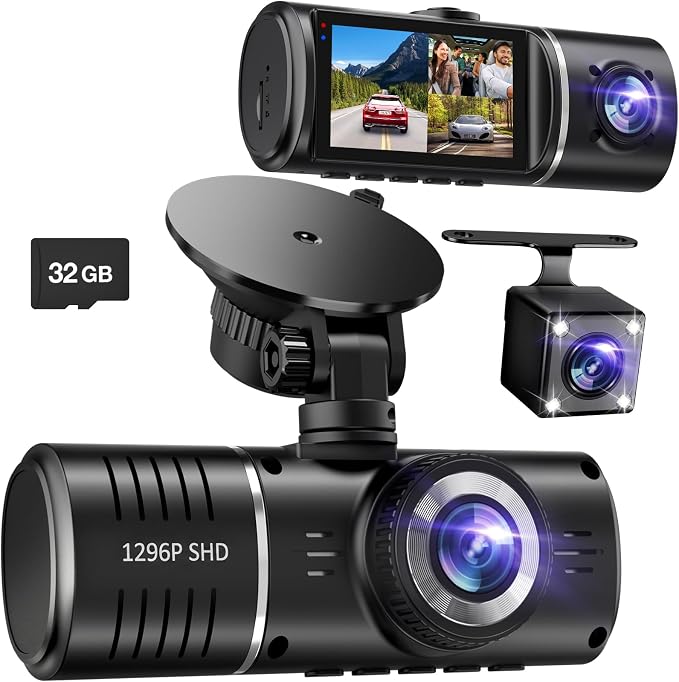
Three cameras covering front, inside, and rear views make this a strong choice for anyone wanting clearer footage around their whole vehicle. The 170° front lens combined with cabin and waterproof rear cameras cuts down on blind spots effectively, helping drivers feel safer with all angles recorded.
Mounting on the windshield is straightforward, and the 3.47-inch IPS screen shows sharp images with no blur from different viewing angles. Recording runs on a loop, so older videos automatically give way to new ones, which keeps storage management simple. The app control adds convenience by letting you adjust settings and review footage without fuss.
Automatic emergency recording kicks in after impacts, so no need to worry about saving critical events manually.
Video clarity at 1296p delivers detailed footage for both inside and out, capturing up to 30 frames per second. The build appears solid, designed with a focus on durability and effective viewing angles.
The most appreciated feature is consistent emergency detection via the G-sensor, while some mention the app could be more intuitive to streamline everyday use.
The built-in G-sensor reliably detects impacts and secures footage, praised for its dependable emergency recording feature. Some find navigating the companion app challenging, which can slow down accessing or adjusting settings during daily use.
Drivers wanting full 3-channel coverage with simple automatic recording will appreciate this dash cam’s design and functionality. Those prioritizing user-friendly software might explore alternative models with more polished app experiences.
Pros
- Triple channels cover front, cabin, and rear views
- Built-in G-sensor locks emergency footage automatically
- Clear IPS screen visible from multiple angles
- Waterproof rear camera suitable for outdoor use
Cons
- App controls lack intuitiveness for some users
- Requires microSD cards for storage; not included
| Specification | Details |
|---|---|
| Video Capture Resolution | 1296p |
| Field Of View | 170 degrees (front camera) |
| Control Method | App |
| Screen Size | 3.47 inches IPS |
| Mounting Type | Windshield Mount |
| Frame Rate | 30 FPS |
7. IIWEY N6 360° 4 Channel Dash Cam

People who need full coverage inside and outside their vehicle will appreciate the IIWEY N6 360° 4 Channel Dash Cam. Ideal for rideshare drivers and fleet vehicles, its biggest highlight lies in capturing crisp 2K video from all four directions simultaneously.
Installing the dash cam requires wiring since it has no built-in battery. It mounts neatly on the windshield, and the adjustable side cameras help customize views to cut down blind spots.
Day-to-day use is supported by Wi-Fi connectivity for easy file transfer and infrared night vision that keeps recordings clear after dark. The 3.18-inch IPS screen gives a good preview of what’s recording.
This setup records front, rear, and side angles with STARVIS 2K and 1080p clarity, making it easier to identify lane markings and license plates. The super-capacitor build handles heat better than typical batteries. Reviews often praise the detailed video quality and 360-degree coverage, but some mention the wired installation can be tricky and requires a separate hardwire kit for parking mode.
The dash cam produces consistently clear 2K and 1080p video from all angles, praised for capturing detailed license plates and lane markings even at night. Most complaints focus on the installation complexity due to its wired design and the need to buy an extra kit for parking surveillance.
Anyone needing comprehensive coverage for both inside and outside the vehicle, such as rideshare drivers or fleet operators, will find this camera effective. Those who want a simple plug-and-play setup or don’t want additional wiring should consider other options.
Pros
- True 4-channel 360° video coverage
- Infrared night vision with 8 IR LEDs
- Wi-Fi for easy video transfer
- Built-in super-capacitor for durability
Cons
- Wired setup with no built-in battery
- Parking mode requires separate hardwire kit
| Specification | Details |
|---|---|
| Video Capture Resolution | 1440p, 2K+1080P+1080P+1080P |
| Connectivity Technology | Wi-Fi |
| Field Of View | 170 degrees |
| Screen Size | 3.18 inches |
| Mounting Type | Windshield Mount |
8. COOAU D30S 4K Dual Front and Inside Dash Cam

Capturing crystal-clear footage inside and outside your car, the COOAU D30S 4K Dual Front and Inside Dash Cam stands out with its 4K resolution for front recording and dual-channel coverage that includes the cabin. Perfect for drivers wanting detailed evidence and protection during everyday commutes or family trips, it covers multiple angles simultaneously.
Installing the dash cam on the windshield is straightforward, and controlling it via the dedicated app over Wi-Fi adds convenience. The 170° field of view for the front lens ensures you see plenty of the road, while the dual cameras handle inside and some rear views at 2.5K and 1080p, capturing clear details like road signs and license plates with ease. Features like loop recording and parking monitoring keep it running quietly in the background.
Recording quality is impressive, with Ultra HD front footage revealing vital driving details clearly. The build is compact with a 1.5-inch screen for quick status checks. Reviews point out strong video clarity and helpful GPS integration, though some mention the app connectivity can be a bit fiddly at times.
Its dual-lens setup covers both your view and cabin well for comprehensive monitoring.
The clearest praise highlights how sharp the 4K front recording is and how well the cabin is covered alongside the road view. On the other hand, frequent notes about occasional app connection problems affect user experience.
Drivers wanting detailed and wide-ranging video coverage will appreciate this dash cam’s performance. Those needing larger screens for on-device review or extremely reliable app connections might want to explore other options.
Pros
- Ultra HD 4K front camera for crisp footage
- Dual-channel recording covers front and inside
- Wide angles capture road and cabin details
- App-controlled with built-in GPS
Cons
- App connectivity can sometimes lag or disconnect
- Small screen size limits on-device viewing
| Specification | Details |
|---|---|
| Video Capture Resolution | 4K(2160P) Single Front Recording, Dual 1440P+1080P Front and Inside Recording |
| Field Of View | 170 degrees |
| Connectivity Technology | Wi-Fi |
| Mounting Type | Windshield Mount |
| Screen Size | 1.5 inches |
| Special Features | Built-in GPS, Loop recording, Voice recording, Accident lock, 24 hours parking monitor |
9. IIWEY N5 360° 4 Channel Dash Cam
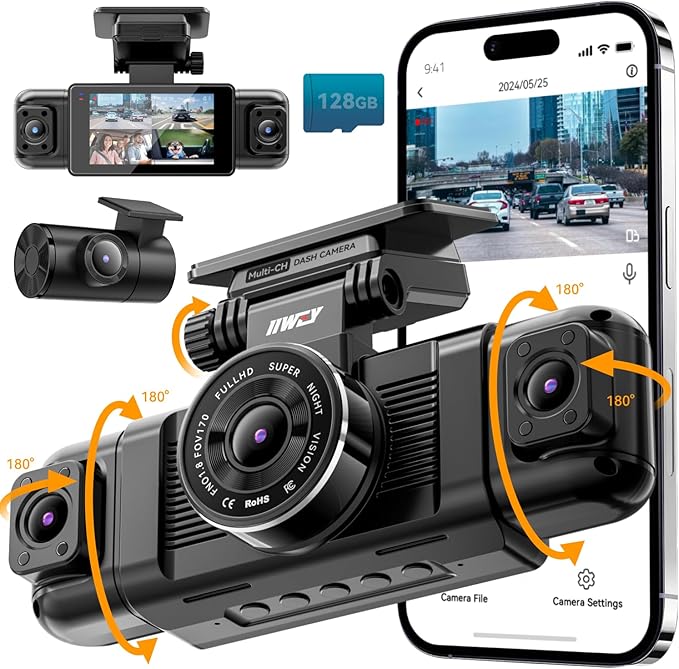
IIWEY N5 360° 4 Channel Dash Cam suits drivers looking to capture every angle inside and outside their vehicle. Its biggest strength is the full 360-degree recording coverage through four cameras, offering extensive visibility front, rear, side, and interior.
Setup requires using the original cigarette lighter charger since USB or Type-C cables won’t power the device. The built-in WiFi lets you connect to your phone through a free app for easy access to footage and controls, helping you manage recordings quickly on the go.
The 3 IPS screen shows real-time views without needing to rely solely on your phone.
Recording in FHD on all four channels means clear video quality from every angle, supported by wide fields of view with 170° front and rear and 150° side cameras. It’s durable with a built-in supercapacitor to avoid battery issues in hot weather.
Strongest praise highlights the 360° view coverage, while a common downside is the lack of GPS functionality.
Many appreciate the camera’s full 360° coverage from four angles, capturing both inside and outside the vehicle with clear 1080p video. The most frequent complaint is about the power restriction, requiring the original cigarette lighter charger instead of more common USB options.
Drivers who want comprehensive multi-angle recording and app control will find this dash cam useful. Those needing GPS logging or more flexible power options might want to consider alternative models.
Pros
- 360-degree all-around recording coverage
- Wide-angle lenses for front, rear, and sides
- Built-in app for easy access and control
- 3″ IPS screen displays real-time footage
Cons
- Cannot be powered by USB or Type-C cables
- No GPS function included
| Specification | Details |
|---|---|
| Video Capture Resolution | 1440P+1080P+1080P+1080P |
| Field Of View | 170 degrees front/rear, 150 degrees sides |
| Control Method | App via Wi-Fi |
| Screen Size | 3.16 inches IPS |
| Power Requirement | Original cigarette lighter charger only |
10. COOAU Dual 2.5K+1080P Front and Inside Dash Cam

Having clear video from both inside and outside the car feels reassuring in everyday driving, especially for rideshare drivers. Ideal for anyone needing detailed footage of both road and passengers, it shines with its sharp dual cameras capturing crisp images with a wide field of view.
Setup is straightforward with the dashboard mount and connects easily via Wi-Fi for app control. The front camera covers up to 170 degrees, and the interior camera’s 150-degree angle combined with IR lights keeps passengers visible at night.
The small 1.5-inch screen is handy for quick checks without distraction during driving.
Recording at 2.5K for the front and 1080P inside delivers impressive image quality, making it simple to see license plates and road signs. The build feels solid and made for long hours on the road.
Reviews often praise the night vision clarity, but some mention the interior camera angle could be wider for better coverage.
The best aspect is its ability to capture clear details both outside and inside the vehicle, especially at night, thanks to IR lighting. Common feedback revolves around wanting a broader interior camera view to include more of the passenger area. The short screen size makes it less ideal for reviewing clips directly on the device.
Ideal for rideshare drivers who need reliable video evidence from two angles and straightforward connectivity on the go. Drivers looking for larger screens or more expansive interior coverage might want to look elsewhere. It’s a strong choice for anyone valuing video quality and night-time visibility over on-device playback options.
Pros
- Crisp 2.5K front and 1080P inside video
- Wide 170° angle covers multiple lanes
- Good night vision with IR lights inside
- Wi-Fi and app control simplify use
Cons
- Interior camera angle could be wider
- Small screen limits in-camera review
| Specification | Details |
|---|---|
| Video Capture Resolution | 2.5K(2560 x 1440P) + 1080P |
| Field Of View | 170 degrees |
| Connectivity Technology | Wi-Fi |
| Control Method | App |
| Screen Size | 1.5 inches |
| Mounting Type | Dashboard Mount |
11. 360° 4 Channel Dash Cam Front Rear Inside

Perfect for drivers who want complete coverage inside and outside their vehicle, this dash cam stands out by offering true 360° protection across four channels. It suits those prioritizing detailed recording from all angles without blocking their view.
Setting it up requires using the original cigarette lighter charger since it doesn’t support wireless power. The windshield mount keeps the camera stable, while app control via 5GHz Wi-Fi lets you adjust angles and check recordings easily. Three video modes allow customizing resolution based on need, and the built-in GPS keeps accurate tracking of location and speed, useful for route review or incident details.
Video quality hits up to 2160p resolution, capturing sharp footage with a CMOS sensor and an aperture of 1.8, making it reliable day or night. Its sturdy build holds well in vehicles, although the need to format SD cards on a computer can be a hassle. The strongest point is its full 360° video coverage; the main drawback centers on its wired power setup, requiring a constant connection to the cigarette lighter.
The camera’s ability to record every angle around the car is praised for comprehensive safety and evidence gathering. Many users find the wired power connection inconvenient compared to wireless models, making mounting options and cable management something to plan for.
Drivers seeking complete coverage both inside and outside will appreciate this setup. Those wanting a simpler, wireless solution may prefer a different model since constant power connection is mandatory here.
Pros
- Full 360° four-channel coverage
- High-resolution 2160p video capture
- Built-in GPS tracks location and speed
- App control via 5GHz Wi-Fi connection
Cons
- Requires wired power from cigarette lighter
- SD card needs formatting on computer to read
| Specification | Details |
|---|---|
| Video Capture Resolution | 2160p |
| Connectivity Technology | Wi-Fi |
| Field Of View | 360 degrees |
| Control Method | App |
| Built-in Features | GPS, Voice Control, 24-Hour Radar Detection |
| Mounting Type | Windshield Mount |
12. Acer Gadget 4K 3 Channel Dash Cam

Constructed with triple 4K and 2.5K lenses, this dash cam suits anyone wanting full coverage from front, cabin, and rear views. Its biggest strength lies in how it captures everything inside and outside the car with sharp video quality from multiple angles simultaneously.
Setup involves mounting three lenses for front, cabin, and rear recording on compatible vehicles like cars and RVs. Daily use depends on its app control, making it easy to access footage or adjust settings.
The wide 180° cabin view means passengers and side seats fit clearly in the frame, covering every ride thoroughly.
Video quality meets expectations with 4K at the front, plus 2.5K resolution inside and on the rear, offering strong visual details day and night thanks to night vision. The build integrates GPS and WiFi well, while the 3-inch screen is handy for quick checks.
Most praise focuses on the triple-angle clarity; complaints sometimes mention the complexity of managing three channels in one device.
The strongest feature is the clear 4K front plus dual 2.5K cabin and rear views that catch every detail inside and outside the vehicle. The most frequent downside involves handling and reviewing footage from three separate camera feeds, which can be overwhelming for some users.
Anyone needing comprehensive recording for family rides, rideshares, or security will appreciate this multi-angle coverage. Those looking for a simpler single-lens dash cam or minimal setup might prefer exploring less complex models.
Pros
- Triple lenses cover front, cabin, and rear simultaneously
- 180° ultra-wide cabin view captures all passengers clearly
- Built-in GPS and WiFi for easy footage transfer
- Night vision improves recording in dark conditions
Cons
- Managing recordings from three channels can feel complex
- Camera angles might require precise installation
| Specification | Details |
|---|---|
| Front Resolution | 4K |
| Cabin and Rear Resolution | 2.5K |
| Field Of View | 140 degrees |
| Real Angle of View | 170 degrees |
| Screen Size | 3 inches |
| Compatibility | ATV, Bus, Car, RV, Tractor |
Comparison of Best Dash Cams for Inside and Outside
| Product | Vehicle Type | Channels | Connectivity | Special Features |
|---|---|---|---|---|
| REDTIGER F17 Dash Cam | Bus, Car, Minivan, Truck | 3 Channel Front Rear Inside | Wi-Fi | 360 Degree, GPS, App Control |
| 70mai T800E Dash Cam | ATV, Bus, Car, Minivan, RV, Tractor, Truck, UTV, Uber | 3-Channel Front+Interior+Rear | Wi-Fi 6 | 4K Front, 64GB SD Included |
| 2.5K+ Front Inside Cam | Cars, Motorcycles, SUVs, Trucks, Vans | Inside Cam | – | Windshield Mount |
| 360 View 4CH Dash Cam | ATV, All, Bus, Car, Minivan, RV, Truck | 4CH 360 Degree | USB, Wi-Fi | Automatic Incident Detection |
| 4K 3CH 5G WiFi Cam | Bus, Car, Minivan, Truck | 3 Channel 4K+1080P+1080P | Wi-Fi | Parking Monitor, Night Vision |
| 1296P 3CH Front Rear Cam | Car | 3CH Front Rear | USB | G-Sensor, 170° Field of View |
| IIWEY N6 360 Dash Cam | Car, Truck, SUV | 4 Cameras | Wi-Fi | 360 Degree, Night Vision |
| COOAU D30S 4K Dual Cam | All Cars | Dual Cam Front and Rear | Wi-Fi | 4K Front, GPS, Loop Record |
| IIWEY N5 360 Dash Cam | Car, Truck | 360 Degree | APP, Wi-Fi | Free App Control |
| COOAU Dual 2.5K+ Cam | Bus, Uber, Car, Ride-Share, Truck, Lyft | Dual 2.5K+ Cam Front Rear | Wi-Fi | Super Night Vision, Parking Monitor |
| 360° 4CH Front Rear Cam | Car | 4CH 360 Degree | Wi-Fi | Radar Detection, GPS, Voice Control |
| Acer 4K 3CH Dash Cam | ATV, Bus, Car, RV, Tractor | 3CH 4K+Dual 2.5K | – | GPS, Night Vision |
- Vehicle TypeBus, Car, Minivan, Truck
- Channels3 Channel Front Rear Inside
- ConnectivityWi-Fi
- Special Features360 Degree, GPS, App Control
- Vehicle TypeATV, Bus, Car, Minivan, RV, Tractor, Truck, UTV, Uber
- Channels3-Channel Front+Interior+Rear
- ConnectivityWi-Fi 6
- Special Features4K Front, 64GB SD Included
- Vehicle TypeCars, Motorcycles, SUVs, Trucks, Vans
- ChannelsInside Cam
- Connectivity–
- Special FeaturesWindshield Mount
- Vehicle TypeATV, All, Bus, Car, Minivan, RV, Truck
- Channels4CH 360 Degree
- ConnectivityUSB, Wi-Fi
- Special FeaturesAutomatic Incident Detection
- Vehicle TypeBus, Car, Minivan, Truck
- Channels3 Channel 4K+1080P+1080P
- ConnectivityWi-Fi
- Special FeaturesParking Monitor, Night Vision
- Vehicle TypeCar
- Channels3CH Front Rear
- ConnectivityUSB
- Special FeaturesG-Sensor, 170° Field of View
- Vehicle TypeCar, Truck, SUV
- Channels4 Cameras
- ConnectivityWi-Fi
- Special Features360 Degree, Night Vision
- Vehicle TypeAll Cars
- ChannelsDual Cam Front and Rear
- ConnectivityWi-Fi
- Special Features4K Front, GPS, Loop Record
- Vehicle TypeCar, Truck
- Channels360 Degree
- ConnectivityAPP, Wi-Fi
- Special FeaturesFree App Control
- Vehicle TypeBus, Uber, Car, Ride-Share, Truck, Lyft
- ChannelsDual 2.5K+ Cam Front Rear
- ConnectivityWi-Fi
- Special FeaturesSuper Night Vision, Parking Monitor
- Vehicle TypeCar
- Channels4CH 360 Degree
- ConnectivityWi-Fi
- Special FeaturesRadar Detection, GPS, Voice Control
- Vehicle TypeATV, Bus, Car, RV, Tractor
- Channels3CH 4K+Dual 2.5K
- Connectivity–
- Special FeaturesGPS, Night Vision
How to Choose the Best Dash Cam
Choosing a good dash cam depends on clear video quality, reliable night vision, and a wide viewing angle to capture both inside and outside views. Prioritizing features like durability and easy installation helps avoid costly replacements and ensures smooth operation over time.
Video Quality and Coverage
Footage clarity can make or break the usefulness of a dash cam, especially when it needs to cover both the inside and outside of a vehicle. Low resolution recordings often result in blurry license plates or facial features, which defeats the purpose of capturing evidence. A 1080p resolution or higher is essential for clear details in daylight conditions, while a wide-angle lens of around 140 to 170 degrees helps capture everything from the dashboard to the road ahead and behind.
Night vision is another crucial factor. Without decent low-light performance, cameras struggle to pick up details in dim conditions.
Look for models equipped with infrared LEDs or enhanced night vision technology. These reduce graininess and improve visibility at night or in tunnels. This makes a notable difference in both security and accident documentation during late hours or poor lighting.
Power Source and Battery Life
Relying solely on an internal battery in dash cams can cause frustration on longer drives or when parking for extended periods. Most internal batteries last between 10 to 30 minutes, barely enough to safely shut down after power loss. Continuous power options through direct wiring or cigarette lighter adapters keep the device running without interruption, which is key for recording the entire trip and any incidents that might happen.
Battery capacity varies, but anything under 400mAh generally doesn’t provide much standalone runtime. Cameras wired to the vehicle offer greater reliability because they won’t shut off unexpectedly. This stability is particularly important during long commutes, road trips, or if the camera is used in parking mode to watch for break-ins while the car is off.
Mounting and Installation
Dash cams that secure both interior and exterior views require mounts that hold steady over bumps without shaking or slipping. Suction cups with strong vacuums or adhesive mounts tend to work best for front windshields.
For rear or internal cameras, small adjustable mounts that attach to the rear window or dashboard offer more flexibility.
Installation should be straightforward enough to do without professional help and must not leave marks or residue on glass. Cameras with adjustable pivot points allow precise angles for recording the driver and passengers inside as well as multiple lanes of traffic outside.
This adaptability helps capture crucial events without blind spots or obstructions.
Storage and Recording Features
Storage capacity dictates how long video footage can be saved before overwriting occurs. Many units support microSD cards up to 128GB or more, giving users several hours of recording time depending on resolution and compression. Expandable memory is necessary for longer trips or busy surveillance during parking mode.
Loop recording ensures the camera continues capturing footage by overwriting the oldest files once the card is full, so you don’t have to manually delete old videos. Event detection sensors, usually accelerometers, automatically save files when a collision or sudden impact is detected. This prevents important clips from being erased and makes reviewing incidents much easier.
Connectivity and User Interface
WiFi or Bluetooth connectivity simplifies the process of transferring footage to smartphones or tablets without removing the memory card. Real-time monitoring through dedicated apps lets users check angles, start recording, or adjust settings directly from their phone. This kind of convenience improves usability and helps avoid missing critical moments.
User interfaces range from simple button controls to touchscreen displays paired with mobile apps. Compatibility with both iOS and Android devices is important to ensure easy access regardless of the smartphone brand.
A responsive app combined with clear on-device menus makes managing recordings and settings much less of a hassle.
Optimizing Dash Cam Placement for Indoor and Outdoor Recording
Mounting your dash cam in the right position ensures clear footage of both the inside and outside of your vehicle. The best spot for the exterior view is usually behind the rearview mirror, close to the windshield center.
This placement minimizes obstruction of your view and captures the road ahead effectively. For interior recording, many dual-lens cameras have a secondary lens that points towards the cabin. This lens should have an unobstructed view of the driver and passengers, often positioned on the same device or attached nearby.
Key points to consider:
- Keep the front lens free from dashboard clutter or window smudges to avoid blurry videos.
- Secure the camera firmly to avoid vibrations that can distort recordings.
- Check lens angle to cover critical areas without showing too much of the car’s roof or dashboard.
Proper placement not only improves footage quality but also keeps the device discreet and safe from accidental damage.
Essential Maintenance Tips to Prolong Your Dash Cam’s Lifespan
Regular upkeep helps your dash cam function reliably over time. Dirt, dust, and temperature changes can affect recording quality and device longevity.
Wiping the lens with a soft, lint-free cloth keeps images clear. Avoid harsh chemical cleaners that could damage the lens coating.
Maintenance steps to follow:
- Periodically check firmware updates from the manufacturer to fix bugs and improve performance.
- Inspect mounting brackets and cables for wear or looseness.
- Format the memory card every few weeks to prevent corrupted files and maintain recording efficiency.
Outside the vehicle, especially if mounted externally or near windows, the camera may gather dust or moisture. Use gentle cleaning and ensure the housing is intact to protect electronic components.
Keeping your dash cam well-maintained prevents unexpected failures and recording gaps.
Comparing Hardwired vs. Battery-Powered Dash Cams for Dual-Use Scenarios
Power options greatly influence dash cam performance for inside and outside recording. Hardwired dash cams connect directly to the car’s electrical system. This setup supports continuous recording, even when parked, since the camera draws power independently of the ignition.
It tends to avoid power interruptions common with battery-operated models during longer trips.
Battery-powered dash cams offer easy installation and portability but have limited recording time based on battery capacity. They require frequent charging or replacement if used for extended monitoring, especially with dual lenses. Some models combine both, using batteries as backup power to retain footage and settings if the main source is cut.
Choosing depends on usage:
- Hardwired units are better suited for constant recording and dash cam parking modes.
- Battery-powered devices work well for temporary use or on rental vehicles without modifying wiring.
Consider your vehicle and recording needs before deciding between these options for inside and outside camera setups.
People Also Asked
How Do I Properly Install a Dash Cam Inside and Outside?
Mount the inside camera on the windshield near the rearview mirror and the outside one on the front exterior, securing cables neatly along trims to avoid loose wires. Test angles to ensure clear views inside and out without obstructing your line of sight.
What Is the Average Lifespan of a Dual Dash Camera?
Most dual dash cameras last around 3 to 5 years depending on usage and conditions. Heat and continuous recording can shorten their life, so parking in shaded areas and turning off the camera when not needed could help extend it.
Are Dash Cams Compatible with All Vehicle Types and Models?
Dash cams generally work with most vehicles but check the camera’s power connector type and mounting options first. For trucks or vehicles with privacy glass, ensure the inside camera can record properly through the tint.
How Do I Clean and Maintain My Dash Cam Safely?
Unplug the dash cams before cleaning to prevent damage. Use a microfiber cloth to wipe lenses gently and avoid spraying cleaner directly on the camera; instead, apply it to the cloth. Regularly check for dust buildup on lenses that can affect video quality.
What Common Problems Should I Watch for with Dash Cams?
Look out for overheating, footage corruption, and battery drain issues. Also, memory cards can become corrupted if not formatted correctly or if cheap cards are used. Using recommended memory cards and regularly backing up footage helps avoid these problems.
Conclusion
A reliable dash cam for both inside and outside use needs to have good video quality for different lighting conditions and clear audio capture. It should offer easy mounting options and controls that are straightforward to operate while driving. Durability matters too, given the varying exposures from interior heat to outdoor weather.
Choose a model that fits your specific vehicle space and budget, as well as how often you plan to use it. Spending a little extra on features you’ll use regularly makes more sense than buying something with bells and whistles you won’t need.
Check the comparison table above to quickly review the options and pick the one that suits your situation best.