
Top 12 Best Dash Cam Without Screen You Can’t Miss!
Many drivers have faced the frustration of a dash cam that obstructs their view or overheats quickly, issues common in low-quality models. The best dash cam without screen solves this by staying compact and discreet, avoiding distractions while driving. Without a screen, these devices rely on app connectivity or simple indicator lights, which prevents bulky hardware taking up space.
Key factors for choosing a good dash cam without screen include video resolution, power source, and mounting design. A clear 1080p or higher resolution ensures the footage captures details like license plates.
Continuous power typically comes from a hardwired connection or a high-capacity battery lasting several hours. Mounting should be low-profile and stable, using materials that withstand heat inside a car, such as strong plastic or metal. Ease of installation and minimal cable clutter also matter for neatness and reliability.
Need a Quick Check?
| Image | Product | Price |
|---|---|---|
Our Top Picks 1  | 4K Front Mini Dash Cam | Check Price |
Our Top Picks 2  | REDTIGER F9 4K Dual | Check Price |
Our Top Picks 3  | 2.5K Front Mini Cam | Check Price |
Our Selected Top 12 Dash Cam Without Screen Worth Your Money
This list features compact dash cams without screens, focusing on performance, ease of use, and reliability. Each review highlights key features, suitability for different drivers, and the strengths and limitations to help you make an informed choice.
1. 4K Dash Cam Front Mini
Galphi 4K Dash Cam Front Mini captures your drives in impressive 4K UHD resolution and suits anyone wanting a compact, no-screen dash cam that offers clear footage without distractions. Its biggest strength lies in combining high-quality video with discreet design and built-in Wi-Fi connectivity.
Setup involves sticking the compact adhesive mount on your windshield and syncing it via a smartphone app for control and viewing. Daily use benefits from loop recording that automatically overwrites old footage and voice recording that captures sounds inside the car. Parking monitoring works around the clock, and accidental events get locked automatically by the G-sensor, keeping key footage safe without manual intervention.
The camera delivers sharp and wide 160-degree views thanks to the 4K 2160P resolution and f/1.6 aperture, making details in footage clear even in various lighting conditions. Build quality feels solid for a mini dash cam, with discreet size to avoid obstructing the windshield.
Strong praise highlights steady Wi-Fi performance for quick access to videos. Some mention needing to upgrade the included 32GB memory card for longer storage.
Sharp 4K video quality and reliable Wi-Fi access get high marks, while the smaller default memory card and lack of built-in display screen are common downsides influencing storage and review convenience. It’s a simple, high-res setup for capturing drives without added bulk or distraction.
Drivers wanting a slim, no-screen dash cam with crystal-clear footage will appreciate this model. Those needing longer recording capacity or on-device video playback should consider a different dash cam with a larger included memory card or built-in screen.
Pros
- 4K resolution captures detailed footage
- Built-in 5G WiFi for easy video access
- Comes with free 32GB memory card
- 24-hour parking monitor included
Cons
- Memory card size reduced to 32GB starting mid-2026
- No display screen to view footage directly
| Specification | Details |
|---|---|
| Video Capture Resolution | 2160p |
| Field Of View | 160 degrees |
| Connectivity Technology | Wi-Fi |
| Control Method | App |
| Flash Memory Type | microSD |
| Mounting Type | Adhesive Mount |
2. REDTIGER F9 4K Front and Rear Dash Cam
Sharp video quality and reliable dual-channel recording make it a solid choice for anyone wanting clear evidence on the road. Perfect for people who want a dash cam that stays out of sight without a screen but still gives crystal-clear footage. The front camera delivers 4K resolution and captures crucial details with ease.
Installation comes down to attaching it with the adhesive mount and connecting it to your vehicle’s power. Using the app via 5.8GHz WiFi is straightforward for live streaming or downloading clips to your phone fast. You manage everything with the app, so no need to fiddle with buttons or screens on the device itself.
It has loop recording to cover long trips and a built-in GPS to track location data automatically.
Video performance is impressive with sharp 4K recording at the front and solid 1080p at the rear, all supported by a 170° wide-angle lens and WDR for low-light clarity. The build feels solid and compact without bulky parts sticking out. Most praise highlights the crystal-clear video quality and quick Wi-Fi transfers.
Complaints usually mention the need for an extra hardwire kit to enable the parking monitor feature.
The camera captures very clear video footage both day and night, and using the app for wireless transfers speeds up sharing clips significantly. The parking monitor is only available with the purchase of an additional hardwire kit, which can be inconvenient.
Anyone wanting high-quality recordings and app control without a screen will appreciate the setup. You might want to look elsewhere when expecting out-of-the-box parking mode or preferring on-device controls.
Pros
- 4K resolution front, 1080p rear recording
- Fast 5.8GHz WiFi for quick file transfer
- Compact design fits discreetly on windshield
- Built-in GPS for location tracking
Cons
- Parking monitor needs extra hardwire kit
- No built-in screen for direct viewing
| Specification | Details |
|---|---|
| Video Capture Resolution | 2160p |
| Connectivity Technology | Wi-Fi |
| Field Of View | 170 degrees |
| Control Method | App |
| Mounting Type | Adhesive Mount |
3. 2.5K Front Mini Dash Cam
Compact and easy to use, this dash cam works well for anyone wanting quality front recording without a built-in screen. Its standout feature is the clear 2.5K resolution combined with super night vision, making it reliable for capturing details like license plates in various lighting conditions.
Installation is straightforward, with a detachable bracket that sticks securely to the windshield and allows 360° rotation for perfect angle adjustment. Control comes entirely through the app, which connects via built-in Wi-Fi.
Day-to-day use is simple thanks to loop recording that overwrites old footage automatically, while important clips remain protected. The included 64GB card means it’s ready to go without extra shopping.
Image quality impresses with a 160° wide angle and a sharp 2560×1440 resolution at 30fps. The six-layer glass lens handles night and contrast well, keeping crucial details visible.
The device feels solid and durable, with a compact design that doesn’t clutter the windshield. Although many praise the clear footage and easy app control, some mention that relying fully on app control can be fiddly compared to models with a screen.
Video clarity and night-time visibility receive strong praise, with many users finding license plates and details readable even in low light. However, controlling everything through the app sometimes causes frustration due to less immediate feedback compared to devices with built-in screens.
Anyone comfortable managing settings via smartphone and wanting high-quality footage without extra bulk will find this dash cam suits their needs. Those who prefer direct access to controls and instant video review might want to look for a model with a screen instead.
Pros
- Clear 2.5K resolution with night vision
- Easy app-based control and setup
- Includes free 64GB memory card
- 360° rotatable, detachable bracket
Cons
- No built-in screen for direct viewing
- App control can feel less intuitive than physical buttons
| Specification | Details |
|---|---|
| Video Capture Resolution | 2.5K |
| Field Of View | 160 degrees |
| Control Method | App |
| Mounting Type | Windshield Mount |
| Connectivity Technology | Built-in WiFi & Smart App |
| Included Storage | Free 64GB Card |
4. Vantrue E1 Lite Mini Dash Cam

Compact and stealthy design makes it easy to install without blocking your windshield view. Well suited for drivers looking for full HD video recording without a screen.
Its standout feature is the ultra-wide 160° lens combined with clear day and night vision thanks to HDR and an F1.8 aperture.
Setup involves mounting it on the windshield and connecting via WiFi to your phone app for control and playback since it has no traditional screen. Automatic features like motion sensing and incident detection work quietly in the background.
The built-in GPS tracks speed and location, helpful for logging your routes and aiding insurance claims, all without needing manual input once running.
Video quality delivers sharp 1080p footage with a wide field of view, clearly capturing license plates and road details day or night. The build is solid and compact, fitting well in different vehicle types without distraction.
Most praise centers on its crisp video and GPS accuracy. A common complaint is the small 1.54-inch screen, which some find too limited for on-device review.
Vantrue E1 Lite records clear Full HD footage thanks to its 160° wide lens and F1.8 aperture, which captures details well both day and night. The built-in GPS is useful for tracking routes, speed, and direction accurately. Some mention the lack of a screen as a drawback, making it harder to adjust settings or review footage without a phone or.
Drivers who want a small, discreet dash cam focused on recording without distractions will find this model suitable. It works well for daily commuting and trips, especially if the app-based controls suit your style. People preferring an on-device screen or those uncomfortable with app navigation might want to consider dash cams that provide direct video playback and easier setup.
Pros
- Crisp 1920*1080p video recording
- 160° ultra-wide lens captures full road view
- Built-in GPS for precise speed and location
- Compact design won’t block driver’s sight
Cons
- Small 1.54-inch screen limits on-device viewing
- Relies on smartphone app for full control
| Specification | Details |
|---|---|
| Video Capture Resolution | 1080p |
| Field Of View | 160 degrees |
| Built-In GPS | Yes |
| Connectivity Technology | Wi-Fi |
| Maximum Aperture | 1.8 f_stop |
| Mounting Type | Windshield Mount |
5. 4K+2K Dual Front and Rear Dash Cam

Crystal-clear 4K front and 2K rear video is what stands out immediately, making this dash cam well suited for cars, trucks, and even buses. Its biggest strength lies in recording detailed footage day or night, handling extreme temperatures without issue.
Setting up involves mounting it on the windshield and connecting through USB or Wi-Fi, with control available via an app or push buttons. The dual-band Wi-Fi lets you manage recordings on your phone, while the multimode GPS accurately tracks your route.
The cameras cover a wide 140-degree field of view, so you won’t miss important details around you.
Video quality benefits from the STARVIS 2 sensor with HDR night vision, delivering sharp images that capture license plates and road signs even in poor lighting. It holds up well under different weather conditions and maintains steady footage without wobbling.
The most consistent note about it is its reliability in extreme climates, though some find the lack of a screen inconvenient for on-the-spot review.
Crystal-clear footage that picks up critical details in real driving conditions earns strong praise. Most complaints focus on the absence of a built-in screen, requiring use of the app for video review. The camera handles fluctuating temperatures and lighting well.
Drivers wanting high-resolution front and rear recording with remote access will appreciate this cam. Those preferring quick in-car screen review might consider models with an integrated display instead.
Pros
- True 4K front and 2K rear simultaneous recording
- HDR night vision captures clear images in darkness
- Works reliably in extreme cold and heat
- Dual band Wi-Fi for easy video access
Cons
- No screen for instant playback
- May require time to master app controls
| Specification | Details |
|---|---|
| Video Capture Resolution | 1440p, 2160p |
| Connectivity Technology | USB, Wi-Fi |
| Field Of View | 140 degrees |
| Control Method | App, Push Button |
| Mounting Type | Windshield Mount |
6. 70mai A810 Lite 4K Front and Rear Dash Cam

Perfect for drivers wanting ultra-clear video evidence without a built-in screen, 70mai A810 Lite 4K Front and Rear Dash Cam records both front and rear views in ultra-high definition. It suits people who prioritize detailed footage for safety and insurance purposes and don’t need to interact with a display on the device itself.
Setup happens easily via the smart app, combining voice control and push-button use to keep things simple while driving. Dual recording captures everything with wide-angle lenses to reduce blind spots. Features like 24H Parking Mode and loop recording run quietly in the background, so you don’t have to check a screen every day.
The front camera records sharp 4K video at 3840×2160P, while the rear delivers 1080P, catching clear details like license plates day or night thanks to HDR and an F1.55 aperture. The build includes a supercapacitor for heat resistance and safe parking recordings.
Praised for the detailed night vision, some find the app connection occasionally slow or unstable.
Clear and detailed videos, especially at night, receive consistent praise. The app controlling the device sometimes reacts slowly or loses connection, which can be frustrating.
Ideal for those who want high-resolution recording and minimal interruption while driving. Drivers needing instant screen access or fully stable app control might look elsewhere.
Pros
- 4K front and 1080P rear dual recording
- Strong night vision with HDR and large aperture
- Works quietly with 24H Parking Mode
- App and voice controlled for hands-free use
Cons
- Occasional slow or unstable app connection
- No built-in screen for direct footage review
| Specification | Details |
|---|---|
| Video Capture Resolution | 1080p, 2160p |
| Field Of View | 140 degrees |
| Connectivity Technology | 5GHz Wi-Fi 6, USB |
| Special Features | 24H Parking Mode, G-Sensor, Loop Recording, Voice Control |
| Control Method | App, Push Button, Voice |
7. REDTIGER F7NP 4K Front and Rear Dash Cam
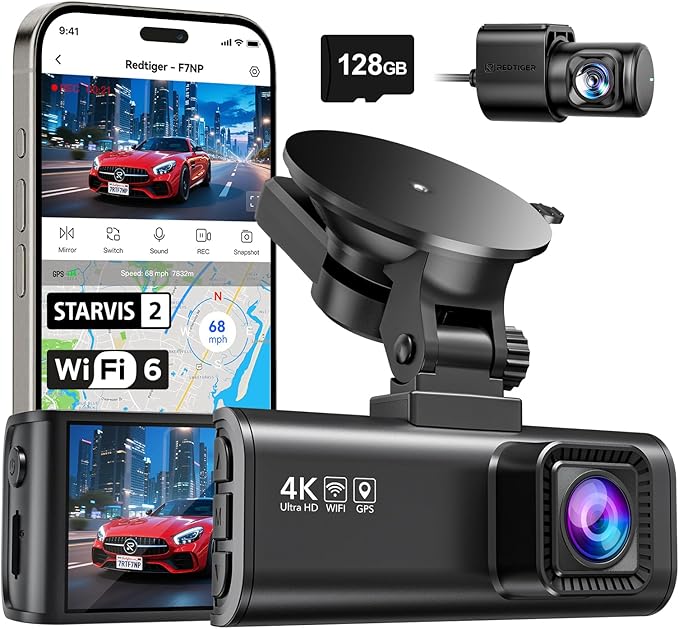
Capturing clear, detailed footage while driving becomes simple with the REDTIGER F7NP 4K front and rear dash cam. It suits bus, car, minivan, or truck drivers looking for sharp video evidence without relying on a big screen.
Its greatest strength lies in crisp 4K front recording paired with a reliable rear camera.
Installation is straightforward, mounting neatly on the windshield. The compact design keeps it out of the way, while Wi-Fi connectivity and app control make accessing footage easy right from your phone. Loop recording and built-in GPS add convenience for everyday use, and the free 128GB memory card means you won’t need extra storage right away.
In terms of performance, it captures sharp, bright video with excellent night vision thanks to the STARVIS 2 sensor and F1.5 large aperture. Build quality feels solid and functional, focused on durability rather than flash. Most users praise the clarity of footage both day and night; a common downside is the small 3.16-inch built-in display, which can be less user-friendly compared to larger screens.
The video clarity stands out, especially at night, due to the STARVIS 2 sensor and large aperture lens. Many find the built-in screen too small for comfortable use, relying instead on the app for camera configuration and footage review.
Drivers prioritizing detailed video and app convenience will appreciate this dash cam. Those wanting a larger screen for instant feedback during travel might want to look elsewhere.
Pros
- 4K front camera captures sharp footage
- Wide-angle lenses for broad road coverage
- Built-in Wi-Fi for easy app control
- Includes free 128GB memory card
Cons
- Small 3.16-inch display limits direct viewing
- Rear camera resolution lower than front
| Specification | Details |
|---|---|
| Video Capture Resolution | 1080p, 2160p |
| Connectivity Technology | Wi-Fi |
| Field Of View | 170 degrees |
| Control Method | App |
| Compatible Vehicle Types | Bus, Car, Minivan, Truck |
8. ROVE R2 Dual Front and Rear Dash Cam

Recording the road in 2.5K QHD upfront and 1080P FHD at the rear makes this dual dash cam great for those wanting detailed footage from both directions. It suits drivers who need clear night vision and GPS data without the distraction of a screen on the device itself.
Setup involves mounting both cameras on the windshield with a solid bracket and connecting via USB. Daily rely on the ROVE app on your phone to control it and watch footage over 5.8GHz WiFi. Firmware updates come over the air, so the unit stays current without hassle.
The built-in GPS logs your location and speed automatically, covering essentials behind the scenes.
The front camera with Sony STARVIS 2 sensor delivers crisp video, even at night, thanks to its wide aperture and HDR. Footage captures license plates and road details well.
The supercapacitor means it handles extreme temperatures steadier than batteries. Most praise the clear, reliable recordings; a common complaint is the camera’s 3-inch screen size, which some find limiting during setup.
Clear and detailed footage stands out as the main strength, especially at night, while the small screen size often causes minor inconvenience during setup. Most find the app control sufficient to work around the lack of a larger display.
Ideal for those wanting solid front and rear coverage with good night vision and GPS features. Not the best choice for drivers who prefer an integrated big screen for instant playback and settings adjustments on the dash cam itself.
Pros
- Dual front and rear recording at high resolution
- Strong low-light performance with Sony sensor
- App control via fast 5.8GHz WiFi
- Built-in GPS tags location and speed
Cons
- Small 3-inch screen can be hard to use
- Rear camera aperture is narrower at F1.8
| Specification | Details |
|---|---|
| Front Camera Resolution | 2.5K QHD (2560 x 1440) at 30FPS |
| Rear Camera Resolution | 1080P FHD at 30FPS |
| Connectivity | USB, Wi-Fi |
| Field of View | 150 degrees |
| Memory Type | microSDXC |
| Mounting Type | Windshield Mount |
9. Garmin Mini 3 1080p Dash Cam

People wanting a compact and stealthy dash cam that records solid footage will appreciate this one. It suits those who don’t want a bulky device visible on their windshield but need reliable incident recording. The standout feature is its ultracompact, key-sized design that stays out of sight while capturing clear 1080p video.
Setting it up involves mounting it on your windshield where it barely takes up space. It connects to your smartphone via Bluetooth and Wi-Fi, allowing control and video access without a screen on the device. Voice commands make operating it easy on the go.
The built-in Garmin Clarity polarizer lens helps reduce glare, so your videos remain clear in various lighting conditions.
This dash cam delivers crisp 1080p video with a wide 140-degree field of view, so important details aren’t missed. It automatically records and saves incident clips with date and time stamps for proof. The camera is built solidly and designed to be discreet.
Praise focuses on its unobtrusive size and clear recordings, but a common complaint involves the absence of any display, requiring a phone to view footage.
The ultracompact, almost invisible design allows it to record incidents clearly without distracting from your view, praised most in reviews. The typical downside is the lack of any screen, meaning clips need to be checked through a phone app, which may be inconvenient for some.
Ideal for those who want a low-profile camera that doesn’t interfere with driving or car aesthetics. People preferring to review videos right on the device should consider models with built-in screens instead.
Pros
- Ultracompact size fits discreetly on windshield
- Clear 1080p HD videos with wide field of view
- Built-in polarizer lens reduces windshield glare
- Voice control simplifies operation while driving
Cons
- No onboard display, requires smartphone to view footage
- Some jurisdictions may limit or prohibit use
| Specification | Details |
|---|---|
| Video Capture Resolution | 1080p |
| Field Of View | 140 degrees |
| Control Method | Voice |
| Connectivity Technology | Bluetooth, USB, Wi-Fi |
| Display Type | No Display |
| Compatible Devices | Smartphone |
10. AKEEYO P1 Mini Front Dash Cam

A compact, no-screen dash cam that fits neatly without blocking your view, designed for drivers wanting discreet front windshield protection. The strongest point is its small size combined with a flexible mount that easily adjusts and hides, making it ideal for those who dislike bulky cams.
Setting up the camera is straightforward: peel the adhesive, stick it behind your mirror or on the console, then route the cable. The 180° tilt mount lets you adjust the angle quickly, and the one-tap image flip fixes orientation without reinstalling.
Control happens via an app over built-in Wi-Fi, letting you manage recordings and settings from your phone.
Video quality holds steady at 1080p with a 140-degree field of view, capturing clear footage day and night thanks to WDR night vision. The build feels solid for its size, though some note the limited display options since it has no screen. Most praise its compactness and ease of use; the main gripe is the reliance on the smartphone app for controls and viewing footage.
Many appreciate how the camera’s small size keeps it out of sight and glare, simplifying installation and use. At the same time, lacking a display means all controls and footage reviews depend on the phone app, which some find inconvenient. The footage quality, however, is consistently clear day and night.
Drivers wanting a discreet, compact dash cam focused on front view recording with easy app access will be pleased. Those who prefer direct on-device controls or a built-in screen should consider other models offering those features.
Pros
- Super compact size avoids blocking driver’s view
- Flexible 180° tilt mount adjusts in seconds
- One-tap image flip corrects orientation easily
- App control via built-in Wi-Fi for convenience
Cons
- No built-in screen for playback or setup
- Full control requires a smartphone app
| Specification | Details |
|---|---|
| Video Capture Resolution | 1080p |
| Field Of View | 140 degrees |
| Connectivity Technology | Wi-Fi |
| Control Method | App |
| Mounting Type | Windshield Mount |
| Memory Storage Capacity | 256 GB |
11. XEGA 4G Dual Dash Cam

XEGA 4G Dual Dash Cam suits drivers wanting constant vehicle protection without a screen. Its main strength lies in real-time remote monitoring through 4G LTE, letting you check live footage anytime via the XEGA Pro APP.
Perfect for those who want serious security with minimal setup inside the car.
Setup involves plugging the dash cam into the vehicle’s OBD port, so confirming your car supports that is important. No screen means you rely fully on the app for adjustments and viewing footage.
Daily use feels hands-off since it turns off automatically when the car battery dips below 20%, avoiding battery drain. The built-in 4G SIM card handles all data, meaning no need for WiFi, though a subscription is required after the trial.
Video recording captures 2K resolution both front and inside, offering clear visuals for incidents inside and outside the vehicle. Build quality is practical with an emphasis on continuous connection via cellular service. Praise often targets the remote viewing capability, while some find the app-only control and required 4G plan limiting, especially since the SIM card isn’t replaceable.
The strongest praised feature is the ability to view live footage remotely using 4G without relying on WiFi, which really suits users wanting constant security. The common complaint is the dependency on a 4G subscription and the lack of a screen, making app control mandatory and sometimes inconvenient.
Anyone with a compatible OBD plug car who values remote access and isn’t bothered by monthly fees will appreciate this. Drivers looking for a dash cam with built-in display or those without easy OBD access might find a different model more suitable.
Pros
- Real-time remote monitoring over 4G LTE
- High resolution 2K video front and inside
- Auto shutdown protects car battery
- No need for WiFi or hotspot connection
Cons
- No screen; full control only via app
- Built-in SIM card not user-replaceable
| Specification | Details |
|---|---|
| Connectivity Technology | 4G LTE |
| Video Capture Resolution | 2K Front+2K Inside |
| Power Source | OBD port only |
| 4G Plan Required | $19.99/mo, $99.9/6mo, or $169.9/yr |
| Battery Protection | Auto shutdown below 20% car battery |
12. REXING V1 4K Dash Cam
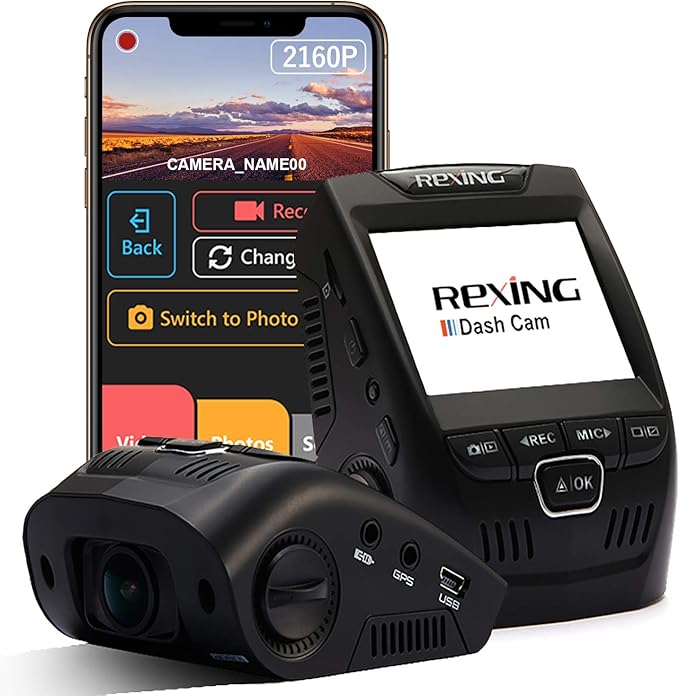
Using a dash cam without a screen feels simpler and less distracting, and the REXING V1 4K fits this bill perfectly. It suits drivers wanting a discreet helper quietly recording ultra-clear footage. Its biggest strength lies in capturing sharp 2160p videos without drawing attention.
Setting up is straightforward thanks to the adhesive mount that stays put on the windshield. Daily use is easy with the free app for controlling the camera remotely, so there’s no fiddling with buttons or menus. It saves recordings on a microSD card up to 256GB, offering plenty of space for loop recording.
The wide 170-degree lens captures almost everything happening ahead, and the app also handles playback with GPS logging for location details.
The main job of recording clear, wide-angle video is handled well with the 7-layer glass lens and wide dynamic range that adapts to different light conditions. The build is compact and low profile, making it hard to spot.
Most people praise the sharp video quality, while some find the app interface a bit tricky to get used to at first. The G-sensor helps save crucial footage when an incident occurs.
Viewers appreciate the ultra HD footage that captures every detail, making it reliable for documenting trips or incidents. The main frustration lies in adjusting settings through the app, which could feel less intuitive compared to physical controls. The adhesive mount ensures the cam stays firmly in place without obstructing the view.
Anyone looking for high-resolution recording without bulky screens will find this dash cam ideal. It suits drivers who prefer using their phone for controls and want a discreet setup. Those who rely on on-device adjustment or prefer a screen for instant playback might want to consider a model with a larger display.
Pros
- Sharp 4K video quality
- Discreet, low-profile design
- Wide 170-degree viewing angle
- Controls via smartphone app
Cons
- App interface can be confusing initially
- Small LCD screen limits direct interaction
| Specification | Details |
|---|---|
| Video Capture Resolution | 2160p |
| Field Of View | 170 degrees |
| Connectivity Technology | App |
| Flash Memory Type | microSD (up to 256GB) |
| Mounting Type | Adhesive Mount |
Best Dash Cams Without Screen Comparison Table
| Product | Resolution | Connectivity | Special Features | Warranty |
|---|---|---|---|---|
| 4K Front Mini Dash Cam | 4K 2160P | Wi-Fi, 5G WiFi | Loop Recording, Parking Monitor | 12-Month |
| REDTIGER F9 4K Dual | 4K Dual | Wi-Fi | Night Vision, GPS, Parking Monitor | 18-Month |
| 2.5K Front Mini Cam | 2.5K | Wi-Fi & Smart App | Voice Prompt, Detachable Bracket | – |
| Vantrue E1 Lite Cam | – | Wi-Fi | GPS, Parking Monitor, Motion Sensing | – |
| 4K+2K Dual Cam | 4K+2K Dual | USB, Wi-Fi | HDR, GPS, High-temp resistant | – |
| 70mai A810 Lite Dual | – | 5GHz Wi-Fi 6, USB | 24H Parking, GPS, Voice Control | – |
| REDTIGER F7NP 4K Dual | 4K Dual | Wi-Fi | GPS, 128GB Memory Card, G-Sensor | – |
| ROVE R2 Dual Cam | – | USB, Wi-Fi | GPS, OTA Updates, Supercapacitor | – |
| Garmin Mini 3 1080p | 1080p | Bluetooth, USB, Wi-Fi | Voice Control, CMOS Sensor | – |
| AKEEYO P1 Mini Cam | 1080p | Wi-Fi | App Control, Night Vision | – |
| XEGA 4G Dual Cam | – | 4G LTE | Auto Shutdown, Battery Protection | – |
| REXING V1 4K Cam | 4K | App Interface | GPS Logger, Wireless Sharing | – |
- Resolution4K 2160P
- ConnectivityWi-Fi, 5G WiFi
- Special FeaturesLoop Recording, Parking Monitor
- Warranty12-Month
- Resolution4K Dual
- ConnectivityWi-Fi
- Special FeaturesNight Vision, GPS, Parking Monitor
- Warranty18-Month
- Resolution2.5K
- ConnectivityWi-Fi & Smart App
- Special FeaturesVoice Prompt, Detachable Bracket
- Warranty–
- Resolution–
- ConnectivityWi-Fi
- Special FeaturesGPS, Parking Monitor, Motion Sensing
- Warranty–
- Resolution4K+2K Dual
- ConnectivityUSB, Wi-Fi
- Special FeaturesHDR, GPS, High-temp resistant
- Warranty–
- Resolution–
- Connectivity5GHz Wi-Fi 6, USB
- Special Features24H Parking, GPS, Voice Control
- Warranty–
- Resolution4K Dual
- ConnectivityWi-Fi
- Special FeaturesGPS, 128GB Memory Card, G-Sensor
- Warranty–
- Resolution–
- ConnectivityUSB, Wi-Fi
- Special FeaturesGPS, OTA Updates, Supercapacitor
- Warranty–
- Resolution1080p
- ConnectivityBluetooth, USB, Wi-Fi
- Special FeaturesVoice Control, CMOS Sensor
- Warranty–
- Resolution1080p
- ConnectivityWi-Fi
- Special FeaturesApp Control, Night Vision
- Warranty–
- Resolution–
- Connectivity4G LTE
- Special FeaturesAuto Shutdown, Battery Protection
- Warranty–
- Resolution4K
- ConnectivityApp Interface
- Special FeaturesGPS Logger, Wireless Sharing
- Warranty–
How to Choose the Right Dash Cam Without Screen
Focus on video quality, ease of installation, and reliable storage options when choosing a dash cam without a screen. Prioritizing these factors guarantees clear recordings and easy use, helping avoid confusion or missed evidence while also saving money on unnecessary features.
Video Quality
Footage clarity depends heavily on resolution and frame rate. Lower quality cameras often produce grainy images or choppy video, which can make it difficult to read license plates or catch important details. A standard resolution you should look for is 1080p at a minimum, paired with 30 frames per second to ensure smooth playback.
Cameras that deliver higher frame rates provide clearer motion capture, especially useful in fast-moving traffic.
Nighttime and lowlight driving pose challenges for many models. Some cameras include IR LEDs or enhanced sensor technology that improve visibility in the dark. A field of view between 120 and 170 degrees offers a broad coverage of the road without excessive distortion at the edges.
This balance ensures that most incidents around the vehicle are recorded.
Power Source and Battery
Hardwiring dash cams directly to the car’s power source prevents interruptions during long trips. Those relying mainly on a built-in battery often run into the issue of the device shutting off too soon, sometimes after only 20 to 30 minutes. A reliable battery backup should last at least 1 to 2 hours to capture events after the engine is off.
Auto start and stop functions that sync with the ignition protect against forgetting to turn the camera on or off, making the device more dependable. Motion detection triggers recording when the car is parked and detects movement, helping catch potential vandalism or accidents without manual activation.
Storage and Compatibility
Most dash cams use microSD cards ranging from 16GB up to 256GB, with 64GB or higher recommended for extended recording without frequent file deletion. Compatibility with Class 10 or UHS-I cards ensures smooth video writing speeds, preventing corrupted files. Loop recording automatically overwrites old footage when the card is full, so there’s no need to manage storage constantly.
Accessing recorded video can be tricky without a built-in screen. Models supporting connection to smartphones or computers via apps or USB cables allow quick downloading and viewing.
It’s important to verify compatibility with common file formats and both Android and iOS platforms for easy retrieval.
Mounting and Size
Compact dash cams that fit discreetly behind the rearview mirror avoid obstructing the driver’s view and reduce the chance of theft. A size under 3 inches in width and height generally works well for windshield mounting. Stable attachment with suction cups or adhesive mounts minimizes vibrations and keeps footage steady.
Ease of installation matters. Cameras with adjustable brackets or magnetic mounts simplify positioning and removal, making it easier to take the device along when leaving the car or switching vehicles.
Some models offer flexibility to attach to dashboards or side windows, catering to different interior layouts.
Connectivity and Controls
Wireless connectivity options simplify setup and file transfers. WiFi or Bluetooth connections allow users to configure settings and download videos directly to a smartphone without removing the card.
This reduces reliance on cables and speeds up sharing footage.
Without an integrated screen, controls should be minimal and intuitive, often limited to a few buttons for starting or stopping recordings and toggling modes. Many devices rely on accompanying mobile apps that provide real-time monitoring, alert notifications, and detailed configuration options, making daily interactions straightforward and effective.
Maximizing Privacy and Discretion with Screenless Dash Cams
Dash cams without screens are less conspicuous inside the vehicle, which reduces the risk of theft. They are designed to record footage without drawing attention, making them ideal for drivers who want a low-profile setup.
These devices often rely on companion apps for playback and settings, which keeps the dashboard free from bulky displays.
Advantages of using screenless dash cams for privacy and discretion:
- No visible screen means fewer distractions while driving.
- Limited exposure reduces curiosity from passengers or passersby.
- The design tends to blend better with the car’s interior.
- Sensitive video files remain accessible only through secure apps or software, rather than on a device screen left in plain view.
Such dash cams cater to drivers who prioritize a minimalist setup and want to keep recorded data private without additional hardware clutter.
Essential Maintenance Tips for Longevity of Dash Cams Without Screens
Regular upkeep is crucial for dash cams without screens because they lack on-device indicators that show recording status or errors immediately. Checking the camera’s app frequently is important to ensure the unit is functioning properly and capturing footage as expected.
Key maintenance tips:
- Inspect the mount and lens weekly to remove dust or smudges that can obscure video quality.
- Format the memory card monthly to avoid file corruption and maintain optimal speed.
- Keep firmware updated via the manufacturer’s app to receive the latest improvements.
- Perform a short test recording now and then to verify the device is capturing and saving files correctly.
Following these steps helps maintain reliable operation over the long term, even without built-in screen notifications.
Comparing Screenless Dash Cams to Models with Displays: Pros and Cons
Choosing between dash cams with or without screens depends largely on how you prefer to interact with the device. Screenless models rely entirely on apps or external devices for setup and playback. This can be a minor inconvenience for those who want immediate access to footage inside the car but offers a cleaner installation without a bulky display unit.
Pros of screenless dash cams:
- Smaller size and less visible inside the vehicle.
- Often easier to install in tight spaces.
- Reduced distraction while driving due to absence of a screen.
Cons:
- Additional steps required to view or change settings remotely.
- Dependency on smartphone connectivity or computer to access recordings.
- No on-device confirmation of recording status or errors.
Models with screens allow quick playback and configuration directly on the camera but can appear bulky and catch unwanted attention. The choice boils down to balancing convenience against discretion and space.
People Also Asked
How Do I Install a Dash Cam Without a Screen Correctly?
Mount the dash cam on the windshield near the rearview mirror using the included adhesive mount and connect it to your car’s 12V power outlet or hardwire kit. Clean the installation area to ensure the mount sticks properly and route the cable to avoid obstructing your view or interfering with airbags.
Can I Use a Dash Cam Without a Screen in Any Car?
Dash cams without screens can be used in nearly all vehicles as long as there is a power source like a cigarette lighter or you can hardwire the device. Check the power plug compatibility and cable length to ensure it will reach your vehicle’s power outlet comfortably.
How Long Does a Dash Cam Without Screen Typically Last?
Dash cams without screens generally last between two to five years, depending on build quality and how frequently they are used. Battery capacity, if included, and constant exposure to heat inside a car can reduce lifespan over time.
What Are the Common Issues with Dash Cams Without Screens?
Common issues include unclear mounting alignment without a screen to preview, difficulty in configuring settings, and potential trouble viewing files if you’re unfamiliar with connecting the device to a computer or phone app. Regularly verify the camera angle by checking footage on your phone or computer.
How Do I Access Footage from a Dash Cam Without Screen?
Access footage by removing the microSD card and inserting it into a computer or by connecting the dash cam to a smartphone or PC via USB or Wi-Fi. Using the accompanying app or software makes downloading and reviewing the recordings easier because the device itself doesn’t have a screen to browse the files.
Conclusion
Choosing a dash cam without a screen comes down to a few key points. Video quality is important for clear evidence if something happens. Look for reliable loop recording that doesn’t stop when storage fills up.
Compact size helps with discreet mounting and less obstruction on the windshield.
Consider how often you drive and where you’d mount the camera before picking one. Smaller models fit tight spaces better but may have fewer features. Check the comparison table again to weigh features, prices, and sizes alongside what suits your car and budget the best.