
Top 12 Best Double Din Car Stereo with Android Auto Revealed
Many drivers have dealt with a cheap car stereo that freezes, lags, or struggles to connect with their phone. Finding the best double din car stereo with android auto fixes these annoyances by providing smoother integration, sharper displays, and reliable controls.
A poorly chosen unit often frustrates with poor responsiveness, distracting crashes, or a cramped interface that doesn’t fit well in the dashboard space.
The key to a good double din stereo with Android Auto starts with reliable hardware, like a responsive capacitive touchscreen around seven inches or larger. Compatibility with current Android Auto versions and stable Bluetooth/Wi-Fi connections makes daily use less annoying.
Power output per channel typically ranges from 15 to 50 watts RMS, enough for clear sound without distortion. Proper sizing and mounting brackets ensure the unit fits snugly and safely in the dashboard, preventing rattles or accidental damage.
Need a Quick Check?
| Image | Product | Price |
|---|---|---|
Our Top Picks 1  | QLED 7 Car Stereo | Check Price |
Our Top Picks 2 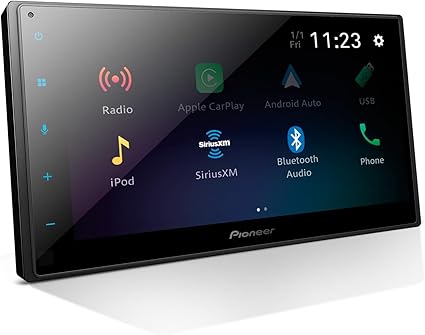 | Pioneer DMH-1600NEX | Check Price |
Our Top Picks 3  | Pioneer DMH-W2770NEX | Check Price |
Our Selected Top 12 Double Din Car Stereo with Android Auto Worth Buying
This list features top double din car stereos equipped with Android Auto, detailing their performance, compatibility, and usability. Each review covers key strengths and potential drawbacks, helping readers identify models that fit different needs and preferences for an enhanced in-car entertainment experience.
1. QLED 7 Double Din Car Stereo
Anyone wanting a clear, modern double din stereo would appreciate a setup using the QLED 7 Double Din Car Stereo. Its standout feature is the bright 7 QLED screen that makes maps, music, and messages pop in vivid colors, ideal for daily drives that involve navigation and media streaming.
Connecting your phone is straightforward thanks to Bluetooth, which activates wireless CarPlay and Android Auto instantly. Streaming music or using voice commands through Siri or Google Assistant keeps your focus on driving without fumbling.
The touchscreen responds quickly, and the interface stays sharp whether you’re checking a map or watching supported video formats on the go.
Output power reaches 240 watts across four stereo channels, delivering strong sound for most car audio needs. The stereo supports popular internet services like Pandora and YouTube, providing variety in entertainment choices.
Most users note the bright QLED display as a highlight, although some mention occasional connection glitches with Bluetooth.
Bright and highly detailed display stands out for clarity in all lighting, though Bluetooth struggles sometimes disrupt wireless connectivity. The clean interface and voice command support reduce distraction while driving.
Perfect for drivers who prioritize a vivid screen and easy smartphone integration for media and navigation. Those needing flawless Bluetooth connections or advanced video playback may want to consider alternatives.
Pros
- Bright, clear 7″ QLED touchscreen
- Supports wireless CarPlay and Android Auto
- Good audio power with 240 watts output
- Compatible with multiple video and audio formats
Cons
- Bluetooth connections can occasionally be unstable
- Video playback limited to certain formats
| Specification | Details |
|---|---|
| Display | 7″ QLED, 1280×720 resolution |
| Output Power | 240 watts |
| Connectivity Technology | Bluetooth, Wi-Fi |
| Audio Output Mode | Stereo, 4 channels |
| Supported Internet Services | Pandora, YouTube |
2. Pioneer DMH-1600NEX Double Din Car Stereo
Hands-free calling combined with solid wired Apple CarPlay and Android Auto integration makes the Pioneer DMH-1600NEX stand out as a great choice for anyone wanting easy smartphone access while driving. It’s especially suitable for those who want clear audio and straightforward controls in one package.
Setting up the unit involves connecting via USB for Apple CarPlay or Android Auto, which works reliably while driving. The Bluetooth feature handles calls well using an external microphone included for clearer sound. The touchscreen makes toggling between maps, music, and messages smooth, keeping distractions low.
Customizing sound with a 13-band equalizer helps match music to the car’s speakers effectively.
Sound quality is impressive, with stereo output and a 5.1 surround sound setup adding depth to music and calls. The build feels sturdy and designed to last, although the touch screen might miss a tap occasionally, which some users mention.
The external microphone for calls generally delivers good voice clarity. Loading apps and switching modes occur without delays, supporting safe use on the move.
The unit receives praise for clear hands-free calls and easy access to smartphone features through wired connections. The most frequent issue involves the touchscreen’s occasional missed input, which can slow menu navigation at times. Sound customization with the equalizer is appreciated for tailoring audio to different vehicle setups.
People who rely heavily on wired Apple CarPlay or Android Auto and prioritize call clarity will find this system fitting well. Those wanting fully wireless smartphone integration or more precise touchscreen response might consider alternatives better suited for those needs.
Pros
- Easy wired smartphone integration with Apple CarPlay and Android Auto
- Clear hands-free calls using external microphone
- Customizable audio with 13-band equalizer and presets
- Responsive touchscreen for quick access to apps
Cons
- Touchscreen can miss taps occasionally
- Requires wired connection for CarPlay and Android Auto
| Specification | Details |
|---|---|
| Connectivity Technology | Bluetooth, USB, Wi-Fi |
| Controller Type | Android, iOS |
| Audio Output Mode | Stereo |
| Surround Sound Channel Configuration | 5.1 |
| Special Features | Android Auto, Apple CarPlay, Built-In Bluetooth |
3. Pioneer DMH-W2770NEX Double Din Car Stereo
Pioneer DMH-W2770NEX Double Din Car Stereo offers smooth smartphone integration with both Android Auto and Apple CarPlay, ideal for drivers who want a reliable, connected experience on the road. Its biggest strength lies in managing apps and calls safely while driving, through a clear 6.8 touchscreen.
Setup involves connecting phones via Bluetooth, USB, or Wi-Fi, which works well with iPhones and Android devices. Daily use is straightforward with easy access to Maps, Music, Messages, and voice commands from Siri or Amazon Alexa. The touchscreen controls respond nicely, and the rearview camera input is a helpful safety feature when parking.
This stereo handles audio playback reliably with support for up to 5.1 surround sound channels. It feels solid in the dashboard, built to fit standard double-din spaces.
Users appreciate how well it integrates with smartphones. The most common gripe involves occasional glitches in wireless connectivity or app freezing during Android Auto use.
Consistent praise centers around how smoothly the stereo connects smartphones and handles apps like Maps and Music, making hands-free use straightforward. Common complaints mostly focus on wireless connection interruptions and occasional freezing in Android Auto while driving.
Drivers wanting reliable phone integration and voice assistance will find it a good match. Those seeking higher-quality stereo audio or stable wireless performance might want to consider other models better suited for those priorities.
Pros
- Supports both Android Auto and Apple CarPlay
- Built-in Wi-Fi and Bluetooth for easy connectivity
- Works with Amazon Alexa and Google Assistant
- Rear View Camera Input included
Cons
- Occasional wireless connectivity glitches
- Mono audio output mode limits stereo sound
| Specification | Details |
|---|---|
| Connectivity Technology | Bluetooth, USB, Wi-Fi |
| Controller Type | Amazon Alexa, Google Assistant, Hand Control |
| Display | 6.8″ WVGA capacitive touchscreen |
| Audio Output Mode | Mono |
| Surround Sound Channel Configuration | Up to 5.1 |
| Compatible Devices | Apple iPhone, Bluetooth, Smartphone |
4. KENWOOD DMX709S eXcelon Double Din Car Stereo
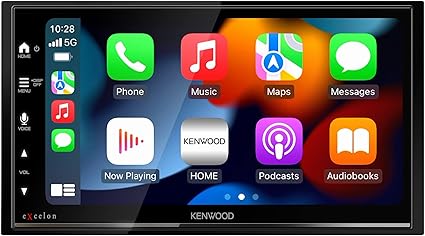
Touching the bright 6.8 capacitive screen makes navigation and control feel natural and instant. Perfect for drivers who want a larger display and easy access to smartphone features while keeping eyes on the road. Its best strength lies in the clear, sharp screen combined with Apple CarPlay and Android Auto compatibility, ensuring connected driving without distractions.
Setting up takes just a few steps, hooking up via USB or Bluetooth to your smartphone. Voice commands let you manage calls, messages, and music without lifting a finger. Streaming through Apple Music, Pandora, or Spotify happens smoothly, while built-in Maps keeps directions visible and easy to follow.
Controls respond quickly on the touchscreen, making daily use straightforward and satisfying.
The stereo delivers solid stereo sound with 5.1 channel surround support through four channels. Built with a capacitive touchscreen, the clarity and contrast are excellent, while the LED backlighting helps with night use.
Most say the audio performance is clear and reliable, though a few mention the wattage feels low at 2.51 milliwatts, which may not fill very large vehicles fully.
Strong points include the sharp, responsive touchscreen and easy voice command controls that let drivers handle apps safely. Common criticism involves the relatively low 2.51 milliwatts wattage, which some find insufficient without extra amplification in large vehicles.
Those who prioritize clear, simple smartphone integration with a larger display will find it an excellent fit. Drivers needing high-powered audio output or wireless smartphone connections should consider other options.
Pros
- Large 6.8″ capacitive touchscreen with LED backlighting
- Supports Apple CarPlay and Android Auto via wired connection
- Clear voice control integration with Siri and Android
- Compatible with major streaming apps like Spotify and Pandora
Cons
- Low wattage output may require external amplifier for bigger cars
- Mostly wired connections, lacks wireless CarPlay or Android Auto
| Specification | Details |
|---|---|
| Connectivity Technology | USB |
| Controller Type | Android, Ring |
| Compatible Devices | Smartphone |
| Wattage | 2.51 Milliwatts |
| Number of Channels | 4 |
| Wireless Technology | Bluetooth |
5. QLED 10.1 Double Din Car Stereo
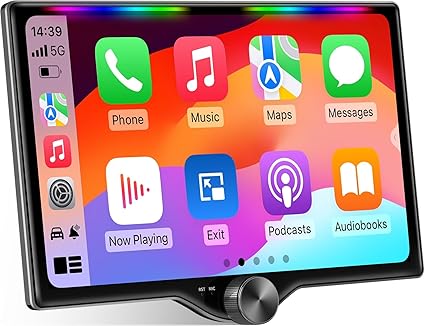
Strong visuals and versatile compatibility make the QLED 10.1 Double Din Car Stereo a great choice for those wanting an easy-to-use infotainment upgrade. It shines most as a clear, responsive display that works well with both Android Auto and Apple CarPlay. People who want straightforward smartphone integration will appreciate its wireless options.
Setup usually requires confirming your dash size and possibly adding a dash kit, but once installed, the touchscreen is very responsive. You can switch between wireless and wired phone connections, and the built-in microphone helps with voice commands like Siri or Google Assistant without needing to touch the screen often.
Bluetooth and USB ports cover most connectivity needs for charging and media playback.
In day-to-day driving, the screen stays clear even in bright daylight, which helps keep navigation and controls visible. The unit supports lots of media formats, providing good versatility for music and video. Most people praise its sound quality and touchscreen, though some mention the need for extra dash parts can complicate installation.
The build feels solid, and the 240 watts output is enough for lively sound.
The sharp screen and reliable Bluetooth with dual USB ports get the best comments for ease of use and media support. Most feedback notes the need for additional dash kits can slow down installation or make it tricky, which causes some frustration.
Good fit for those wanting touchscreen clarity and smooth phone integration while driving. Better to consider a dedicated fit model if your vehicle requires a complex dash adapter or if you prefer a fully bundled installation package.
Pros
- Clear QLED display visible in sunlight
- Works wirelessly and wired with Android Auto and CarPlay
- Includes accurate microphone for voice commands
- Supports many audio and video formats
Cons
- May require a separate dash kit for some vehicles
- No mention of included installation hardware
| Specification | Details |
|---|---|
| Display Size | 10.1-Inch QLED |
| Connectivity Technology | 2 Rear USB Port, Bluetooth |
| Audio Output Mode | Stereo |
| Output Wattage | 240 watts |
| Compatible Devices | Smartphone, iPhone |
| Control Method | Remote, Touch |
6. QLED 7 Double Din Car Stereo

QLED 7 Double Din Car Stereo features a vibrant 7-inch QLED touchscreen built to fit smoothly into most vehicles. It’s suited for drivers wanting wireless Apple CarPlay and Android Auto connectivity, making phone integration its standout feature for safer, hands-free control while driving.
Setting it up involves simple wireless pairing with your smartphone, automatically connecting when you start the car. The display remains clear even in sunlight thanks to its wide 170-degree viewing angle. Voice control through Siri or Google Assistant keeps navigation, messaging, and music under your command without distractions.
Audio performance is solid with 240 watts output across four channels, producing clear, stereo surround sound. The unit’s construction feels durable. Most praise centers on the sharp screen quality and smooth wireless connectivity, while some note occasional glitches in screen mirroring or app compatibility.
Users appreciate the vibrant screen and automatic wireless phone connection that make driving safer and easier. The main drawback experienced involves occasional hiccups with screen mirroring and certain apps not running smoothly.
Those relying heavily on wireless smartphone integration and strong voice control will find it suits their needs well. Anyone wanting flawless app performance or extensive screen mirroring might want to look for another option.
Pros
- Wireless Apple CarPlay and Android Auto support
- Bright, clear 7″ QLED touchscreen
- 170-degree wide viewing angle
- Built-in Bluetooth and DSP
Cons
- Screen mirroring can be inconsistent at times
- Some app compatibility issues reported
| Specification | Details |
|---|---|
| Display Resolution | 1280×720 QLED |
| Controller Type | Android Auto, Apple Carplay |
| Output Power | 240 watts |
| Connectivity Technology | Bluetooth, USB, Wi-Fi |
| Audio Output Mode | Stereo |
7. 7 Wireless Double Din Car Stereo

Wireless Apple CarPlay and Android Auto grab your attention first with a smooth, automatic phone connection when you start the car. Perfect for drivers wanting hands-free control of navigation, calls, and music without fuss.
The biggest strength is its wireless setup that keeps you connected smoothly while on the road.
Setup is straightforward, linking your smartphone without cables the moment the ignition turns on. Voice control through Siri or Google Assistant helps keep focus on driving by managing calls, directions, and playlists on Spotify via your phone.
Screen mirroring lets you see phone apps directly on the stereo display. Music playback and navigation apps like Google Maps and Waze are easy to use and stay reliable throughout the drive.
The sound quality impresses with built-in DSP and a 4.2 channel pre-amplifier outputting up to 240 watts, delivering rich audio with good stereo separation. The unit’s build feels solid and sturdy, holding up well to daily use. Common praise revolves around the wireless connection convenience, while some find occasional hiccups in voice recognition responsiveness.
The wireless connection feature saves hassle by connecting phones automatically, which tends to earn the most praise. Users note the convenient hands-free voice commands make driving safer, but some mention voice control doesn’t always catch commands perfectly. Occasional Bluetooth drops are noticeable but not frequent enough to disrupt enjoyment.
Great choice for drivers relying heavily on their phones for navigation and music while wanting to minimize distractions. Those who prioritize flawless voice control or absolute connection stability might consider other options, though this stereo covers most daily driving needs very well.
Pros
- Wireless connection automates phone linking
- Supports voice commands through Siri and Google Assistant
- High fidelity sound with DSP and 4.2 channel output
- Compatible with popular navigation and music apps
Cons
- Voice recognition can be inconsistent at times
- May occasionally drop Bluetooth connection briefly
| Specification | Details |
|---|---|
| Connectivity Technology | Auxiliary, Bluetooth, USB |
| Controller Type | Android Auto, Apple Carplay |
| Audio Output Mode | Stereo |
| Surround Sound Channel Configuration | 4.2 |
| Output Power | 240 watts |
8. 7 Double Din Car Stereo

Picking a double din car stereo often comes down to smooth smartphone integration, and here the 7 Double Din Car Stereo stands out by supporting both wireless and wired Apple CarPlay and Android Auto, plus voice control. It’s ideal for anyone wanting to keep smartphone functions accessible and hands-free while driving.
Setting up is straightforward, as your phone connects automatically when the car starts, removing any hassle. Voice commands through Siri or Google Assistant let you make calls, get directions, and control music without taking your eyes off the road.
Bluetooth, USB, and auxiliary inputs cover most connectivity needs, while a built-in mic and RCA outputs add options for expansion or clearer call quality.
Audio quality impresses with a built-in DSP processor and 240 watts output, providing crisp sound and powerful bass with subwoofer support. A 10-band EQ allows personalized tuning, which is great for users who care about sound details. The solid build includes a rear heat sink that keeps the unit cool during extended use.
Some users note occasional glitches in wireless connection, but overall performance in audio and interface is reliable.
Many praise the automatic phone connection and voice control for keeping distractions low. Frequent mentions of inconsistent wireless connections point to some stability issues during use. The sound quality and bass output receive strong approval across reviews.
Anyone looking for a versatile stereo that pairs smoothly with both Android and iPhone will be pleased. Drivers who depend heavily on wireless connections and prefer detailed setup guidance might want to explore alternatives.
Pros
- Supports wireless and wired Apple CarPlay and Android Auto
- Built-in DSP for clear audio and customizable EQ
- Automatic phone connection when car starts
- Subwoofer output for enhanced bass
Cons
- Wireless connection can occasionally be spotty
- Lacks detailed instructions for advanced setup
| Specification | Details |
|---|---|
| Connectivity Technology | Auxiliary, Bluetooth, USB |
| Controller Type | Android, iPhone |
| Audio Output Mode | Stereo |
| Output Power | 240 watts |
| Supported Internet Services | YouTube |
| Special Features | Android Auto, Apple CarPlay, Voice Control |
9. Alpine iLX-W670 Multimedia Receiver

Struggling to find a car stereo that handles both Android Auto and Apple CarPlay with a responsive touchscreen? The Alpine iLX-W670 fits well for anyone wanting a straightforward setup with sharp visuals and good sound customization. Its biggest strength lies in its bright 7-inch screen that integrates naturally into most dashboards.
Setting it up is pretty easy, thanks to intuitive touchscreen controls that let you move through apps and music quickly. The wired connections for Android Auto and Apple CarPlay ensure a steady connection to your phone without lag. The added Bluetooth capability lets you stream audio wirelessly when wired modes aren’t available, and the Sound Boost menu is easy to use for adjusting bass levels and subwoofer settings right from the screen.
Sound quality is strong with surround output across two 50-watt channels, providing plenty of power and clarity for daily driving. The build feels solid and fits in nearly any vehicle with a double-DIN slot.
Most users appreciate the sound control options and stable phone connectivity. Complaints mostly focus on the wired-only phone interface, which limits wireless convenience.
Most users find the audio customization menus and sound quality excellent for their daily drives, especially the bass adjustments and Lighting Link control. Wired-only connections for phone integration attract criticism for restricting wireless convenience.
Anyone who prioritizes solid sound control and a clear, simple interface will appreciate this unit. Those wanting full wireless Android Auto or Apple CarPlay functionality might want to explore other options.
Pros
- Bright and responsive 7-inch touchscreen
- Wired Apple CarPlay and Android Auto support
- Advanced bass and subwoofer controls
- Bluetooth streaming capability
Cons
- Android Auto and Apple CarPlay require wired connection
- Limited to 2 audio channels for output
| Specification | Details |
|---|---|
| Controller Type | Touchscreen |
| Connectivity Technology | Bluetooth |
| Number of Channels | 2 |
| Output Power | 50 watts |
| Connector Type | 3.5mm Jack, USB |
10. Alpine ILX-W670-M Double Din Multimedia Receiver

Wired Apple CarPlay and Android Auto integration stands out on this double DIN multimedia receiver, making it ideal for anyone wanting reliable smartphone connection on the road. A responsive 6.75-inch touchscreen adds a personal touch with customizable home screens and key illumination.
Installation fits neatly thanks to the ultra-shallow 2.4-inch chassis, great for tight dashboard spaces. Daily operation involves just plugging in your phone via USB for instant access to maps, music, and apps. The touchscreen responds quickly, and you can tailor the display colors and layout to suit your preferences.
Sound output supports a 5.1 channel surround sound configuration, producing clear stereo audio. A highlight involves compatibility with Alpine’s PowerStack amplifiers for thicker sound systems. Most praise revolves around its crisp touch interface, while some users mention the lack of wireless connectivity options as a downside.
The receiver’s touchscreen performs smoothly with strong wired smartphone integration, consistently praised for dependable connection and visual customization, though some miss wireless options for convenience. Setup is straightforward, and the compact chassis fits in most vehicles without hassle.
People who rely on wired connections and want a compact, visually adjustable system will appreciate this unit. Those preferring wireless connectivity or larger displays might want to consider alternatives.
Pros
- Responsive 6.75-inch touchscreen
- Supports wired Apple CarPlay and Android Auto
- Ultra-shallow 2.4-inch chassis depth
- Customizable key illumination colors
Cons
- No wireless smartphone connection support
- Screen size may feel small to some users
| Specification | Details |
|---|---|
| Connectivity Technology | Android Auto, Apple Carplay, Maestro |
| Controller Type | Digital Multimedia Receiver |
| Display Size | 6.75-inch |
| Audio Output Mode | Stereo |
| Surround Sound Channel Configuration | 5.1 |
| Connector Type | USB |
11. KENWOOD DMX8709S Double Din Car Stereo

Drivers wanting a large, responsive touchscreen paired with wireless Apple CarPlay will find this unit a solid match. It suits those who prioritize safe smartphone integration and clear visuals.
Its standout feature is the 6.8 capacitive touchscreen that delivers sharp, vivid images and fast response to touch controls.
Setup involves connecting your smartphone via Bluetooth or USB and then enjoying wireless Apple CarPlay for hands-free calls, messages, and navigation. The touchscreen’s high contrast and LED backlight make daytime and nighttime use easy on the eyes.
Controlling music apps like Pandora or Spotify feels intuitive, and voice commands through Siri keep distractions low while driving.
The stereo handles its core functions well, providing stereo audio output through four channels that deliver balanced sound. Build quality is steady, with a smooth glass touchscreen and reliable buttons. Most praise focuses on its large, bright display and simple voice control.
A common downside is the occasional complexity in menu navigation for less tech-savvy users.
The biggest praise focuses on the bright, responsive touchscreen combined with smooth wireless Apple CarPlay integration. Common frustration involves navigating the menus, which some find less intuitive and requiring a learning curve.
The stereo suits drivers who use Apple devices heavily and want easy access to voice commands and music apps without wires. People looking for straightforward navigation or extensive Android Auto support may want to explore alternative models.
Pros
- Large, clear 6.8″ capacitive touchscreen
- Wireless Apple CarPlay for safer phone use
- Supports popular streaming services
- Voice control via Siri included
Cons
- Menu navigation can be confusing at first
- No Android Auto mentioned in specs
| Specification | Details |
|---|---|
| Connectivity Technology | Bluetooth, USB |
| Controller Type | Android |
| Audio Output Mode | Stereo |
| Number of Channels | 4 |
| Wireless Technology | Bluetooth |
| Supported Internet Services | Pandora, SiriusXM, Spotify |
12. KENWOOD DMX5020S Double Din Car Stereo

KENWOOD DMX5020S stands out with its clear focus on safe and smart control, fitting anyone wanting solid Android Auto and Apple CarPlay integration. Its main strength lies in combining a large touchscreen with voice control, ensuring you keep your eyes on the road while managing calls, music, or navigation.
Setup is straightforward, connecting easily through Bluetooth or USB. The dual Bluetooth connection lets two phones stay paired for calls and streaming without swapping devices constantly. The touchscreen responds well, and voice commands are handy for making calls or navigating.
Everyday use feels connected and convenient, with compatibility across Android and iOS devices making it a flexible choice for mixed households.
Sound quality impresses, offering a 13 Band Graphic EQ and Digital Time Alignment to tailor audio exactly how you like it. It handles a wide range of file formats, from MP3 to FLAC, ensuring playback variety.
Built solidly as a double DIN unit, it delivers 45 watts across four channels. Users like the audio customization options most, yet some find the touchscreen slighty less responsive in bright sunlight.
The strongest praise points to the extensive audio customization and reliable voice control combined with Android Auto and Apple CarPlay. The most common complaint involves the touchscreen’s responsiveness diminishing under bright sunlight, which can require more careful use at times.
Anyone wanting solid smartphone integration and sound personalization will benefit here, especially in regular daily drives. Those who often drive under intense sunlight or require the highest audio volume without external equipment might want to consider other options.
Pros
- Dual Bluetooth connections for two phones
- 13 Band Graphic EQ for personalized sound
- Supports diverse music file formats
- Easy voice control for safer driving
Cons
- Touchscreen can be less responsive in sunlight
- No built-in amplifier, requires external amp for loudest sound
| Specification | Details |
|---|---|
| Connectivity Technology | Bluetooth, USB |
| Control Method | Touch, Voice |
| Output Wattage | 45 watts |
| Number of Channels | 4 |
| Compatibility | Android, iOS |
| Special Features | Android Auto, Apple CarPlay, Equalizer, Sirius XM |
Best Double Din Car Stereo with Android Auto Comparison
| Product | Connectivity | Controller Type | Display Size | Special Features |
|---|---|---|---|---|
| QLED 7 Car Stereo | Bluetooth, Wi-Fi | Android, iOS | – | Android Auto, QLED Touchscreen |
| Pioneer DMH-1600NEX | Bluetooth, USB, Wi-Fi | Android, iOS | – | Android Auto, Sirius XM |
| Pioneer DMH-W2770NEX | Bluetooth, USB, Wi-Fi | Alexa, Google Assistant | 6.8″ WVGA | Android Auto, Rear Camera Input |
| Kenwood DMX709S eXcelon | USB | Android, Ring | – | Apple CarPlay, Android Auto Wired |
| QLED 10.1 Car Stereo | Bluetooth, 2 USB Ports | Android, iOS | 10.1 | Android Auto, Sound Illumination |
| QLED 7 Stereo Model 2 | Bluetooth, USB, Wi-Fi | Android Auto, Apple Carplay | – | DSP, Screen Mirroring |
| 7 Wireless Double Din | Auxiliary, Bluetooth, USB | Android Auto, Apple Carplay | – | DSP, Screen Mirroring |
| 7 Double Din Stereo | Auxiliary, Bluetooth, USB | Android, iPhone | – | Voice Control, Android Auto |
| Alpine iLX-W670 | Bluetooth | Touchscreen | – | Surround Sound, 50W Output |
| Alpine ILX-W670-M | Android Auto, Apple Carplay | Digital Multimedia Receiver | 6.75 | Android Auto, Double Din |
| Kenwood DMX8709S | Bluetooth, USB | Android | – | Equalizer, Pandora |
| Kenwood DMX5020S | Bluetooth, USB | Android, iOS | – | Android Auto, Sirius XM |
- ConnectivityBluetooth, Wi-Fi
- Controller TypeAndroid, iOS
- Display Size–
- Special FeaturesAndroid Auto, QLED Touchscreen
- ConnectivityBluetooth, USB, Wi-Fi
- Controller TypeAndroid, iOS
- Display Size–
- Special FeaturesAndroid Auto, Sirius XM
- ConnectivityBluetooth, USB, Wi-Fi
- Controller TypeAlexa, Google Assistant
- Display Size6.8″ WVGA
- Special FeaturesAndroid Auto, Rear Camera Input
- ConnectivityUSB
- Controller TypeAndroid, Ring
- Display Size–
- Special FeaturesApple CarPlay, Android Auto Wired
- ConnectivityBluetooth, 2 USB Ports
- Controller TypeAndroid, iOS
- Display Size10.1
- Special FeaturesAndroid Auto, Sound Illumination
- ConnectivityBluetooth, USB, Wi-Fi
- Controller TypeAndroid Auto, Apple Carplay
- Display Size–
- Special FeaturesDSP, Screen Mirroring
- ConnectivityAuxiliary, Bluetooth, USB
- Controller TypeAndroid Auto, Apple Carplay
- Display Size–
- Special FeaturesDSP, Screen Mirroring
- ConnectivityAuxiliary, Bluetooth, USB
- Controller TypeAndroid, iPhone
- Display Size–
- Special FeaturesVoice Control, Android Auto
- ConnectivityBluetooth
- Controller TypeTouchscreen
- Display Size–
- Special FeaturesSurround Sound, 50W Output
- ConnectivityAndroid Auto, Apple Carplay
- Controller TypeDigital Multimedia Receiver
- Display Size6.75
- Special FeaturesAndroid Auto, Double Din
- ConnectivityBluetooth, USB
- Controller TypeAndroid
- Display Size–
- Special FeaturesEqualizer, Pandora
- ConnectivityBluetooth, USB
- Controller TypeAndroid, iOS
- Display Size–
- Special FeaturesAndroid Auto, Sirius XM
How to Choose the Right Double Din Stereo
Consider factors like screen size, compatibility with your phone, and sound quality to ensure the stereo fits your needs and car. Choosing the right features upfront prevents costly upgrades and installation issues later, making your driving experience smoother and more enjoyable.
Compatibility with Android Auto
Most modern phones require a stereo that supports the latest Android Auto versions to connect properly and run apps smoothly. A device stuck on an older Android Auto version might lag or drop connections frequently, which gets frustrating on daily drives.
Some stereos only offer a wired connection, meaning you always have to plug your phone in to use Android Auto, while others support wireless connections for quick access without cables. Using wireless can feel more convenient but sometimes drops out in areas with poor connectivity or with certain phone models. Besides the connection style, the stereo must work well with your phone’s operating system and your car’s hardware.
For example, some units struggle with certain Android versions or car electrical systems, causing odd glitches or failure to sync. Checking the specific compatibility list is helpful to avoid surprises. Choosing a stereo with dependable support for both wireless Android Auto and common Android versions generally leads to fewer headaches.
Screen Quality and Interface
Trying to use a touchscreen that’s slow to respond or reflects too much sunlight ruins the entire experience, especially when driving. The difference between a low- and a high-resolution display is very noticeable for maps and app icons.
A screen around 6 to 7 inches usually fits most dashboards well, providing enough space without obstructing sight lines. Brightness is crucial; a display rated around 500 nits or higher offers good visibility during bright daylight and in tunnels. Menus that are cluttered or confusing can force you to take your eyes off the road longer than necessary.
Units featuring a simple, clean interface with logically grouped controls make it easier to find what you need quickly. A responsive touchscreen combined with a glare-resistant surface prevents taps from being inaccurate or delayed. These factors add up to safer, more comfortable use every time you drive.
Audio Performance and Power Output
Cranking the volume to drown out road noise without sound distortion requires a strong built-in amplifier. Many double DIN stereos have amplifiers rated between 50 to 60 watts RMS per channel, which is generally enough for clear and powerful audio in standard vehicles. Support for multiple audio formats like MP3, AAC, and FLAC helps ensure your music plays without conversion issues.
An equalizer with preset options and manual adjustments allows you to tailor the sound to your car’s unique acoustics. Noise reduction features can cut down on unwanted static or hum from the car’s electrical system.
Distortion control is equally important to keep music clean at higher volumes. A stereo lacking these will produce muddy, harsh audio that quickly wears out the ears, making longer drives tiring instead of enjoyable.
Installation and Fitment
Rack-mounted stereos follow the double DIN standard size, about 7 by 4 inches, fitting most factory dash openings straight out of the box. Stereos that don’t meet this size can lead to gaps or require extensive modifications to the dash, which can be messy and expensive. Wiring harness compatibility is another piece of the puzzle; stereos matching your car’s harness type avoid splicing or cutting wires.
This reduces the risk of electrical faults or failures down the road. Installation manuals that clearly explain each wiring connection and mounting step can be a lifesaver, especially for first-timers.
Some brands also offer professional installation services or partner recommendations if you want the job done with confidence. Having the right guides and support options saves time and stress during setup.
Connectivity and Expansion Options
Typical connectivity options include USB, AUX, Bluetooth, and built-in microphones for hands-free calls. USB ports support charging and playing media from drives or phones, so having at least one USB input is practical. AUX jacks remain useful for devices without Bluetooth.
Bluetooth quality varies across models; a reliable, stable connection reduces call dropouts and audio stutters. Extras like an input for a rearview camera or support for external amplifiers allow adding convenience and better sound quality later on.
Some stereos also support multiple Bluetooth devices or additional microphones for better voice recognition. The ability to upgrade easily with cables and accessories makes the system adaptable as your needs change. This flexibility can extend the stereo’s usefulness for years.
Maximizing Your Double Din Car Stereo Experience with Android Auto Integration
Android Auto allows you to control your smartphone through your double din car stereo, making navigation and communication easier while driving. Using voice commands, you can access music, maps, messages, and calls without taking your hands off the wheel or eyes off the road.
It’s important to connect your phone via a USB cable or wirelessly, depending on your stereo’s capabilities, to ensure a reliable connection.
Tips for better use:
- Keep your phone’s Android Auto app updated for smoother performance and new features.
- Customize your home screen on the stereo to place frequently used apps front and center.
- Adjust the audio settings within the stereo to balance sound quality for a clear listening experience.
- Regularly check for firmware updates for the stereo system to maintain compatibility with Android Auto.
Proper use of Android Auto integration transforms your car stereo into a smart, accessible interface without compromising safety.
Essential Maintenance Tips to Prolong the Life of Your Android Auto Car Stereo
Maintaining an Android Auto double din car stereo involves both software updates and physical care. Dirt or moisture can affect touch sensitivity, so clean the screen gently with a microfiber cloth dampened with a small amount of water or a screen-safe cleaner. Avoid harsh chemicals or abrasive materials.
Additional maintenance tips:
- Keep the wiring secure and free from damage, checking connectors periodically for corrosion or loose connections.
- Close apps or reboot the system occasionally to prevent lag or freezing during use.
- Store the stereo’s manual or quick-start guide for reference on troubleshooting common issues.
- Protect the system from extreme temperatures by parking in shaded areas or using sunshades when possible.
Following these steps helps maintain system responsiveness and extends the life of your stereo unit.
Comparing Android Auto Double Din Stereos with Other In-Car Entertainment Systems
Android Auto double din stereos differ from other in-car entertainment options primarily through smartphone integration and app support. Unlike basic CD or radio units, these stereos allow real-time access to navigation, messaging, and music apps directly from your phone.
Compared to standalone GPS or multimedia screens without Android Auto, they offer a more flexible and frequently updated interface. Third-party systems often rely on proprietary software, which may not receive regular updates or support a wide range of apps.
Advantages of Android Auto double din stereos:
- Syncing with compatible phones is smooth for calls, texts, and notifications.
- Access to familiar apps like Google Maps and Spotify, reducing the need to learn new interfaces.
- Regular updates improve functionality and add new features over time.
These factors make Android Auto units a practical choice for drivers wanting a connected and customizable in-car experience.
People Also Asked
How Do I Install a Double Din Car Stereo with Android Auto?
To install a double din car stereo with Android Auto, disconnect your vehicle’s battery first for safety. Mount the stereo using the vehicle-specific dash kit and connect the wiring harness adapter to your car’s wiring. Make sure to secure the antenna cable and test connections before reassembling the dash. 2 | Android Auto works with most double din car stereos designed since it requires the correct hardware and software support. Check the stereo’s specs to confirm Android Auto compatibility; some lower-end models or older units might not support it fully or at all. 3 | A standard double din stereo fits a dashboard opening roughly 7 inches wide by 4 inches tall. This size is pretty much universal in modern cars designed for double din units, but always measure your dash opening or consult your vehicle’s manual before purchasing. 4 | Double din car stereos with Android Auto typically last several years depending on usage and environment. Exposure to heat or moisture can shorten lifespan, so park in shade and clean connections occasionally to keep the stereo working well over time. 5 | A common problem is intermittent disconnection of Android Auto, often caused by poor USB cable quality or incompatible cables. Use a high-quality USB cable and keep the software updated to reduce connection drops during use.
Is Android Auto Compatible with All Double Din Car Stereos?
Android Auto is not compatible with all double din car stereos. Only those specifically designed with Android Auto support will work properly. Check the product specifications to confirm compatibility. Some models require a USB connection for Android Auto to function, so keep a compatible cable handy for the connection to your phone.
What Size Double Din Stereo Fits Standard Car Dashboards?
A standard double DIN stereo measures about 7 inches wide by 4 inches tall. Most modern cars designed for double DIN stereos will fit this size without modification. It’s helpful to check your car’s dashboard opening or consult the manual before buying to make sure the dimensions match. Some vehicles may require an installation kit for a perfect fit.
How Long Do Double Din Car Stereos with Android Auto Last?
Double din car stereos with Android Auto usually last between 5 to 10 years. The lifespan depends on factors like build quality and how well the unit is protected from extreme temperatures and moisture. Keeping the firmware updated and avoiding excessive force on the touchscreen can also help extend its usability.
Are There Common Issues When Using Android Auto in a Double Din?
Common issues with Android Auto in double din stereos include connection drops or slow response times. These problems often come from using low-quality USB cables or older phone models. Using a good, short USB cable and keeping your phone’s software updated helps maintain a stable connection. Sometimes, the stereo’s firmware update can fix glitches, so checking for updates is useful.
Conclusion
Choosing a double din car stereo with Android Auto comes down to a few key points: compatibility with your vehicle, ease of use while driving, and clear screen visibility. Sound quality and connection options also matter because they impact how well you enjoy music and calls on the road.
Make sure the stereo fits your dashboard size and matches your budget. Consider how often you’ll actually use Android Auto features compared to basic audio. Revisit the comparison table and the detailed picks above to find a good balance for your needs.