
Top 12 Best Double Din Car Stereo with Apple CarPlay Now!
The frustration of dealing with a double din car stereo that lags or won’t connect properly to Apple CarPlay is common. The best double din car stereo with apple carplay keeps the connection steady and responds quickly, which makes driving less distracting.
Cheap models often come with clunky touchscreens or crashes that force you to stop and reset the system, which can be dangerous on the road.
Fit is the first thing to check, as not all double din units match your vehicle’s dashboard perfectly. A good stereo has a clear, responsive screen around 6.5 to 7 inches in size.
It should offer at least 50 watts per channel for decent sound quality without distortion. Reliable connectivity to your iPhone is crucial; look for versions that support both wired and wireless CarPlay for flexibility. Simple menu layouts also help keep focus on driving rather than fumbling with controls.
Need a Quick Check?
| Image | Product | Price |
|---|---|---|
Our Top Picks 1  | 7 QLED Car Stereo | Check Price |
Our Top Picks 2 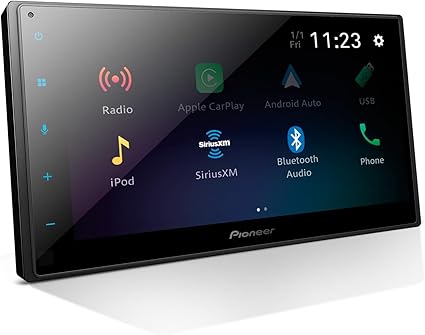 | Pioneer DMH-1600NEX | Check Price |
Our Top Picks 3  | Alpine ILX-W670-M | Check Price |
Our Selected Top 12 Double Din Car Stereo with Apple Carplay Worth Considering
This list features carefully chosen double din car stereos with Apple CarPlay compatibility, highlighting their performance, ideal users, and key advantages and drawbacks. Each review provides practical insights to help you understand which model fits your driving needs and tech preferences best.
1. 7 QLED Double Din Car Stereo
Driving without easy access to your phone’s apps can be distracting, and this 7 QLED Double Din Car Stereo handles that with smooth wireless Apple CarPlay and Android Auto. Perfect for anyone wanting a clear screen and easy voice commands, its biggest strength lies in combining vibrant display quality with hands-free connectivity.
Connecting a phone happens instantly through Bluetooth, so no cables clutter the setup. The 7 QLED screen clearly shows music, maps, and messages, while Siri and Google Assistant keep you focused on driving.
Using it daily means just tapping or speaking, with the stereo supporting your smartphone’s features smoothly and making streaming or navigation simple.
Sound output is solid at 240 watts across 4 channels, delivering clear and full audio for most drivers. The QLED screen impresses with sharp details and vivid colors whether driving in bright sunlight or at night.
The build includes RCA connectors and supports popular video formats too. Some users mention occasional Bluetooth connectivity hiccups, but most appreciate the reliable performance and bright display.
Most praise focuses on the sharp, vivid 7″ QLED display that makes maps and videos easy to see in all lighting, while the main complaint is about occasional Bluetooth connectivity issues during wireless use. The unit delivers solid sound and compatible features for daily driving entertainment and navigation.
People wanting a bright, clear screen with wireless CarPlay will be satisfied, especially those keeping a steady connection most of the time. Drivers needing the most reliable Bluetooth or advanced connector options might prefer alternatives with newer interfaces.
Pros
- Wireless Apple CarPlay and Android Auto support
- Bright 7″ QLED screen with 1280×720 resolution
- Built-in Bluetooth for easy phone connection
- Supports multiple video and audio formats
Cons
- Bluetooth connection can occasionally be unstable
- RCA connectors may limit modern audio setups
| Specification | Details |
|---|---|
| Connectivity Technology | Bluetooth, Wi-Fi |
| Controller Type | Android, iOS |
| Output Power | 240 watts |
| Screen Size | 7″ QLED touchscreen |
| Video Playback Support | 1080P, MPEG-4, RMVB, DivX, AVI |
2. Pioneer DMH-1600NEX Double Din Car Stereo
Wired Apple CarPlay stands out as the biggest feature, perfect for anyone wanting smooth and safe smartphone integration on the road. Ideal for drivers focused on access to navigation, calls, music, and messages without distractions, it keeps things connected while you’re behind the wheel.
Setting it up involves plugging your iPhone with a USB cable to enjoy Apple CarPlay instantly. Bluetooth is handy for hands-free calls using the included external microphone, which delivers clear voice quality.
The touchscreen interface makes jumping between apps and adjusting audio settings intuitive during daily drives.
Audio performance benefits from a 13-band equalizer, letting you tweak sound to suit your car’s speakers and personal taste. Build quality feels solid with a responsive touchscreen and multiple input options. Praise often focuses on its sound customization, while some mention occasional complexity in navigating menus as a downside.
Strong praise centers on the excellent sound customization options and clear hands-free calling. The most common complaint is that the touchscreen menus can be a bit tricky to use, which might slow down quick adjustments while driving.
Drivers who want detailed audio controls and reliable wired Apple CarPlay will appreciate this unit. Those preferring wireless smartphone connectivity or simpler interfaces might want to explore other models.
Pros
- Clear hands-free calling with external microphone
- Customizable sound with 13-band equalizer
- Supports both Apple CarPlay and Android Auto
- Multiple connectivity options including Wi-Fi
Cons
- Menu navigation can feel complicated at times
- No wireless Apple CarPlay support
| Specification | Details |
|---|---|
| Connectivity Technology | Bluetooth, USB, Wi-Fi |
| Controller Type | Android, iOS |
| Audio Output Mode | Stereo |
| Number of Channels | 2 |
| Supported Internet Services | SiriusXM |
| Connector Type | 3.5mm Jack, RCA, USB Type A |
3. Alpine ILX-W670-M Double DIN Multimedia Receiver
People who enjoy having their phone apps and music easily accessible in the car will appreciate this double din stereo. It’s tailored for those who want reliable wired Apple CarPlay or Android Auto without needing complicated setup. Its standout feature is the bright, responsive 6.75-inch touchscreen that’s easy to customize for a personal driving experience.
Setting it up in the car is straightforward, partly thanks to its ultra-shallow 2.4-inch chassis that fits tight spaces. Connecting your iPhone or Android happens via USB, making the connection solid and lag-free for navigation and media.
You can tweak the screen’s key illumination color and home screen layout, so daily interaction feels familiar and smooth while driving.
The stereo handles its main job smoothly, delivering clear audio through its 6-channel, 5.1 surround sound setup which is great for music and calls. Build quality feels solid, and integration with Alpine amps is handy for those looking to boost sound. Most praises highlight the crisp display and dependable Apple CarPlay connection.
A common drawback is the lack of wireless CarPlay, which some users miss for convenience.
The screen is crisp and responsive, making day-to-day use straightforward with quick, reliable wired connections to Apple CarPlay. Most users are happy with the integration and customization options, but missing wireless CarPlay has been noted as a frequent downside.
Those looking for an easy-to-install unit with reliable wired connections and solid sound will appreciate this stereo. People wanting wireless connectivity or a larger display might find other models better suited to their needs.
Pros
- Responsive 6.75-inch touchscreen with customizable colors
- Wired Apple CarPlay and Android Auto with USB connection
- Ultra-shallow 2.4-inch chassis fits tight dashboards
- Supports Alpine PowerStack amplifier integration
Cons
- No wireless Apple CarPlay support
- Screen size may feel small compared to some competitors
| Specification | Details |
|---|---|
| Connectivity Technology | Android Auto, Apple Carplay, Maestro |
| Controller Type | Digital Multimedia Receiver |
| Display Size | 6.75-inch |
| Chassis Depth | 2.4-inch (Ultra-Shallow) |
| Audio Output Mode | Stereo |
| Surround Sound Channel Configuration | 5.1 |
4. Pioneer DMH-W2770NEX Double Din Car Stereo

Offering solid smartphone integration with Apple CarPlay and Android Auto, this double din stereo suits anyone wanting straightforward connectivity while driving. Its standout feature is the bright 6.8 capacitive touchscreen that makes accessing apps and controls easy and intuitive.
Setting it up is pretty straightforward, with Bluetooth, USB, and Wi-Fi all supported for multiple connection types. It links up quickly with an iPhone to bring Maps, Music, Messages, and Siri voice commands right to the dashboard. Bluetooth lets you make hands-free calls and stream music without fuss, while the rear view camera input adds a nice safety touch.
Audio performance holds up well with support for up to 5.1 surround sound channels, delivering clear and balanced output. The build feels solid, fitting standard double din slots without issues.
Common praise highlights how responsive the touchscreen is, though some find the audio output defaulting to mono, which might bother those used to stereo sound. Amazon Alexa integration via a separate app is a neat bonus for voice control.
The touchscreen responsiveness and smooth smartphone integration receive consistent praise, making it easy to control apps and music while driving. Users often mention that the mono audio output mode is a downside, especially for those expecting stereo sound quality from the unit.
Drivers prioritizing straightforward smartphone access and a large display will find this stereo useful. Those who want full stereo sound or prefer Alexa built directly into the unit might consider alternatives that better match those needs.
Pros
- Bright 6.8″ capacitive touchscreen
- Supports Apple CarPlay and Android Auto
- Built-in Bluetooth and Wi-Fi connections
- Rear view camera input included
Cons
- Audio output mode limited to mono
- Amazon Alexa requires separate smartphone app
| Specification | Details |
|---|---|
| Connectivity Technology | Bluetooth, USB, Wi-Fi |
| Controller Type | Amazon Alexa, Google Assistant, Hand Control |
| Display Size | 6.8″ WVGA capacitive display |
| Audio Output Mode | Mono |
| Surround Sound Channel Configuration | Up to 5.1 |
| Compatible Devices | Apple iPhone, Bluetooth, Smartphone |
5. 7 QLED Double Din Car Stereo

7 QLED Double Din Car Stereo offers impressive wireless Apple CarPlay integration that suits drivers wanting a hands-free, connected experience. Its biggest strength lies in the automatic phone syncing and voice command use through Siri, making it ideal for frequent commutes and long drives.
Setup involves easy wireless pairing with Apple CarPlay or Android Auto, eliminating cables for daily use. The 7-inch QLED touchscreen stays sharp and bright even under sunlight, and wide viewing angles let both front seats see clearly.
Voice commands handle navigation, messages, and music, so you stay focused on driving without distractions.
Performance delivers clear sound with its 240-watt output in a stereo setup, supporting a surround sound channel configuration of 4.2 for immersive audio. The build includes solid connectivity options like Bluetooth, USB, and Wi-Fi.
Reviews often highlight the excellent screen quality and wireless convenience, while some mention occasional connection drops as a downside.
Many users appreciate how the wireless Apple CarPlay syncs automatically and keeps the screen vibrant even in bright daylight. Some users face connectivity drops that can interrupt the smooth smartphone integration.
People looking for easy hands-free control with a bright, responsive screen will find this unit fitting. Those who prioritize the absolute stability of wireless connections or prefer physical dials for volume might consider alternatives.
Pros
- Wireless Apple CarPlay and Android Auto
- Bright 7″ QLED screen with wide angles
- Automatic phone syncing on entry
- Supports voice commands for safer use
Cons
- Occasional wireless connection drops reported
- No physical knob for quick volume adjustments
| Specification | Details |
|---|---|
| Display | 7″ QLED 1280×720 HD touchscreen |
| Connectivity | Bluetooth, USB, Wi-Fi |
| Controller Type | Apple CarPlay, Android Auto |
| Audio Output Power | 240 watts |
| Surround Sound Channel Configuration | 4.2 |
6. 10.1 QLED Double Din Car Stereo
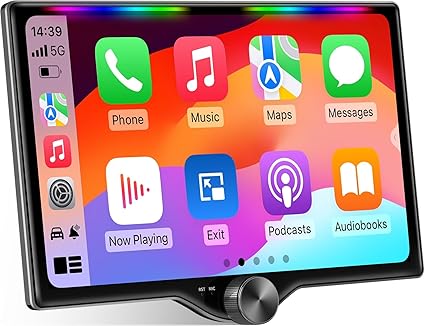
Bright and clear visuals make navigation and media enjoyment simple with a 10.1-inch QLED display designed for easy viewing in sunlight. Suited for drivers wanting a large touchscreen with flexible fit options, its biggest strength is ease of access to smartphone features through wireless and wired Carplay and Android Auto.
Setting up involves confirming the dash opening size, as it fits most single or double din slots with a proper kit. Day-to-day, switching between wireless and wired Carplay is convenient, and voice control works well through the built-in microphone. Using music apps, maps, and calls feels natural with touchscreen and remote control options, while the sound-synchronized lighting adds a bit of style.
Audio output reaches 240 watts with four channels delivering stereo sound that fills the car adequately. The build supports common video and audio formats with good compatibility for iPhone and Android devices. Reviews highlight excellent voice recognition for hands-free use while a frequent downside mentioned is the need to prepare a specific dash kit for some vehicles, making installation a bit complex for some.
Voice recognition accuracy impresses and improves hands-free driving, though many find installing it tricky without the right dash kit. Visual clarity under sunlight is excellent, making media and map reading easier on the road.
Drivers who want easy smartphone integration and a large, bright display will appreciate this stereo. Those with less common dash sizes or without dash kit options might want to consider units designed for a more straightforward fit.
Pros
- Wide viewing angles with clear QLED screen
- Supports both wireless and wired Carplay
- Built-in microphone for accurate voice commands
- Supports numerous audio and video formats
Cons
- Installation may require custom dash kit
- Not compatible with all dash sizes out of the box
| Specification | Details |
|---|---|
| Display Size | 10.1 Inch QLED |
| Output Wattage | 240 watts |
| Connectivity Technology | Bluetooth, 2 Rear USB Port |
| Control Method | Remote, Touch |
| Compatible Devices | Smartphone, iPhone |
7. 7 Wireless Double Din Car Stereo

Excellent for anyone wanting both wired and wireless Apple CarPlay in one unit, this double din car stereo is strong on connectivity. It suits drivers who rely heavily on voice control for navigation and playlists.
Its standout feature is the automatic wireless phone connection right when you start driving.
Setup is straightforward with multiple connectivity options like Bluetooth, USB, and RCA. Daily use revolves around its wireless CarPlay and Android Auto, meaning apps like Google Maps and Spotify run smoothly from your phone. The voice control allows hands-free interactions, helping you stay focused on the road while managing calls or music with ease.
Sound quality benefits from a built-in DSP and a 4.2 channel pre-amplifier outputting up to 240 watts, delivering clear, well-balanced audio across all speakers. The physical build feels solid, but some say the touchscreen response can lag occasionally. Most praise its automatic wireless connection, while a few note occasional delays in screen mirroring.
Users appreciate the automatic wireless connection that happens as soon as the car starts, making driving simpler and safer. The most common downside is occasional touchscreen lag, especially when using screen mirroring, which can interrupt smooth operation during use.
Anyone who wants quick hands-free access to apps and music with strong sound output will find this a good fit. Drivers expecting flawless touchscreen speed or heavy-duty video functions might want to consider other options better suited for intensive use.
Pros
- Automatic wireless phone connection on startup
- Supports Apple CarPlay and Android Auto wirelessly
- High fidelity sound with 240 watt output
- Voice control works well with Siri and Google Assistant
Cons
- Touchscreen can lag during screen mirroring
- Occasional delay when switching between apps
| Specification | Details |
|---|---|
| Connectivity Technology | Auxiliary, Bluetooth, USB |
| Controller Type | Android Auto, Apple Carplay |
| Output Power | 240 watts |
| Surround Sound Channel Configuration | 4.2 |
| Video Encoding | MPEG-4, RMVB, DivX, AVI, 1080P, MP3, WMA, JPEG |
8. Wireless Apple CarPlay Double Din Car Stereo

Constructed with a vibrant 7-inch IPS touchscreen, the double din wireless Apple CarPlay stereo fits well for drivers seeking a modern, cable-free interface. Its biggest strength lies in offering wireless Apple CarPlay and Android Auto, reducing clutter and keeping key apps accessible during drives.
Connecting the stereo takes little effort using USB Type A or Type-C and pairs quickly with smartphones via Bluetooth or Wi-Fi. Daily drives become simpler thanks to hands-free calls and Siri voice commands, plus navigation that displays real-time routes with turn-by-turn directions right on the screen. All controls remain within easy reach, keeping attention on the road.
Audio delivery is strong with a 100-watt output across four stereo channels, supporting a range of video formats for entertainment. The build feels solid, focusing on practical features over flashy extras. The highest praise notes the convenience of wireless functions, while the most common gripe mentions occasional connectivity lags during long trips.
Wireless connectivity and integration with Siri or Google Assistant get high marks for making drives more manageable and reducing distraction. However, some users mention occasional slowdowns in connection stability over longer trips or sessions. The touchscreen and speaker setup work well but don’t offer advanced multimedia customization.
Drivers wanting reliable wireless Apple CarPlay functionality and easy navigation access will appreciate this unit’s straightforward interface. Those seeking larger screens or more advanced audio control features might need to explore other options.
Pros
- Wireless connection for Apple CarPlay and Android Auto
- 7-inch IPS touchscreen display
- Supports multiple video encoding formats
- Strong 100-watt stereo audio output
Cons
- Connectivity can lag during extended use
- Limited to 7-inch screen size
| Specification | Details |
|---|---|
| Connectivity Technology | Auxiliary, Bluetooth, USB, Wi-Fi, Wireless |
| Controller Type | Hand Control |
| Audio Output Mode | Stereo |
| Output Power | 100 watts |
| Compatible Devices | Microphone, Smartphone, Speaker |
| Connector Type | USB Type A, USB Type-C |
9. 7 QLED Double Din Car Stereo
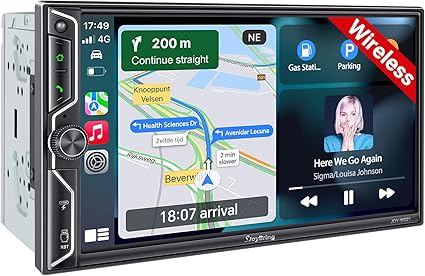
A 7-inch QLED HD screen is the first thing you’ll notice on the 7 QLED Double Din Car Stereo, which suits anyone wanting sharp visuals alongside easy wireless Apple CarPlay and Android Auto. Its biggest strength lies in delivering sharp, bright images while keeping your phone connected without cables.
Setup involves connecting your smartphone via Bluetooth or USB for screen mirroring and app access, making daily use straightforward. Voice control helps with hands-free calls and navigation commands while driving.
The touchscreen responds well, and having Google Maps, Spotify, and YouTube right on display is convenient for both navigation and entertainment in the car.
Audio performance offers clear stereo sound with 240 watts output across four channels, handling music and calls well. The build handles video formats up to 1080P smoothly, and the QLED screen is vibrant.
Frequent remarks mention the bright, clear display as a big plus. Some users note that wired connections via USB are needed for some features like video playback, which adds cables back into the setup.
Voice control and wireless phone connectivity simplify hands-free use, but some features require USB connection, meaning cables cannot be completely avoided. The 7-inch QLED display consistently receives praise for its sharp visuals during both daylight and night driving.
Drivers who want modern wireless CarPlay with a bright screen and good audio are likely to be happy. People seeking a fully cable-free setup for all functions or those sensitive to occasional touchscreen lag might want to look into other options.
Pros
- Bright 7-inch QLED screen with HD resolution
- Wireless Apple CarPlay and Android Auto support
- 240 watts stereo output for solid audio
- Supports multiple video formats up to 1080P
Cons
- USB cable needed for screen mirroring and video playback
- Occasional touchscreen responsiveness issues reported
| Specification | Details |
|---|---|
| Connectivity Technology | Bluetooth |
| Controller Type | Apple Carplay |
| Output Wattage | 240 watts |
| Screen Size & Resolution | 7-inch QLED HD (1280×720) |
| Video Playback Support | 1920 x1080P |
| Audio Output Mode | Stereo |
10. 7 Double Din Car Stereo

Designed for drivers who want smooth iPhone integration without fumbling with cords, the 7 Double Din Car Stereo shines with both wired and wireless Apple CarPlay support. It’s especially useful for those who spend a lot of time navigating or handling calls on the road, offering convenient automatic phone connection and easy voice control.
Setting it up takes a few minutes, connecting via Bluetooth or cable depending on your preference. Once running, the stereo links to your phone as soon as you start the car.
Voice commands activate Siri smoothly, so you can handle navigation, calls, or music without lifting a finger. It also works with Android Auto, giving flexibility if you switch devices. Controls respond quickly, making it simple to manage playback or adjust settings on the fly.
Audio quality stands out thanks to the built-in DSP and 240 watts of power across five channels. The 10-band EQ lets you tailor sound to your liking, boosting bass or clarity.
A dedicated subwoofer output helps fill out low frequencies for richer sound. The unit is solidly built to stay cool during long drives, and most users praise its reliable connection and audio performance. A few mention occasional glitches in voice recognition, which can interrupt hands-free operation.
The strongest praise highlights the crisp audio and convenience of automatic wireless Apple CarPlay connectivity, making it easy to stay connected while driving. Common complaints revolve around occasional voice command issues that can disrupt hands-free control.
This stereo fits well for drivers who want high-quality sound and smooth phone integration with an iPhone or Android device. Those looking for a simpler installation or more consistent voice control might want to consider other models.
Pros
- Supports wireless and wired Apple CarPlay
- Automatic phone connection on engine start
- Customizable sound with 10-band EQ and subwoofer output
- Built-in DSP and 240W power deliver clear audio
Cons
- Voice recognition glitches can interrupt commands
- Setup may be complex for non-technical users
| Specification | Details |
|---|---|
| Output Power | 240 watts |
| Connectivity Technology | Auxiliary, Bluetooth, USB |
| Controller Type | Android, iPhone |
| Special Features | Android Auto, Apple CarPlay, Voice Control |
| Audio Output Mode | Stereo |
| Connector Type | 3.5mm external mic jack, RCA |
11. Alpine iLX-W670 Multimedia Receiver

Finding a reliable double-DIN stereo that works smoothly with Apple CarPlay can make daily drives more enjoyable. Ideal for anyone wanting a clear, responsive touchscreen and solid music controls, it stands out with its vibrant 7-inch display and strong sound management options.
Setup involves a straightforward installation that fits well into most vehicle dashboards. Daily use benefits from the easy navigation on the touchscreen and quick access to apps through Apple CarPlay.
Adjusting sound is simple, thanks to the Sound Boost menu, which offers bass and subwoofer tweaks. Bluetooth connectivity handles calls and music wirelessly, but Apple CarPlay and Android Auto require a wired connection.
Sound quality is clear and full, with 50 watts output per channel creating a good surround sound experience. The build feels sturdy and well-integrated into the dash. Reviews commonly mention the excellent audio customization.
Some note the limitation that CarPlay is only wired, which can be inconvenient for certain users expecting wireless options.
Users appreciate the detailed sound customization and vibrant touchscreen experience, making music and app navigation satisfying during drives. The most common complaint focuses on the lack of wireless Apple CarPlay, which feels limiting compared to other modern units.
This stereo suits drivers who prefer wired connections and want easy control over audio settings. Those looking for wireless CarPlay or a multi-channel surround sound setup might want to consider different models.
Pros
- Clear 7-inch bright touchscreen
- Extensive bass and subwoofer controls
- Wired Apple CarPlay and Android Auto support
- Good Bluetooth audio and call handling
Cons
- Apple CarPlay only works wired, no wireless option
- Two channels limit surround sound depth
| Specification | Details |
|---|---|
| Controller Type | Touchscreen |
| Output Power | 50 watts |
| Output Wattage | 50 watts |
| Connectivity Technology | Bluetooth |
| Number of Channels | 2 |
| Connector Type | 3.5mm Jack, USB |
12. Alpine ILX-W670 Double DIN Multimedia Receiver

Apple CarPlay wired compatibility stands out with the Alpine ILX-W670, making it ideal for someone wanting a reliable, modern multimedia receiver in their car. Its 7-inch screen combined with 6-channel time correction takes sound and connectivity to a practical level suited for everyday driving and smartphone integration.
Setup is straightforward, with USB and auxiliary inputs ready to connect various devices. Daily control is simple via the push-button interface or steering wheel controls, keeping safety in mind by minimizing distractions. The multi-color illumination lets you customize the display colors to your liking, which helps with visibility on different drives.
Wired Apple CarPlay and Android Auto integration ensure your favorite apps and navigation tools stay accessible.
Sound quality benefits from 4V pre-outs and crossover settings for front, rear, and subwoofer channels, delivering a clear and balanced output through a 5.1 surround sound configuration. The build feels solid, able to handle bumps without losing touchscreen responsiveness. High praise centers on its integration and sound options, while some find the 800 x 480 pixel screen resolution a bit limited for detailed graphics.
Clear sound tuning and Apple CarPlay make this receiver pleasant to use during drives, but the screen resolution might feel dated compared to newer displays. Connectivity options are solid, though using CarPlay requires a wired connection, limiting convenience somewhat.
Someone valuing sound customization and reliable phone integration will be satisfied with this unit. Those wanting a wireless CarPlay experience or a higher-resolution screen might want to explore alternatives.
Pros
- Steering wheel control compatible
- Multi-color illumination options
- Support for front and rear camera input
- 6-channel time correction for sound tuning
Cons
- Screen resolution could be sharper
- Apple CarPlay only works wired
| Specification | Details |
|---|---|
| Screen Resolution | 800 x 480px |
| Pre-outs | 4V (Front, Rear and Subwoofer) |
| Time Correction | 6-Channel |
| Connectivity Technology | Auxiliary, Bluetooth, USB |
| Controller Type | Push Button |
| Wireless Technology | Bluetooth |
Best Double Din Car Stereos with Apple CarPlay Comparison
| Product | Display Size | Connectivity | Special Features | Compatible Devices |
|---|---|---|---|---|
| 7 QLED Car Stereo | 7 QLED | Bluetooth, Wi-Fi | Android Auto, Apple CarPlay | Smartphone |
| Pioneer DMH-1600NEX | – | Bluetooth, USB, Wi-Fi | Android Auto, Apple CarPlay, Sirius XM | Smartphone |
| Alpine ILX-W670-M | 6.75-inch | Android Auto, Apple Carplay | Digital Multimedia Receiver, Double Din | Android Auto, Apple Carplay |
| Pioneer DMH-W2770NEX | 6.8″ WVGA | Bluetooth, USB, Wi-Fi | Android Auto, Apple CarPlay, Sirius XM, Rear View Camera Input | Smartphone |
| 7 QLED Stereo Mk2 | 7 QLED | Bluetooth, USB, Wi-Fi | Android Auto, Apple CarPlay, DSP, Screen Mirroring | Amplifier, Smartphone, Speaker |
| 10.1 QLED Car Stereo | 10.1 QLED | 2 Rear USB Port, Bluetooth | Android Auto, Apple CarPlay, Sound Synchronised Illumination | Smartphone, iPhone |
| 7 Wireless Car Stereo | 7 Wireless | Auxiliary, Bluetooth, USB | Android Auto, Apple CarPlay, DSP, Screen Mirroring | Amplifier, Smartphone, Speaker |
| Wireless Apple CarPlay | – | Auxiliary, Bluetooth, USB, Wi-Fi, Wireless | Android Auto, Wireless CarPlay, IPS Touchscreen | Microphone, Smartphone, Speaker |
| 7 QLED Stereo Pro | 7 QLED | Bluetooth | Android Auto, Apple CarPlay, DSP, Screen Mirroring | Smartphone |
| 7 Double Din Stereo | 7 Double Din | Auxiliary, Bluetooth, USB | Android Auto, Apple CarPlay, Voice Control | Smartphone |
| Alpine iLX-W670 | – | Bluetooth | Touchscreen, Surround Sound, 50 watts output | Smartphone |
| Alpine ILX-W670 Dual | – | Auxiliary, Bluetooth, USB | Android Auto, Apple CarPlay, Front/Rear Camera Input | Amplifier |
- Display Size7 QLED
- ConnectivityBluetooth, Wi-Fi
- Special FeaturesAndroid Auto, Apple CarPlay
- Compatible DevicesSmartphone
- Display Size–
- ConnectivityBluetooth, USB, Wi-Fi
- Special FeaturesAndroid Auto, Apple CarPlay, Sirius XM
- Compatible DevicesSmartphone
- Display Size6.75-inch
- ConnectivityAndroid Auto, Apple Carplay
- Special FeaturesDigital Multimedia Receiver, Double Din
- Compatible DevicesAndroid Auto, Apple Carplay
- Display Size6.8″ WVGA
- ConnectivityBluetooth, USB, Wi-Fi
- Special FeaturesAndroid Auto, Apple CarPlay, Sirius XM, Rear View Camera Input
- Compatible DevicesSmartphone
- Display Size7 QLED
- ConnectivityBluetooth, USB, Wi-Fi
- Special FeaturesAndroid Auto, Apple CarPlay, DSP, Screen Mirroring
- Compatible DevicesAmplifier, Smartphone, Speaker
- Display Size10.1 QLED
- Connectivity2 Rear USB Port, Bluetooth
- Special FeaturesAndroid Auto, Apple CarPlay, Sound Synchronised Illumination
- Compatible DevicesSmartphone, iPhone
- Display Size7 Wireless
- ConnectivityAuxiliary, Bluetooth, USB
- Special FeaturesAndroid Auto, Apple CarPlay, DSP, Screen Mirroring
- Compatible DevicesAmplifier, Smartphone, Speaker
- Display Size–
- ConnectivityAuxiliary, Bluetooth, USB, Wi-Fi, Wireless
- Special FeaturesAndroid Auto, Wireless CarPlay, IPS Touchscreen
- Compatible DevicesMicrophone, Smartphone, Speaker
- Display Size7 QLED
- ConnectivityBluetooth
- Special FeaturesAndroid Auto, Apple CarPlay, DSP, Screen Mirroring
- Compatible DevicesSmartphone
- Display Size7 Double Din
- ConnectivityAuxiliary, Bluetooth, USB
- Special FeaturesAndroid Auto, Apple CarPlay, Voice Control
- Compatible DevicesSmartphone
- Display Size–
- ConnectivityBluetooth
- Special FeaturesTouchscreen, Surround Sound, 50 watts output
- Compatible DevicesSmartphone
- Display Size–
- ConnectivityAuxiliary, Bluetooth, USB
- Special FeaturesAndroid Auto, Apple CarPlay, Front/Rear Camera Input
- Compatible DevicesAmplifier
How to Choose the Right Double Din Car Stereo
Choosing the right double din car stereo with Apple CarPlay involves focusing on compatibility with your vehicle, ease of use, and sound quality. Prioritizing these factors helps ensure smooth integration and an enjoyable experience, avoiding costly upgrades or installation problems later on.
Compatibility and Connectivity
Installing a stereo that does not fit your vehicle complicates the entire process. Some models require extra adapters or modifications to the dashboard, leading to uneven fitting or loose connections.
Matching your car’s make and model guarantees a flush installation, which is crucial for both aesthetics and function. Confirming support for recent Apple CarPlay updates is important because outdated software can lead to connectivity problems or missing features.
Wired connections generally offer more stable audio and data transfer, while wireless options add convenience by eliminating cables. Choose a model that supports both wired and wireless CarPlay to accommodate different usage preferences and scenarios. Double check compatibility lists provided by manufacturers to avoid technical headaches later on.
Display Quality and Usability
The size and touch responsiveness of the screen directly impact usability on the road. Screens around 7 to 8 inches strike a good balance between visibility and space usage.
Poor touch sensitivity or lag can distract while driving. High resolution ensures that icons and text are legible quickly without squinting, especially crucial when checking directions or messages.
Look for user interfaces that are straightforward and limit menu layers. Ability to customize shortcuts speeds up access to commonly used functions. Visibility under bright sunlight often separates good displays from frustrating ones.
Anti-glare coatings and adjustable brightness help maintain clear visibility in various lighting conditions.
Audio Performance and Features
Most built-in amplifiers provide between 15 and 50 watts RMS per channel, which works well for typical passenger cars. Those looking for stronger sound systems should choose models with preamp outputs to hook up external amplifiers and subwoofers. Not all stereos have equalizer settings or presets, but these controls allow you to adapt sound to different music types and car acoustics.
Noise filtering features reduce engine and road interference, which boosts clarity on quieter tracks. Good signal-to-noise ratios make a noticeable difference in playback quality, preventing distortion at higher volumes.
Testing various audio settings in the store or reading detailed reviews helps confirm the practical performance you want.
Installation and Fitment
Dashboard openings marked as double din typically measure about 7 by 4 inches. It sounds simple but stereos with slight size variations may not fit with factory bezels or mounting brackets. Manufacturers sometimes include installation kits that contain screws, trims, or wiring harnesses, simplifying integration without extra purchases.
Wiring connections designed to match common car harnesses reduce installation time and errors. The placement of physical buttons matters too: controls should be reachable without glancing away from the road.
Large knobs for volume and clearly labeled buttons improve ease of use and safety during driving.
Build Quality and Durability
The screen glass should resist scratches since it’s touched frequently, and a plastic chassis can help absorb vibrations without cracking. Some models include water-resistant seals or dust protection, valuable for cars driven in dusty or wet environments. Temperature tolerance is often overlooked but matters if the vehicle spends a lot of time under the sun or in cold climates.
Warranty length and the availability of customer support influence long-term satisfaction. A stereo is a significant investment, and prompt responses to problems or replacement parts prevent frustration.
Prefer products from brands with established reputations for durability and service.
Optimizing Your Double DIN Stereo for Seamless Apple CarPlay Integration
Double DIN car stereos that support Apple CarPlay offer a straightforward way to access your iPhone’s features directly from the dashboard. To get the best experience, make sure your USB cable is in good condition and is Apple-certified.
A faulty or non-certified cable can cause connection drops or slower response times. Before plugging in, check that the stereo firmware is up to date, as manufacturers often release updates that improve compatibility and fix bugs with CarPlay.
Practical steps include:
- Using the factory USB port if the stereo connects via factory wiring harnesses, as some ports provide better data transfer.
- Disabling unnecessary apps on your phone to avoid cluttered menus on the CarPlay screen.
- Adjusting screen brightness on the stereo for clear visibility while driving.
Taking these small steps can greatly improve responsiveness and usability during your drives.
Essential Maintenance Tips to Prolong Your Double DIN Car Stereo’s Lifespan
Maintaining your double DIN car stereo involves more than just occasional cleaning. Dirt and dust can accumulate on touchscreens, leading to sluggish response or ghost touches.
Use a microfiber cloth lightly dampened with water to gently clean the display without scratching it.
Other maintenance tips:
- Avoid exposing the unit to extreme temperatures by parking in shaded areas or using sunshades inside your car.
- Turn off the stereo properly rather than abruptly disconnecting power or the USB connection to prevent software glitches.
- Keep your phone’s CarPlay software updated to match the stereo’s firmware for smooth interaction.
Regular care ensures the stereo remains functional and responsive for years.
Common Installation Mistakes to Avoid with Double DIN Apple CarPlay Stereos
Incorrect installation of double DIN Apple CarPlay stereos can cause problems ranging from poor audio quality to complete lack of connectivity. One common issue is miswiring the USB data cables. Many installers assume that all USB cables are the same, but data lines must be correctly connected for CarPlay to function.
Other typical mistakes:
- Neglecting to securely mount the head unit, resulting in vibrations that affect touchscreen performance.
- Using adapters or extension cables that interfere with signal strength.
- Failing to update the stereo’s firmware after installation, which can limit compatibility with newer Apple iOS versions.
Testing all functions before finalizing dashboard assembly helps catch issues early and ensures a smooth user experience.
People Also Asked
How Do I Check If My Car Fits a Double Din Stereo?
Check your car’s dashboard to see if the opening is about 7 by 4 inches, which is the size of a double din slot. Measuring the existing stereo or consulting your car manual can prevent buying the wrong size stereo.
Is Apple CarPlay Compatible with All Double Din Car Stereos?
Apple CarPlay works with many double din stereos, but not all of them support it. Always check the product specifications for CarPlay compatibility before purchasing.
What Are Common Problems with Double Din Apple CarPlay Units?
Common problems include occasional connection drops between the iPhone and the stereo, lag during menu navigation, and syncing issues with some apps. Keeping your stereo’s firmware updated can help minimize these problems.
How Do I Safely Install a Double Din Car Stereo Myself?
Disconnect the car battery before installation to avoid any electrical shorts. Follow the wiring diagram carefully, use proper connectors, and test the unit before securing it in place to make sure everything works correctly.
How Long Do Double Din Apple CarPlay Stereos Usually Last?
Double din Apple CarPlay stereos typically last around 5 to 7 years with regular use. Proper care like avoiding extreme temperatures and keeping the firmware updated can extend their lifespan.
Conclusion
Choosing the right double din car stereo with Apple CarPlay mainly depends on the ease of use, sound quality, and compatibility with your vehicle. A clear screen and responsive touch controls make a big difference in daily driving.
Also, consider how well the system connects with your phone and other devices for smoother navigation and communication.
Make sure the unit fits your dashboard and matches your budget without sacrificing key features you need. Think about how often you’ll use features like navigation or music streaming to pick the right model. You can review the comparison table and detailed descriptions above to find the one that suits your setup best.