
Top 12 Best iPhone Compatible Car Stereo You Need Now
Many people have experienced the frustration of a cheap car stereo that struggles to connect to an iPhone or delivers poor audio quality. The best iPhone compatible car stereo offers reliable Bluetooth or wired connections and clear, consistent sound without random dropouts.
This is critical during commutes or long drives when stable access to music and calls is essential.
A good iPhone-compatible car stereo fits standard dashboard sizes, typically double DIN or single DIN, ensuring easy installation and a clean look. Look for systems providing at least 45 watts per channel for decent volume and clarity. Compatibility with CarPlay over both USB and Bluetooth, easy-to-read touchscreens with responsive controls, and straightforward cleaning options contribute to safer and more convenient use while driving.
Need a Quick Check?
| Image | Product | Price |
|---|---|---|
Our Top Picks 1  | 7 QLED Double Din | Check Price |
Our Top Picks 2  | Pioneer MVH-S230BT | Check Price |
Our Top Picks 3  | 7 QLED Double Din Plus | Check Price |
Our Selected Top 12 Iphone Compatible Car Stereo Worth Buying
This list features carefully chosen car stereos that work well with iPhones, covering a range of features and designs. Each review explains how the product performs, who it suits best, and highlights its main advantages and drawbacks to help you make an informed choice.
1. 7 QLED Double Din Car Stereo
Choosing a stereo that pairs flawlessly with an iPhone makes the 7 QLED Double Din Car Stereo stand out. Ideal for drivers who want a clear touchscreen and easy access to music, maps, and messages while on the road, its wireless CarPlay connection is the feature that really shines.
Setting up the stereo is straightforward using Bluetooth, with no cables needed for Apple CarPlay or Android Auto. Daily use revolves around the vivid 7 QLED touchscreen, showing sharp images even in bright sunlight or nighttime driving.
Voice commands with Siri keep your hands on the wheel while navigating or changing tracks, which is perfect for staying focused on driving.
The screen resolution at 1280×720 delivers crisp, colorful visuals whether you are streaming a video or following directions. The stereo’s built-in Bluetooth and Wi-Fi ensure stable connections.
While many praise the clear display and responsiveness, a common drawback is that some might find the touch interface less intuitive at first. The unit’s build feels solid enough for everyday use.
The stereo’s ultra-clear 7″ QLED display has been praised for its vivid colors and sharp detail, making videos and maps easy to see anytime. A frequent complaint involves the touchscreen’s learning curve, which may require getting used to. Voice command integration reduces distractions, making the entire experience safer while driving.
Anyone wanting straightforward wireless iPhone compatibility with a sharp screen will like this stereo. Those looking for a more customizable or advanced touch interface might want to consider other options. The unit suits drivers focused on visuals and hands-free control without extra complications.
Pros
- Wireless CarPlay and Android Auto connectivity
- Bright 7″ QLED display with high resolution
- Supports voice commands for safer driving
- Good audio power with 4-channel stereo output
Cons
- Touch interface can be tricky for some users
- Limited to RCA connector for audio output
| Specification | Details |
|---|---|
| Connectivity Technology | Bluetooth, Wi-Fi |
| Controller Type | Android, iOS |
| Display | 7″ QLED Touchscreen, 1280×720 resolution |
| Audio Output Power | 240 watts |
| Supported Internet Services | Pandora, YouTube |
2. Pioneer MVH-S230BT 1-Din Car Stereo
Long drives with tangled cords and unsafe phone handling end when you have a car stereo that pairs seamlessly with your iPhone and keeps calls hands-free. Perfect for anyone who wants easy, reliable wireless connection and simple music playback without distractions on the road, this model’s strongest point is its built-in Bluetooth technology.
Setting it up is straightforward, just pair your iPhone via Bluetooth to start using hands-free calling and streaming. The USB port lets you plug in your device for music playback or charging without extra adapters. Controls respond well to touch, making it easy to switch tracks or adjust volume safely while driving.
It supports common audio formats and streaming services like Spotify, so your playlist is always ready.
The stereo delivers solid stereo sound with 50 watts output, giving music a clear and punchy feel. Its build is compact, fitting most single-DIN dash slots without hassle.
Reviews often highlight its reliable Bluetooth connection and easy integration, though some note the sound quality might not satisfy audiophiles seeking deep bass or very high volume. It balances features with simplicity effectively.
The most appreciated feature is its reliable Bluetooth connection that makes hands-free calls and music streaming smooth. On the downside, some users feel the speaker output doesn’t match the depth or power of more expensive models. It sounds good for everyday listening but won’t replace high-end audio systems.
People wanting convenient phone connectivity and basic, clear music playback will find this stereo a good fit. Those wanting richer, louder sound or specialized audio features should look for more advanced options.
Pros
- Built-in Bluetooth for hands-free and streaming
- USB port for music playback and device charging
- Supports multiple audio formats including WAV and AAC
- Compatible with popular internet services like Spotify
Cons
- Sound quality may lack depth for bass enthusiasts
- Limited to 50 watts output per channel
| Specification | Details |
|---|---|
| Connectivity Technology | Bluetooth, USB |
| Output Power | 50 watts |
| Supported Internet Services | Pandora, Spotify |
| Controller Type | Android, Hand Control, iOS |
| Audio Output Mode | Stereo |
3. 7 QLED Double Din Car Stereo
Wireless Apple CarPlay and Android Auto compatibility makes this 7-inch QLED double din car stereo ideal for anyone wanting smooth smartphone integration on the road. The standout feature is its automatic wireless connection, enabling easy hands-free use without needing to plug in every time.
Setup is straightforward with Bluetooth, USB, and Wi-Fi connections all available. The 7 QLED touchscreen is bright and easy to see, even under sunlight, and the wide viewing angle means both driver and passengers can enjoy the display without glare issues.
Voice controls through Siri or Google Assistant work well for calls, navigation, and music, ensuring your attention stays on driving.
Sound comes through clearly from four 60-watt channels (240 watts total), delivering good stereo quality. The build feels solid with a vibrant 1280×720 HD display. Most people appreciate the ease of wireless CarPlay and Android Auto syncing, while some mention occasional connectivity hiccups during longer trips.
The wireless automatic syncing with Apple CarPlay and Android Auto is praised for delivering seamless and hands-free smartphone integration. The most common downside mentioned is that the connection sometimes drops or stutters during longer drives. The bright touchscreen also performs well, but reflections can slightly affect clarity under strong light.
Anyone wanting reliable wireless smartphone control and a vivid display will appreciate this stereo. Those requiring perfect constant connectivity or a screen completely free of reflections might want to explore other options focused on those specific needs.
Pros
- Wireless connection for Apple CarPlay and Android Auto
- Bright 7″ QLED HD touchscreen with wide viewing angles
- 240 watts output power for clear stereo sound
- Supports multiple internet apps like YouTube and Pandora
Cons
- Occasional connectivity hiccups during extended use
- Display can reflect under some lighting conditions
| Specification | Details |
|---|---|
| Display | 7″ 1280×720 QLED HD touchscreen |
| Connectivity Technology | Bluetooth, USB, Wi-Fi |
| Controller Type | Android Auto, Apple CarPlay |
| Output Power | 240 watts |
| Number of Channels | 4 |
| Supported Internet Services | Pandora, Skype, YouTube, iTunes |
4. 7 Wireless CarPlay Screen

Anyone looking to add wireless Apple CarPlay to their car without a full stereo replacement will find this 7 Wireless CarPlay Screen ideal. It fits well for those who want easy access to navigation, music, and calls without messy wires. Its biggest strength is automatic reconnection after setup, making it ready whenever you start driving.
Setting it up involves connecting your phone to the screen via Bluetooth. Once paired, it quickly hooks into CarPlay or Android Auto, letting you use voice commands for navigation, phone calls, music, and texts through Siri or Google Assistant. Day-to-day use is simple, with fast reconnection every time the car starts and a clear, easy-to-see display mounted on your dash.
The build feels solid for a portable screen and delivers reliable Bluetooth audio output in stereo. It consistently handles navigation and calls without lag.
The strongest praise is for its automatic wireless reconnection, but the most common complaint revolves around occasional Bluetooth pairing quirks that need troubleshooting.
Automatic reconnection to your phone and quick voice controls are highlights for daily driving, although Bluetooth pairing issues show up now and then and may need re-setup. The device’s simple, Bluetooth-based setup suits those looking for added CarPlay functionality without a complex install.
Drivers wanting wireless CarPlay access in any car will appreciate how smoothly it integrates after setup. Those preferring a fully integrated stereo system with fewer occasional connection steps might look for a different solution.
Pros
- Automatic reconnection after startup
- Supports both CarPlay and Android Auto
- Voice control with Siri or Google Assistant
- Clear, portable 7-inch screen
Cons
- Bluetooth pairing can sometimes be tricky
- Requires initial USB Type-C connection
| Specification | Details |
|---|---|
| Connectivity Technology | Bluetooth |
| Controller Type | iOS |
| Connector Type | USB Type-C |
| Audio Output Mode | Stereo |
| Wireless Technology | Bluetooth |
5. 7 Wireless Double Din Car Stereo

Wireless connection to Apple CarPlay sets this double din car stereo apart, ideal for iPhone users who want a smooth, hands-free in-car experience. Its standout feature is automatic wireless pairing, making it perfect for anyone who prefers minimal setup and straightforward control while driving.
Setup is pretty straightforward, connecting your iPhone automatically as the car starts, no need for cables. On a daily basis, you can use GPS apps like Google Maps or Waze, stream Spotify playlists directly, and rely on voice assistants like Siri. Screen mirroring is handy for playing videos or viewing apps without fuss.
Controls respond quickly, and Bluetooth plus USB connectivity add convenience for other devices.
The stereo delivers solid sound with built-in DSP and a 240-watt output, filling the car evenly over four channels. The construction feels durable and the interface is responsive, though some users mention occasional lag in voice commands.
Sound clarity gets strong praise, but complaints mainly focus on the touchscreen sensitivity, which takes getting used to.
Automatic wireless connection to Apple CarPlay is praised for saving time and improving convenience. The touchscreen’s sensitivity causes some frustration, requiring patience and adjustment to operate smoothly. Sound quality receives consistent positive remarks, making it a reliable choice for music lovers.
Anyone who wants easy wireless connectivity and clear sound will appreciate this stereo. Those who rely heavily on quick voice commands or need a highly responsive touchscreen might want to explore other models. It fits well for drivers focused on streaming and navigation without fuss.
Pros
- Automatic wireless iPhone connection on car start
- High fidelity sound with built-in DSP
- Supports both Apple CarPlay and Android Auto
- Screen mirroring for video and apps
Cons
- Touchscreen can be sensitive or unresponsive at times
- Occasional delays in voice control commands
| Specification | Details |
|---|---|
| Connectivity Technology | Auxiliary, Bluetooth, USB |
| Controller Type | Android Auto, Apple Carplay |
| Output Power | 240 watts |
| Surround Sound Channel Configuration | 4.2 |
| Video Encoding | MPEG-4, RMVB, DivX, AVI, 1080P, MP3, WMA, JPEG |
6. KENWOOD KMM-BT332U Bluetooth Single DIN Car Stereo

KENWOOD KMM-BT332U is a single DIN car stereo designed for iPhone users who want reliable Bluetooth connectivity and solid sound power. Its biggest strength lies in quick device charging combined with straightforward hands-free calling and audio streaming.
Setup requires mounting the detachable face in a compatible slot and connecting via Bluetooth or USB. Daily use is smooth thanks to built-in voice recognition dialing and support for two phones simultaneously.
The front AUX input provides flexibility, while controls are simple enough for quick adjustments when driving.
Audio performance delivers 50 watts per channel across six channels, providing clear and loud stereo sound. The unit plays a variety of file formats including high-res FLAC and WAV. Build quality feels durable, but some find the screen a bit small for quick glance visibility.
The included mic works well for calls, though voice commands may occasionally miss recognition.
Users appreciate how fast the USB port charges devices and the convenience of handling two phones at once. The most frequent complaint involves the small display size that can be hard to read quickly and occasional issues with voice recognition accuracy.
Those wanting basic but reliable iPhone integration with solid sound output and quick charging will like this stereo. Drivers needing a larger screen or flawless voice command might want to consider other options.
Pros
- Fast USB charging at 1.5A
- Supports two phones on Bluetooth
- Wide file format compatibility including FLAC
- Built-in voice recognition dialing
Cons
- Small LCD display for quick info
- Voice commands sometimes unreliable
| Specification | Details |
|---|---|
| Output Wattage | 50 watts |
| Number of Channels | 6 |
| Connectivity Technology | Auxiliary, Bluetooth, USB |
| Controller Type | Android |
| USB Output | 1.5A |
| Supported Formats | MP3, WMA, WAV, ACC, FLAC |
7. 9.26 Wireless Portable CarPlay Screen

Using a wireless CarPlay screen in your car can make a huge difference on daily drives, especially when it connects quickly and stays stable. The 9.26 Wireless Portable CarPlay Screen fits well for anyone wanting a portable solution to get full Apple CarPlay and Android Auto functionality without complex wiring. Its standout feature is how it keeps the connection wireless and responsive while offering a handy backup camera.
Setting it up involves Bluetooth and Wi-Fi pairing, which happens smoothly in just a couple of minutes. Day-to-day use includes navigating with Apple Maps, Google Maps, or Waze right on the touch screen, plus voice commands for safer hands-free control. Music and calls run through Bluetooth or AUX, and the backup camera adds helpful visibility when reversing.
The USB Type-C connector keeps the power stable, making it easy to plug in or remove when needed.
Performance generally nails the main job, showing clear, lag-free navigation and phone interface. The screen is nicely built for a portable device and supports over-the-air updates, which keeps the software fresh.
A common positive note is the consistent wireless connectivity. The most frequent gripe involves occasional minor delays or hiccups under certain conditions, but these don’t usually disrupt driving. Solid build quality with practical features present a reliable upgrade for cars lacking modern infotainment.
The wireless connection generally stays strong and responsive, providing smooth access to maps and calls while driving. The backup camera integration is praised for adding safety. However, some notice small delays during complex tasks or at times, which may interrupt the experience slightly.
Ideal for drivers wanting easy, wireless smartphone integration in their car without dealer installation. Not recommended for those needing flawless high-speed response or who drive in very demanding signal environments where lag could be a problem.
Pros
- Wireless CarPlay and Android Auto connection
- Comes with a backup camera for safer reversing
- Supports OTA updates for software improvements
- Multiple audio outputs: AUX, Bluetooth, FM Transmission
Cons
- Occasional minor connectivity delays reported
- Screen sometimes lags under heavy use
| Specification | Details |
|---|---|
| Connectivity Technology | Bluetooth, Wi-Fi |
| Controller Type | Touch |
| Connector Type | USB Type-C |
| Audio Output Mode | Stereo |
| Control Method | App, Touch, Voice |
| Wireless Technology | Bluetooth, Wi-Fi |
8. 10.1 Wireless Single Din Car Stereo

For anyone needing an iPhone-compatible car stereo that fits most single or double DIN slots, this 10.1-inch touchscreen model stands out. Its biggest strength lies in offering both wired and wireless CarPlay, making access to apps and voice control simple during your drive.
Setting up means connecting your iPhone via USB cable or wirelessly, then using the 10.1-inch IPS touchscreen to browse menus easily. Multi-angle viewing helps keep screen glare down.
Day-to-day use revolves around voice commands with Siri for calls, navigation, and music, plus Bluetooth and USB options for audio playback. Wired MirrorLink turns your car into a versatile media hub.
The stereo delivers solid audio power at 240 watts with a 4-channel setup, providing clear sound and support for external subwoofers. The build feels sturdy and the display is bright and responsive.
Voice control works reliably, but wired connections sometimes feel easier for stable streaming. Common feedback highlights the great CarPlay experience but notes occasional issues with wireless connectivity.
The display quality and power output are often praised for enhancing the driving experience, though wireless connection glitches can sometimes interrupt smooth use. Voice commands function well, making hands-free operation easier for daily drives.
Drivers who want flexible Apple CarPlay connectivity and a large screen will find this stereo suitable. Those who prioritize flawless wireless connections or need specialized dashboard sizes may want to explore other options.
Pros
- Wired and wireless CarPlay options
- Vivid 10.1-inch HD IPS screen
- 240 watts output with subwoofer support
- Voice control with Siri and Google Assistant
Cons
- Wireless CarPlay occasionally unstable
- May require precise fitting in some dashboards
| Specification | Details |
|---|---|
| Screen Size | 10.1-Inch IPS Touchscreen |
| Output Power | 240 watts |
| Connectivity Technology | Auxiliary, Bluetooth, USB |
| Controller Type | Remote, Voice Control |
| Supported Features | Android Auto, Apple CarPlay, Screen Mirroring |
| Compatible Devices | Smartphone, Speaker |
9. 9 Wireless CarPlay Screen

Made with a 9-inch LCD capacitive touchscreen, this wireless CarPlay screen suits drivers looking for easy smartphone integration without the fuss of cables. Its strongest feature is the wireless connection for both Apple CarPlay and Android Auto, making it great for anyone who values quick access to music, maps, and calls while driving.
Setup is straightforward with dashboard mounting that keeps the screen in clear view. Daily use focuses on smooth voice control and touchscreen taps for navigation, messaging, and calls.
OTA updates happen automatically, so the system keeps up with phone software changes without any manual work. The microphone picks up voice commands clearly, adding convenience on longer drives.
Connection quality is reliable, maintaining smooth CarPlay and Android Auto functions during trips. The build feels solid enough for regular use, though the 9-inch screen size means it fits best on medium to large dashboards.
Most praise revolves around the wire-free setup and quick responsiveness. Some reviewers note occasional glitches in firmware updates as a drawback.
The wireless connection consistently delivers a smooth experience for Apple CarPlay and Android Auto, while the automatic OTA updates help maintain compatibility. The main complaint concerns occasional glitches during these firmware updates, which can temporarily interrupt the user experience.
Anyone wanting a wireless, touchscreen interface for everyday driving will appreciate this device. It works best for cars with enough dashboard space to fit a 9-inch screen. Drivers needing a simpler or smaller setup might want to consider alternatives.
Pros
- Wireless CarPlay and Android Auto connection
- Automatic over-the-air firmware updates
- Clear microphone for voice control
- Easy dashboard mounting
Cons
- Screen size may not suit smaller dashboards
- Firmware updates sometimes glitch
| Specification | Details |
|---|---|
| Screen Size | 9 inches |
| Connectivity Technology | Android Auto, Apple CarPlay |
| Mounting Type | Dashboard Mount |
| Touch Screen Type | Capacitive |
| Audio Output Mode | Stereo |
10. 7 Wireless Portable CarPlay Touchscreen

A 7-inch touchscreen that connects wirelessly to your iPhone, designed for anyone wanting easy access to Apple CarPlay features without complicated installs. Its biggest strength is how easily it connects to your phone via Bluetooth and Wi-Fi after the initial setup, making it convenient for everyday driving.
Setup involves connecting the screen to your car’s power and running the initial pairing with your iPhone. From there, the wireless link to CarPlay or Android Auto kicks in automatically, so there’s no need to plug in each time.
Voice commands through Siri help with navigation, calls, and messages, keeping your hands on the wheel. The screen also mirrors your smartphone’s display, adding flexibility when you want to view apps directly.
Performance is solid for streaming music and following directions, with sound output in stereo and surround modes through your car speakers. The build supports multiple connection methods like RCA and a 3.5mm audio jack, ensuring compatibility with a wide range of vehicles.
Positive notes frequently highlight the reliable wireless connection, while the most common issue concerns occasional lag in touch response during heavy use.
The connection to your phone is praised for automatically linking via Bluetooth and Wi-Fi after setup, making it easy to use daily. Some users notice the touchscreen occasionally lags, especially when multitasking or accessing complex apps. Audio options and voice control generally meet expectations well.
Anyone wanting a portable, wire-free CarPlay experience will appreciate this screen. Drivers looking for a fully integrated, built-in stereo replacement might prefer a dedicated unit with wired connections and quicker touch responses.
Pros
- Wireless connection after first setup
- Supports both Apple CarPlay and Android Auto
- Voice control via Siri and Google Assistant
- Phone mirror link for iOS and Android
Cons
- Touch response can lag under heavy use
- Requires external power connection
| Specification | Details |
|---|---|
| Connectivity Technology | Bluetooth |
| Controller Type | Android, Google Assistant, iOS |
| Connector Type | RCA, 3.5mm Jack |
| Audio Output Mode | Stereo, Surround |
| Wireless Technology | Bluetooth, Wi-Fi |
11. 7 QLED Double Din Car Stereo
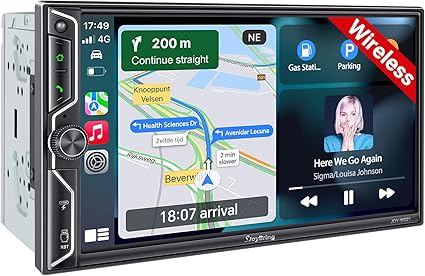
Car stereos with wireless CarPlay and Android Auto can be hard to find at a reasonable price, but the 7 QLED Double Din Car Stereo manages to pack solid tech into one package. It suits anyone who wants easy wireless smartphone integration and a bright, clear screen for navigation and media.
Setup is straightforward thanks to Bluetooth connectivity and wireless CarPlay. Connecting your iPhone is as simple as tapping on the menu, and you avoid clutter since cables aren’t necessary.
The 7-inch QLED screen is bright enough to use in daylight and supports mirroring your phone through USB for apps like Google Maps or YouTube. The touchscreen responds well, and voice control lets you stay hands-free while driving.
This stereo handles music and calls clearly with its built-in DSP and 240 watts spread across four channels delivering stereo sound. The chassis feels solid and durable with reliable RCA connectors. Some users note occasional glitches with the wireless connection, but most praise how well the screen displays HD video and how smooth the interface runs for media playback and navigation.
The screen shows vivid HD video and gives easy access to navigation and streaming apps, making the in-car experience more enjoyable. However, some glitches with wireless connections and minor touchscreen lag mean it isn’t flawless every day.
This stereo fits users wanting wireless smartphone integration and clear visuals from their car dashboard. Those needing completely smooth operation or the absolute top build quality might prefer other more expensive units without reported minor hiccups.
Pros
- Wireless CarPlay and Android Auto connectivity
- Bright 7-inch QLED HD display
- 240-watt stereo sound output power
- Supports screen mirroring via USB cable
Cons
- Wireless connection can be unstable at times
- Occasional lag in touchscreen responsiveness reported
| Specification | Details |
|---|---|
| Connectivity Technology | Bluetooth |
| Controller Type | Apple Carplay |
| Audio Output Mode | Stereo |
| Output Power | 240 watts |
| Screen Resolution | 1280×720 (7-inch QLED) |
| Supported Video Encoding | MPEG-4, RMVB, DivX, AVI, 1080P |
12. Single Din Car Stereo

Long drives or daily commutes get a lot more enjoyable when your phone’s navigation and music are right at your fingertips. This single din car stereo works well with iPhones and other smartphones, making wireless and wired Apple CarPlay easy to use. Its standout feature is the quick and smooth responsiveness of the touchscreen and connectivity, cutting down lag and frustration while driving.
Setup doesn’t take long, thanks to familiar connections via Bluetooth, USB, and Type-C ports. Switching between calls, maps, and playlists on the in-cell 6.9 display feels natural, with voice controls like Siri adding hands-free convenience. You can pair it wirelessly or use a wired connection for Apple CarPlay, and Android Auto is supported too, so it works fine if you have other devices.
The stable 5G Wi-Fi connection makes real-time navigation and music streaming reliable during your trips.
Sound quality goes beyond just speakers with the built-in DSP processor, 10-band EQ, and dual subwoofers offering 240W peak power to fill the car with rich audio. The build feels sturdy and the touchscreen is responsive, with most folks praising its speed and connection stability. Some users have pointed out that the controls can be a bit complex at first, especially the multiple ways to operate it via remote, voice, or buttons.
The stereo is praised for its smooth, lag-free connectivity and quick touchscreen response that makes using Apple CarPlay a breeze. Some find the variety of control options a bit overwhelming to learn initially, which might slow down getting comfortable with the system.
Anyone wanting reliable wireless Apple CarPlay with good sound power will appreciate this unit. Those looking for a simpler, more straightforward interface might want to explore models with fewer control modes or easier initial setups.
Pros
- Supports both wired and wireless Apple CarPlay
- Responsive touchscreen with 1.35x faster operation
- 240W peak power with dual subwoofer outputs
- Multiple control options including voice assistants
Cons
- Controls can be confusing at first
- Complex setup for some advanced features
| Specification | Details |
|---|---|
| Connectivity Technology | Bluetooth, Type-C, USB |
| Controller Type | Hand Control, Remote Control, Voice Control, Google Assistant, Siri Assistant, Push Button, Touchscreen |
| Special Features | Wireless Apple CarPlay, Wireless Android Auto, FM AM Car Radio, 2 Subwoofer Outputs, High Power (240W), in-Cell 6.9″ Display, Hands-Free Calling |
| Compatible Devices | Subwoofer, Amplifier, Smartphone, Speaker, iPhone, USB Storage Devices, External Microphones, Backup Cameras |
Best iPhone Compatible Car Stereos Compared
| Product | Connectivity Technology | Controller Type | Special Features | Audio Output Mode |
|---|---|---|---|---|
| 7 QLED Double Din | Bluetooth, Wi-Fi | Android, iOS | Android Auto, Apple CarPlay | Stereo |
| Pioneer MVH-S230BT | Bluetooth, USB | Android, Hand Control, iOS | Built-In Bluetooth | Stereo |
| 7 QLED Double Din Plus | Bluetooth, USB, Wi-Fi | Android Auto, Apple Carplay | Android Auto, Apple CarPlay | – |
| 7 Wireless CarPlay | Bluetooth | iOS | Apple CarPlay | Stereo |
| 7 Wireless Double Din | Auxiliary, Bluetooth, USB | Android Auto, Apple Carplay | Android Auto, Apple CarPlay | – |
| Kenwood KMM-BT332U | Auxiliary, Bluetooth, USB | Android | Equalizer | Stereo |
| 9.26 Wireless CarPlay | Bluetooth, Wi-Fi | Touch | Apple CarPlay, Android Auto | – |
| 10.1 Wireless Single Din | Auxiliary, Bluetooth, USB | Remote, Voice Control | Android Auto, Apple CarPlay | – |
| 9 Wireless CarPlay | Android Auto, Apple CarPlay | – | Android Auto, Apple CarPlay | Stereo |
| 7 Wireless Touchscreen | Bluetooth | Android, Google Assistant, iOS | Android Auto | Stereo, Surround |
| 7 QLED Double Din Max | Bluetooth | Apple Carplay | Android Auto, Apple CarPlay | Stereo |
| Single Din Stereo | Bluetooth, Type-C, USB | Hand Control, Remote Control | Wireless Apple CarPlay | – |
- Connectivity TechnologyBluetooth, Wi-Fi
- Controller TypeAndroid, iOS
- Special FeaturesAndroid Auto, Apple CarPlay
- Audio Output ModeStereo
- Connectivity TechnologyBluetooth, USB
- Controller TypeAndroid, Hand Control, iOS
- Special FeaturesBuilt-In Bluetooth
- Audio Output ModeStereo
- Connectivity TechnologyBluetooth, USB, Wi-Fi
- Controller TypeAndroid Auto, Apple Carplay
- Special FeaturesAndroid Auto, Apple CarPlay
- Audio Output Mode–
- Connectivity TechnologyBluetooth
- Controller TypeiOS
- Special FeaturesApple CarPlay
- Audio Output ModeStereo
- Connectivity TechnologyAuxiliary, Bluetooth, USB
- Controller TypeAndroid Auto, Apple Carplay
- Special FeaturesAndroid Auto, Apple CarPlay
- Audio Output Mode–
- Connectivity TechnologyAuxiliary, Bluetooth, USB
- Controller TypeAndroid
- Special FeaturesEqualizer
- Audio Output ModeStereo
- Connectivity TechnologyBluetooth, Wi-Fi
- Controller TypeTouch
- Special FeaturesApple CarPlay, Android Auto
- Audio Output Mode–
- Connectivity TechnologyAuxiliary, Bluetooth, USB
- Controller TypeRemote, Voice Control
- Special FeaturesAndroid Auto, Apple CarPlay
- Audio Output Mode–
- Connectivity TechnologyAndroid Auto, Apple CarPlay
- Controller Type–
- Special FeaturesAndroid Auto, Apple CarPlay
- Audio Output ModeStereo
- Connectivity TechnologyBluetooth
- Controller TypeAndroid, Google Assistant, iOS
- Special FeaturesAndroid Auto
- Audio Output ModeStereo, Surround
- Connectivity TechnologyBluetooth
- Controller TypeApple Carplay
- Special FeaturesAndroid Auto, Apple CarPlay
- Audio Output ModeStereo
- Connectivity TechnologyBluetooth, Type-C, USB
- Controller TypeHand Control, Remote Control
- Special FeaturesWireless Apple CarPlay
- Audio Output Mode–
How to Choose the Right iPhone Car Stereo
Consider compatibility with your iPhone model, ease of connectivity, sound quality, and user-friendly controls when choosing a car stereo. Choosing the right features helps you use the product smoothly and prevents expensive returns or upgrades, making your driving experience safer and more enjoyable.
Compatibility and Connectivity
Using a car stereo that doesn’t fully support the latest iPhone models or iOS versions can lead to frustration right away. In daily use, outdated compatibility may cause connection drops, slow responses, or inability to access key features like Apple CarPlay.
Radios with reliable Bluetooth and AirPlay options mean fewer interruptions when streaming music or making calls. Wired connections via USB still provide dependable audio and charging, so having both types ensures flexibility for different situations.
Strong integration with Apple CarPlay is crucial for quick access to apps like Maps, Messages, and music players without distractions. Look for head units that offer smooth CarPlay compatibility and make sure this support is regularly updated to handle new iOS releases.
The presence of a dedicated CarPlay button or shortcut also speeds up daily use, letting you jump straight into your phone’s interface without fiddling through menus.
Audio Quality and Power Output
A car stereo that sounds muddy or distorted at higher volumes quickly becomes a nuisance. Clear, full-range audio that maintains richness at both low and high volumes offers a better driving experience. Pay attention to the amplifier power; around 50 watts RMS per channel is common for entry-level units, but higher ratings help when paired with aftermarket speakers.
This power ensures the stereo can handle your car’s sound system without clipping.
The ability to play various audio formats like MP3, AAC, FLAC, and WAV is practical, especially if you have a diverse music library. Equalizer settings also make a difference, car stereos that provide at least a 5-band EQ let you tailor the sound to your preferences, whether you want deeper bass or clearer vocals on the road.
Installation and Fitment
Sizes matter when swapping a car stereo. Most vehicles accept either single DIN (about 2 inches tall) or double DIN (about 4 inches) head units, so knowing your dashboard specs avoids purchasing a unit that won’t fit.
Installation can be straightforward with proper wiring harnesses and mounting kits, which many brands offer separately or bundled.
Some installations are plug-and-play, but others require cutting or splicing wires, which might need a professional’s help. Radios advertised with compatibility specific to your car’s make and model save time and prevent headaches. It’s worth double-checking whether the package includes or recommends the necessary adapters to get the stereo up and running without delays.
User Interface and Controls
Touchscreens that lag or have clumsy layouts are distracting behind the wheel. A responsive display with well-organized menus makes controlling music or switching apps faster and safer. Physical buttons for volume and source selection provide tactile feedback, which helps when adjusting settings without looking away from the road.
Voice control integration adds another layer of convenience, enabling hands-free operation.
Steering wheel control compatibility is a practical feature, too. It lets you keep key functions at your fingertips without reaching for the head unit, maintaining focus during busy drives. Not all models support this out of the box, so verify that the stereo can connect with your car’s control system or comes with adapters for that integration.
Durability and Warranty
Daily driving exposes a car stereo to bumps, vibrations, and temperature swings, so build quality is more important than it might seem. Units made from sturdy materials with reinforced mounting points and shock-resistant internal components tend to last longer under these conditions. Some offer basic dust-proofing or moisture resistance to prevent damage from accidental spills or humidity inside the car.
A warranty that lasts at least one year and covers repairs or replacements adds confidence. Responsive customer support can make a difference if problems arise after installation. Reading the fine print on what aspects are covered avoids surprises later, especially with electronics installed in a vehicle environment where wear and tear occur faster.
Optimizing Connectivity: Tips for Seamless iPhone Integration with Car Stereos
Pairing your iPhone with a car stereo often relies on either Bluetooth or a wired connection. Although Bluetooth offers convenience, using a Lightning cable can reduce audio latency and provide more stable connectivity for calls and navigation.
For the best sound quality, check if your stereo supports Apple’s AAC codec over Bluetooth, as it delivers superior audio compared to the default SBC codec.
To maintain a steady connection, ensure your stereo’s firmware is up to date. Many manufacturers release updates that improve compatibility and fix bugs. Clear your Bluetooth pairing list periodically, especially if you connect multiple devices, to avoid interference.
Quick tips for better integration:
- Use certified Apple cables to prevent disconnections.
- Disable Wi-Fi on your iPhone during Bluetooth use to reduce signal conflicts.
- Customize your car stereo’s app permissions to allow navigation alerts.
- Keep your iOS updated for the latest CarPlay features.
Maintaining Your iPhone-Compatible Car Stereo for Longevity and Performance
Regular cleaning of the car stereo’s interface, especially touchscreens, prevents sticky or unresponsive controls. Use a soft, lint-free cloth with a small amount of screen-safe cleaner and avoid harsh chemicals. Buttons and knobs should be gently wiped to maintain tactile feedback.
Firmware updates are crucial. These updates can improve compatibility with newer iPhone models and add functionality or stability improvements. Check the manufacturer’s website or use their app to download updates and follow their instructions carefully.
Avoid leaving the stereo powered on without the engine running for extended periods to prevent draining the car battery. Also, disconnect cables when not in use to protect ports from wear or corrosion over time.
Key maintenance habits:
- Clean the unit monthly.
- Update software quarterly or as updates become available.
- Store cables properly to protect connectors.
- Inspect connections for any dirt or corrosion.
Comparing Apple CarPlay and Android Auto Compatibility in Modern Car Stereos
Apple CarPlay offers native integration for iPhones, displaying familiar apps directly on the car stereo screen. This provides easy access to maps, messages, and music without unlocking the phone.
Android Auto provides similar functionality but caters to Android devices.
Some modern car stereos support both systems, allowing drivers to use either platform depending on their phone. CarPlay usually requires a wired connection, though wireless options are becoming more common.
Android Auto increasingly supports both wired and wireless modes as well.
The user interface for CarPlay tends to be more consistent across models, given Apple’s controlled ecosystem. Android Auto can vary more since manufacturers sometimes customize the experience, which might affect app availability or responsiveness.
- CarPlay offers better integration if you use an iPhone exclusively.
- Android Auto may suit households with multiple device types.
- Wireless support depends on vehicle and stereo model.
- Check stereo specs for compatibility before purchasing.
People Also Asked
How Do I Know If a Car Stereo Is iPhone Compatible?
Look for car stereos that support Apple CarPlay or have Lightning or Bluetooth compatibility explicitly stated. Checking the product specs or manual can confirm this, since those features ensure better integration with iPhones.
What Size Car Stereo Fits Standard Dashboards for iPhone Use?
A single-DIN or double-DIN size is standard; double-DIN is more common for iPhone-friendly models with touchscreens. Measuring your dashboard opening before purchase helps avoid installation issues.
Are Wireless Connections Between iPhones and Car Stereos Safe?
Wireless connections like Bluetooth or CarPlay Wireless are generally secure but can be vulnerable on public networks. Turning off wireless features when not in use reduces risks.
How Long Do iPhone Compatible Car Stereos Typically Last?
These stereos typically last around 5 to 10 years depending on build quality and usage. Regular software updates may extend useful life by fixing bugs and maintaining compatibility.
What Common Problems Occur with iPhone Compatible Car Stereos?
Common problems include connection drops, delayed response with Siri, or app crashes during use. Having updated software on both phone and stereo often fixes these issues.
Conclusion
Choosing the best iPhone compatible car stereo boils down to how well it connects with your phone, sound quality, and ease of use while driving. Bluetooth and Apple CarPlay compatibility make handling calls and music simple.
Clear sound without distortion keeps your drive enjoyable, and controls should be straightforward for safety.
Consider your car’s dashboard size and how much you are willing to spend before deciding. A stereo used daily deserves a bit more investment and better features. Take another look at the comparison table and product details above to find the one that fits your needs best.