
Top 12 Best Laptop Car Charger You Can’t Live Without
Running out of laptop power during long drives or urgent work calls is a common hassle. A poorly designed charger can overheat, disconnect easily, or fail to deliver enough power, leaving your device without juice when you need it most. The best laptop car charger avoids these problems by providing consistent power delivery and compatibility with different laptop models.
Key factors that distinguish a reliable laptop car charger include its power output, connector fit, and build quality. Chargers with at least 65 watts output typically support most modern laptops, while connectors must match your device’s port securely to prevent accidental unplugging. Durable, heat-resistant materials and built-in safety features like overcurrent protection reduce risks and extend the charger’s lifespan.
Compact size also helps it fit comfortably in tight car spaces without blocking other ports.
Need a Quick Check?
| Image | Product | Price |
|---|---|---|
Our Top Picks 1  | BESTEK 300W Inverter | Check Price |
Our Top Picks 2  | 100W USB-C Laptop Charger A | Check Price |
Our Top Picks 3  | 100W USB-C Laptop Charger B | Check Price |
Our Selected Top 12 Laptop Car Charger Picks for Every Need
This list features a variety of laptop car chargers designed for different devices and usage needs. Each review explains how well the charger performs, highlights its advantages and drawbacks, and identifies who would benefit most from using it.
1. BESTEK Power Inverter 300W
Perfect for anyone needing reliable power on the road, this compact car charger delivers a solid 300 watts continuously for laptops and other devices. Its key strength is compatibility with a wide range of vehicles, including Teslas, making it a versatile travel companion for long drives or camping trips.
Setup involves plugging the inverter into the cigarette lighter socket, which fits almost any vehicle thanks to its 32-inch plug. Daily use is simple with two 110V AC outlets for laptops or tablets and two USB ports for smaller devices. Its small, iPhone-sized design means it doesn’t clutter the car and is easy to carry along on trips.
Performance meets practical needs with 300 watts continuous power and a peak of 700 watts, handling typical laptop charging without a hiccup. The modified sine wave output suits most devices, although some sensitive electronics may prefer pure sine wave. Constructed to be lightweight and ultra-compact, this model impresses with portability.
The most common complaint involves output limitations for very high-power devices.
Strong points include wide vehicle compatibility and multiple charging options that handle laptops and USB devices well. The most frequent downside is that the power output may not support very power-hungry electronics, which limits its use in some situations.
Ideal for travelers needing efficient and portable charging for typical devices like laptops and tablets. Those requiring higher power or pure sine wave output should consider other models better suited for sensitive or demanding equipment.
Pros
- Compatible with Teslas and most vehicles
- Two AC outlets and two USB ports
- Compact, lightweight, easy to carry
- Quick USB charging, 4.8A total
Cons
- Modified sine wave output not ideal for all devices
- Limited to 300 watts continuous power
| Specification | Details |
|---|---|
| Wattage | 300 watts |
| Input Voltage | 17 volts |
| Number of Outlets | 4 (2 AC, 2 USB) |
| Output Voltage | 120V |
| Peak Output Power | 700 watts |
2. 100W USB-C Laptop Car Charger
High-quality materials make this car charger sturdy and resistant to wear, perfect for frequent travelers needing reliable laptop charging on the go. Best suited for those with USB-C compatible Dell Latitude and XPS laptops, it delivers a strong 100W power output to keep devices charged during long drives.
Setup involves plugging the charger into a car’s 12V-24V power outlet, then connecting the 1.8M USB-C cable to the laptop. Daily use is straightforward with its straightforward connector and flexible cord length.
The wear-resistant materials mean the cord doesn’t kink easily, making it easy to handle and store inside the vehicle without worrying about damage.
Delivering up to 100 watts, it handles multiple power levels to suit various laptop demands, maintaining a steady and quick charge. Well-built with durable materials, it resists common bending problems. The main positive point is its compatibility with a wide range of Dell laptops and Samsung phones, but some find it limited by having only one USB port for charging.
High power output and solid build are praised for quick and reliable charging during road trips. Some users mention wanting more than one USB port to charge multiple devices simultaneously.
Those who rely on Dell Latitude or XPS laptops and want a strong, durable car charger should find this fits well. Drivers needing multiple device ports or broader input voltage range might look for alternatives.
Pros
- Supports up to 100W power output for fast charging
- Durable, wear-resistant cables prevent bending damage
- Wide compatibility with Dell Latitude and XPS laptops
- Long 1.8M cable suitable for easy in-car use
Cons
- Only one USB port available for charging
- Input voltage limited to 12 volts in technical data
| Specification | Details |
|---|---|
| Output Voltage | 20.3 volts_of_direct_current |
| Output Current | 5 A |
| Wattage | 100 watts |
| Connector Type | USB Type C |
| Input Voltage | 12 volts |
| Total USB Ports | 1 |
3. 100W USB-C Laptop Car Charger
Power delivery stands out with 100W output, making it suitable for anyone needing to charge laptops on the go. It fits a wide variety of vehicles and supports numerous laptop and phone models, especially useful for people who drive long hours and want reliable, fast charging.
Plugging it into the car’s cigarette lighter is straightforward, and the USB-C connector fits modern laptops from brands like Dell, Apple, and Lenovo without fuss. It handles input voltages from 12V to 24V, so it works in everything from cars to boats.
Daily use is easy since it supports USB PD 3.0 for fast charging laptops and phones, keeping devices powered while driving.
Charging speed meets expectations with multiple output levels up to 100W, delivering enough juice for powerful laptops. The build feels solid enough for travel, though some mention the charger can get warm during extended use.
It suits a wide range of devices well, but the cable and plug can feel a bit bulky for compact car interiors.
Reviews highlight steady fast charging that keeps laptops powered through long drives as the strongest point. The frequent note of the charger getting warm and its physical size are the most common drawbacks mentioned.
Anyone needing a strong, versatile charger for multiple laptop brands will find this suitable, especially for longer trips or heavy use. Those looking for a compact option or minimal heat may want to explore smaller or lower watt models.
Pros
- High power output up to 100W
- Wide device compatibility
- Works in various vehicles (cars, trucks, boats)
- Supports USB PD 3.0 fast charging
Cons
- Gets warm during extended charging
- Bulky plug and cable for small car spaces
| Specification | Details |
|---|---|
| Input Voltage | DC 12V-24V-12A (DC 9V-32V Max) |
| Output Voltage and Current | 5V/3A, 9V/3A, 12V/3A, 15V/3A, 19V/5A, 20V/5A |
| Power Output Levels | 30W, 45W, 61W, 65W, 85W, 90W, 100W |
| Charging Port | USB PD 3.0 USB-C |
| Compatible Devices | MacBook Pro/Air, Dell Latitude 11-7530, HP, Lenovo, Samsung Galaxy S7-S24 |
4. 100W USB-C Laptop Car Charger

Powerful enough to charge laptops on the go, this 100W USB-C Laptop Car Charger suits anyone needing reliable charging while traveling in various vehicles. Its main strength is delivering stable and fast power through voltage regulation even in fluctuating car electrical systems.
Setup is straightforward, plugging into any 12V or 24V vehicle power outlet. Daily use benefits from both USB-C and USB-A ports, offering up to 100W plus an additional 18W total power delivery.
It fits a wide range of vehicles including cars, trucks, buses, and campers, letting you keep devices charged without fuss on longer trips.
Charging performance holds well to the promise of output voltage stability and fast charging, even through voltage fluctuations. The build feels solid with a compact design suitable for travel. Praise often mentions its reliable fast charging, while the most common complaint revolves around the charger delivering only 45 watts despite 100W specifications listed.
Reviews highlight steady fast charging as a key advantage, but note the charger sometimes provides just 45 watts instead of the advertised 100W. The stable output helps prevent device interruptions even on less stable vehicle power sources.
Great for anyone needing a dependable travel charger across many vehicles especially with USB-C laptops and other devices. Those requiring consistent full 100W charging in any setting or outside Europe may want to consider other options.
Pros
- Stable voltage despite car power fluctuations
- Multiple USB ports including USB-C and USB-A
- Compatible with many vehicles including RVs and boats
- Compact and travel-friendly design
Cons
- Actual power output is often 45 watts, not full 100W
- European Type C plug may limit use without adapter
| Specification | Details |
|---|---|
| Output Current | 5 A |
| Output Voltage | 5 volts |
| Input Voltage | 240 volts |
| Wattage | 45 watts |
| Connector Type | USB Type C |
5. FOVAL 200W Car Power Inverter
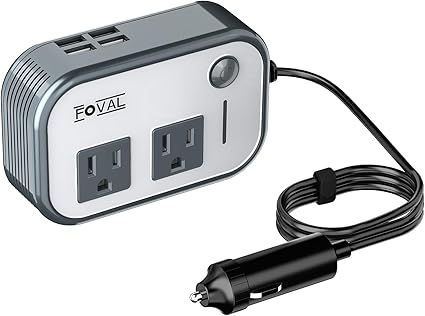
Charging your laptop and multiple gadgets on the go can be tricky without the right power source. Ideal for road warriors and anyone who spends significant time in a vehicle, this car power inverter converts your 12V car outlet to 110V AC power.
Its biggest strength is its ability to charge several devices at once, thanks to its multiple ports.
Setting up involves just plugging the inverter into your vehicle’s DC power socket. The two US standard AC sockets and four USB charging ports mean you can charge a laptop, tablets, phones, and other small electronics all at once. Its compact size makes it easy to keep in your glove box or travel kit without taking up much space.
Handling 200 watts of power, it supports everyday electronics like laptops and game consoles effectively. The build is lightweight, weighing around 8 oz, and compact at 3.2 x 2.5 x 1.5 inches. Strong praise often goes to its multiple ports and portability, while some users note the modified sine wave output may not suit very sensitive devices.
The device receives strong praise for its ability to charge multiple devices at once while remaining small and easy to carry. A common drawback is that the output waveform is a modified sine wave, which can be less compatible with sensitive items.
Those who need to power laptops and several USB devices during car trips will find this inverter useful. Users requiring pure sine wave power for specialized electronics should consider alternatives.
Pros
- Multiple ports for AC and USB devices
- Compact and lightweight design
- Supports up to 200 watts power output
- Convenient for charging several gadgets simultaneously
Cons
- Modified sine wave may not suit sensitive electronics
- Limited to 200 watts peak output
| Specification | Details |
|---|---|
| Power Source | Vehicle DC Power Socket |
| Wattage | 200 watts |
| Voltage | 110 volts |
| Number of Outlets | 6 (2 AC sockets, 4 USB ports) |
| Input Voltage | 12 volts |
6. Anker 167.5W USB-C Car Charger

167.5W total power with a 100W USB-C port makes charging multiple devices in a car quick and efficient. Perfect for anyone who needs to charge a laptop and other gadgets on the go without slowing down.
Its ability to handle powerful laptops like a 16-inch MacBook Pro sets it apart from simpler chargers.
Plugging it into a car’s 12V outlet is straightforward, and it immediately delivers power across three ports. The first USB-C port pumps out a strong 100W, excellent for fast laptop charging. The second USB-C port offers 45W, which works well for smartphones, and there’s a USB-A port at 22.5W for older devices.
The charger’s compact size means it fits nicely without taking up space or getting in the way.
The main job of charging multiple devices at fast speeds is handled well, especially when powering devices simultaneously. Materials feel solid, and the compact design contributes to ease of use inside vehicles. Most users praise how quickly it charges their laptops.
Some note the size, although small, could still block adjacent car outlets depending on the design.
Charging speeds impress, especially the 100W port powering a MacBook Pro quickly. The main complaint centers on occasional obstruction of nearby car sockets, depending on where it’s plugged in. The size is small but could still interfere in some vehicle designs.
Anyone needing to charge a laptop and multiple devices on the road will benefit the most. Those with cars having tight or unusual outlet arrangements might want to consider a smaller or differently shaped charger.
Pros
- 100W USB-C port charges large laptops fast
- Two additional ports for simultaneous device charging
- Compact size fits well in car interiors
- Reliable 45W power for smartphones and tablets
Cons
- May block other car outlets depending on layout
- USB-A port slower at 22.5W compared to USB-Cs
| Specification | Details |
|---|---|
| Wattage | 167.5 watts |
| Total USB Ports | 3 |
| Input Voltage | 12 volts |
| Amperage | 18.2 A |
| Connector Type | USB Type C |
7. 200W USB-C Dual PD Car Charger
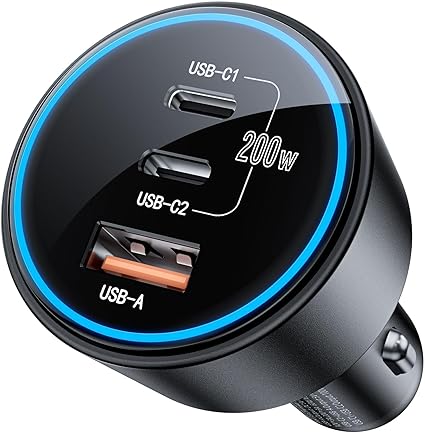
People who often need to charge multiple devices on the go will find the 200W USB-C Dual PD Car Charger a solid companion. Its standout feature is the ability to fast charge three devices simultaneously, making it perfect for road trips or busy days with various gadgets.
Setting it up is straightforward, plugging into the car’s 24V DC socket. It conveniently offers two USB Type-C ports and one USB-A port, so you can charge your laptop, phone, and headphones without juggling adapters. The charger keeps a low temperature during use, which reassures you it won’t overheat even while powering several devices at once.
Performance-wise, it supports up to 200W total output, split as 100W on each Type-C port and 60W on the USB-A. This makes charging quick and efficient, especially for laptops like the HP Pavilion or Lenovo Notebook. The build feels sturdy, with built-in protections against common electrical risks. The most frequent complaint mentions the charger’s size, as it is bulkier than simpler models.
Charging three devices simultaneously with high wattage is highly appreciated for keeping laptops and phones powered efficiently. The bulkier build compared to smaller models is a common drawback mentioned.
Those needing fast laptop and multiple device charging in one go will be well served. Drivers with only 12V systems or who prefer compact chargers should consider other options.
Pros
- Charges 3 devices at the same time
- Supports up to 100W on USB-C ports
- Includes USB-A port with 60W output
- Advanced safety protections against overheating
Cons
- Larger size compared to simpler car chargers
- Only compatible with 24V DC input
| Specification | Details |
|---|---|
| Wattage | 200 watts |
| Connector Type | USB Type A, USB Type C |
| Input Voltage | 24 volts_of_direct_current |
| Total USB Ports | 3 |
| Output Current | 5 A |
8. USB-C Laptop Car Charger

Offering an extra long 10 ft power cord, this USB-C Laptop Car Charger fits perfectly for those who need flexibility while charging on the go. It works well with a wide range of laptops, especially from Dell, Lenovo, and MacBook models, and stands out for its safe and powerful charging capabilities.
Plugging it in is simple thanks to the USB-C connector and compatibility with 12V-24V car power outlets. The long cable means you can keep your laptop comfortably on your lap or nearby without feeling tethered too close to the power source. Daily use benefits from its compact size and built-in charging indicator, allowing you to know the status at a glance while commuting or traveling.
Performance matches expectations with fast charging up to 90W, supporting multiple voltage outputs like 5V, 9V, 12V, 15V, and 20V at 3A or 4.5A. Build quality includes reinforcements around connectors and strain relief for durability.
Reviews often praise its safety features such as overload and short-circuit protection, though some mention the charger runs a little warm during heavy use.
Many appreciate the long cable length and safety features that make in-car charging convenient and reliable. The most common concern involves the charger becoming noticeably warm during higher power delivery periods. This warmth has not affected functionality but is worth noting.
This charger suits people who need a long reach and multiple voltage options for various laptops. It is ideal for those who prioritize safety features and compactness. Users with laptops outside the compatibility list should look for a different model for guaranteed fit.
Pros
- Extra long 10 ft power cable for flexible use
- Supports fast charging up to 90W output
- Multiple safety protections included
- Compact design with clear charging indicator
Cons
- Can run warm during extended use
- Compatibility limited to specific laptop models
| Specification | Details |
|---|---|
| Output Max | 5V 3A, 9V 3A, 12V 3A, 15V 3A, 20V 4.5A (30W to 90W) |
| Input Voltage | 12V-24V |
| Connector Type | USB Type C |
| Power Cord Length | 10 ft |
| Safety Features | Short-Circuit, Overheating, Overload Protection |
| Compatible Devices | Dell Latitude, Lenovo IdeaPad, MacBook Pro 13, Razer Blade Stealth, Microsoft Surface Go |
9. 100W USB-C Laptop Car Charger

100W USB-C Laptop Car Charger quickly powers laptops and multiple devices on the go, working well for those who need reliable charging in cars, trucks, or boats. Its biggest advantage lies in delivering fast charging with USB-C PD compatibility that fits a wide range of laptop models.
Setting it up is straightforward, just plug into your vehicle’s power socket and connect your laptop or phone. The charger includes a 100W USB-C port for laptops and an 18W USB-A port for smaller devices, so you can charge two gadgets at once. It also features automatic off and short circuit protection, which offers extra safety while traveling.
Charging speed stays strong, supporting fast charging for many major laptops like MacBook Pro and Dell XPS. Build quality handles frequent use well, though a few reviews point out that the charger can get warm during heavy use.
Most appreciate the dual-port functionality; some wish for a lighter design.
Many appreciate the fast-charging speed and multi-device capabilities that suit daily travel needs. A common complaint involves heat buildup during longer charging sessions, which could be uncomfortable in tight spaces.
Those who regularly charge multiple devices in vehicles will find this charger practical and dependable. People looking for a lighter, cooler-running option might want to explore other models.
Pros
- Supports fast charging for a wide range of laptops
- Dual ports allow charging multiple devices simultaneously
- Includes safety features like automatic off and short circuit protection
- Works in various vehicles like cars, trucks, and boats
Cons
- Gets warm during extended heavy charging
- Heavier than some other car chargers
| Specification | Details |
|---|---|
| Connector Type | USB Type C |
| Power Output | 100W USB-C PD, 18W USB-A |
| Compatible Devices | MacBook, ThinkPad, Yoga 7i, HP, Dell, Acer, Asus, Huawei Matebook, Xiaomi |
| Special Features | Automatic Off, Fast Charging, Multi Device Charging, Short Circuit Protection |
10. USB-C Car Charger for Dell Latitude

Charging your Dell laptop on the go feels straightforward with this USB-C car charger. It is designed specifically for Dell devices and stands out with its extra-long 10-foot power cord, making it easy to reach your laptop comfortably inside any vehicle. Perfect for those frequently working remotely or traveling in a car.
Setting it up involves plugging into your car’s 12V-24V power outlet, and the extra length of the cord means you don’t have to be cramped next to the socket. The charger is lightweight and easy to handle, and a charging indicator lets you know your device is receiving power. Built-in protections guard against overheating and short circuits, so it’s built for safe, daily use.
The charger delivers a solid 90 watts, supporting fast charging for Dell laptops without overheating or overloading issues. It feels sturdy enough for regular use but keeps its profile light.
Users often praise its reliability and the generous cable length, but some find the single USB-C port limiting if they need to charge multiple devices at once.
The charger’s most appreciated feature is its long power cord combined with reliable fast charging that keeps laptops powered without safety concerns. The most common drawback is having only one USB-C port, which can be inconvenient for users needing to charge several devices at the same time.
Anyone driving extensively with a Dell laptop will find this charger fits well, especially appreciating the length of the cord and quick charging. Those needing multi-device charging or compatibility beyond Dell models should consider other options.
Pros
- Extra-long 10-foot power cord for flexibility
- Charging indicator shows power status
- Certified for electrical safety with multiple protections
- Supports fast charging up to 90W output
Cons
- Single USB-C port limits charging multiple devices
- Designed mainly for Dell, may lack universal compatibility
| Specification | Details |
|---|---|
| Output Voltage | 20 volts |
| Output Current | 4.5 A |
| Wattage | 90 watts |
| Input Voltage | 12V-24V |
| Connector Type | USB Type C |
| Power Cord Length | Extra Long 10 Ft |
11. 100W USB-C Laptop Car Charger

Great for anyone needing a reliable car charger for USB-C laptops, this 100W charger stands out with its impressive power output. It suits Dell Latitude and XPS models smoothly, offering fast charging on the go and enough wattage to keep high-demand devices running without a fuss.
Connecting the charger is straightforward thanks to a sturdy 1.8-meter cable that resists wear and bending. Once plugged into the car’s 12V-24V input, it provides flexible voltage outputs ranging from 5V to 20.5V.
Charging different devices feels consistent, and the single USB-C port keeps things simple without clutter. The cable length works well for most vehicles and gives enough reach to the laptop without mess.
This charger delivers strong, steady power at up to 100W, matching well with laptops that require between 30W and 90W. Built to last, it uses quality materials that don’t easily bend or fray.
Users mention its reliability during frequent drives, while the main drawback has been its single port, which limits charging more than one device at a time.
Strong praise centers on its reliable and steady charging power, even for laptops with higher wattage needs. The single USB-C port is the most frequent complaint, limiting options for charging multiple devices simultaneously during trips.
Anyone driving a Dell Latitude or XPS laptop who needs dependable fast charging will find this charger suits daily use well. Those needing to power several devices at once may want to consider a charger with additional ports.
Pros
- Consistent power delivery up to 100W
- Durable 1.8M cable resists wear
- Wide voltage output range for compatibility
- Compatible with many Dell Latitude and XPS laptops
Cons
- Only one USB-C output port
- Heavier than standard chargers
| Specification | Details |
|---|---|
| Output Voltage | 20 volts |
| Output Current | 5 A |
| Wattage | 118 watts |
| Connector Type | USB Type C |
| Input Voltage | 240 volts |
| Total USB Ports | 1 |
12. Universal 100W Laptop Car Charger

Built with a lightweight design and a powerful 100W output, this car charger suits anyone needing a versatile and compact power source on the go. Its standout feature is the ability to charge a wide range of devices through one USB-C port and 15 interchangeable barrel tips, making it ideal for travelers with multiple gadgets.
Setting it up involves just plugging the USB-C car charger into your vehicle’s power socket, then attaching the correct barrel tip for your device. Switching between laptops, tablets, or phones is simple thanks to the included 15 different connectors. Carrying fewer cables is a relief, especially during travel, without losing any charging speed or convenience.
Performance is solid, delivering a steady 100 watts at 20 volts, quickly powering compatible laptops and more. The charger is built with short circuit protection for safety and a lightweight frame that won’t add bulk. Most appreciate its charging speed and versatility, while some wish it had more than a single USB port for simultaneous charging.
The charger is praised for its flexibility in powering many device types quickly through a single USB-C port and versatile barrel tips. The most common complaint mentions the limitation of having just one USB port, which restricts charging multiple devices at once.
Travelers or professionals with various gadgets will find it highly useful for consolidating their charging needs into one compact unit. Those who require charging of several devices simultaneously or for gadgets with unusual voltage needs might want to consider other options.
Pros
- Charges multiple devices with 15 barrel tips
- Compact and lightweight for easy travel
- Fast charging up to 100W output power
- Includes short circuit protection for safety
Cons
- Only one USB port limits simultaneous charging
- May not support devices needing non-standard voltages
| Specification | Details |
|---|---|
| Connector Type | USB, USB Type C |
| Wattage | 100 watts |
| Output Voltage | 20 |
| Output Current | 5 A |
| Special Features | Fast Charging, Lightweight Design, Short Circuit Protection |
Best Laptop Car Chargers Comparison Table
| Product | Power (Wattage) | Compatible Devices | Connector Type | Output Voltage |
|---|---|---|---|---|
| BESTEK 300W Inverter | 300W | – | – | 120V |
| 100W USB-C Laptop Charger A | 100W | Laptops | USB Type C | 20.3V |
| 100W USB-C Laptop Charger B | 100W | MacBook, HP, Lenovo | USB Type C | – |
| 100W USB-C Laptop Charger C | 45W | Laptops, HP | USB Type C | 5V |
| FOVAL 200W Inverter | 200W | – | – | 110V |
| Anker 167.5W USB-C Charger | 167.5W | iPhone, iPad, Samsung | USB Type C | – |
| 200W USB-C Dual PD Charger | 200W | Phones, Laptops, Tablets | USB Type A, USB C | – |
| Generic USB-C Laptop Charger | – | Dell, Lenovo, MacBook | USB Type C | – |
| 100W USB-C Laptop Charger D | 100W | MacBook, Thinkpad, HP | USB Type C | – |
| USB-C Dell Latitude Charger | – | Dell Laptops, Tablets | USB Type C | – |
| 100W USB-C Laptop Charger E | 100W | Laptops, iPhone | USB Type C | – |
| Universal 100W Laptop Charger | 100W | HP, Dell, Toshiba | USB, USB Type C | – |
- Power (Wattage)300W
- Compatible Devices–
- Connector Type–
- Output Voltage120V
- Power (Wattage)100W
- Compatible DevicesLaptops
- Connector TypeUSB Type C
- Output Voltage20.3V
- Power (Wattage)100W
- Compatible DevicesMacBook, HP, Lenovo
- Connector TypeUSB Type C
- Output Voltage–
- Power (Wattage)45W
- Compatible DevicesLaptops, HP
- Connector TypeUSB Type C
- Output Voltage5V
- Power (Wattage)200W
- Compatible Devices–
- Connector Type–
- Output Voltage110V
- Power (Wattage)167.5W
- Compatible DevicesiPhone, iPad, Samsung
- Connector TypeUSB Type C
- Output Voltage–
- Power (Wattage)200W
- Compatible DevicesPhones, Laptops, Tablets
- Connector TypeUSB Type A, USB C
- Output Voltage–
- Power (Wattage)–
- Compatible DevicesDell, Lenovo, MacBook
- Connector TypeUSB Type C
- Output Voltage–
- Power (Wattage)100W
- Compatible DevicesMacBook, Thinkpad, HP
- Connector TypeUSB Type C
- Output Voltage–
- Power (Wattage)–
- Compatible DevicesDell Laptops, Tablets
- Connector TypeUSB Type C
- Output Voltage–
- Power (Wattage)100W
- Compatible DevicesLaptops, iPhone
- Connector TypeUSB Type C
- Output Voltage–
- Power (Wattage)100W
- Compatible DevicesHP, Dell, Toshiba
- Connector TypeUSB, USB Type C
- Output Voltage–
How to Choose the Right Laptop Car Charger
Choosing the right laptop car charger means considering compatibility with your device, power output, and safety features. Matching these ensures efficient charging without damaging your laptop, saving you from costly repairs and frustration during travel.
Power Output and Compatibility
Many laptops have specific power needs that chargers must meet to function properly. A charger unable to deliver the right wattage and voltage can cause slow charging or even damage the battery over time. Matching the charger’s specifications with the laptop’s is essential, especially since some require as much as 65 watts or more.
Compatibility with the charging port is also critical, as not all connectors fit every model.
Using a suitable charger means the laptop will charge efficiently and safely. Chargers offering fast charging or the option to charge multiple devices add convenience, especially during travel.
Look for output wattage matching your laptop’s rating and verify the connector type, be it USB-C or barrel plug, to ensure compatibility.
Build Quality and Durability
Charger cables that wear out or connectors that loosen quickly are common issues. A charger made with durable materials, such as thick braided cables and sturdy connectors, generally lasts longer in a car environment where movement and heat are constant.
Plastic parts that feel flimsy tend to crack or fail, leading to replacement sooner than expected.
Cables around 18-22 AWG thickness resist fraying and breakage better than thinner options. Chargers advertised with heat resistance or weatherproofing also perform better if left plugged in multiple times during hot summers or chilly winters.
These features reduce the chance of malfunction from daily stress.
Safety Features
Unprotected chargers risk overheating or causing electrical faults that can damage both the charger and the laptop. Chargers equipped with overcurrent, overvoltage, and short circuit protection prevent these hazards by automatically cutting off power in unsafe conditions. Temperature control is important during long charging sessions to avoid excessive heat build-up.
Safety certifications like UL or CE can provide confidence the charger has passed electrical safety standards. These protections are especially important when charging in a moving vehicle where power fluctuations occur. Without them, there’s a risk of hardware failure or fire.
Portability and Size
The size of the charger and its cable length affect how easily it fits inside a vehicle. Large, bulky chargers can block adjacent outlets, making it hard to power other devices. A compact charger that fits snugly into the power socket is easier to use and store without getting in the way.
Cable length should be enough to position the laptop comfortably, usually around 3 to 6 feet is suitable. Lightweight chargers make it simpler to transfer between cars or pack without adding bulk. These practical aspects impact the charger’s convenience during typical use.
Ease of Use and Installation
A charger that plugs directly into a standard cigarette lighter socket or 12V power outlet saves time and effort. Some models require additional adapters, which adds clutter and complexity.
A plug that fits securely prevents accidental disconnection while driving.
Built-in LED indicators or small displays showing charging status help know if the device is working correctly. Chargers that require no complicated setup are preferable, they should be plug and play so users can start charging in seconds without extra tools or configurations.
Proper Safety Precautions When Using Laptop Car Chargers
Proper safety measures are crucial when using a laptop car charger to avoid damage to your device or vehicle. Always check that the charger’s voltage and amperage match your laptop’s requirements before plugging it in. Using an incompatible charger can cause overheating or battery damage.
Avoid connecting the charger if the car’s engine is off for long periods to prevent draining the car battery. Ensure the charger and cables are in good condition; frayed wires or exposed conductors increase the risk of electrical shorts or shocks. Position the charger so it does not block driver controls or airbag areas.
Use chargers with built-in overcurrent and surge protection features to guard against power fluctuations common in vehicles. Regularly inspect the charger plug and port to make sure they fit securely and do not wobble, which could wear connectors prematurely or interrupt charging. Proper usage and inspection go a long way in preventing accidents and prolonging charger effectiveness.
Maintenance Tips to Prolong the Life of Your Laptop Car Charger
Maintaining your laptop car charger helps it last longer and perform reliably. Start by storing the charger and cables in a dry place to prevent moisture damage, which can corrode internal components. Avoid sharply bending or twisting the cables, especially near the connectors, to reduce the risk of internal wire breakage.
Clean the charger plug and ports periodically with a dry cloth to remove dust and debris that can interfere with electrical contact. Do not pull the charger cable forcefully to unplug it; instead, hold the plug firmly to prevent strain on the wires. Disconnect the cable from your charger when it’s detachable and not in use to prevent accidental tugs.
Using your car charger within the recommended temperature range also protects its circuitry from overheating or freezing. These simple habits keep the charger functioning well and help you avoid unexpected failures while on the road.
Comparing Laptop Car Chargers with Portable Power Banks for On-the-Go Charging
Laptop car chargers and portable power banks serve different charging needs for users on the move. Car chargers require a vehicle’s power outlet to operate, providing continuous power as long as the engine or accessory power is on. This makes them ideal for long trips where plugging into the car is possible, eliminating battery drain concerns on the laptop charger itself.
Portable power banks store electrical energy and allow laptop charging anywhere, even without a car, but their capacity limits the total charge amount, and they require recharging afterward. Power banks can add extra weight and take up space in your bag, while car chargers stay anchored in your vehicle. Some laptops may also charge faster through a car charger due to consistent power supply compared to power banks with lower output levels.
Choosing between them depends on your travel pattern and device power needs rather than one being categorically better.
People Also Asked
How Do I Choose the Right Laptop Car Charger Size?
The right laptop car charger size depends on your laptop’s voltage and current requirements. Check the original charger or laptop specs and match the output rating. The tip is to also confirm the plug tip fits securely to avoid loose connections while driving.
Is a Laptop Car Charger Safe to Use While Driving?
Laptop car chargers are generally safe to use while driving if you plug them in properly and avoid disturbing the driver. Extra care is needed to prevent tangled wires or devices distracting the driver. Secure all cables to keep them from interfering with pedals or controls.
Can I Use Any Laptop Car Charger for My Model?
Not every laptop car charger fits all models, since power needs and connectors vary by brand and model. Choose a charger that matches the voltage, wattage, and plug type for your specific laptop to avoid damage or poor charging. The label on your laptop or original charger usually gives exact specs.
How Long Does a Typical Laptop Car Charger Last?
Typical laptop car chargers last around one to three years based on quality and usage frequency. Avoid dropping the charger or bending the cable sharply to increase its life. Keeping the charger clean and unplugging it when not in use also helps prevent wear.
What Common Problems Occur with Laptop Car Chargers?
Common issues with laptop car chargers include loose connections, overheating, and cable fraying. Using a charger in extreme temperatures or with poor vehicle power quality can cause failure. Inspect the cable and plug regularly and replace the charger at signs of damage for safe use.
Conclusion
Power output and compatibility with your laptop model are the key points to focus on when choosing a laptop car charger. A charger needs to deliver enough wattage to keep your device running smoothly without overheating. Also, consider the type of connection, whether USB-C or a traditional plug, to make sure it fits your laptop’s charging port.
Think about where you will use the charger most often and how much you want to spend. Some chargers are compact and good for occasional use, while others are bulkier but better for heavy charging needs. Check the comparison table and the picks in the article to find a charger that fits your setup and budget.
This can save time and avoid frustration with incompatible or underpowered models.