
Top 12 Best Non Wifi Dash Cam You Can’t Miss Today!
Dropping a dash cam into your car without much thought often leads to blurry footage, constant disconnects, or a device that drains your battery faster than you can drive home. A best non wifi dash cam avoids these common headaches by offering reliable, straightforward recording without network complications. These models appeal to drivers seeking consistent video capture without worrying about Wi-Fi setups or remote access issues that sometimes slow down or confuse the device’s use.
Key factors that distinguish a quality non wifi dash cam include image clarity, storage capacity, and ease of installation. A solid device usually records in at least 1080p resolution, providing clear enough footage to capture license plates and road signs, especially during daytime. Most models save video to microSD cards, typically supporting up to 64GB or 128GB.
The power source matters too; many plug directly into a vehicle’s 12V outlet with an automatic start feature when the car powers on. A compact size helps keep the camera discreet and unobtrusive, while simple mount options make it easy to adjust or remove.
Need a Quick Check?
| Image | Product | Price |
|---|---|---|
Our Top Picks 1  | Generic 2.5K Dual Dash Cam | Check Price |
Our Top Picks 2  | RexingUSA V1 1080p Dash Cam | Check Price |
Our Top Picks 3  | XEGA 4G Dual Dash Cam | Check Price |
Our Selected Top 12 Non Wifi Dash Cam Worth Considering
This list features twelve carefully chosen non wifi dash cams known for reliability and ease of use. Each review explains how the cameras perform, highlights their strengths and weaknesses, and suggests who might benefit most from each model’s features.
1. Dash Cam Front and Rear 2.5K Dual Camera
Capturing clear video from both front and rear cameras with a high 2.5K resolution front lens and 1080P rear, this dash cam fits well for drivers wanting thorough coverage without relying on WiFi. Standout feature is the wide 170-degree front view, which helps catch more detail on the road ahead and behind.
Setting up involves mounting it on the windshield with a fairly compact 2-inch screen for controls. Daily use feels straightforward, thanks to push button operation and loop recording that cycles old footage automatically.
Wide Dynamic Range and starlight night vision improve clarity in all lighting, making night or tunnel drives easier to review.
Video clarity lives up to the specs with solid detail from the F1.8 aperture lens and CMOS sensor. The build focuses on practicality with a durable 6-layer glass lens and a Type-C port that is handy for charging or file transfer. Reviews praise the night vision boost but note the small screen limits on-spot playback visibility.
Video quality receives strong praise, especially during night and low-light driving, thanks to the starlight sensor and WDR feature. The most common complaint notes the small 2-inch screen can make reviewing footage on the device itself a bit challenging.
This dash cam suits drivers looking for dependable front and rear coverage with good nighttime recording. Those wanting larger screens or higher resolution rear cameras might look for other options better tailored to those preferences.
Pros
- High front video resolution (2560x1440p)
- Wide 170° front angle lens covers more road
- Enhanced clarity in low light with WDR and night vision
- Loop recording automatically manages memory
Cons
- Small 2-inch screen limits video playback quality
- Rear camera resolution lower than front at 1080P
| Specification | Details |
|---|---|
| Video Capture Resolution | 2560p (2.5K front), 1080P rear |
| Field Of View | 170 degrees |
| Control Method | Push Button |
| Mounting Type | Windshield Mount |
| Connectivity Technology | USB Type-C Port |
| Optical Sensor Technology | CMOS |
2. RexingUSA V1 Basic 1080p Dash Cam
RexingUSA V1 Basic 1080p Dash Cam stands out for capturing clear footage in low light thanks to its super night vision. Ideal for drivers wanting reliable recording without WiFi, it focuses on simplicity and consistent image quality with features like parking monitoring that activate on detecting vibrations.
Setup involves mounting it on the windshield, where the touch control screen makes adjusting settings simple. Day-to-day use is straightforward, with the camera automatically recording in Full HD 1080p.
The parking monitor comes in handy when the car is parked, activating when it senses movement or bumps, so surveillance continues even when the vehicle is off.
Video clarity remains sharp across different light conditions due to the F1.8 large aperture combined with WDR and HDR technologies. The build feels solid with an LCD screen of 2.4 inches, offering a wide 170-degree view. G-sensor technology ensures important moments are locked in.
Most praise highlights great night vision without extra lighting, while the usual complaint involves the screen size being somewhat small for detailed viewing.
Strong night vision performance stands out, delivering crisp video without auxiliary light. Many find the parking monitor useful for security while parked. The main drawback mentioned is the limited screen size, which can make reviewing footage less comfortable.
Drivers seeking straightforward, dependable recording without extra connectivity features will appreciate this dash cam. Those wanting larger displays or WiFi file access might want to look elsewhere for their dash cam needs.
Pros
- Clear night vision with large F1.8 aperture
- Automatically records during parking vibrations
- Wide 170-degree angle captures more of the road
- Simple touch controls on a compact screen
Cons
- Screen size is small for detailed playback
- No WiFi connectivity for quick file transfer
| Specification | Details |
|---|---|
| Video Capture Resolution | 1080p |
| Field Of View | 170 degrees |
| Screen Size | 2.4 inches |
| Control Method | Touch |
| Special Features | G-Sensor, Parking Monitor |
| Connectivity Technology | Auxiliary |
3. XEGA 4G Dual Dash Cam
Living with a dash cam that works entirely through a 4G connection changes how you think about car security. Perfect for anyone who wants real-time remote monitoring without relying on WiFi.
Its strongest feature is the ability to view live footage remotely anytime, making it ideal for those who want constant oversight of their vehicle.
Setup requires connecting the dash cam to your car’s OBD port and installing the XEGA Pro APP since the camera has no screen. Day-to-day use centers around managing the 4G LTE connection and subscription for the SIM card that’s built in, as there’s no WiFi option available.
The app handles all settings and live streaming, which works well when you have cellular coverage but means your phone or tablet is essential for control.
Video quality is solid with 2K resolution on both front and inside cameras, providing clear footage. The dash cam shuts down automatically when the car battery drops below 20%, protecting the battery, though this means it depends heavily on your vehicle’s electrical system. Build quality is durable, but without a screen, it’s all app-reliant which some might find inconvenient.
The subscription model is a consistent expense to consider.
Offers reliable, clear 2K video footage with the convenience of live remote access anytime, but managing it depends completely on a 4G cellular subscription and app control, which may not suit all users. Shutting down at low battery protects the vehicle but can interrupt recording at key moments.
Great choice for those who want to monitor their car remotely and have consistent cellular coverage. Not ideal for users seeking a screen interface or wanting to avoid ongoing SIM subscription costs. Make sure your vehicle supports OBD power before choosing this model.
Pros
- Live remote viewing via 4G LTE connection
- High-resolution 2K video for front and inside cameras
- Protects car battery by automatic shutoff below 20%
- Controls managed entirely through smartphone app
Cons
- No screen on the dash cam for direct use
- Requires ongoing 4G SIM subscription fees
| Specification | Details |
|---|---|
| Connectivity Technology | 4G LTE |
| Video Capture Resolution | 2K Front+2K Inside |
| Power Source | Powered exclusively via OBD port |
| Vehicle Compatibility | Exclusive for Vehicle with OBD Interface |
4. 360° 4 Channel 1080P Dash Cam

Easy to set up and ideal for anyone wanting full coverage without relying on wifi, the 360° 4 Channel 1080P Dash Cam shines with its four-camera system providing a complete panoramic view. Its biggest strength lies in capturing sharp, clear footage from every angle, making it a solid choice for both city and highway drivers.
Installation is straightforward with a dashboard mount, and the USB connectivity keeps things simple. The four adjustable cameras, including one dedicated interior lens, cover all angles to monitor inside and outside the vehicle. Features like loop recording and 24/7 parking surveillance keep you protected day and night, while smart exposure control handles tricky lighting conditions during drives.
Recording in 1080p, it produces clear, detailed videos that capture license plates and road signs effectively. The build feels solid and reliable, with an IPS screen that shows the footage clearly. The most common praise focuses on its comprehensive four-channel view, while some users mention the lower resolution on the three adjustable cameras as a downside.
The strongest praise highlights the full 360° view from four cameras, covering blind spots and recording clearly in varied light conditions. Common complaints point to the 480P resolution on the three adjustable cameras and the relatively small 2-inch display that can make reviewing footage more challenging.
Drivers needing detailed front footage and inside monitoring will appreciate this setup. Those seeking uniformly high resolution across all cameras or a larger screen for reviewing footage may want to consider other models with higher specs in those areas.
Pros
- Four channels for total 360° coverage
- Smart exposure control for clear day and night footage
- Dedicated interior camera for cabin monitoring
- 24/7 parking and collision detection
Cons
- Three cameras record at 480P, lower than front camera
- Screen size only 2 inches, small for detailed review
| Specification | Details |
|---|---|
| Video Capture Resolution | 1080p |
| Field Of View | 150 degrees |
| Memory Storage Capacity | 64 GB |
| Display Type | IPS |
| Connectivity Technology | USB |
| Mounting Type | Dashboard Mount |
5. 4K Mini Dash Cam with WiFi

Compact and designed with a discreet adhesive mount, it suits anyone needing a reliable front dash cam without fuss. It excels in capturing detail thanks to its 4K 2160P resolution, making it a solid pick for those who prioritize video clarity on the road.
Setting up involves sticking the camera in place, inserting the included 32GB microSD card, and connecting through the built-in 5G WiFi for easy app control. Day-to-day use benefits from loop recording, voice commands, and a G-sensor that locks footage during accidents. The 24-hour parking monitor adds extra security when the vehicle is parked, supporting continuous vigilance.
Video quality stands out, clearly capturing wide 160-degree views of drives. The camera’s build feels sturdy and functional without a display, which keeps it hidden and clean-looking. The most common complaint regards the drop from a 64GB to 32GB memory card, limiting default storage space for some users who don’t upgrade their cards.
On the plus side, it includes a free memory card to start using immediately.
Strongest praise highlights the sharp 4K video quality combined with a wide 160-degree lens that captures crucial details on the road. A frequent downside is the reduction from a 64GB to a 32GB memory card, which many find limits how much footage can be stored straight out of the box.
Drivers seeking high-resolution recordings and simple app control will appreciate this camera’s design and feature set. Those wanting longer default storage or a camera with a display should look into alternative models to better fit those specific needs.
Pros
- Clear 4K UHD recordings
- Includes free 32GB memory card
- Voice recording and accident lock features
- Discreet, no-display design
Cons
- Only comes with 32GB card, less storage than before
- No built-in display for live view
| Specification | Details |
|---|---|
| Video Capture Resolution | 2160p |
| Field Of View | 160 degrees |
| Connectivity Technology | Wi-Fi |
| Flash Memory Type | microSD |
| Mounting Type | Adhesive Mount |
| Auto Part Position | Front |
6. ROVE R2-4K Dual Dash Cam

Upscaled 4K video quality is the highlight, making it ideal for drivers wanting sharp front and rear footage without wifi dependency. It suits various vehicles including cars, SUVs, and trucks, focusing on clear visuals day and night for safety-conscious users.
Installation is straightforward with the windshield mount, and the setup benefits from a 3-inch screen that offers easy on-device navigation. The built-in GPS records location and speed while the rear camera adds extra coverage. Using the ROVE app for Android or iOS lets you quickly download footage with fast 5.8GHz WiFi, although wifi is optional for operation.
The front camera uses a Sony STARVIS 2 sensor combined with HDR and a wide aperture for excellent low-light clarity and detail. Footage shows readable license plates and signs reliably.
The build includes a supercapacitor for endurance in heat or cold. Users praise its detailed imagery but sometimes mention the upscaled 4K isn’t true 4K, which affects native resolution expectations.
The sharpness from the upscaled 4K front footage receives a lot of praise for capturing readable details in various lighting. The most frequent downside reported is the upscaling itself, which doesn’t match true 4K clarity some expect. Another minor issue is occasional lag connecting through the app.
Drivers wanting dual cameras with clear night vision and GPS tracking will appreciate this model. Those strictly needing native 4K resolution or prefer a fully wifi-dependent system might want to explore other options better suited to those preferences.
Pros
- Clear front and rear video coverage
- Effective low-light performance
- Built-in GPS for speed and location
- Supercapacitor withstands heat and cold
Cons
- Front camera records upscaled, not native 4K
- Some find the app connection occasionally slow
| Specification | Details |
|---|---|
| Video Capture Resolution | 1080p, 2160p (Upscaled), 1440p (Native) |
| Connectivity Technology | USB, Wi-Fi |
| Optical Sensor Technology | CMOS (Sony STARVIS 2 IMX675 front sensor) |
| Field Of View | 150 degrees |
| Mounting Type | Windshield Mount |
| Screen Size | 3 inches |
7. 3 Channel 1296P Dash Cam
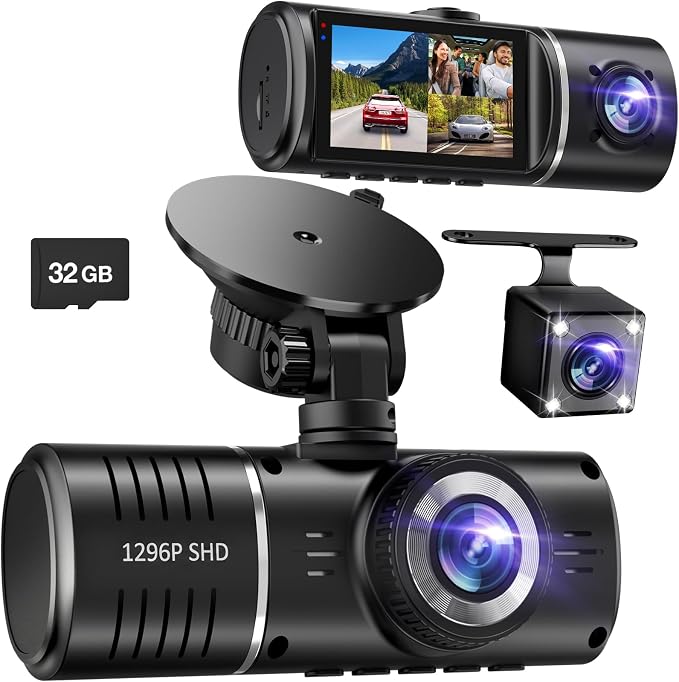
Perfect for anyone wanting a clear view of front, rear, and cabin areas without needing WiFi, this dash cam stands out with its triple-channel setup. The sharp 1296P video quality covers all angles, giving a broader perspective than single or dual channel dash cams typically do.
Installation is straightforward, mounting on your windshield without fuss. The wide 170° front camera catches a broad road view, while the cabin and rear cameras add layers of coverage that help reduce blind spots. The IPS screen stays clear from multiple angles, and the G-sensor triggers emergency recording automatically if something impacts the vehicle while parked.
Videos loop in intervals, so no storage hiccups interrupt recording.
Recording at 1296P with 30 frames per second means it captures detailed and smooth video to catch important moments effectively. Build-wise, it features a compact windshield mount and durable rear camera rated waterproof, designed for everyday driving conditions.
Praised for its broad coverage and reliable emergency recording, the most common complaint revolves around needing to manage the microSD storage since loop overwriting can occasionally erase less important footage sooner than expected.
The triple-camera setup consistently captures multiple views with sharp 1296P detail, making it very reliable for full coverage. Users notice the emergency lock function activates correctly during sudden shakes or impacts, but the loop recording system sometimes deletes earlier recordings faster than desired.
Those valuing wide-angle video from front, cabin, and rear will find it well worth considering. It suits vehicles where full visual awareness is needed without wifi. Drivers wanting larger storage options or cloud backup should explore other models.
Pros
- Wide 170° front camera reduces blind spots
- Emergency recording locks footage upon impact
- Waterproof rear camera suitable for outdoor exposure
- Clear IPS screen for good viewing angles
Cons
- Loop recording may overwrite footage too soon
- Storage limited to microSD cards only
| Specification | Details |
|---|---|
| Video Capture Resolution | 1296p |
| Field Of View | 170 degrees |
| Mounting Type | Windshield Mount |
| Flash Memory Type | microSD |
| Frame Rate | 30 FPS |
| Screen Size | 3.47 inches |
8. REDTIGER F7NP 4K Dual Dash Cam
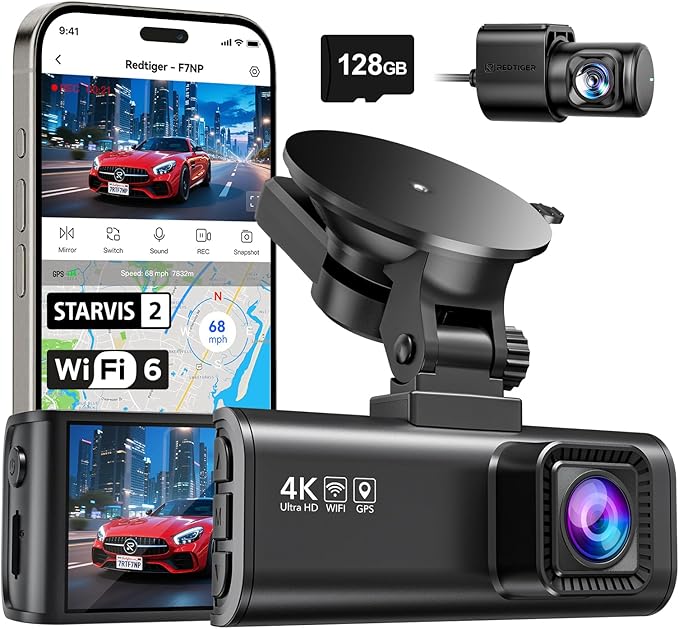
Recording clear footage on both ends of your vehicle matters a lot, especially when driving in busy city streets or on long road trips. Ideal for cars, trucks, and buses, this dash cam captures sharp 4K video from the front and 1080P from the rear, making it great for anyone who wants solid evidence without relying on Wi-Fi to store files.
Setup is straightforward with a windshield mount and a compact design that doesn’t block your view. Daily use benefits from features like loop recording and built-in GPS that track your location. The app offers control options, although the camera stores video on an SD card, so no internet connection is needed to save your footage.
Night driving is clear thanks to the STARVIS 2 sensor and WDR technology.
Recording quality lives up to the 4K front and 1080P rear promise, producing clear and detailed footage day and night. The build is sturdy yet compact, fitting discreetly on the windshield without distraction. Reviews highlight how well the night vision works but mention the app control can sometimes be slow or less intuitive.
The ninja-like night vision stands out, capturing detailed footage even when light is low. A common drawback is that the app controlling the camera doesn’t always run smoothly, which can slow down accessing settings or videos.
Those needing crisp dual-camera recording with reliable night footage will appreciate this dash cam. Drivers who want simpler app operation or cloud backups might look for alternatives without Wi-Fi dependence on internal storage.
Pros
- 4K front and 1080P rear video recording
- Clear night vision with STARVIS 2 sensor
- Includes free 128GB memory card
- Built-in GPS tracks location effectively
Cons
- App control can be unresponsive at times
- Uses Wi-Fi but stores files internally only
| Specification | Details |
|---|---|
| Video Capture Resolution | 1080p, 2160p |
| Field Of View | 170 degrees |
| Mounting Type | Windshield Mount |
| Optical Sensor Technology | CMOS |
| Maximum Aperture | 1.5 f_stop |
| Connectivity Technology | Wi-Fi |
9. Dual 4K Dash Cam Front and Rear

Dual 4K recording at 3840x2160P from both front and rear cameras makes it ideal for anyone wanting clear, high-quality dash cam footage. The high resolution combined with wide-angle lenses provides sharp, balanced video coverage from both ends of your vehicle.
Setup is straightforward with a windshield mount and a 3-inch IPS widescreen display that lets you check footage easily. The dashcam features a starlight-level sensor for excellent low-light recording, which performs well at night or in dim conditions.
Day-to-day use involves managing files via microSD storage, and the app connection is available but can be avoided since wifi isn’t required to record.
Video quality delivers very clear, detailed footage thanks to its 4K front and rear lenses with wide 170° and 160° views. The build feels solid on the glass mount, and the screen is bright enough for quick checks.
People praise the clear night vision from the f/1.5 aperture and optical lens. The most common complaint is about occasional challenges with app connectivity and firmware updates.
Video clarity both day and night stands out thanks to the starlight-level sensor and solid optical components, delivering detailed scenes on front and rear cameras simultaneously. Complaints mainly target the occasional difficulties with the supporting app and OTA firmware updates, which might frustrate some users.
Those wanting dependable high-res recording with clear night vision will appreciate its performance and screen interface. People looking for a fully app-dependent or wifi-based dashcam experience might prefer something else that leans more on wireless features and regular updates.
Pros
- Dual 4K Ultra HD recording front and rear
- Super night vision with f/1.5 large aperture lens
- 3-inch IPS widescreen for easy playback
- Wide 170° front and 160° rear viewing angles
Cons
- App connectivity and firmware updates can be unreliable
- Built-in wifi not necessary for core functions
| Specification | Details |
|---|---|
| Video Capture Resolution | 4K Front (3840x2160P), 4K Rear (3840x2160P) |
| Field Of View | 170 degrees |
| Screen Size | 3 inches |
| Control Method | App, Push Button |
| Mounting Type | Windshield Mount |
| Flash Memory Type | microSD |
10. Dash Cam Front and Rear 2.5K Dual Camera

People who want reliable front and rear video coverage in their vehicle without dealing with WiFi will appreciate this dash cam. It suits drivers needing clear day and night footage, especially those who value detailed video quality from both angles.
Its strongest feature is the 2.5K front camera paired with a 1080P rear camera, providing solid video clarity and wide views.
Setting it up is straightforward, mounting the main camera on the windshield and running the wired rear cam to the back. The 2-inch IPS screen helps with easy navigation of settings through push buttons.
Daily use benefits from automatic loop recording and a G-sensor that captures impacts, plus starlight night vision keeps things clear even in low light. Parking monitoring is available but requires an extra hardwire kit.
Video quality stands out with a 2.5K front lens featuring an F/1.6 aperture and a 170-degree field of view, capturing a wide stretch of road. The rear camera covers blind spots well with 1080P resolution.
The dash cam has a compact design that fits neatly without being intrusive. Most praise focuses on excellent night vision and video clarity, while a common complaint is the need for additional wiring to enable 24-hour parking monitoring.
The strongest praise for the dash cam is the clear and detailed video capture, especially at night, thanks to the F/1.6 aperture and starlight sensor. The most frequent frustration comes from the fact that continuous parking monitoring needs a separate hardwiring accessory, adding complexity for some drivers.
Drivers who want dependable front and rear video recording with good low-light performance will be pleased. Those needing built-in extensive parking surveillance without extra installation might want to look for options with integrated parking mode support.
Pros
- High-resolution 2.5K front and 1080P rear cameras
- Starlight night vision for low light clarity
- Wide front (170°) and rear (160°) views
- Compact size with easy push button control
Cons
- 24H parking monitor requires extra hardwire kit
- Small 2-inch screen limits detailed settings view
| Specification | Details |
|---|---|
| Video Capture Resolution | 1080p, 2.5k |
| Field Of View | 170 degrees |
| Screen Size | 2 inches |
| Control Method | Push Button |
| Connectivity Technology | Type-C |
| Mounting Type | Windshield Mount |
11. 360° 4 Channel Dash Cam with GPS

Covering every angle around your vehicle, this 360° 4 Channel Dash Cam captures footage from front, rear, left, and right all at once. Ideal for drivers who want complete coverage without relying on WiFi, its biggest strength lies in the full four-camera setup offering a broad perspective for safety and security.
Setup involves mounting the dashboard camera and adjusting the front cameras to your preferred angles, including inside the vehicle if needed. The microSD card handles recording with time-lapse mode saving space by compressing long footage into minutes.
Daily use means you can record in full HD 1080P and activate parking mode for protection when parked, though this needs an optional hardwire kit. Control happens via app or push buttons on its compact 3-inch screen.
Footage quality is sharp with all four channels running at a consistent 1080P resolution, capturing clear views on all sides. The build includes a built-in supercapacitor, which improves durability and heat resistance compared to batteries. The strongest praise focuses on the truly complete 360-degree coverage, while a common complaint mentions that activating parking mode requires an extra accessory not included in the package.
The wide 360-degree view with four synchronized cameras is highly praised for providing full vehicle coverage and enhanced security. Many find the parking mode useful but note that the extra installation cost for the ACC hardwire kit adds complexity and expense.
Those who want detailed and simultaneous recordings from all angles will appreciate this cam even without WiFi use. Drivers seeking a simpler dash cam without additional parts or a focus on connectivity might want to consider a different model.
Pros
- Records from four cameras simultaneously
- Time-lapse mode saves memory card space
- Built-in supercapacitor for durability
- Adjustable front cameras for flexible angles
Cons
- Parking mode needs optional hardwire kit
- Built-in WiFi may be unnecessary for some users
| Specification | Details |
|---|---|
| Video Capture Resolution | 1080p |
| Field Of View | 360 degrees |
| Screen Size | 3 inches |
| Flash Memory Type | microSD |
| Control Method | App, Push Button |
| Mounting Type | Dashboard Mount |
12. iZEEKER 2.5K Front Dash Cam
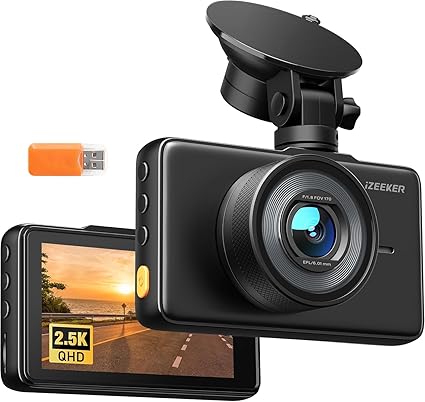
iZEEKER 2.5K Front Dash Cam delivers clear, detailed footage without any Wi-Fi fuss. Perfect for drivers wanting straightforward, reliable recording quality with strong evidence in case of accidents. Its standout feature is the sharp 2.5K resolution combined with a wide 170° lens capturing multiple lanes instantly.
Setup is simple thanks to a suction cup mount and clear instructions. The 3 IPS screen lets you review videos directly on the device, no apps or Wi-Fi needed. Physical buttons provide easy control while driving, minimizing distractions.
Auto and loop recording cover everyday capturing, and 24/7 parking monitoring keeps your vehicle secure while parked.
Recording quality is impressive, showing details like license plates and signs clearly, which is crucial for disputes. The build feels solid, with a touchscreen for convenience alongside physical buttons for quick access. Most find it easy to handle, though some mention the small screen can make reviewing videos a bit cramped at times.
High-resolution footage and wide-angle capture give confidence in accident situations, praised by many. A common downside noted is the compact screen size, which makes video playback a bit tight when reviewing directly.
Those wanting a simple, no-Wi-Fi dash cam with strong video quality and on-device controls will appreciate this model. Drivers who prefer remote access or larger screen playback might want to explore other options.
Pros
- Clear 2.5K QHD video captures detailed road scenes
- Wide 170-degree lens covers multiple lanes
- 3″ IPS screen for on-device video review
- Easy physical buttons for safe, quick control
Cons
- Screen is small for detailed video playback
- No Wi-Fi means no app-based control or backup
| Specification | Details |
|---|---|
| Video Capture Resolution | 2.5K (2560×1440P @30fps) |
| Field Of View | 170 degrees |
| Screen Size | 3″ IPS Display |
| Mounting Type | Suction Mount |
| Auto & Manual Emergency Recording | Supported |
Best Non Wifi Dash Cams Comparison Table
| Product | Compatible Vehicle | Connectivity | Resolution | Special Features |
|---|---|---|---|---|
| Generic 2.5K Dual Dash Cam | Car, SUV, Bus, Minivan | USB | 2.5K | Loop Recording, G-Sensor, Night Vision |
| RexingUSA V1 1080p Dash Cam | Car | Auxiliary | 1080p | G-Sensor, 170° FOV, Touch Control |
| XEGA 4G Dual Dash Cam | OBD Interface Vehicles | 4G LTE | – | Battery Protection, Auto Shutdown |
| 360° 4 Channel Dash Cam | Bus, Car, Minivan | USB | 1080p | 4 Channel 360° View, Parking Monitor |
| Mini 4K WiFi Dash Cam | Universal | Wi-Fi | 4K 2160P | Loop Recording, G-sensor, Parking Monitor |
| ROVE R2-4K Dual Dash Cam | Bus, Car, Minivan, SUV | USB, Wi-Fi | – | Built-In GPS, OTA Updates |
| 3 Channel 1296P Dash Cam | Car | USB | 1296p | G-Sensor, App Control, 170° FOV |
| REDTIGER F7NP 4K Dash Cam | Bus, Car, Minivan, Truck | Wi-Fi | 4K | STARVIS Sensor, GPS, Loop Recording |
| Dual 4K Front Rear Dash | All, Car, SUV, UTV | USB, Wi-Fi | 4K | 2-Channel 4K, OTA Firmware |
| Generic 2.5K Front Rear Cam | Car, SUV, Truck | Type-C | 2.5K Front+1080P Rear | Parking Monitor, Night Vision |
| 360° 4 Channel GPS Dash | ATV, All, Bus, Car | USB, Wi-Fi | 1080p | 360 Degree, Incident Detection |
| iZEEKER 2.5K Front Dash Cam | All | Powerline | 2.5K 1440P QHD | Parking Monitor, Auto Recording |
- Compatible VehicleCar, SUV, Bus, Minivan
- ConnectivityUSB
- Resolution2.5K
- Special FeaturesLoop Recording, G-Sensor, Night Vision
- Compatible VehicleCar
- ConnectivityAuxiliary
- Resolution1080p
- Special FeaturesG-Sensor, 170° FOV, Touch Control
- Compatible VehicleOBD Interface Vehicles
- Connectivity4G LTE
- Resolution–
- Special FeaturesBattery Protection, Auto Shutdown
- Compatible VehicleBus, Car, Minivan
- ConnectivityUSB
- Resolution1080p
- Special Features4 Channel 360° View, Parking Monitor
- Compatible VehicleUniversal
- ConnectivityWi-Fi
- Resolution4K 2160P
- Special FeaturesLoop Recording, G-sensor, Parking Monitor
- Compatible VehicleBus, Car, Minivan, SUV
- ConnectivityUSB, Wi-Fi
- Resolution–
- Special FeaturesBuilt-In GPS, OTA Updates
- Compatible VehicleCar
- ConnectivityUSB
- Resolution1296p
- Special FeaturesG-Sensor, App Control, 170° FOV
- Compatible VehicleBus, Car, Minivan, Truck
- ConnectivityWi-Fi
- Resolution4K
- Special FeaturesSTARVIS Sensor, GPS, Loop Recording
- Compatible VehicleAll, Car, SUV, UTV
- ConnectivityUSB, Wi-Fi
- Resolution4K
- Special Features2-Channel 4K, OTA Firmware
- Compatible VehicleCar, SUV, Truck
- ConnectivityType-C
- Resolution2.5K Front+1080P Rear
- Special FeaturesParking Monitor, Night Vision
- Compatible VehicleATV, All, Bus, Car
- ConnectivityUSB, Wi-Fi
- Resolution1080p
- Special Features360 Degree, Incident Detection
- Compatible VehicleAll
- ConnectivityPowerline
- Resolution2.5K 1440P QHD
- Special FeaturesParking Monitor, Auto Recording
How to Choose the Best Non Wifi Dash Cam
Focus on video quality, storage capacity, and ease of use when selecting a non wifi dash cam, as these factors ensure clear footage and reliable recording without complications. Choosing the right features prevents unnecessary expenses and reduces frustration from technical issues or missing critical moments.
Video Quality
Video quality makes a big difference when reviewing footage after an incident. A resolution of 1080p is the baseline for clear identification of license plates and faces, with frame rates around 30fps keeping motion smooth and easy to follow.
Lower frame rates often result in choppy videos that miss critical details during fast movement. Nighttime recording can be tricky; look for dash cams with good lowlight performance. Models that use larger apertures or high-sensitivity sensors capture brighter, clearer videos in dark conditions.
A wide field of view between 120 and 160 degrees is practical, capturing enough of the road and sidewalks without too much distortion at the edges.
Poor video quality causes frustration when footage is useless or grainy. Higher resolution and frame rate dash cams give footage that’s easier to analyze and share, which really pays off in unexpected situations.
Storage and Data Management
Dash cams usually depend on microSD cards, and supporting cards up to 128GB or more means you can store several hours of footage before the oldest files start getting overwritten. Loop recording is essential for continuous recording; it automatically deletes the oldest videos once the card fills up, so you never have to worry about losing recent captures.
Without this feature, manually deleting files becomes a tedious chore.
Ease of accessing footage also matters. The best models allow quick transfers via USB or Wi-Fi adapters, but since these are non-networked, a reliable memory card slot and clear file organization are key.
Cards that support Class 10 speed ratings or UHS-I ensure smooth recording without dropped frames or corrupted files.
Power Supply and Battery
Power options vary: some dash cams plug into the cigarette lighter for constant power during driving, while others can be hardwired directly to the vehicle for a cleaner look and 24/7 monitoring. Battery-powered models give more flexibility for temporary setups but usually only last 1-2 hours before needing a recharge. Battery capacity in the range of 400-600mAh is common but limits how long the unit can function independently.
Auto shutdown or power-saving modes prevent battery drain when the vehicle is off, helping preserve battery health. When running without external power, expect footage to be limited to short recording sessions, so the power supply choice should fit your daily driving habits and installation ease.
Mounting and Installation
Not all vehicles have flat windshields or dashboards that work well with standard mounts. Suction cups are common but can lose grip over time or on curved surfaces. Adhesive mounts offer stability but limit repositioning options.
Quality units include adjustable joints or pivots, allowing the camera to be angled precisely to cover blind spots and avoid reflections.
Installation matters for everyday use, it should feel solid to prevent vibrations that blur footage. A mount that stays firm during driving but can be easily removed or repositioned when needed saves a lot of hassle, especially if multiple people share a vehicle.
Durability and Build Quality
The interior of vehicles can get very hot, especially when parked under direct sunlight. Dash cams made from heat-resistant plastics can withstand temperatures above 60°C without warping or failing. Models lacking this tend to malfunction or shut down unexpectedly on hot days.
Impact resistance is also important, with well-built units surviving minor collisions or drops without cracking.
Materials like ABS plastic combined with reinforced mounts improve durability. Vibration resistance is less obvious but critical for stable footage over rough roads. Cheaper dash cams often use flimsy materials that degrade faster, so investing in solid build quality protects your equipment in the long term.
Maximizing Dash Cam Performance with Proper Installation Techniques
Positioning the dash cam correctly plays a key role in capturing clear footage. It should be installed behind the rearview mirror, where it won’t obstruct the driver’s view but still has a broad perspective of the road.
Ensure the lens is angled to cover both the road ahead and some of the dashboard to reference your vehicle’s speed and time stamps effectively.
Secure the mount firmly using the adhesive or suction cup provided, since vibrations can blur the video. Routing the power cable along the car’s interior trim keeps it neat and prevents it from dangling, which could distract the driver or get caught.
Regularly calibrate the camera settings, such as date and time, to maintain accurate recordings. Turning off any parking mode functions during regular drives avoids unnecessary battery drain or memory usage. Taking these installation steps seriously helps your dash cam perform at its best while staying unobtrusive.
Essential Maintenance Practices to Extend the Lifespan of Your Dash Cam
Keeping the lens clean is one of the simplest ways to extend your dash cam’s life. Use a microfiber cloth to gently wipe the lens surface; dust and smudges can degrade video quality noticeably.
Avoid harsh chemicals that might damage the lens coating.
Check your memory card regularly for errors. Reformat it every few weeks or as recommended by the manufacturer to prevent file corruption, which can cause recording issues.
Always use a high-quality, compatible microSD card for reliable performance.
Store the dash cam in stable temperature conditions whenever possible. Extreme heat inside parked cars, especially in summer, can shorten the device’s lifespan. Removing the dash cam when not in use for extended periods also helps preserve its battery and internal components.
Comparing Non WiFi Dash Cams with Traditional Recorder Alternatives
Non WiFi dash cams have a distinct advantage in simplicity and reliability over their WiFi-enabled counterparts. They don’t rely on wireless connections, so there’s no risk of signal drops or hacking attempts targeting a networked device.
This type tends to save footage directly to an SD card without syncing to cloud storage. That setup often means faster setup, less interference, and no need for app management. Review of footage requires removing the card or connecting the camera by cable, which some drivers prefer for privacy reasons.
Traditional dash recorders, which may include older models without real-time connectivity, often offer plug-and-play operation but lack features like GPS tracking or remote viewing. Non WiFi dash cams strike a balance by providing quality recording with straightforward functionality, avoiding potential technical headaches linked to wireless tech.
People Also Asked
How Do I Install a Non WiFi Dash Cam Properly?
Install a non WiFi dash cam by mounting it on the windshield near the rearview mirror using the included adhesive or suction mount. Route the power cable along the headliner and down the side of the windshield to the 12V socket or fuse box to keep it tidy and avoid interfering with airbags.
What Is the Average Battery Life of a Non WiFi Dash Cam?
The average battery life of a non WiFi dash cam usually ranges from 10 to 30 minutes without external power. Most models rely on the car’s power supply when driving, so the internal battery mainly supports short parking mode recordings or emergency saves.
Are Non WiFi Dash Cams Safe for Privacy Concerns?
Non WiFi dash cams are generally safer for privacy since they do not transmit data wirelessly. Footage stays stored locally on the SD card, reducing the risk of unauthorized access through hacking over a network connection.
Will a Non WiFi Dash Cam Fit All Vehicle Types?
Non WiFi dash cams are designed to fit virtually all vehicle types as they come with universal mounts and 12V power adapters. Some larger or irregular windshields might require creative cable routing or repositioning to avoid blocking the driver’s view.
How Do I Troubleshoot Common Issues with a Dash Cam?
First, check the power connection if the dash cam won’t turn on or record. Next, format the SD card in the camera to prevent file errors. Resetting the device to factory settings often resolves frozen screens or recording glitches.
Conclusion
Choosing a non wifi dash cam comes down to video quality, ease of installation, and storage capacity. Clear footage that can capture incidents well is essential. It should be simple enough to set up without many complications.
Storage needs depend on how long you want to keep the recordings before they overwrite.
Consider how much space you have in your vehicle and how often you plan to use the dash cam to pick the right size and price point. Check the comparison table and detailed reviews above to match a model that fits your specific needs and budget.